Business Central Pricing 2026: Essentials vs Premium vs Team Members, Plus the Implementation Costs Nobody Lists
TL;DR
- Business Central Prices (US list, paid yearly): Business Central Essentials $80, Premium $110 and Team Members $8 per user per month; device licenses $45 per device per month.
- Free access: three external accountant licenses are included, and Microsoft 365 users can view shared Business Central records in Teams.
- Business Central Real cost: licenses are often only 20 to 35 percent of first-year spend. Implementation, migration and integrations make up the rest.
- Example: a 25-person distributor pays about $15,000 a year in licenses and roughly $45,000 to $90,000 in total for year one.
- Biggest saving: match licenses to what each person actually does, and use device licenses for shared terminals.
In 2026, Microsoft Dynamics 365 Business Central costs $80 per user per month for Essentials and $110 per user per month for Premium (US list price, paid yearly). Team members cost $8 per user per month, and shared device licences cost $45 per device per month. Licenses are usually the smaller part of the bill. Implementation, data migration, add-ons and support often cost more in year one.
This guide explains what each license includes, which people actually need, and what a realistic first-year budget looks like. If you are new to the platform, start with our overview of Microsoft Dynamics 365. Prices were checked against Microsoft's own announcement on October 30, 2026.
How much does Business Central cost per user in 2026?
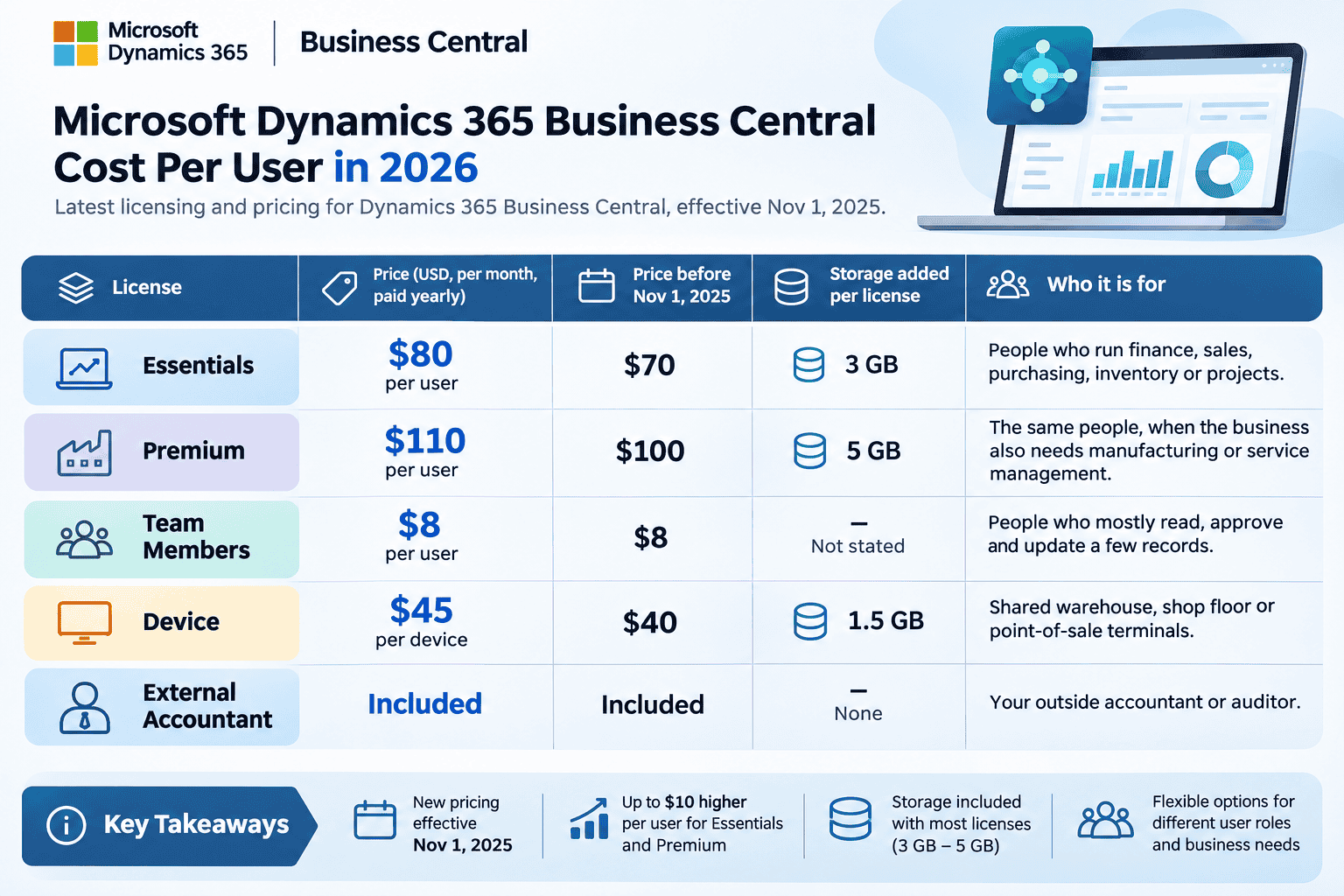
Microsoft raised Business Central prices on November 1, 2025, the first increase in more than five years. It also raised the storage included with each license (Microsoft).
License | Price (USD, per month, paid yearly) | Price before Nov 1, 2025 | Storage added per license | Who it is for |
Essentials | $80 per user | $70 | 3 GB | People who run finance, sales, purchasing, inventory or projects |
Premium | $110 per user | $100 | 5 GB | The same people, when the business also needs manufacturing or service management |
Team Members | $8 per user | $8 | Not stated | People who mostly read, approve and update a few records |
Device | $45 per device | $40 | 1.5 GB | Shared warehouse, shop floor or point-of-sale terminals |
External Accountant | Included | Included | None | Your outside accountant or auditor |
Three things to know about these prices:
They are list prices. Microsoft notes that actual prices vary by currency, country and region, and that you buy through a partner.
Existing customers move to the new price at renewal. The new rates apply to new cloud subscriptions and to existing ones at their first renewal on or after November 1, 2025. If your renewal is coming up, budget for the increase now.
You buy through a partner. Business Central licenses can only be purchased through Microsoft's Cloud Solution Provider (CSP) program. Partners may also offer monthly billing, which usually costs more than an annual commitment.
What does each Business Central license include?
Business Central is licensed per named user. Each person who signs in needs their own license, except people using shared Device licenses. Microsoft requires at least one Essentials or Premium user before you can add Team Members.
Essentials is the full-user license for most businesses. It covers finance, sales, purchasing, inventory, warehousing and project management.
Premium includes everything in Essentials, plus Manufacturing and Service Management. Choose it only if you make products or run service orders and contracts in Business Central.
Team Members is for people who use the system lightly. A Team Member can read anything in Business Central and make a limited set of changes, such as approving requests or updating records. Team Members cannot run full processes, like posting invoices. Business Central enforces this in the product, so a misassigned Team Member hits a wall mid-task.
Device licenses cover a shared terminal instead of a person. Several people can use the covered device, but the number of devices signed in at the same time cannot exceed the number of Device licenses you buy. This suits warehouse scanners, shop floor stations and store counters.
External Accountant licenses are included with your subscription. Microsoft's licensing guide states that Business Central includes three of them.
Microsoft 365 users can view Business Central data in Teams at no extra cost. Employees with a qualifying Microsoft 365 license can open Business Central records shared with them in Microsoft Teams (Microsoft Learn). This is read-only, but it is often enough for managers who only need to look at a customer or an order.
Which license does each person in your team need?
Match licenses to what each person does, not to their job title. This table covers the most common roles.
What the person does in Business Central | License |
Posts invoices, payments, journals, sales or purchase orders | Essentials |
Does the above and the business uses manufacturing or service orders | Premium |
Approves purchase orders, enters time sheets, updates own records | Team Members |
Scans, picks or sells from a shared terminal | Device |
Only views records shared in Microsoft Teams | Microsoft 365 license (no Business Central license) |
Outside accountant or auditor | External Accountant (included) |
Essentials vs Premium: can you mix them?
Not in the same environment. All full users in one Business Central environment must be on the same tier. So if one planner needs Manufacturing, every full user in that environment moves to Premium.
That is an extra $30 per full user per month. For 20 full users, it adds $7,200 a year.
There is one exception worth asking your partner about. Microsoft's licensing terms allow Essentials and Premium subscriptions in separate environments under the same tenant. For example, one environment can run Premium for a manufacturing company and another can run Essentials for a sales company. This only helps when the two groups work in different companies with separate data.
A simple rule: if no one will create production orders, bills of materials or service contracts in Business Central, choose Essentials. You can upgrade to Premium later.
Does Copilot cost extra? Copilot features are included in Essentials and Premium. Some newer AI agent capabilities may use additional capacity that is billed separately, so confirm current terms before you plan an agent rollout. Read more about Copilot and AI features in Business Central.
What does Business Central cost beyond licenses?
Licenses give you access to the software. Turning it into a working system for your business is a separate cost. Industry estimates put licensing at only 20 to 35 percent of first-year spend. A good Dynamics 365 consulting partner should show you all of these costs before you sign.
The ranges below are third-party benchmarks for US mid-market projects, not Cynoteck quotes. Your number depends on your processes, data and integrations.
Cost item | Typical range (USD) | What drives it |
Implementation | $25,000 to $400,000+ one-time | Number of processes, companies and locations; how much you change standard features |
Data migration | $8,000 to $60,000 one-time | Data quality more than data volume |
Integrations | $6,000 to $45,000 per system | Ecommerce, CRM, payroll, EDI, warehouse systems |
Custom development | $12,000 to $150,000 one-time | Extensions for genuine gaps in standard features |
Add-on apps (AppSource) | $10 to $100+ per user per month | Industry features standard Business Central lacks |
Training and change management | $5,000 to $40,000 one-time | Number of users and roles; how different the new processes are |
Ongoing support | 15 to 20% of implementation per year | Help desk, updates, small improvements |
Source for ranges: ERP Software Blog, Sept 2026.
Two smaller items are easy to miss:
Environments. Each tenant includes one production environment and three sandboxes. A second production environment is a paid add-on.
Storage. Each tenant has an 80 GB base database allowance, plus the per-license storage in the price table above. Companies that attach many documents or keep long history may need to buy more.
If you are moving from another system, migration is part of implementation. See how Cynoteck handled migrating from Sage CRM and QuickBooks to Business Central, customizing Dynamics NAV for core business processes and integrating Business Central with third-party tools.
Integrations and reporting are often the most underestimated lines. Our guide to Microsoft Dynamics 365 integration explains how to plan connections to your other systems. Many teams also add Power BI dashboards on top of Business Central for management reporting.
Example: a first-year budget for a 25-person distributor
Here is a worked example for a US wholesale distributor with 25 employees. Twelve people post transactions, eight only approve or look up data, and the warehouse uses five shared scanners.
Line item | Calculation | Cost per year (USD) |
Essentials | 12 users × $80 × 12 months | $11,520 |
Team Members | 8 users × $8 × 12 months | $768 |
Device | 5 scanners × $45 × 12 months | $2,700 |
Total licensing | $14,988 | |
Implementation and migration (estimate) | $2 to $5 per $1 of annual licensing | $30,000 to $75,000 one-time |
Estimated first-year total | About $45,000 to $90,000 |
The implementation estimate uses a rule of thumb from the ERP Software Blog article cited above. Add-ons and support come on top.
What if the same company starts light assembly? All 12 full users move to Premium. Licensing rises from $14,988 to $19,308 a year, an extra $4,320. That is why the Manufacturing decision belongs in your first scoping call, not after go-live.
Why device licenses matter here: licensing those five scanners as Devices costs $2,700 a year. Giving Essentials licenses to ten warehouse staff instead would cost $9,600.
How to lower your Business Central cost
Map roles before you buy licenses. List every user and what they actually do. Most over-licensing comes from giving full licenses to approvers and report readers.
Use Device licenses for shared terminals. One scanner used across three shifts needs one Device license, not three user licenses.
Use free access first. Give outside accountants their included External Accountant licenses. Let managers who only view records use Business Central in Microsoft Teams.
Delay Premium until you need it. Start on Essentials if manufacturing or service management is a later phase.
Commit annually. If your headcount is stable, annual billing is usually cheaper than monthly.
Configure before you customize. Every custom extension must be tested and maintained through every Microsoft update. Use standard features where they fit.
Clean your data before migration. Removing duplicate customers, vendors and items before the project starts lowers migration cost.
Review licenses before each renewal. People change roles. Check assignments 60 to 90 days before your renewal date.
Common Business Central licensing mistakes
Buying Essentials for a few users and Premium for others in the same environment. The licensing rules do not allow it, and fixing it later raises costs mid-year.
Giving Team Member licenses to people who post transactions. They will be blocked from posting. You then need emergency upgrades during go-live.
Budgeting with old prices. Many websites still list $70 and $100. Use $80 and $110.
Comparing ERPs on license price only. A cheaper license with expensive customization can cost more over five years.
Choosing Business Central when you have outgrown it. Very large, multi-country or complex manufacturing businesses may need Dynamics 365 Finance and Supply Chain Management. See Business Central vs Finance and Operations.
Cynoteck's take: where Business Central budgets go wrong
Cynoteck is a Microsoft Solutions Partner. Its Business Central consulting team has delivered more than 40 Business Central projects, including migrations from Dynamics NAV, Dynamics GP, Sage and QuickBooks. For examples, see how we improved financial management with Business Central and helped a client scale with a Dynamics 365 implementation.
"Most Business Central budgets don't go wrong on the license price. They go wrong on what Business Central has to connect to. When we scope a project, the first question isn't how many users you have. It's which other systems need to share data with Business Central, such as your CRM, your bank or your online store. Each of those connections is its own cost line, and it is often bigger than the difference between Essentials and Premium."
Abhishek Singh, Competency Head – Microsoft, Cynoteck. Abhishek has more than 18 years of experience on the Microsoft stack and holds multiple Microsoft certifications across Dynamics 365, Azure and .NET.
Project example: when integration, not licensing, drives the cost
A US-based B2B referral marketing company was already using Business Central and Dynamics CRM, but the two systems did not sync well. Finance, accounts and sales teams struggled to keep data consistent, and the company's banking and payment processes were slow and outdated.
Cynoteck built a custom integration between Business Central and Dynamics CRM, connected the sales, purchase and finance modules, and linked the company's banking processes to Business Central, including import and export of bank transactions. The work was built in AL with RDLC reporting. The result was automated financial and banking tasks, better visibility across operations, and lower ongoing maintenance. Read the full Business Central integration case study.
What this means for your budget: this client did not need more licenses. The real cost was making the systems it already had work together. If you run a CRM, bank feeds or other tools alongside Business Central, budget for each integration separately, using the integration line in the cost table above.
Get a Business Central cost estimate for your business
Cynoteck's certified consultants can map your users to the right licenses and estimate your implementation, migration and integration costs.
Book a free Business Central licensing and cost reviewPrices are Microsoft US list prices as of October 30, 2026. Actual prices vary by region and partner. Check with your licensing partner before you finalize a budget.
Explore comprehensive blogs, best practices, and insights from our technology experts.

10 Ways to Build Stronger Customer Relationships and Increase Loyalty
The best ways to build strong customer relations are to listen actively, communicate proactively, personalize every interaction, respond fast, be transparent, exceed expectations, act on feedback, reward loyalty, build a community, and use a CRM to keep every customer touchpoint connected. Businesses that do this consistently keep more customers, earn more referrals, and spend less on acquisition.
 Dynamics 365 Sales Pricing, Features & Alternatives.webp)

10 Proven Benefits of Custom CRM Software for Modern Businesses (2026)
Discover the top 10 benefits of custom CRM software development for modern businesses. Learn how tailored CRM solutions improve efficiency, enhance customer relationships, and drive business growth.
.png)
 Microsoft Dynamics 365 Sales Professional vs Enterprise.webp)
Turning expertise into action for your business.
We are more than just developers and consultants—we are your partners in navigating the digital landscape. Let us be the engine behind your next big success while you focus on your core vision.
Explore Opportunities!