Microsoft Dynamics 365 Integration: Streamlining Business Processes with Seamless Connectivity

Modern businesses rely on multiple applications, but disconnected systems often create data silos, duplicate work, and slow decision-making.
Research shows that employees switch between apps nearly 1,200 times a day, wasting valuable time and reducing productivity.
Microsoft Dynamics 365 integration solves this by connecting your CRM, ERP, Microsoft 365, Power Platform, and third-party applications into a single, connected ecosystem. With real-time data synchronization and automated workflows, businesses can improve collaboration, eliminate manual processes, and make faster, data-driven decisions.
In this guide, you'll learn everything about Microsoft Dynamics 365 integration, including its benefits, integration methods, tools, common use cases, challenges, and best practices for building a connected business.
Dynamics 365 Integration connects Microsoft Dynamics 365 applications such as Sales, Customer Service, Business Central, Finance, Supply Chain Management, Field Service, and Marketing with your existing business systems and third-party applications.
It allows information to move seamlessly between platforms in real time or through scheduled updates, so your teams always have access to accurate and consistent data.
Instead of entering the same information into multiple systems, data is automatically shared wherever it is needed. This reduces manual work, minimizes errors, improves collaboration across departments, and helps businesses make faster, more informed decisions with a complete view of their operations.
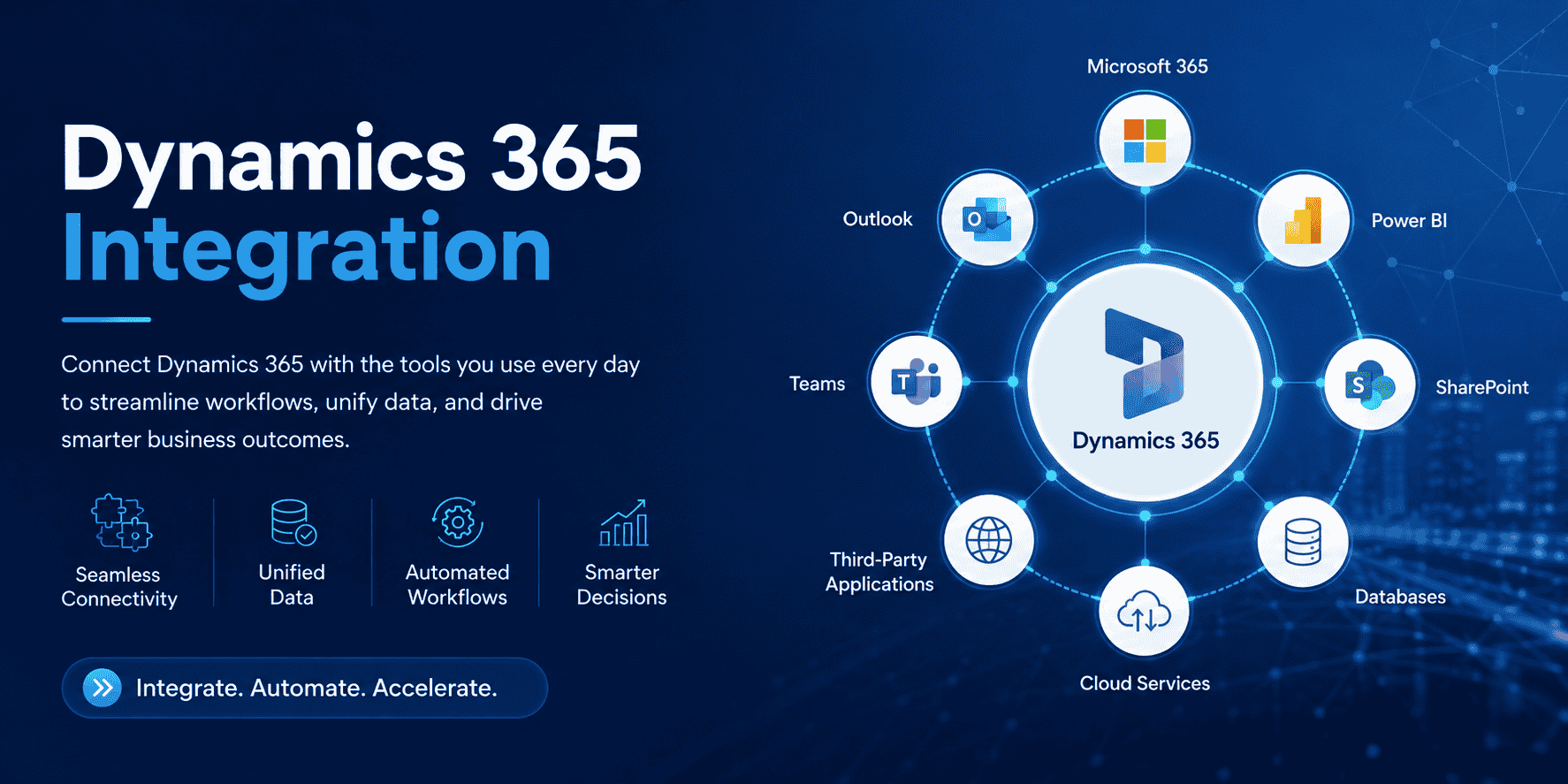
Connecting your business systems through Dynamics 365 helps eliminate data silos and creates a single source of truth across your organization. With seamless data flow between applications, teams can work more efficiently, make informed decisions, and deliver better customer experiences.
Improve Operational Efficiency: Automate routine processes, reduce repetitive tasks, and enable teams to work faster with connected business applications.
Strengthen Customer Engagement: Give sales, marketing, and customer service teams access to complete customer information, enabling personalized interactions and faster response times.
Reduce Manual Work: Eliminate duplicate data entry and minimize human errors by automatically syncing information across systems.
Lower Data Management Costs: Reduce the time and resources spent maintaining disconnected systems while improving data accuracy and consistency.
Accelerate Business Growth: Scale your operations with integrated systems that support better collaboration, real-time insights, and faster business decisions.
According to McKinsey, companies that adopt interconnected digital platforms see 20–30% improvement in operational performance. Gartner also notes that by 2025, 75% of enterprise data will be processed outside traditional CRM and ERP systems, making integration more critical than ever.
Integrate Microsoft Dynamics 365 with your CRM, ERP, eCommerce platforms, and business applications to streamline operations and improve productivity.
Book a Free ConsultationOne of the biggest advantages of Microsoft Dynamics 365 is its ability to connect with the systems your business already relies on. Whether you want to integrate Microsoft applications, ERP platforms, eCommerce stores, marketing tools, or custom-built software, Dynamics 365 provides flexible integration options that eliminate data silos and improve operational efficiency.
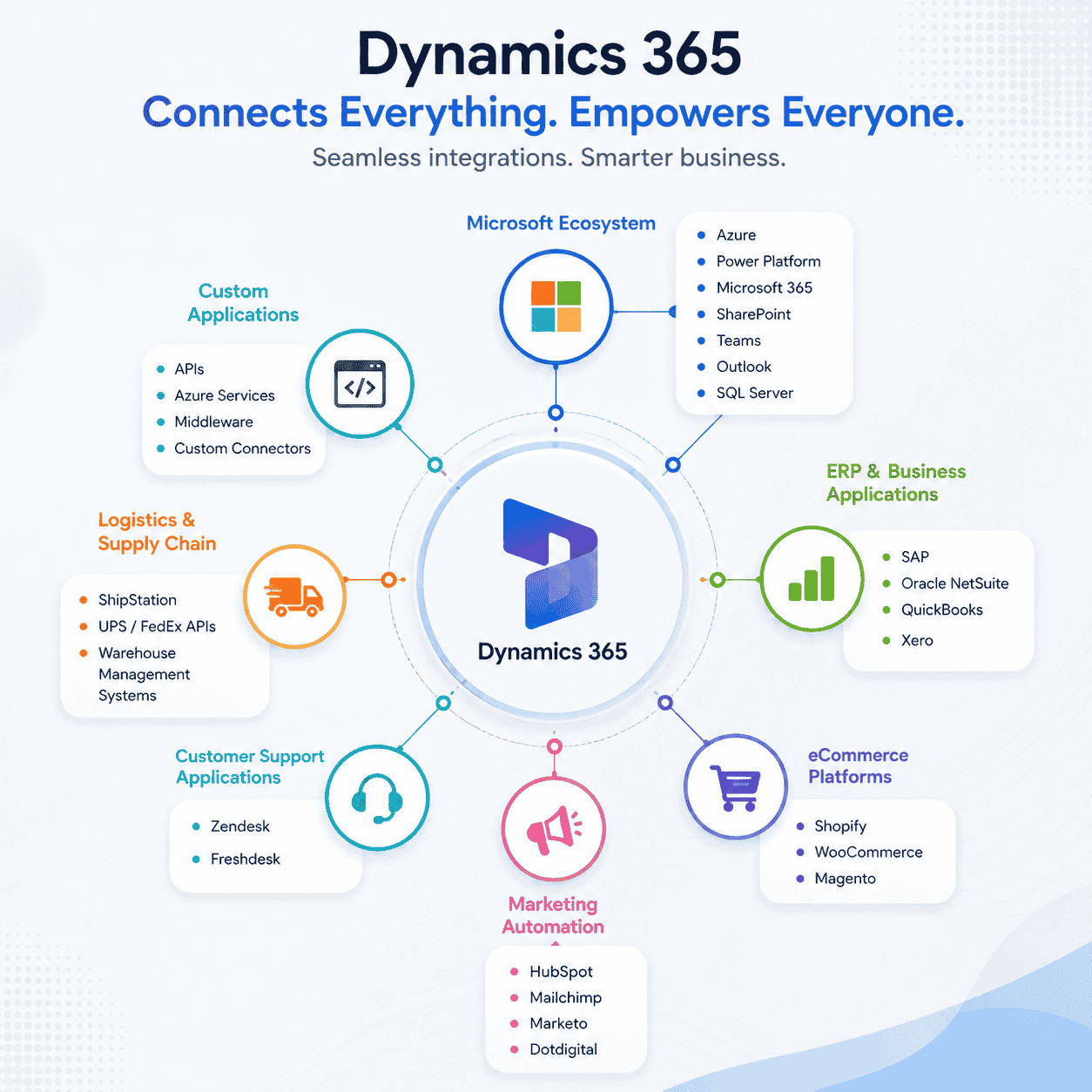
Dynamics 365 works seamlessly with Microsoft's business applications, allowing teams to collaborate more effectively while keeping data synchronized across platforms.
Azure
Microsoft Power Platform
Microsoft 365
SharePoint
Microsoft Teams
Outlook
SQL Server
Integrate Dynamics 365 with leading ERP and accounting platforms to synchronize financial data, inventory, orders, and customer information.
SAP
Oracle NetSuite
QuickBooks
Xero
Connect your online store with Dynamics 365 to automatically synchronize products, customers, inventory, and orders.
Shopify
WooCommerce
Magento
Keep your marketing and sales teams aligned by synchronizing leads, campaign performance, and customer engagement data.
HubSpot
Mailchimp
Marketo
Dotdigital
Provide a consistent customer experience by connecting your help desk and customer service platforms.
Zendesk
Freshdesk
Improve order fulfillment and inventory visibility by integrating shipping providers and warehouse management systems.
ShipStation
UPS and FedEx APIs
Warehouse Management Systems (WMS)
Dynamics 365 can also integrate with proprietary business applications through APIs, Azure Integration Services, middleware, or custom connectors, enabling organizations to build a connected technology ecosystem.
Dynamics 365 gives organizations a flexible cloud platform that adapts to diverse business environments. When integrated with other systems, the benefits multiply across teams and processes.
Below are the major advantages.
Dynamics 365 CRM and ERP applications store large volumes of customer, financial, and operational data. Integration creates a single, accurate record that helps teams:
Track customer journeys
Predict buying behavior
Improve service quality
Build targeted marketing campaigns.
Enable accurate inventory forecasting.
When CRM and ERP systems are connected, sales teams instantly see stock availability, finance teams see payments and orders, and service teams see case history. This reduces delays and miscommunication.
Integration eliminates manual data entry and creates transparent workflows. Businesses can automate:
Order processing
Invoice syncing
Inventory updates
Lead scoring
Project tracking
Shipment notifications
This reduces human error and speeds up decision-making.
Microsoft reports that businesses using integrated Dynamics 365 solutions reduce manual processing time by up to 40%.
Dynamics 365 is cloud-based and supports modular adoption. Companies scale usage as needed—adding or removing apps without infrastructure costs.
Integration improves scalability by:
Connecting new apps quickly
Supporting dynamic data volume
Allowing flexible workflows as teams grow
A Nucleus Research study found that Dynamics 365 delivers an average ROI of $16.97 for every $1 invested, driven significantly by integration and automation.
Businesses can integrate Dynamics 365 with:
Power Apps – build custom apps
Power Automate – create automated workflows
Power BI – visualize data
Microsoft 365 tools like SharePoint, Teams, Outlook
Azure Services for identity, integration, automation, and AI
This native compatibility shortens development time and improves user adoption.
Dynamics 365 apps pull behavioral and social insights through:
Customer interactions
Website behavior
External data sources
Third-party digital engagement tools
This helps companies deliver personalized experiences. According to Microsoft, organizations using AI-backed customer insights see a 226% improvement in marketing ROI.
Dynamics 365 offers thousands of connectors, APIs, and marketplace apps. This allows companies to add new capabilities without rebuilding systems.
Examples:
Connecting Dynamics 365 with Shopify
Integrating with HubSpot
Syncing with QuickBooks
Linking with custom SQL databases
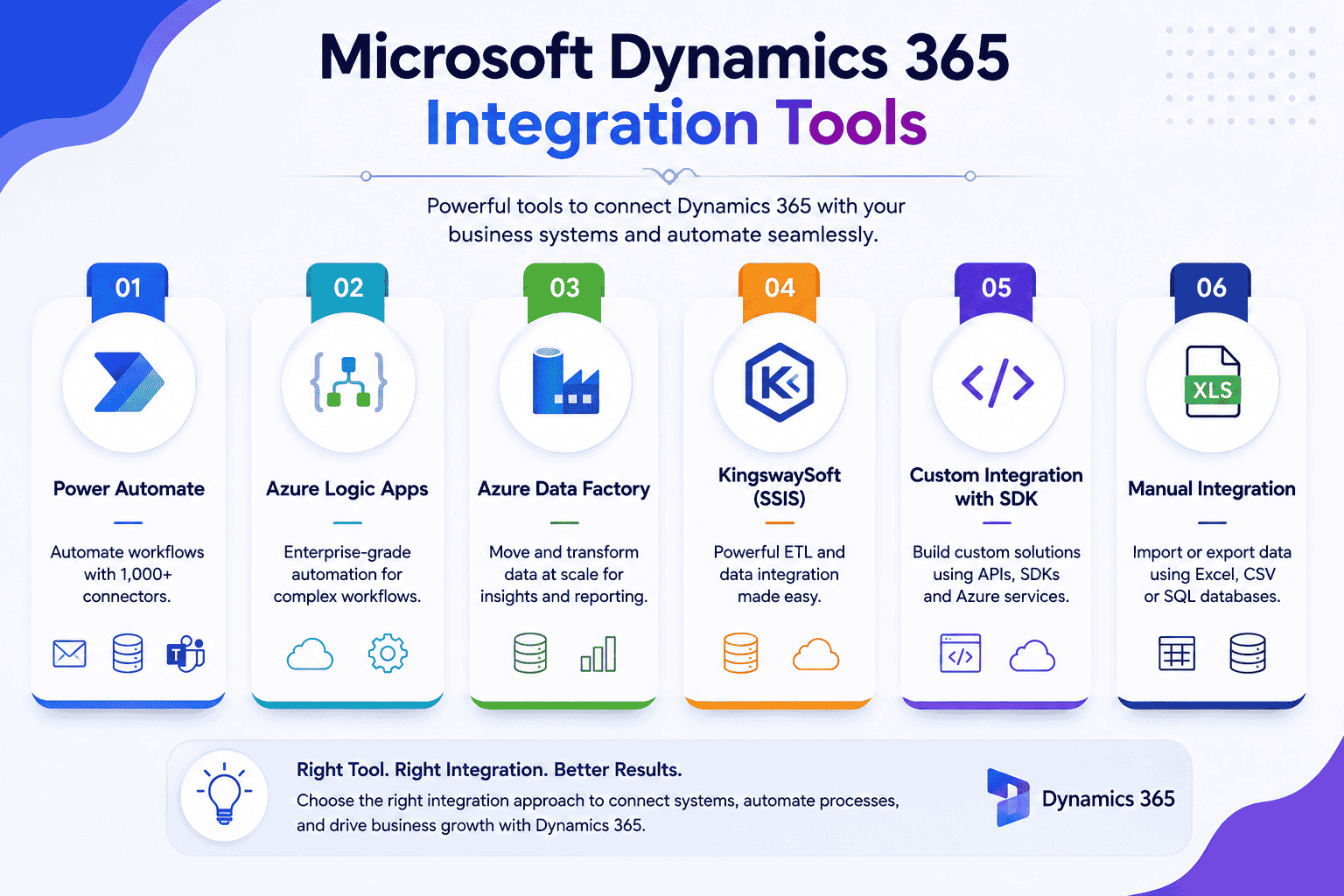
Automates workflows between Dynamics 365 and 1,000+ connectors.
Use cases:
Sync CRM leads to Mailchimp.
Update inventory from ERP.
Send notifications to Teams.
Enterprise-grade automation for complex workflows.
Use cases:
Multi-system integrations
High-volume data processing
Handles batch data movement and transformation.
Use cases:
Migration
Reporting pipelines
Large data syncs
Third-party middleware is widely used for Dynamics 365 integration.
Use cases:
Data warehousing
ETL operations
Hybrid cloud integrations
Developers create custom solutions using:
C#
JavaScript
Azure Functions
Plugins
Businesses often import/export data manually from:
Excel
CSV
SQL databases
This method works for:
One-time migrations
Small datasets
Low-complexity syncs
But it is not recommended for real-time operations.
Integrating Dynamics 365 successfully requires both careful planning and the right tools. Follow this structured approach for smooth, efficient, and scalable integration:
Inventory Applications: Identify all systems in use, including CRM, accounting, e-commerce, HR, and other critical tools.
Data Flow & Processes: Map of how data moves between systems and pinpoint bottlenecks or redundant processes.
Integration Needs: Determine what data should sync, the frequency (real-time vs. batch), and any transformation rules.
API-First: Offers full customization and flexibility, ideal for organizations with technical resources.
iPaaS Platforms (like Power Automate): Pre-built connectors simplify integration for mid-market businesses.
Pre-Built Applications: Best for industry-specific processes already solved by vendors.
Hybrid Approach: Combine standard iPaaS workflows with custom APIs for specialized requirements.
Data Flow Maps: Define how information moves across systems.
Transformation Logic: Ensure data formats align between systems.
Error Handling: Plan for duplicates, failures, or conflicts.
Security & Authentication: Use secure protocols and access controls.
Monitoring & Alerts: Track integration health and KPIs.
Low-Code Automation: Power Automate flows for quick wins.
Custom APIs: Develop with Visual Studio using Dynamics 365 SDK, C#, Python, or JavaScript.
Enterprise Integration: Leverage iPaaS platforms like Workato or MuleSoft for large-scale operations.
Pre-Built Apps: Microsoft AppSource apps reduce development time for common scenarios.
Validate all data mappings with real sample data.
Test error scenarios, recovery procedures, and performance under expected load.
Perform security audits and ensure compliance standards are met.
Roll out in phases, starting with low-risk processes.
Monitor metrics like data throughput, error rates, and latency.
Maintain proper documentation and establish support procedures for any integration issues.
Unlock real productivity gains through powerful Dynamics 365 integration across all departments.
Book a Free ConsultationIntegrating Microsoft Dynamics 365 with existing business applications can improve efficiency and data visibility, but organizations often face technical and operational challenges during implementation. Understanding these challenges helps businesses plan a smoother and more successful integration.
Many organizations have duplicate, incomplete, or outdated data spread across multiple systems. Poor data quality can lead to synchronization errors and inaccurate reporting after integration.
Older ERP systems, on-premises databases, and custom-built applications may not support modern APIs or cloud connectivity, making integration more complex.
Every organization has unique workflows. Mapping business processes between Dynamics 365 and third-party applications often requires custom development and careful planning.
Keeping data synchronized across multiple systems without delays or conflicts can be challenging, especially when large volumes of transactions occur simultaneously.
Sensitive customer and financial data must be protected during data exchange. Organizations need secure authentication, encryption, and compliance with regulations such as GDPR, HIPAA, or industry-specific standards.
While Dynamics 365 provides powerful APIs, third-party applications may have API restrictions, rate limits, or limited functionality that can affect integration performance.
As data volume and user activity increase, integrations must continue to perform efficiently without slowing down business applications or creating bottlenecks.
Business applications receive regular updates, which can impact existing integrations. Ongoing monitoring, testing, and maintenance are essential to ensure everything continues to work as expected.
Without proper monitoring, failed data transfers or workflow errors can go unnoticed. Businesses need automated alerts, logging, and recovery mechanisms to quickly identify and resolve issues.
Selecting between APIs, Power Automate, Azure Logic Apps, Azure Data Factory, middleware platforms, or custom development can be difficult. The best approach depends on business goals, data volume, budget, and technical requirements.
A: Dynamics 365 integrates with CRMs, ERPs, marketing tools, e-commerce systems, productivity apps, analytics platforms, logistics tools, and custom-built applications.
A: Dynamics 365 supports real-time, batch, API-based, event-driven, and middleware-based integrations.
A: Yes. Dynamics 365 provides Web API, Dataverse API, SOAP API, and Online Management API for custom or enterprise integrations.
A: Complexity depends on the connected systems, data volume, and integration method. Modern tools like Power Automate and Azure Logic Apps simplify most scenarios.
A: For simple workflows, Power Automate works well. For enterprise workloads, Azure Logic Apps or Data Factory is preferred.
Dynamics 365 integration creates a unified digital ecosystem where CRM, ERP, analytics, communication tools, and third-party platforms connect seamlessly. With the right APIs, automation tools, and architecture, businesses can eliminate silos, boost productivity, and improve customer engagement.
Whether you want to integrate e-commerce, finance, logistics, sales systems, or custom apps, Dynamics 365 provides flexibility, scalability, and security to support any enterprise scenario.

Discover the top 10 benefits of custom CRM software development for modern businesses. Learn how tailored CRM solutions improve efficiency, enhance customer relationships, and drive business growth.
We are more than just developers and consultants—we are your partners in navigating the digital landscape. Let us be the engine behind your next big success while you focus on your core vision.
Explore Opportunities! Dynamics 365 Sales Pricing, Features & Alternatives.webp)
.png)
 Microsoft Dynamics 365 Sales Professional vs Enterprise.webp)
 Power BI vs Excel (1).webp)