Microsoft Dynamics 365 Sales Professional vs Enterprise
Summary: Dynamics 365 Sales Professional costs $65 per user per month and covers core CRM basics. Sales Enterprise costs $105 per user per month and adds AI forecasting, unlimited customization, territory management, and Copilot. This guide breaks down exactly what changes between the two, and which one fits your sales team. |
If you are comparing Dynamics 365 Sales Professional and Enterprise, the short answer is this: Professional handles the basics well for a small, simple sales process, and Enterprise exists for everything Professional deliberately leaves out, like AI forecasting, unlimited customization, and territory management. The rest of this guide explains exactly where that line sits, in plain language, so you are not stuck decoding a Microsoft licensing PDF.
Sales Professional | Sales Enterprise | |
Price | $65/user/month | $105/user/month |
Best for | Small teams, simple sales process | Growing or complex sales operations |
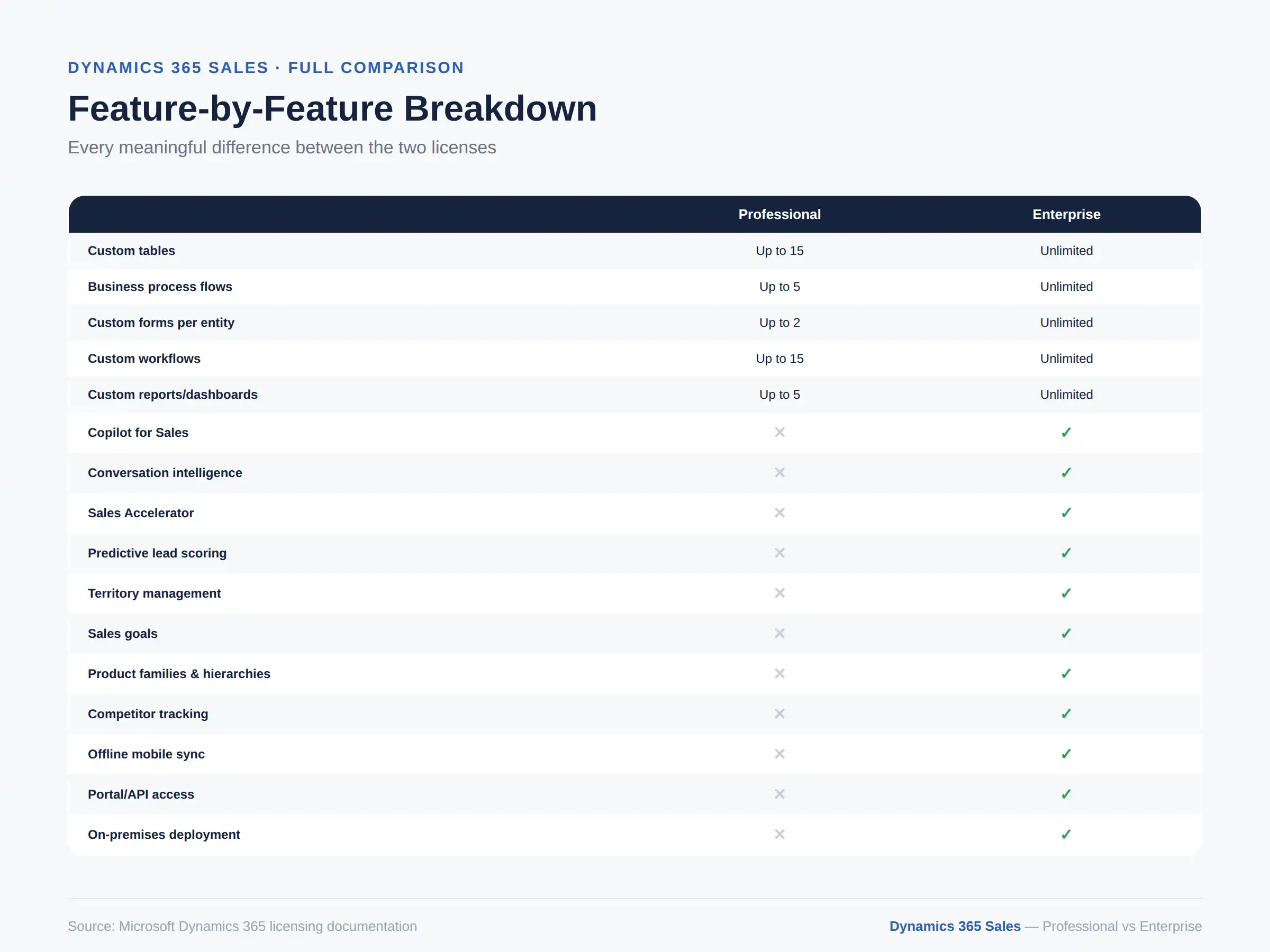
Custom tables | Up to 15 | Unlimited |
AI and Copilot | Not included | Included |
Territory management | No | Yes |
Sales forecasting | Basic only | AI-driven forecasting |
Offline mobile access | No | Yes |
Portal/API access for partners | No | Yes |
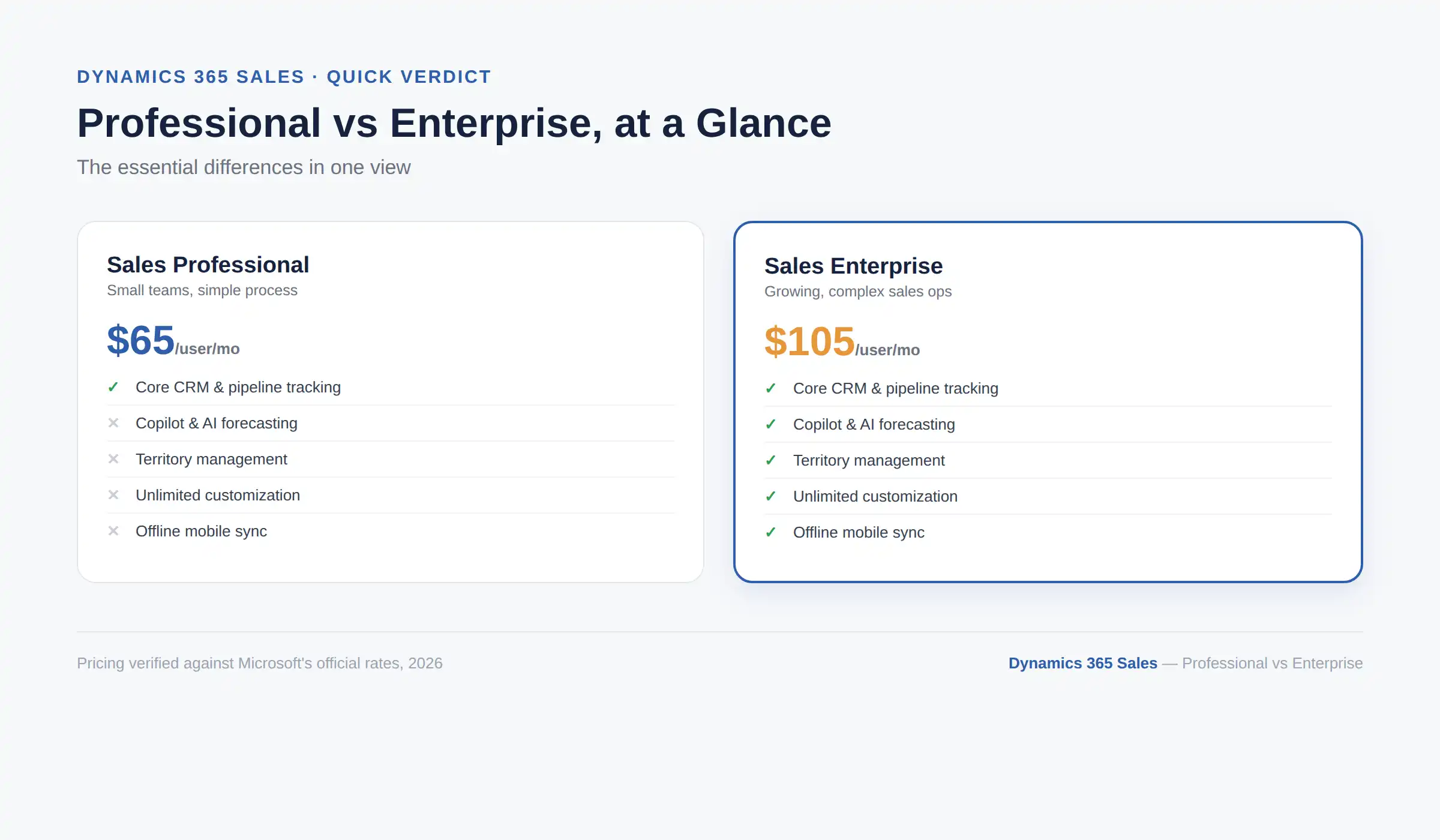
Sales Professional gives you core lead, contact, and opportunity tracking with tight customization limits and no AI. Sales Enterprise removes almost all of those limits and adds Copilot, AI-driven forecasting, territory management, and unlimited custom tables and workflows.
The $40-per-user gap between them is not just "more features." It is specifically the gap between a CRM you configure lightly out of the box and one you can genuinely reshape around a complex sales process.
Before getting into what separates them, it helps to know what you get either way, since both licenses share a solid CRM foundation.
Core sales records: accounts, contacts, leads, opportunities, quotes, orders, products, and price lists
Standard dashboards and out-of-the-box reporting
Microsoft 365 integration with Outlook, Excel, and Teams
Power BI embedding for deeper analytics
Basic marketing lists and campaign tracking
Basic case management records (full customer service functionality still requires a separate Customer Service license)
Note: One easy-to-miss rule: you cannot run Sales Professional and Sales Enterprise apps in the same environment at the same time. If you decide to upgrade, the Professional app gets removed as part of that process, not layered alongside Enterprise. |
Sales Professional is Microsoft's entry-level Sales license, built for organizations with a straightforward sales process that does not need heavy customization. It genuinely covers the fundamentals well. Where it gets restrictive is the moment your business needs to go beyond a standard setup.
Professional covers standard sales force automation: tracking leads through to closed deals, basic pipeline visibility, and the shared CRM records listed above. For a small team with a simple, linear sales process, this is often enough on its own.
This is the part most comparison guides bury in a wall of bullet points, so here it is with context attached to each limit:
Up to 15 custom tables (formerly called entities) per application. Fine for a lightly customized setup, restrictive the moment you need several custom record types for your specific business.
Only 2 custom forms per entity and 5 business process flows. This limits how differently you can tailor the data-entry experience for different teams or deal types.
15 custom workflows and 5 custom reports or dashboards, maximum. Once your reporting needs grow past a handful of views, you will hit this ceiling.
No AI or embedded intelligence. No Copilot for Sales, no predictive forecasting, no assistant cards.
No territory management, sales goals, product families, or competitor tracking. These are structural sales-management tools, not add-ons, and Professional simply does not include them.
No offline mobile sync. Reps working without a signal cannot update records until they reconnect.
No portal or API access for non-employees. External partners or customers cannot be given controlled access.
Cloud-only, named-user licensing. No on-premises deployment option, and no per-device licensing for shared workstations.
Business outcome: a fast, affordable CRM for a small team that does not yet need to bend the system to a complex process, with a real ceiling once that changes.
Sales Enterprise is built for organizations whose sales process has outgrown a standard template, whether that means multiple regions, layered approval steps, or a genuine need for AI-assisted prioritization.
Enterprise removes the caps entirely: unlimited custom tables, business process flows, forms, workflows, reports, and dashboards. If your sales process needs to look meaningfully different from Microsoft's default, this is the tier where that becomes practical instead of a workaround.
Enterprise includes Copilot in Dynamics 365 Sales along with a meaningful slice of the Sales Insights feature set at no extra cost: unlimited conversation intelligence hours, Sales Accelerator for up to 1,500 sequence-connected records per environment per month, and lead and opportunity scoring for up to 1,500 records per environment per month. Businesses that need more capacity than that can add the full Sales Premium license on top.
Territory management, sales goals, product families and hierarchies, and competitor tracking are all included. These matter most once a business has multiple sales teams, regions, or product lines that need to be managed as distinct structures rather than one flat list of deals.
Enterprise adds offline mobile sync for field reps, portal and API access for external partners or customers, and extra Dataverse storage per user (250 MB of database capacity and 2 GB of file capacity, on top of the shared tenant baseline). It also supports on-premises deployment and per-device licensing, which Professional does not.
Business outcome: a CRM that can genuinely be reshaped around a complex sales operation, with AI-assisted prioritization built in rather than bolted on.
Watch how Sales Enterprise's forecasting, Copilot, and territory tools work compared to Professional.
Book Your Free Demo →Feature | Sales Professional | Sales Enterprise |
Monthly price | $65/user | $105/user |
Custom tables | Up to 15 | Unlimited |
Business process flows | Up to 5 | Unlimited |
Custom forms per entity | Up to 2 | Unlimited |
Custom workflows | Up to 15 | Unlimited |
Custom reports/dashboards | Up to 5 | Unlimited |
Copilot for Sales | Not included | Included |
Conversation intelligence | Not included | Included (unlimited hours) |
Sales Accelerator | Not included | Included (1,500 records/mo) |
Predictive lead/opportunity scoring | Not included | Included (1,500 records/mo) |
Territory management | No | Yes |
Sales goals | No | Yes |
Product families & hierarchies | No | Yes |
Competitor tracking | No | Yes |
Knowledge base & sales playbooks | No | Yes |
Offline mobile sync | No | Yes |
Portal/API access | No | Yes |
Extra Dataverse storage per user | No | 250 MB database + 2 GB file |
Deployment | Cloud only | Cloud or on-premises |
Licensing model | Named user only | Named user or per device |
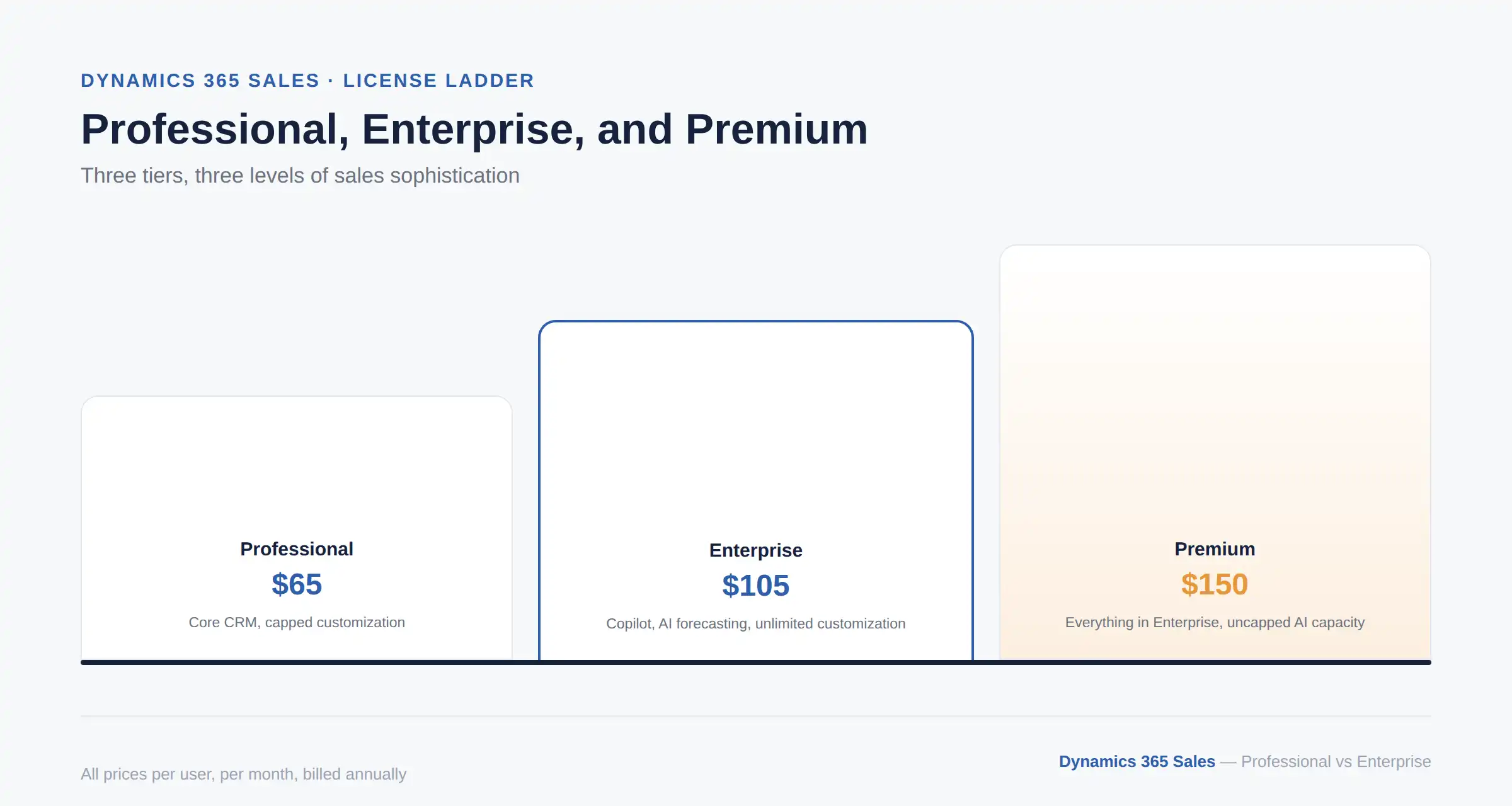
Sales Premium sits above Enterprise, and it is worth mentioning here since it often comes up in the same breath as Professional vs Enterprise. At $150 per user per month, Premium includes everything in Enterprise plus the full Sales Insights bundle without the capacity caps: unlimited Sales Accelerator and lead scoring, deeper conversation intelligence, and the complete predictive forecasting toolkit. For a full breakdown of Premium alongside the other plans, see our Dynamics 365 Sales pricing, features, and alternatives guide.
There is also Microsoft Relationship Sales, which bundles Sales Enterprise with LinkedIn Sales Navigator for teams that lean heavily on social selling. It is priced separately through a partner rather than listed at a fixed price.
Everything above comes down to a practical decision, not a feature checklist exercise. Match your actual sales process, not your budget alone, against the two lists below, since the wrong choice usually shows up as either wasted spend or a painful mid-year upgrade.
Your sales team is small, and your process is straightforward
You do not need AI-driven forecasting or Copilot right now
You are not managing multiple territories, product lines, or approval layers
You want the lowest entry cost while you validate the CRM fits your business
Your sales process involves multiple stages, teams, or regions
You need AI-assisted prioritization and forecasting, not just manual pipeline tracking
You expect to build meaningful custom workflows or reports beyond a handful of views
You need offline access for field reps, or portal access for external partners
A useful gut check: if you have already caught yourself thinking "we'll just work around that limit for now" more than once while reading the Professional restrictions above, that is usually a sign Enterprise is the right starting point rather than a later upgrade.
Yes, and this is one of the more reassuring parts of how Microsoft built this. Since both licenses run on the same underlying platform, your data and customizations carry over automatically. The process is straightforward:
Purchase Sales Enterprise licenses through the Microsoft 365 admin center
Assign the new licenses to your users
Install the Sales Enterprise solution through the Power Platform admin center
Remove the Sales Professional solution once Enterprise is confirmed working
Optionally add Sales Premium or individual AI add-ons on top, if you need more than Enterprise's included capacity
Pro Tip: If you are on the fence, starting with Professional and upgrading later is a genuinely low-risk path, not just a sales line. The migration keeps your records and customizations intact. The bigger cost to watch for is time spent working around Professional's limits before you finally upgrade, not the upgrade itself. |
Cynoteck helps sales teams pick and set up the right Dynamics 365 Sales license the first time.
Talk to an Expert →The Professional vs Enterprise decision comes down to one real question: does your sales process need to be reshaped around AI, territories, and deep customization, or does it run fine on a solid, simpler CRM foundation? Professional is not a stripped-down trial version, and Enterprise is not overkill for its own sake. They are built for genuinely different stages of sales complexity.
If you are still unsure which side of that line your business sits on, our broader guide to Dynamics 365 for Sales benefits, capabilities, and features and the top 10 uses for Dynamics 365 for Sales are good next reads before you commit to a plan.
Ans: Sales Professional costs $65 per user, per month, and Sales Enterprise costs $105 per user, per month, both billed annually. That is a $40 per user, per month difference.
Ans: No. Microsoft does not allow Sales Professional and Sales Enterprise (or Premium) apps to run in the same environment simultaneously. Upgrading replaces the Professional app rather than adding Enterprise alongside it.
Ans: No. Copilot for Sales, conversation intelligence, and predictive scoring are only included starting with Sales Enterprise.
Ans: Up to 15 custom tables per application. Sales Enterprise removes this limit entirely.
Ans: No. Because both licenses share the same underlying platform, your data and customizations migrate automatically when you install the Enterprise solution and remove Professional.
Ans: Yes. Territory management, sales goals, product families, and competitor tracking are Enterprise-and-above features and aren't available in Professional.
Ans: It depends on whether your sales process needs what Professional excludes. If you need AI forecasting, unlimited customization, territory management, or offline mobile access, the extra cost is usually justified. If your process is simple and stable, Professional may be enough indefinitely.

Discover the top 10 benefits of custom CRM software development for modern businesses. Learn how tailored CRM solutions improve efficiency, enhance customer relationships, and drive business growth.
We are more than just developers and consultants—we are your partners in navigating the digital landscape. Let us be the engine behind your next big success while you focus on your core vision.
Explore Opportunities! Dynamics 365 Sales Pricing, Features & Alternatives.webp)
.png)
 Microsoft Dynamics 365 Sales Professional vs Enterprise.webp)
 What Is the Sales Qualification Agent in Dynamics 365 Sales.webp)