Microsoft Dynamics 365 for Sales: Benefits, Capabilities & Features

Summary: This guide explains what Microsoft Dynamics 365 for Sales does, its core capabilities, the business benefits behind them, and how AI and Copilot are changing how sales teams work in 2026. By the end, you will know whether it fits your sales organization. |
Sales teams often have customer information spread across emails, spreadsheets, CRM records, meeting notes, and half a dozen other apps. The result is familiar: reps spend too much time updating records instead of selling, managers lack a clear view of the pipeline, and important follow-ups slip through the cracks.
Microsoft Dynamics 365 for Sales was built to fix exactly that problem. It brings customer data, sales activity, forecasting, and increasingly AI into one connected workspace. This guide covers what it is, what it can do, the benefits it delivers, and how to tell whether it fits your business.
Microsoft Dynamics 365 for Sales is a cloud-based customer relationship management (CRM) platform that helps sales teams manage accounts and contacts, move leads through the pipeline, forecast revenue, and act on AI-driven insights. In simple terms, it is where your sales team tracks who they are talking to, what stage each deal is at, and what to do next.
Sales representatives, sales managers, sales operations teams, and sales leaders use it, and it supports the full sales cycle from first contact to closed deal and beyond. For a broader look at how it fits alongside Microsoft's other business applications, see what Microsoft Dynamics 365 is.
Most deals move through a similar path: Lead → Qualification → Opportunity → Engagement → Quote → Close → Customer Relationship. Dynamics 365 Sales is built around this flow, giving reps and managers visibility at every stage instead of losing track of a deal between steps.
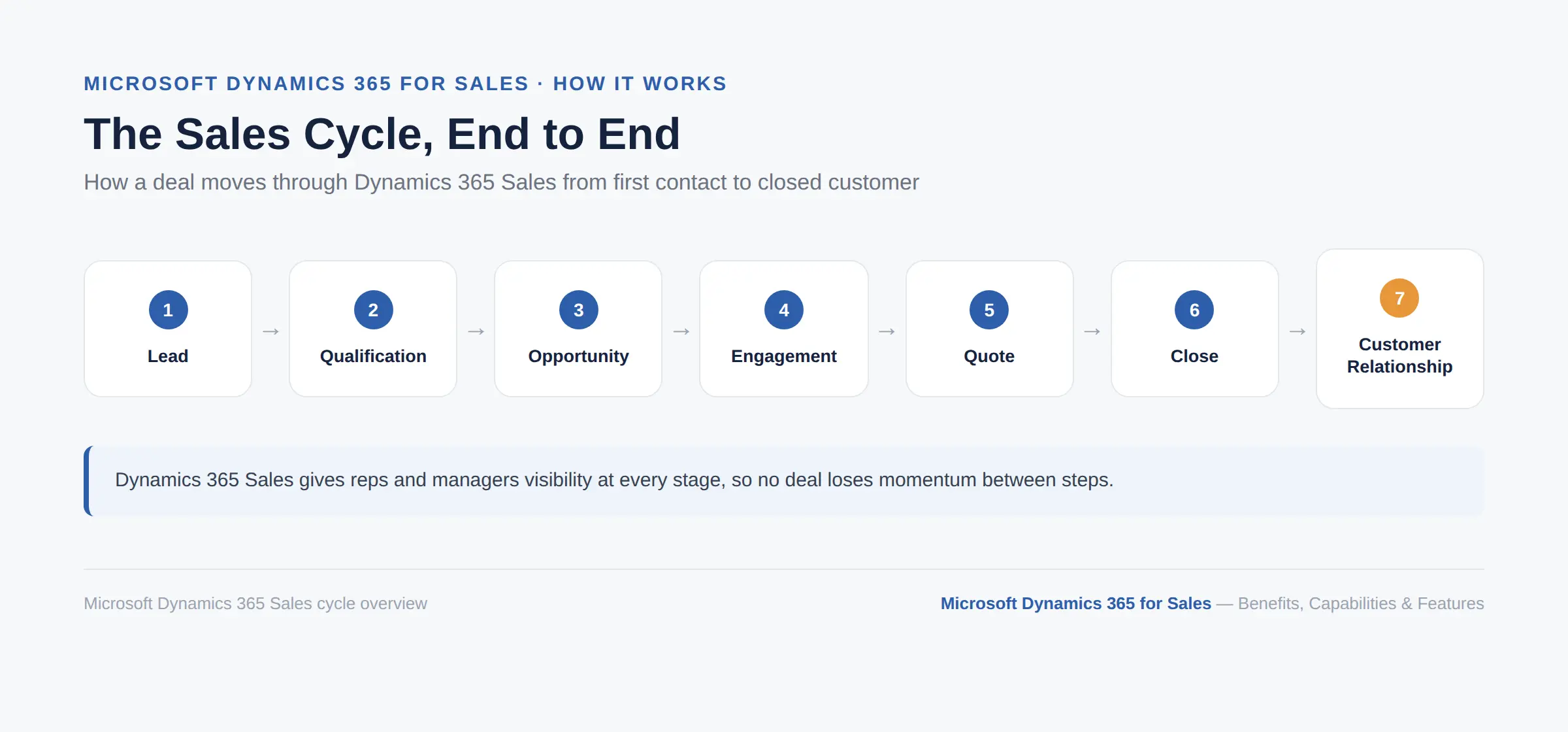
This is the heart of the platform, so it helps to walk through what it actually does, one capability at a time.
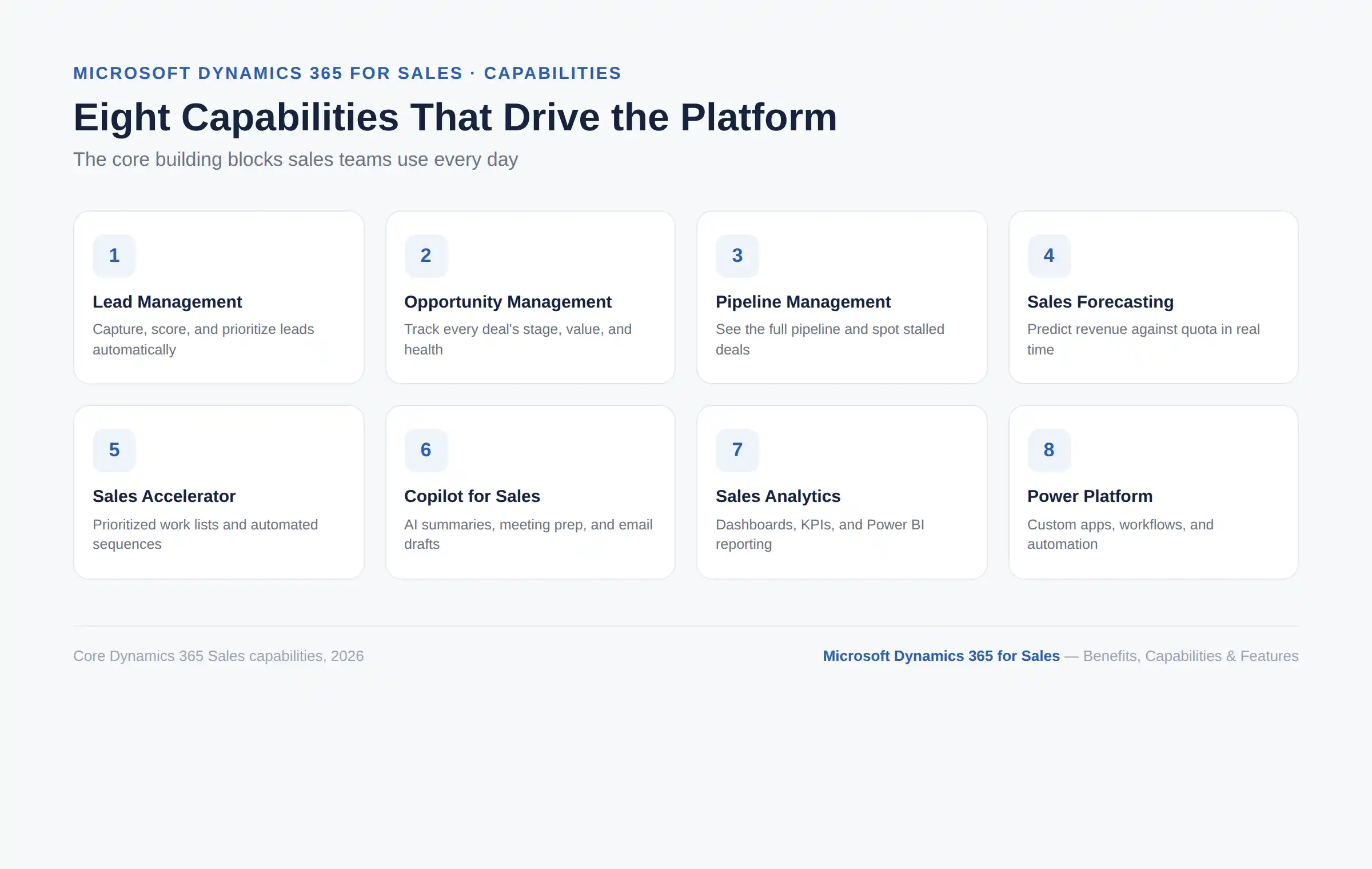
Dynamics 365 Sales captures leads, scores them, and helps reps prioritize which ones to work first. AI-assisted qualification adds research and prioritization on top, so reps are not manually sorting every lead by hand.
Business benefit: Sales reps spend more time on promising prospects instead of chasing everyone equally.
Every open deal is tracked with its stage, value, health, and recommended next action. AI-generated opportunity insights flag deal risks early, so nothing sits quietly until it is too late to save. This answers the question every sales manager asks in a Monday pipeline review: which deals need attention right now?
Reps and managers can see the entire pipeline at once, spot stalled opportunities, and prioritize high-value deals. Nothing has to live in a separate spreadsheet or a rep's personal notes just to stay visible. This kind of shared visibility is what turns a pipeline review from guesswork into a real conversation about what needs to move.
Dynamics 365 Sales combines current pipeline data, quota tracking, and predictive forecasting into one view. In practice, a sales manager can see whether the current pipeline is likely to support the quarter's target and catch risks before the quarter ends, rather than after.
Sales Accelerator is a dedicated workspace that builds prioritized work lists and sales sequences, so reps do not spend their morning deciding who to call first. It recommends the next best action and the best channel, whether that is a call, an email, or a LinkedIn message, then keeps the sequence moving on its own. For busy reps juggling dozens of open leads, this alone can save real hours every week.
Copilot summarizes records, catches reps up on recent changes, helps prepare for meetings, and drafts emails using real CRM data. Microsoft's 2026 release wave has expanded Copilot into a broader Sales Agent experience that surfaces insights directly inside Outlook, Teams, and Excel, not just inside the CRM itself.
Predictive lead and opportunity scoring, relationship intelligence, and conversation intelligence all work quietly in the background. Together, they tell a sales manager which leads and deals show the strongest signals of conversion, so time and follow-up effort go where they count instead of being spread evenly across every record.
Microsoft's 2026 release wave introduces AI agents that handle research, qualification, and follow-up work with less manual input, part of what Microsoft describes as a shift from a system of record toward a system of action. Some of these agent capabilities are still rolling out in preview, so it is worth confirming current availability before planning around a specific agent.
Account history, contact details, and past interactions all live in one place instead of being scattered across inboxes and personal notes. A rep can walk into every conversation with full context, already knowing what was discussed last time and what the customer cares about. That context is often the difference between a call that feels transactional and one that feels genuinely useful to the buyer.
Built-in dashboards, KPIs, and reports give a real-time read on performance. For deeper, more customizable reporting, Dynamics 365 Sales connects natively to Power BI, which most teams outgrow basic spreadsheets once their pipeline gets complex.
For a business already running on Microsoft 365, this is one of the most practical capabilities on the list. Email, meetings, and calendar activity sync directly with customer records, so reps are not switching between five different tools to find the same information. See how this connects more broadly in this Dynamics 365 integration guide.
The mobile app lets reps review meetings, update opportunities, capture voice-to-text notes, and get notifications while away from their desk. For field sales teams especially, this means a deal does not have to sit untouched just because a rep spent the day on the road instead of in the office.
Dynamics 365 Sales extends through Power Apps, Power Automate, Power BI, and Copilot Studio so that businesses can build custom workflows and applications rather than being boxed into the default setup. Cynoteck's Dynamics 365 Development Services cover this kind of extension work directly.
A feature is what the software does. A benefit is what your business actually gets from using it. Here is that translation.
Automation removes a big chunk of administrative work, from logging calls to updating deal stages by hand. That translates directly into more actual selling time per rep, per day, which is the one resource every sales leader wishes they had more of.
Centralized opportunity and account information gives managers a real-time picture of what is happening across the pipeline. No one needs to wait for someone to compile a spreadsheet before a Monday meeting, since the data already sits in one place and updates as reps work.
AI-assisted research, scoring, and prioritization mean reps follow up faster instead of working through leads in whatever order they landed in the inbox. That speed matters most with time-sensitive leads, where a same-day response can be the difference between winning and losing the deal.
Current pipeline data combined with predictive insights helps sales leaders plan revenue with more confidence. That said, no CRM guarantees forecasting accuracy. It improves the inputs, not the certainty.
A centralized history of every interaction gives sellers better context before a call ever starts. Conversations feel informed rather than repetitive, and customers notice the difference when they are not asked the same question for the third time.
This is one of the most common complaints about CRM software in general, and it is also one of the clearest wins here. Copilot, Microsoft 365 integration, and automation together cut down on repetitive record updates.
Shared customer information across Teams and Outlook means managers can coach in context instead of asking reps to recap a deal from memory. It also means reps are not accidentally duplicating each other's outreach to the same contact, which happens more often than most teams like to admit.
Dashboards, forecasting, AI insights, and Power BI move decisions from "I think" to "the data shows." That shift changes how a sales leader talks to the executive team, since every claim about the pipeline can be backed by a number instead of a gut feeling.
Sequences, workflows, and automation help standardize best practices across a growing team. New hires ramp up faster because they follow a proven process built into the system, instead of reinventing their approach through trial and error.
This is one of the strongest reasons businesses choose Dynamics 365 Sales in the first place. Combined with Microsoft 365, Teams, Outlook, Power BI, and Power Platform, it creates a single connected environment rather than a CRM that sits apart from everything else your team already uses.
See how Microsoft Dynamics 365 for Sales can improve pipeline visibility, sales productivity, forecasting, and customer management across your organization.
Discuss Your Sales Goals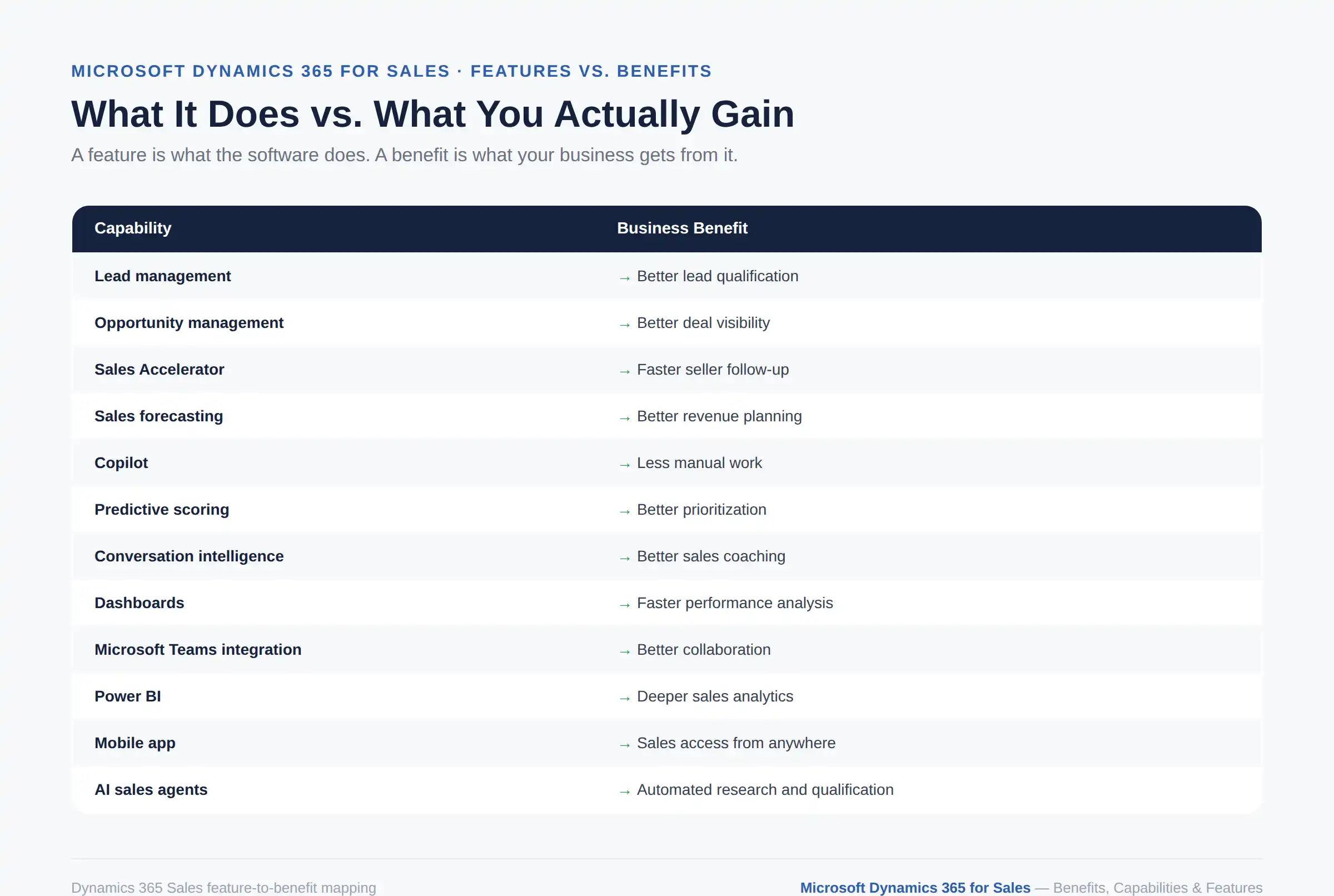
Capability | Business Benefit |
Lead management | Better lead qualification |
Opportunity management | Better deal visibility |
Sales Accelerator | Faster seller follow-up |
Sales forecasting | Better revenue planning |
Copilot | Less manual work |
Predictive scoring | Better lead and deal prioritization |
Conversation intelligence | Better sales coaching |
Dashboards | Faster performance analysis |
Microsoft Teams integration | Better collaboration |
Power BI | Deeper sales analytics |
Mobile app | Sales access from anywhere |
AI sales agents | Automated research and qualification |
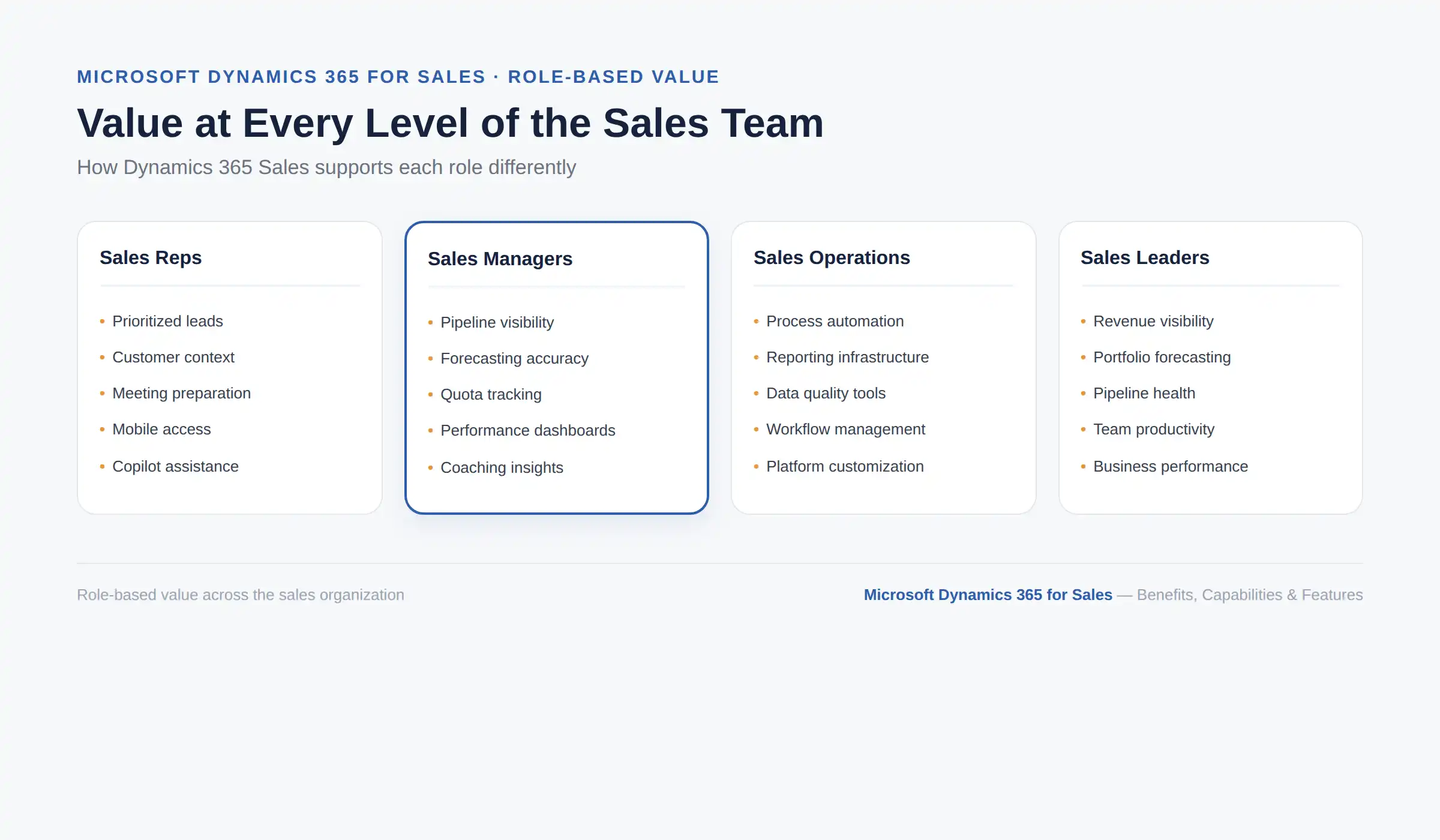
For sales representatives: Prioritized leads, customer context, meeting preparation, follow-up reminders, mobile access, and Copilot assistance during the actual selling work.
For sales managers: Pipeline visibility, forecasting accuracy, quota tracking, performance dashboards, and coaching insights based on real activity, not guesswork.
For sales operations teams: Process automation, reporting infrastructure, data quality tools, workflow management, and the customization needed to match how the business sells.
For sales leaders: Revenue visibility, forecasting at the portfolio level, pipeline health across teams, and a clear read on productivity and business performance.
B2B lead qualification: Sorting a high volume of inbound leads by conversion signal instead of first-come, first-served.
Managing long sales cycles: Keeping multi-month enterprise deals organized across many stakeholders and touchpoints.
Improving sales forecasts: Replacing spreadsheet-based forecasting with pipeline data that updates in real time.
Managing key accounts: Centralizing account history so relationship managers do not rely on institutional memory alone.
Automating sales follow-ups: Using sequences so no lead goes cold simply because a rep got busy.
Preparing for customer meetings: Using Copilot to pull account history and recent activity before a call, instead of digging through old emails.
Identifying at-risk opportunities: Catching deals that have gone quiet before they are lost, not after.
There is no universal answer here, and any article that claims otherwise is probably trying to sell you something. The honest approach is to work through your own situation against the list below, rather than assume the answer is automatically yes.
Already use Microsoft 365
Have a growing sales team
Need better pipeline visibility
Manage complex, multi-stage sales cycles
Need stronger forecasting
Want AI assistance built into the sales workflow
Need CRM customization
Want to connect sales with the Power Platform
Your sales process is very simple
Your CRM data is poorly maintained today
Your team has been resistant to adopting a CRM in the past
Your organization lacks a clearly defined sales process
You are considering extensive customization without a clear business case yet
Real user reviews echo this balance. Businesses consistently praise the Microsoft integrations, lead management, and customization options, while also flagging implementation complexity and a learning curve as real considerations.
If you are also weighing hosting models, this cloud CRM vs on-premises CRM comparison and this comparison of Dynamics 365 Sales against Salesforce are useful next reads.
As of Microsoft's current U.S. pricing, Dynamics 365 Sales is licensed per user, per month, across three plans:
Plan | Price per user/month |
Sales Professional | $65 |
Sales Enterprise | $105 |
Sales Premium | $150 |
Feature availability varies by plan, and some newer AI capabilities carry their own licensing or capacity requirements. Because Microsoft pricing and feature bundling change often, treat these numbers as a snapshot rather than a permanent quote.
For a complete breakdown of what each plan includes, real per-team cost examples, and how Dynamics 365 Sales compares on price against Salesforce, Zoho, HubSpot, and Pipedrive, see our full Dynamics 365 Sales pricing, features, and alternatives guide.
A CRM delivers value only if you roll it out properly. In practice, that means:
Define your actual sales process before configuring anything
Clean and prepare your existing CRM data
Configure Dynamics 365 Sales around that process
Connect Microsoft 365 and any other core business applications
Automate the most repetitive sales tasks first
Set up dashboards and forecasting views your managers will actually use
Introduce Copilot and AI features gradually, not all at once
Train sales users properly, not just send a login email
Measure adoption and business results after go-live
Continuously refine the CRM as your process evolves
This is also where most "learning curve" complaints in reviews originate, and where a certified implementation partner earns its keep. For a full look at what drives implementation costs up or down, see the Dynamics 365 implementation cost guide.
If you are also comparing licensed off-the-shelf setups against a more tailored build, these benefits of custom CRM software and this note on when a custom mobile app makes sense are worth a look before you commit to a build plan.
Get a practical implementation plan covering data migration, customization, Microsoft 365 integration, automation, training, and user adoption.
Plan Your ImplementationBuying the right CRM is only half the job. The other half is implementing it in a way your team adopts, and your business gets a real return on. That is where the right Dynamics 365 Sales consulting partner makes the difference between a CRM that sits half-used and one that genuinely transforms how your sales team works.
What We Bring | The Number |
Microsoft Solutions Partner experience | 16+ years |
Global team | 250+ professionals |
Dynamics 365 projects completed | 90+ full-cycle |
Total projects delivered | 500+ |
Client retention rate | 90%+ |
Countries served | 15+ |
Security certification | ISO 27001 |
Cynoteck is a Microsoft Solutions Partner, not a generalist IT vendor that also offers CRM work. Our team holds ISO 27001 certification for information security and has completed 90-plus full-cycle Dynamics 365 implementations, so the process you get for your Dynamics 365 Sales implementation is proven, documented, and repeatable, not improvised on your dime.
Numbers matter more than promises. Cynoteck has delivered 500-plus projects across 15-plus countries, with a client retention rate above 90 percent. That kind of repeat business only happens when clients see real value after go-live, which is a better signal of quality than any sales pitch.
Many Dynamics 365 Sales implementations fail to deliver ROI because they configure the system around a generic template instead of the business's actual sales process. Our approach starts by mapping how your team really sells, before configuring a single field.
We then roll out automation and AI capabilities like Copilot and Sales Accelerator in phases, each one tied to a measurable adoption or performance goal. That way, the investment shows up in your pipeline numbers, not just in your software budget.
Implementation is the starting point, not the finish line. Our Dynamics 365 Sales customization and support work includes:
Power Platform customization to match your exact sales workflow
Integration with your existing Microsoft 365 environment
Data migration and cleanup from legacy CRM systems
Ongoing optimization as your sales process matures and scales
The goal is a CRM that evolves with your business, not one your team outgrows within a year of going live.
If you want a partner that treats Dynamics 365 Sales as a business transformation project rather than a one-time software install, explore Cynoteck's Dynamics 365 Sales services or book a free consultation to talk through your specific requirements.
Dynamics 365 Sales is no longer just a place to store customer records. It combines CRM, sales automation, analytics, Microsoft 365 integration, Copilot, and increasingly autonomous AI to help sales teams decide what to do next and act on it faster.
Whether it is the right fit depends on your current sales process, your existing tech stack, and how much support your team needs during rollout. If you want help figuring that out, Cynoteck's Dynamics 365 Sales services team can walk through your requirements, or you can book a free consultation directly to talk through your specific setup.
Work with Microsoft-certified experts to configure Dynamics 365 Sales around your workflows, integrate your systems, and prepare your team for AI-powered selling.
Book a Free ConsultationAns: It is Microsoft's cloud-based CRM for managing sales, tracking leads and opportunities, forecasting revenue, and using AI to support sellers throughout the sales cycle.
Ans: The biggest benefits are better sales productivity, clearer pipeline visibility, faster lead qualification, more accurate forecasting, and less manual data entry, largely thanks to Microsoft 365 integration and Copilot.
Ans: Core capabilities include lead and opportunity management, pipeline management, forecasting, Sales Accelerator, Copilot, predictive scoring, analytics, and mobile access.
Ans: Yes. It is Microsoft's dedicated sales CRM within the broader Dynamics 365 family of business applications.
Ans: It manages the full sales cycle: capturing leads, tracking opportunities, forecasting revenue, and maintaining customer relationships in one system.
Ans: Yes, extensively. It includes Copilot, predictive lead and opportunity scoring, conversation intelligence, and increasingly autonomous AI agents for research and qualification tasks.
Ans: Sales Accelerator is a workspace that builds prioritized work lists and automated sales sequences, so reps always know who to contact next.
Ans: Copilot summarizes records, prepares meeting briefs, drafts emails, and answers natural-language questions using your CRM data, and increasingly surfaces this directly inside Outlook and Teams.
Ans: Yes. Email, meetings, and calendar activity sync natively, so reps don't have to switch between separate tools to find customer information.
Ans: It can work well for small businesses already using Microsoft 365, though very simple sales processes may not need its full feature set right away.
Ans: Pricing ranges from $65 to $150 per user per month across the Professional, Enterprise, and Premium plans, billed annually.
Ans: Professional covers core CRM functions, Enterprise adds advanced customization and forecasting, and Premium adds Copilot and full AI-driven selling features. See the full plan comparison for a detailed breakdown.
Discover the top 10 benefits of custom CRM software development for modern businesses. Learn how tailored CRM solutions improve efficiency, enhance customer relationships, and drive business growth.
We are more than just developers and consultants—we are your partners in navigating the digital landscape. Let us be the engine behind your next big success while you focus on your core vision.
Explore Opportunities! Dynamics 365 Sales Pricing, Features & Alternatives.webp)
.png)
 Microsoft Dynamics 365 Sales Professional vs Enterprise.webp)
 What Is the Sales Qualification Agent in Dynamics 365 Sales.webp)