Salesforce vs Dynamics 365 CRM: The Complete 2026 Comparison Guide
Summary: This guide compares Salesforce and Dynamics 365 CRM across pricing, features, AI tools, and real-world implementation experience. You will get a side-by-side breakdown of both platforms, along with clear guidance on which one fits your business, your budget, and the tools your team already uses. |
Choosing between Salesforce and Dynamics 365 CRM is one of the most expensive software decisions your business will make this year. Get it right, and your sales, service, and marketing teams get a system that grows with you for years to come. Get it wrong, and you are looking at a costly migration project down the line, along with the lost productivity that comes with it.
This guide breaks down Salesforce vs Dynamics 365 CRM on pricing, features, AI, customization, and real-world implementation experience, so you know exactly which platform fits your business, your budget, and your existing technology stack.
If you need the short version before the details, here it is.
Choose Salesforce if you want the deepest CRM feature set, the largest marketplace of third-party apps, and a platform built around one job: managing customer relationships. Salesforce tends to win for sales-led organizations and for businesses planning to scale quickly across departments.
Choose Dynamics 365 if your company already runs on Microsoft 365, Teams, Outlook, and Power BI. Dynamics 365 CRM connects natively to those tools and extends into finance, operations, and supply chain. Hence, it works well for businesses that want CRM and ERP (enterprise resource planning, the software that manages a company's core processes like finance and inventory) under one roof.
Category | Salesforce | Microsoft Dynamics 365 |
Best for | Sales-first organizations wanting the deepest CRM | Microsoft-first organizations wanting connected CRM and ERP |
Starting price | $25/user/month (Starter Suite) | $65/user/month (Sales Professional) |
Core CRM modules | Sales Cloud, Service Cloud, Marketing Cloud, Experience Cloud | Dynamics 365 Sales, Customer Service, Customer Insights, Field Service |
AI assistant | Agentforce and Einstein | Microsoft Copilot |
App marketplace | AgentExchange (Formerly AppExchange) | Microsoft AppSource |
Native ecosystem | Slack, Tableau, MuleSoft | Microsoft 365, Teams, Outlook, Power BI, Azure |
Learning platform | Trailhead (free, gamified) | Microsoft Learn |
Customization | Apex and Lightning (developer-led) | Power Platform (low-code) |
Now, let's get into the details behind each category. This is where the right answer starts to depend on your industry, your team size, and the tools you already use.
Still weighing your options? Get expert guidance to identify the CRM platform that aligns with your business goals and budget.
Request Expert GuidanceSalesforce is a cloud-based, AI-powered customer relationship management (CRM) platform. In simple terms, this means it is software that helps your business track leads, manage customer accounts, close deals, and support customers after the sale, all from one connected system. Salesforce was one of the first companies to build CRM as a pure cloud service, and CRM remains its main product line today.
Salesforce organizes its functionality into products it calls Clouds. Sales Cloud, now sold under the Agentforce Sales name, handles pipeline and opportunity management. Service Cloud manages support cases. Marketing Cloud runs email and journey-based campaigns. Experience Cloud lets you build customer and partner portals connected to your CRM data. This means you only pay for the Clouds your team uses.
Sales Cloud (Agentforce Sales): Manages leads, pipelines, and forecasting.
Service Cloud: Routes support cases across channels and automates responses.
Marketing Cloud: Runs email campaigns and multi-step customer journeys.
Experience Cloud: Builds branded self-service portals for customers and partners.
AppExchange: Connects thousands of third-party apps to your CRM.
Trailhead: Offers free, self-paced training for admins and developers.
Pros | Cons |
Deepest CRM feature set on the market | Higher starting price than most CRMs |
Largest third-party app marketplace | Marketing and Commerce Cloud needs a custom quote |
Free, structured training through Trailhead | Steeper learning curve for complex customization |
Strong fit for sales-first organizations | Advanced features usually need certified developers |
Microsoft Dynamics 365 is Microsoft's suite of business applications, and it covers far more ground than CRM alone. Dynamics 365 includes CRM apps such as Sales, Customer Service, Field Service, and Customer Insights, as well as ERP apps for finance, supply chain, and operations. As a result, Dynamics 365 CRM is really one piece of a larger business platform rather than a standalone product.
Because Microsoft builds Dynamics 365, it shares a data model with Microsoft 365, Teams, Outlook, and Power BI. This is why a sales rep working inside Outlook can see and update Dynamics 365 records without switching screens. For companies already running their business on Microsoft tools, this native connection is often the deciding factor in the Salesforce vs Dynamics 365 CRM decision.
Dynamics 365 Sales: Manages leads, opportunities, and forecasting inside the Microsoft ecosystem.
Customer Service: Handles case management with a mature Field Service add-on.
Customer Insights: Combines customer data and marketing journeys in one tool.
Power Platform: Adds low-code apps and automation through Power Apps and Power Automate.
Microsoft AppSource: Connects Dynamics 365 to Microsoft's app marketplace.
Microsoft Learn: Provides free training tied to Microsoft's certification paths.
Pros | Cons |
Native connection to Microsoft 365, Teams, and Outlook | Smaller third-party app marketplace than AppExchange |
Combines CRM and ERP under one platform | Best value depends on already owning Microsoft licenses |
Familiar interface for Microsoft-first teams | Combined CRM and ERP projects take longer to implement |
Transparent, published pricing | Deep customization still needs Power Platform expertise |
Both platforms cover the same core CRM ground: contacts, accounts, leads, opportunities, case management, forecasting, and reporting. This table lines up the details side by side before we go deeper into each category.
Feature | Salesforce | Dynamics 365 |
Starting price | $25/user/month | $65/user/month |
Top-tier price | $550/user/month (Agentforce 1 Sales) | $150/user/month (Sales Premium) |
CPQ (quote automation) | Yes, mature | Available via add-on |
Field Service | Add-on module | Built-in, considered more mature out of the box |
AI assistant | Einstein and Agentforce | Microsoft Copilot |
Marketing automation | Marketing Cloud | Customer Insights |
Customization method | Apex, Flow, Lightning | Power Platform, Power Apps |
App marketplace size | Thousands of apps (AppExchange) | Smaller (Microsoft AppSource) |
Native Microsoft 365 integration | Via connectors | Native, no middleware needed |
Typical CRM-only implementation | 6 to 12 weeks | 6 to 12 weeks |
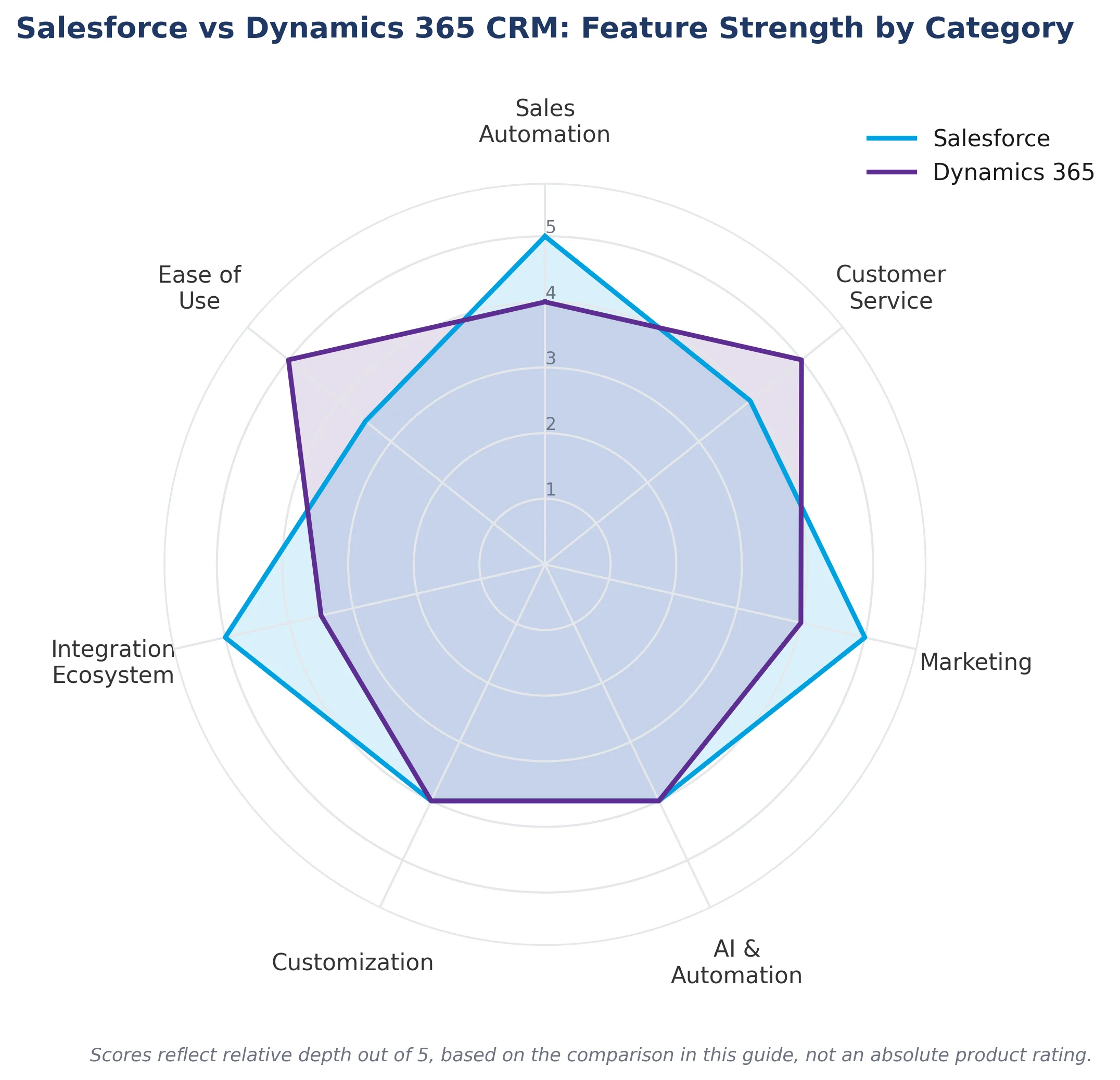
Salesforce costs less to start, but Dynamics 365 can cost less overall if you already own Microsoft 365 licenses.
Salesforce pricing: Sales Cloud, now branded Agentforce Sales, starts at $25 per user per month for the Starter Suite. Pricing climbs to $100 for the Pro Suite, $175 for the Enterprise, $350 for the Unlimited, and $550 for the AI-heavy Agentforce 1 Sales plan. Marketing Cloud and Commerce Cloud are priced separately, so you will need a custom quote for each.
Dynamics 365 pricing: Dynamics 365 Sales starts at $65 per user per month for the Professional tier, which covers core sales automation. Enterprise runs $105 per user per month and adds advanced customization and forecasting. Sales Premium, at $150 per user per month, layers in AI-powered sales insights. Because Microsoft publishes these prices directly, budgeting tends to be more predictable than with Salesforce.
Note: If your organization already owns Microsoft 365 licenses, Dynamics 365 often works out cheaper overall, because you are not paying twice for overlapping productivity tools. |
Winner: Tie – Salesforce is cheaper at the entry level, but Dynamics 365 usually costs less overall for Microsoft-first businesses.
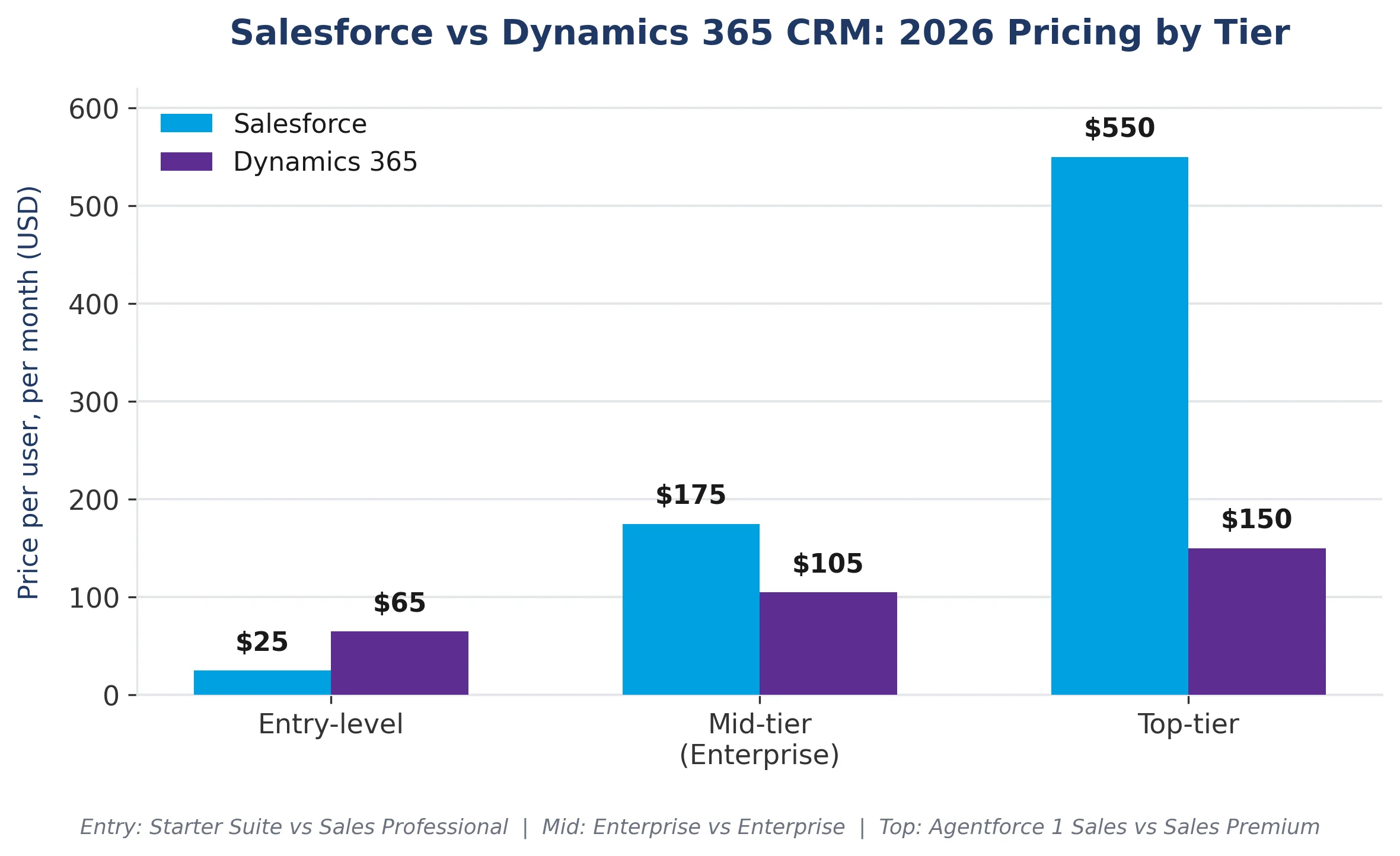
Salesforce offers a deeper native sales toolkit, while Dynamics 365 wins on built-in Outlook and Teams data.
Salesforce Sales Cloud gives you detailed pipeline visualization, territory management, guided selling paths, and CPQ (Configure, Price, Quote), a tool that helps sales teams build accurate quotes for complex products. A manufacturing company selling configurable equipment, for example, can use Salesforce CPQ to generate accurate, rules-based quotes in minutes instead of relying on spreadsheets.
Dynamics 365 Sales covers the same fundamentals, including lead scoring, opportunity management, and forecasting, and adds relationship insights pulled directly from Outlook and Teams conversations. For a professional services firm where reps live in their inboxes and calendars all day, this native connection can reduce the manual data entry required to keep the CRM accurate.
Winner: Salesforce – its native sales tools go deeper, especially for complex, multi-step sales processes.
Salesforce Service Cloud has stronger omnichannel case tools, while Dynamics 365's Field Service module is often considered more mature out of the box.
Salesforce Service Cloud provides support teams with omnichannel case routing, a knowledge base, and automation via Salesforce Flow, an automated process built in Salesforce that can route cases or update records without custom code. Field Service, an add-on module, extends this to technicians working on-site, a feature that suits industries like HVAC and equipment maintenance.
Dynamics 365 Customer Service offers comparable case management, along with a strong built-in Field Service app that many reviewers consider more capable straight out of the box. A utilities company dispatching field technicians across a large region may find it needs less custom configuration to get running.
Note: If field service is central to your business, test both platforms' scheduling tools before you commit. This is usually where the real difference shows up. |
Winner: Dynamics 365 – for field service depth without heavy customization.
Salesforce Marketing Cloud has more enterprise maturity, while Dynamics 365 Customer Insights fits naturally into a Microsoft-first analytics stack.
Salesforce Marketing Cloud is a mature, established platform for email marketing, customer journeys, and multichannel campaigns, with years of adoption among retail and consumer brands running personalized campaigns at scale.
Dynamics 365 Customer Insights, formerly Dynamics 365 Marketing, has grown quickly since Microsoft folded customer data platform capabilities into it. For a business already using Power BI and Azure for analytics, Customer Insights feels like a natural extension of the tools the marketing team already touches.
Winner: Salesforce – for proven scale in complex, high-volume campaigns.
Salesforce concentrates AI inside the CRM through Agentforce and Einstein, while Microsoft spreads Copilot across your entire workday.
Agentforce and Einstein: Salesforce built Einstein as its predictive and generative AI layer across every Cloud, and more recently launched Agentforce, a toolkit for building autonomous AI agents that handle customer questions and qualify leads without constant human input. Both sit atop Data Cloud, Salesforce's tool for unifying customer data from multiple sources.
Microsoft Copilot is woven into Dynamics 365 Sales, Customer Service, and Customer Insights. Copilot can summarize customer records, draft follow-up emails, and pull insights from Teams meeting transcripts. Because Copilot also lives inside Word, Excel, and Outlook, reps get consistent AI support across every tool they already use.
Note: The real question is not which AI is smarter, since both are improving quickly. The better question is where you want AI support to live: inside a CRM-first platform with Agentforce, or spread across your whole Microsoft workday with Copilot.
Winner: Tie – it depends on whether you want AI concentrated in your CRM or spread across your daily tools.
Salesforce gives certified developers more control through Apex and Lightning, while Dynamics 365's Power Platform is easier for general Microsoft staff to pick up.
Salesforce customization runs on objects (a type of record in Salesforce, similar to a database table), Flow for no-code automation, and Apex, Salesforce's own programming language, for custom logic that goes beyond clicks and configuration. Lightning, its modern interface framework, lets developers build components that feel native to the platform. This gives certified developers considerable control, though custom builds require Salesforce-specific skills.
Dynamics 365 customization runs through the Power Platform, Microsoft's suite of low-code tools that includes Power Apps for building custom applications and Power Automate for workflow automation. Because Power Platform skills overlap with general Microsoft development knowledge, some organizations find it easier to use internal staff for basic customization.
Note: For deep, complex builds, such as a financial services firm building a custom loan origination workflow, both platforms typically require a certified partner, regardless of which you choose. |
Winner: Tie – Salesforce rewards specialist developers, and Dynamics 365 rewards generalist Microsoft teams.
Salesforce wins on the size of its app marketplace, while Dynamics 365 wins on native depth within the Microsoft stack.
AppExchange lists thousands of third-party apps, ranging from simple productivity boosters to full industry-specific solutions. This depth exists because Salesforce has the largest installed base of CRM customers, which makes it worth a developer's time to build and maintain an app for the platform.
Microsoft AppSource is smaller by comparison, but it offers something AppExchange cannot: native integration with the rest of Microsoft's business tools. If your team already relies on Teams, SharePoint, and Azure, Dynamics 365 connects to them without middleware or a paid connector app.
Winner: Salesforce – for the sheer size and variety of its third-party ecosystem.
Dynamics 365 tends to feel more familiar to teams already working with Microsoft tools, while Salesforce offers more in-depth free training through Trailhead.
Trailhead is Salesforce's free, gamified learning platform, open to anyone, not just paying customers. This lowers the barrier to training internal staff rather than relying entirely on outside consultants for every change.
Microsoft Learn is how most Dynamics 365 users train, alongside in-app guidance. Because the interface follows familiar Microsoft design patterns, users who already work daily in Outlook and Teams often find the learning curve shorter for basic tasks.
Note: The biggest factor in ease of use is almost always the quality of the initial setup, not the platform itself. A system built around your actual sales process will always feel easier to use than one that was overbuilt from day one.
Winner: Dynamics 365 – for a shorter learning curve among Microsoft-first teams.
A CRM-only Salesforce or Dynamics 365 project typically takes six to twelve weeks, while combined CRM and ERP rollouts take three to six months or more.
Salesforce implementation: A straightforward Sales Cloud rollout, covering standard sales process setup, data migration, and training, typically takes 6 to 12 weeks. Adding Service Cloud, Marketing Cloud, or custom Apex development extends the timeline and increases costs.
Dynamics 365 implementation follows a similar pattern for CRM alone. However, projects that combine CRM with ERP modules tend to run three to six months because finance and operations configuration adds real complexity beyond CRM setup.
Note: If you only need CRM and want the fastest path to going live, a focused CRM-only project will almost always beat a combined CRM and ERP rollout in terms of timeline. |
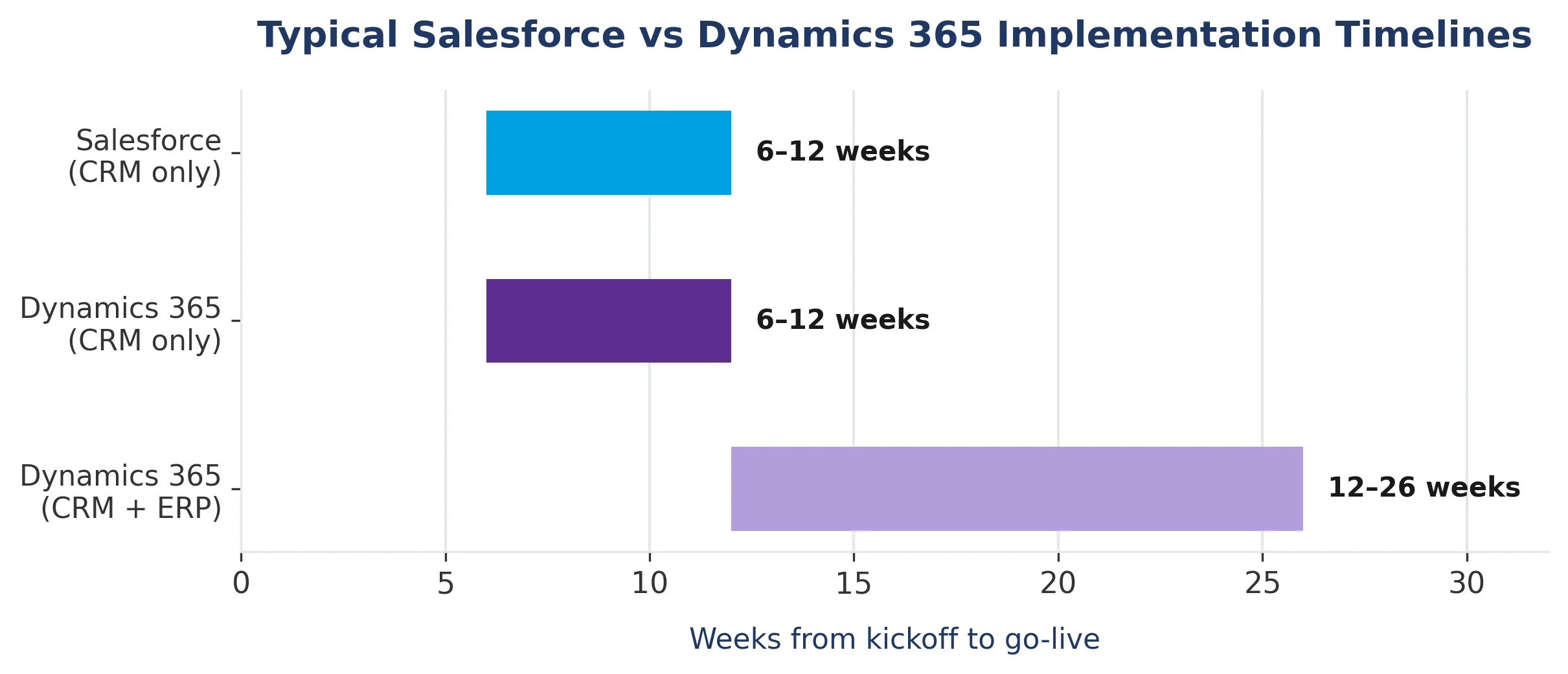
Winner: Tie – both platforms move at a similar pace for CRM-only projects.
Neither platform is universally better across every industry. Here is how the choice tends to play out in practice.
Manufacturing and distribution companies often lean toward Salesforce when they need advanced CPQ for configurable products, or toward Dynamics 365 when supply chain and inventory data already live in Microsoft's ERP tools.
Financial services firms frequently choose Salesforce Financial Services Cloud for its built-in compliance and relationship-management features. However, Dynamics 365 remains common among firms with heavy Azure investment for security and data residency.
Retail and consumer brands tend to favor Salesforce, largely because Marketing Cloud and Commerce Cloud are more established for high-volume, personalized campaigns across channels.
Professional services firms, including agencies, consultancies, and law firms, often find Dynamics 365 appealing because so much of their daily work already happens in Outlook, Teams, and Word.
Nonprofits benefit from Salesforce's Nonprofit Cloud and steep education discounts through Salesforce.org, which makes it a common choice in that sector regardless of company size.
Every business has different CRM priorities. Let our specialists help you choose the platform that fits your long-term goals.
Book a Free ConsultationBy now, the pattern should be clear. Salesforce vs Dynamics 365 CRM is not really a question of which platform is objectively better. It is a question of fit.
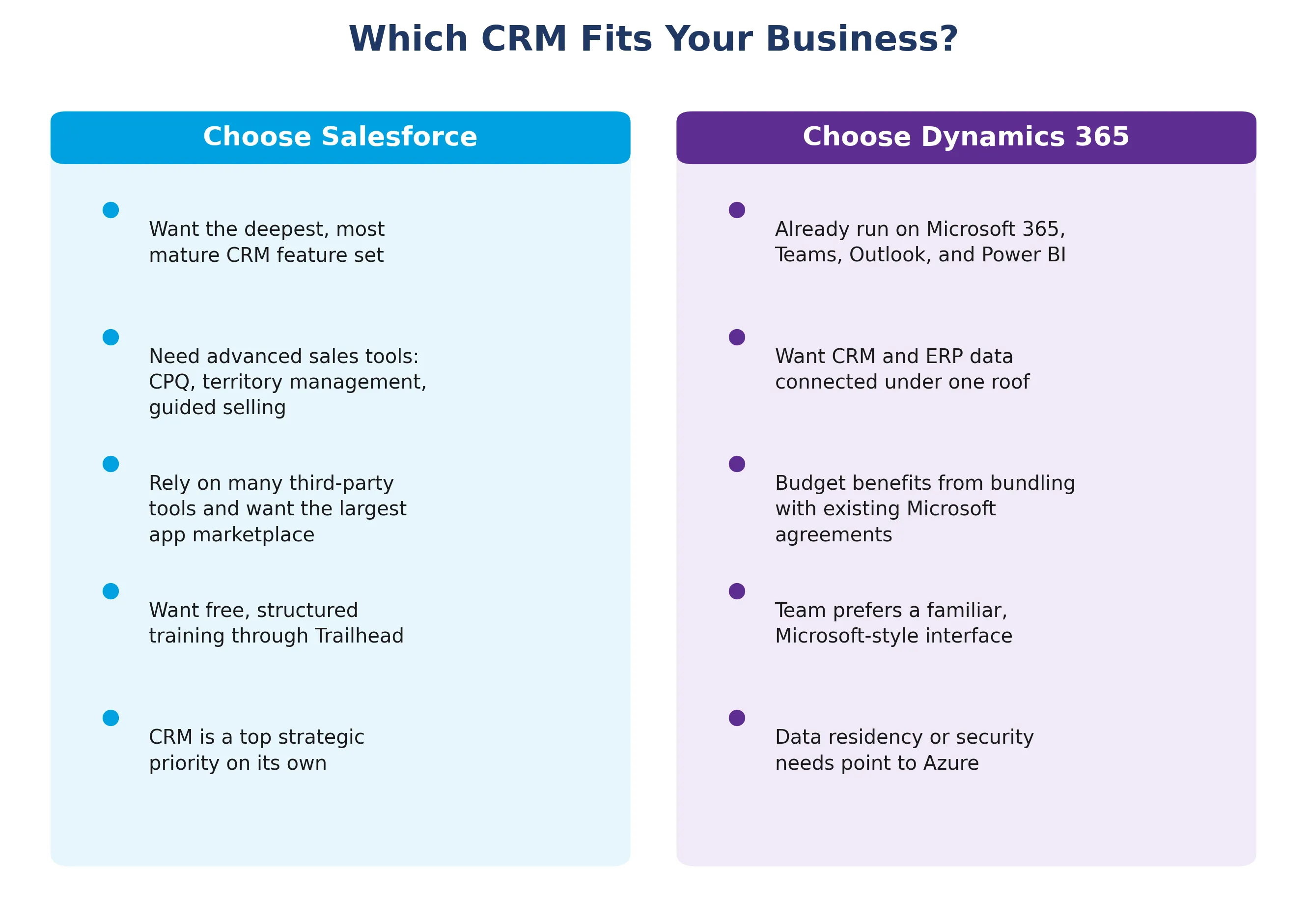
You want the deepest, most mature CRM feature set on the market
Your team needs advanced sales tools like CPQ, territory management, or guided selling
You rely on a wide mix of third-party tools and want the largest app marketplace to connect them
You want free, structured training through Trailhead to build internal Salesforce skills
CRM is a top strategic priority, not just one piece of a bigger IT puzzle
Your company already runs on Microsoft 365, Teams, Outlook, and Power BI
You want CRM and ERP data connected under one platform
Your budget benefits from bundling CRM licenses with existing Microsoft agreements
Your team prefers a familiar, Microsoft-style interface to reduce training time
Data residency or security requirements point you toward Azure's infrastructure
If you are still unsure after weighing these factors, the safest next step is a short discovery workshop with a certified partner for each platform. A good consultant will map your actual sales and service processes against both systems before recommending one, rather than pushing whichever platform they specialize in.
Whichever platform you choose, a few practices consistently separate successful CRM rollouts from painful ones.
Start with your process, not your features: Map how your sales and service teams work today before you configure either platform. Bending your business around a system's default settings, or customizing everything before you understand your own process, both lead to expensive rework later.
Clean your data before you migrate it: Whether you are moving from a legacy CRM, spreadsheets, or switching between Salesforce and Dynamics 365, migrating duplicate or outdated records only carries old problems into your new system.
Invest in training from day one: The best-configured CRM in the world fails if your team does not use it consistently. Budget time and resources for onboarding, not just the technical setup.
Work with a certified partner for anything beyond basic configuration: Both Salesforce and Dynamics 365 reward experienced implementation partners who have already seen the platform's edge cases. This is how you avoid mistakes that are expensive to fix after go-live.
Reduce CRM implementation risks with a proven strategy for migration, configuration, user adoption, and long-term CRM success.
Start Your CRM Project TodayWhichever platform you choose, the software is only half the project. This is why Cynoteck supports businesses through both Salesforce implementation and Microsoft Dynamics 365 implementation, from the first discovery call through to post-launch support.
Platform selection guidance: We map your sales, service, and marketing processes against both platforms before recommending one, so the decision fits your business instead of our specialty.
Implementation and configuration: We set up your CRM around your actual workflows, including pipelines, case routing, approval processes, and reporting.
Data migration: We clean and move your existing records from spreadsheets, a legacy CRM, or another platform, so you start with accurate data instead of old problems.
Custom development: Our Salesforce team builds with Apex, Lightning, and Flow. Our Dynamics 365 team builds with the Power Platform, including Power Apps and Power Automate.
Integrations: We connect your CRM to the other tools your business runs on, from finance systems to marketing platforms to Microsoft 365 or Slack.
Training and adoption support: We train your team on the workflows you will use day to day, so the system gets adopted instead of ignored.
Ongoing support: After go-live, we stay on to fix issues, add features, and adjust the system as your business changes.
Note: If you are migrating from one platform to the other, tell your implementation partner early. Migration projects need a different data-cleanup and cutover plan than a first-time CRM setup. |
Cynoteck holds certified partner status for Salesforce and works with Microsoft Dynamics 365 across Sales, Customer Service, and the Power Platform. This means you get one point of contact, whether your business ends up on Salesforce, Dynamics 365, or a mix of both alongside your existing Microsoft tools.
Salesforce vs Dynamics 365 CRM ultimately comes down to your existing technology stack, your budget, and how deep you need your CRM features to go. Salesforce offers the most specialized, feature-rich CRM experience with the largest third-party ecosystem. Dynamics 365 offers tighter integration with the Microsoft tools your team may already use every day, along with a path to connect CRM and ERP data under one roof.
Neither platform is the wrong choice. The wrong choice is to pick one without first mapping it to your actual business process.
If you want an experienced partner to walk through your specific requirements, compare editions, and build a realistic implementation plan, Cynoteck's certified Salesforce consultants can help you make that decision with confidence. Get in touch for a free consultation to see which platform best fits your business.
Partner with certified CRM experts to implement, customize, and optimize Salesforce or Dynamics 365 with complete confidence.
Schedule a Free ConsultationAns: Salesforce's Starter Suite offers a lower entry price of $25 per user per month, giving a small sales team a simpler path to get up and running quickly. Dynamics 365 can still work well for small businesses already using Microsoft 365, since bundled pricing can offset the higher per-user starting cost.
Ans: At the entry level, Salesforce is generally cheaper. However, once you add advanced automation, AI features, and additional Clouds, both platforms reach comparable enterprise pricing. Your total cost depends more on which modules and add-ons you need than on the base sticker price.
Ans: Yes. Many organizations run Salesforce as their CRM while keeping Dynamics 365 or Microsoft 365 for productivity, finance, or operations. Bidirectional integrations are available for tools like Outlook, Teams, and SharePoint, so switching to Salesforce does not necessarily mean giving up your Microsoft tools.
Ans: A focused CRM-only implementation typically takes six to twelve weeks for either platform. Timelines extend significantly when you add ERP modules, complex integrations, or heavy customization.
Ans: Salesforce's Agentforce and Einstein are built specifically around CRM data and autonomous customer-facing agents. Microsoft Copilot extends across the entire Microsoft 365 suite, not just Dynamics 365. The better fit depends on whether you want AI concentrated in your CRM or spread across your whole workday.
Ans: You do not strictly need one for very simple, out-of-the-box setups. However, most businesses see a faster, smoother rollout and fewer costly mistakes by working with a certified Salesforce or Microsoft Dynamics 365 consulting partner, particularly for data migration, integrations, and custom automation.
Ans: Salesforce's highest sales tier, Agentforce 1 Sales, runs around $550 per user per month and includes advanced AI agents on top of core sales automation. Most mid-market teams land on the Enterprise tier instead, at $175 per user per month.

The best ways to build strong customer relations are to listen actively, communicate proactively, personalize every interaction, respond fast, be transparent, exceed expectations, act on feedback, reward loyalty, build a community, and use a CRM to keep every customer touchpoint connected. Businesses that do this consistently keep more customers, earn more referrals, and spend less on acquisition.

Discover the top 10 benefits of custom CRM software development for modern businesses. Learn how tailored CRM solutions improve efficiency, enhance customer relationships, and drive business growth.
We are more than just developers and consultants—we are your partners in navigating the digital landscape. Let us be the engine behind your next big success while you focus on your core vision.
Explore Opportunities!
 Dynamics 365 Sales Pricing, Features & Alternatives.webp)