How Much Does a Dynamics 365 Implementation Cost in 2026
What is the Microsoft Dynamics 365 implementation cost?
The cost of a Dynamics 365 implementation in 2026 depends on factors such as business size, number of users, customization, integrations, data migration, and implementation scope. Small projects may start around $10,000, while complex enterprise implementations can exceed $300,000.
The important point is that Dynamics 365 implementation cost is not the same as the software licensing cost. Your total implementation cost usually includes licenses, consulting, configuration, customization, integrations, migration, training, testing, and ongoing support.
.png)
How Much Does a Dynamics 365 Implementation Actually Cost?
Direct answer: There isn't one fixed number for this. Total cost of ownership in year one typically lands as a multiple of your annual licensing cost.
The size of that multiple depends on how much configuration, data migration, integration work, and training your specific project needs.
A lean, low-customization deployment sits toward the lower end of that multiple. A heavily customized, multi-integration project sits toward the higher end.
That multiple usually narrows after year one. Once configuration, migration, and training are behind you, ongoing costs settle back down to licensing plus a smaller support and maintenance retainer.
Treat every number in this guide, including this one, as a starting point for a real scoping conversation. Not as a quote.
A Realistic Dynamics 365 Implementation Timeline and Cost Phasing
Implementation cost doesn't get spent all at once. It moves through phases, and knowing that shape helps you plan cash flow, not just a total number.
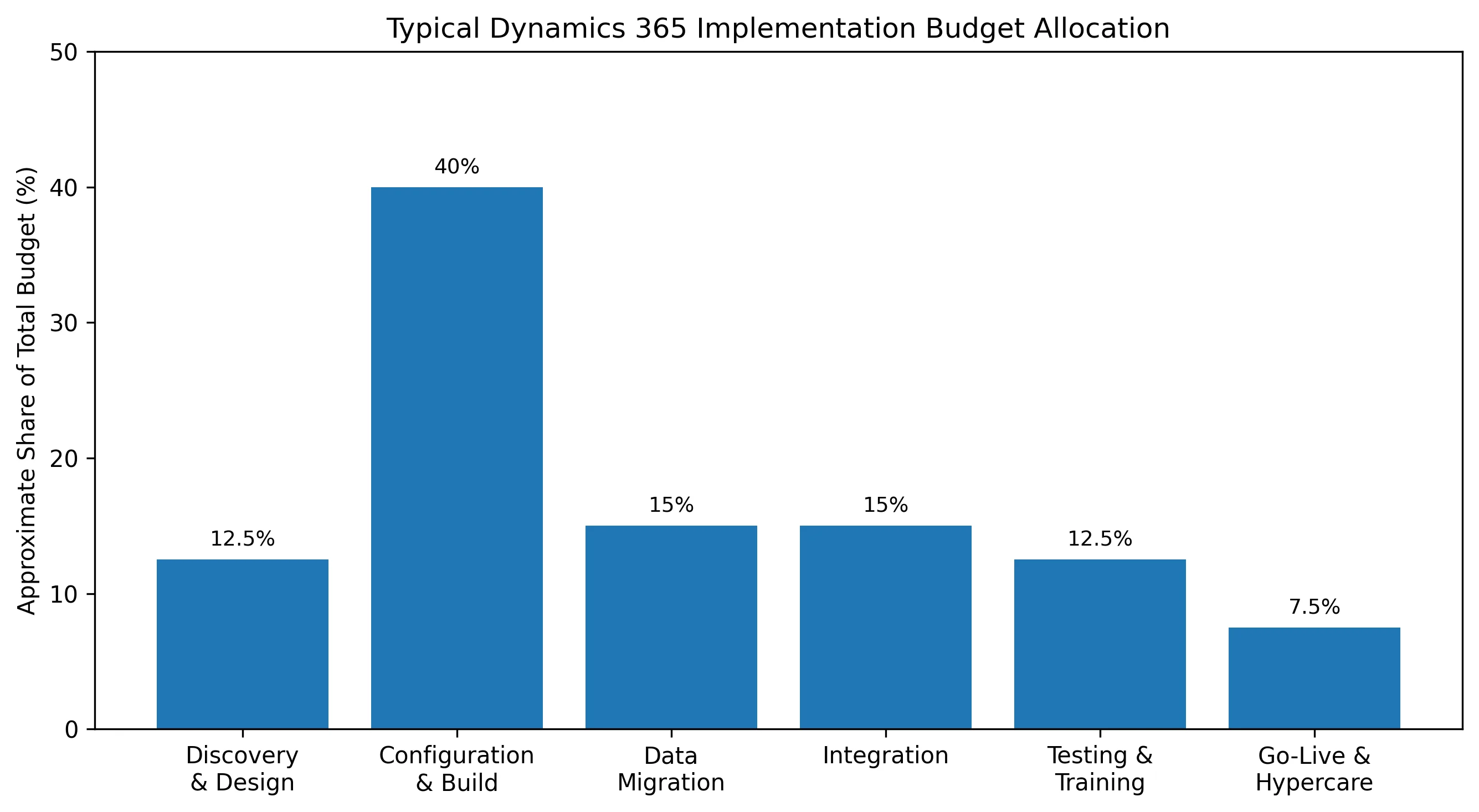
Discovery and Design, roughly 10 to 15 percent of budget: requirements gathering, process mapping, solution architecture
Configuration and Build, roughly 35 to 45 percent of budget: core system setup, customizations, workflow automation
Data Migration, roughly 10 to 20 percent of budget: cleansing, mapping, and migrating legacy data
Integration, roughly 10 to 20 percent of budget: connecting third-party systems, APIs, and ISV apps
Testing and Training, roughly 10 to 15 percent of budget: user acceptance testing, end-user training, documentation
Go-Live and Hypercare, roughly 5 to 10 percent of budget: cutover support, post-launch stabilization
These percentages are approximate and will shift depending on your specific implementation requirements. A CRM-only project, for example, will lean much more heavily on Configuration and Build than on data migration.
What Is the Dynamics 365 Implementation Cost Breakdown?
The implementation cost of Microsoft Dynamics 365 depends on the size of your organization, the number of applications deployed, and the complexity of your business processes. Below is a realistic cost breakdown for most projects.
Cost Component | Typical Cost (USD) | Notes |
|---|---|---|
Discovery & Planning | $2,000 – $15,000 | Business analysis, workshops, solution design, project planning |
Implementation & Configuration | $5,000 – $150,000+ | Environment setup, workflows, security roles, standard configuration |
Customization & Development | $3,000 – $100,000+ | Custom entities, plugins, Power Apps, automations, business logic |
Data Migration | $2,000 – $50,000+ | Importing customers, products, transactions, historical records |
Third-Party Integrations | $2,000 – $75,000+ | ERP, eCommerce, accounting, marketing, payment gateways, APIs |
Testing & Quality Assurance | $2,000 – $20,000 | Functional testing, UAT, performance testing, bug fixing |
Training & Change Management | $1,000 – $20,000 | User training, documentation, adoption workshops |
Go-Live & Deployment | $1,000 – $10,000 | Production deployment, cutover, launch support |
Post-Go-Live Support | $1,000 – $10,000/month | Ongoing maintenance, enhancements, issue resolution |
How Much Should You Budget for a Dynamics 365 Implementation?
The total cost of a Dynamics 365 implementation varies based on your business size, the applications deployed, customization needs, integrations, and data migration. The estimates below provide a general guideline to help you plan your implementation budget.
Business Size | Estimated Implementation Cost |
|---|---|
Small Business | $10,000 – $40,000 |
Mid-Sized Business | $40,000 – $150,000 |
Large Enterprise | $150,000 – $1,000,000+ |
7 Hidden Costs Buyers Miss in Their Dynamics 365 Budget
Storage overages: Each license includes a data allotment. Heavy document, attachment, or historical record volume can require additional Dataverse capacity.
AI Builder and Copilot credits: Microsoft is removing seeded AI Builder credits from some Power Platform and Dynamics licenses starting November 2026. That shifts automation cost planning going forward.
Sandbox or non-production environments: Needed for safe testing and staged rollouts, and not always included by default.
ISV app licensing: Industry-specific add-ons, advanced manufacturing tools, tax engines, e-commerce connectors carry their own subscription fees.
Power BI and Power Platform costs: Reporting and low-code automation often get scoped in later, as a surprise add-on nobody budgeted for up front.
Post-go-live support retainers: Ongoing partner support after go-live is a separate line item that a lot of first-time buyers simply forget to include.
Re-training after upgrades: Microsoft ships continuous updates, so periodic re-training and adjustment work is a real, recurring cost past year one.
How to Keep Your Dynamics 365 Implementation Cost Under Control
Scope a minimum viable rollout first. Add advanced modules in a second phase once adoption is proven.
Order attach licensing deliberately. Assign the highest-value base license first for each user.
Insist on a clean, staged data migration plan. Avoid a "lift everything and sort it out later" approach.
Choose a partner who scopes customization conservatively and pushes back on unnecessary complexity.
Build training and change management into the budget from day one. Not as a contingency you hope you won't need.
Dynamics 365 vs. Salesforce Pricing Comparison
While both Microsoft Dynamics 365 and Salesforce use subscription-based pricing, their pricing models differ significantly.
Dynamics 365 allows businesses to purchase individual applications and often offers cost advantages for organizations already using Microsoft products.
Salesforce pricing typically starts lower for basic editions but can increase substantially as advanced features, add-ons, and multiple clouds are added.
Feature | Microsoft Dynamics 365 | Salesforce |
|---|---|---|
Pricing Model | Per-user, per-app subscription | Per-user, per-cloud subscription |
Starting Price* | From ~$50/user/month (varies by app) | From ~$25/user/month (Starter editions) |
Implementation Cost | $10,000 – $1,000,000+ | $10,000 – $1,500,000+ |
Customization | Power Platform (low-code + pro-code) | Apex, Lightning Platform |
Integration | Native with Microsoft 365, Azure, Teams, Power BI | Native with Salesforce ecosystem; third-party integrations available |
AI Features | Microsoft Copilot | Einstein AI |
Best For | Businesses already invested in Microsoft technologies | Organizations seeking a CRM-first platform |
*Starting prices vary by application, edition, region, and licensing agreement.
Which Is More Cost-Effective?
Choose Dynamics 365 if your organization already uses Microsoft 365, Azure, Teams, or Power Platform, as native integrations can reduce implementation and operational costs.
Choose Salesforce if your primary focus is CRM functionality and you require a large ecosystem of industry-specific applications and extensions.
For both platforms, implementation services, customizations, integrations, data migration, and user training often represent a larger investment than software licensing itself.
How Cynoteck Can Help You Budget and Deploy Dynamics 365 the Right Way
Getting Dynamics 365 pricing right on paper is only half the job. The bigger risk is scope creep once the project actually starts.
Cynoteck works with organizations across CRM and ERP deployments to scope Dynamics 365 projects realistically from the very first conversation. That includes requirements discovery, licensing and attach-pricing optimization, configuration and customization, data migration, third-party integrations, user training, and ongoing managed support after go-live.
We don't quote a fixed package price, because that's not how honest scoping works. Pricing depends on the number of users, the modules you select, how much customization your processes need, and the level of support your team wants after launch.
That means your budget gets built around your business, not squeezed into a generic template someone else already wrote.
If you're planning a Dynamics 365 project for 2026 and want a realistic, line-item picture of cost before you commit to anything, talk to a Cynoteck Dynamics 365 consultant and get the right plan scoped for your organization.
Ready to Estimate Your Dynamics 365 Implementation Cost?
Talk to Cynoteck's Dynamics 365 experts for a personalized implementation roadmap, transparent pricing estimate, and the right licensing recommendations for your business.
Book a Free ConsultationFAQs About Dynamics 365 Implementation Cost
Q: How much does a Dynamics 365 implementation cost in 2026?
Ans: There's no fixed answer. Business Central implementations tend to sit toward the lower end of the cost spectrum for simple, low-customization rollouts. Enterprise Finance and Supply Chain Management deployments sit at the higher end. The exact number depends on user count, customization, integrations, and data migration effort.
Q: Is Dynamics 365 licensing cheaper than implementation?
Ans: Usually, yes. Annual licensing cost is fairly predictable once you know your user count and modules. Implementation, meaning configuration, migration, integrations, and training, is frequently the higher cost, sometimes several times the annual license fee depending on scope.
Q: What is Dynamics 365 attach pricing?
Ans: Attach pricing lets you add a second Dynamics 365 app to a user who already holds a qualifying base license, at a reduced rate, often around $20 per user per month, instead of paying full price for each additional app separately.
Q: Did Dynamics 365 Business Central prices increase in 2026?
Ans: Yes. Microsoft raised Business Central pricing effective November 1, 2025, its first increase in over five years. Essentials moved to $80 per user per month and Premium moved to $110 per user per month, tied to new Copilot AI features and expanded storage.
Q: Is Dynamics 365 cheaper than Salesforce?
Ans: It depends on your scope. Dynamics 365's per-app, per-user model with attach discounts can work out cheaper for organizations that need both CRM and ERP. Salesforce is priced per CRM cloud and typically needs third-party add-ons for ERP functionality.
Q: What hidden costs should I budget for beyond licensing?
Ans: Common ones include Dataverse storage overages, sandbox environments, ISV app licensing, Power BI and Power Platform add-ons, post-go-live support retainers, and re-training after major platform updates.
Q: How long does a typical Dynamics 365 implementation take?
Ans: Standard Business Central implementations often run 3 to 6 months. Enterprise Finance and Supply Chain Management rollouts can take 9 to 18 months or longer, depending on scope, customization, and how many entities or regions are involved.
Dynamics 365 keeps getting more capable every quarter. More embedded AI, more Power Platform depth, more automation built directly into the license.
That also means the cost of getting the scoping wrong is rising right along with it.
The organizations that come out ahead in 2026 aren't the ones with the biggest budget. They're the ones who scope licensing, implementation, and the hidden costs together, before anyone signs anything.
Get that part right, and Dynamics 365 pays for itself. Get it wrong, and you'll be back here next year, rebuilding the budget you should have built the first time.
Need an Accurate Dynamics 365 Implementation Cost Estimate?
Get a free consultation with our Dynamics 365 specialists and receive a customized implementation cost estimate designed for your business.
Book a Free Consultation NowExplore comprehensive blogs, best practices, and insights from our technology experts.

10 Ways to Build Stronger Customer Relationships and Increase Loyalty
The best ways to build strong customer relations are to listen actively, communicate proactively, personalize every interaction, respond fast, be transparent, exceed expectations, act on feedback, reward loyalty, build a community, and use a CRM to keep every customer touchpoint connected. Businesses that do this consistently keep more customers, earn more referrals, and spend less on acquisition.
 Dynamics 365 Sales Pricing, Features & Alternatives.webp)

10 Proven Benefits of Custom CRM Software for Modern Businesses (2026)
Discover the top 10 benefits of custom CRM software development for modern businesses. Learn how tailored CRM solutions improve efficiency, enhance customer relationships, and drive business growth.
.png)
.png)
Turning expertise into action for your business.
We are more than just developers and consultants—we are your partners in navigating the digital landscape. Let us be the engine behind your next big success while you focus on your core vision.
Explore Opportunities!