7 Signs You Need a Salesforce CRM Custom Mobile App
TL;DR
A custom Salesforce CRM mobile app helps businesses extend their existing Salesforce investment when standard mobile capabilities no longer meet their operational or customer experience requirements. It supports advanced device features, offline workflows, high-volume transactions, and personalized customer experiences while Salesforce remains the central system of record. Businesses should consider custom mobile app development when customers, partners, or field teams need more flexibility, deeper integrations, and purpose-built mobile experiences.
- Key Signs: Limited mobile functionality, unreliable offline access, complex workflows, advanced device requirements, and disconnected business systems.
- Business Benefits: Improve field productivity, customer engagement, operational efficiency, and mobile transaction management.
- Implementation Approach: Extend Salesforce with a custom Android or iOS app while keeping CRM data, business processes, and reporting connected.
If your business already runs on Salesforce, you don't need to replace it to improve how your teams work on mobile. Salesforce can continue to serve as the system of record while a custom mobile app extends what your teams and customers can do with that data.
The question is when do you actually need one?
As mobile requirements become more demanding, you may find that your teams need workflows, device capabilities, offline access, integrations, custom customer experiences beyond what the standard Salesforce mobile app offer.
Below, we explain 7 signs that your business is ready for a custom Salesforce CRM mobile app, so you can understand when extending Salesforce makes business sense and when the standard Salesforce mobile app is still enough.
Why Businesses Extend Salesforce Instead of Replacing It
A custom mobile app doesn't replace Salesforce. It extends the CRM when specific users need a mobile experience that goes beyond the standard Salesforce experience.
Salesforce will continue to manage customer records, sales data, service information, and reporting, while the custom app will handle mobile-specific needs such as field workflows, offline access, customer self-service, or device-based features.
This keeps Salesforce as the system of record, while the custom app serves as the mobile experience for users who need more flexibility.
The result is a connected setup where mobile interactions can continue flowing into Salesforce without replacing the CRM your business already relies on.
When to Customize Salesforce Mobile vs Build a Custom Mobile App
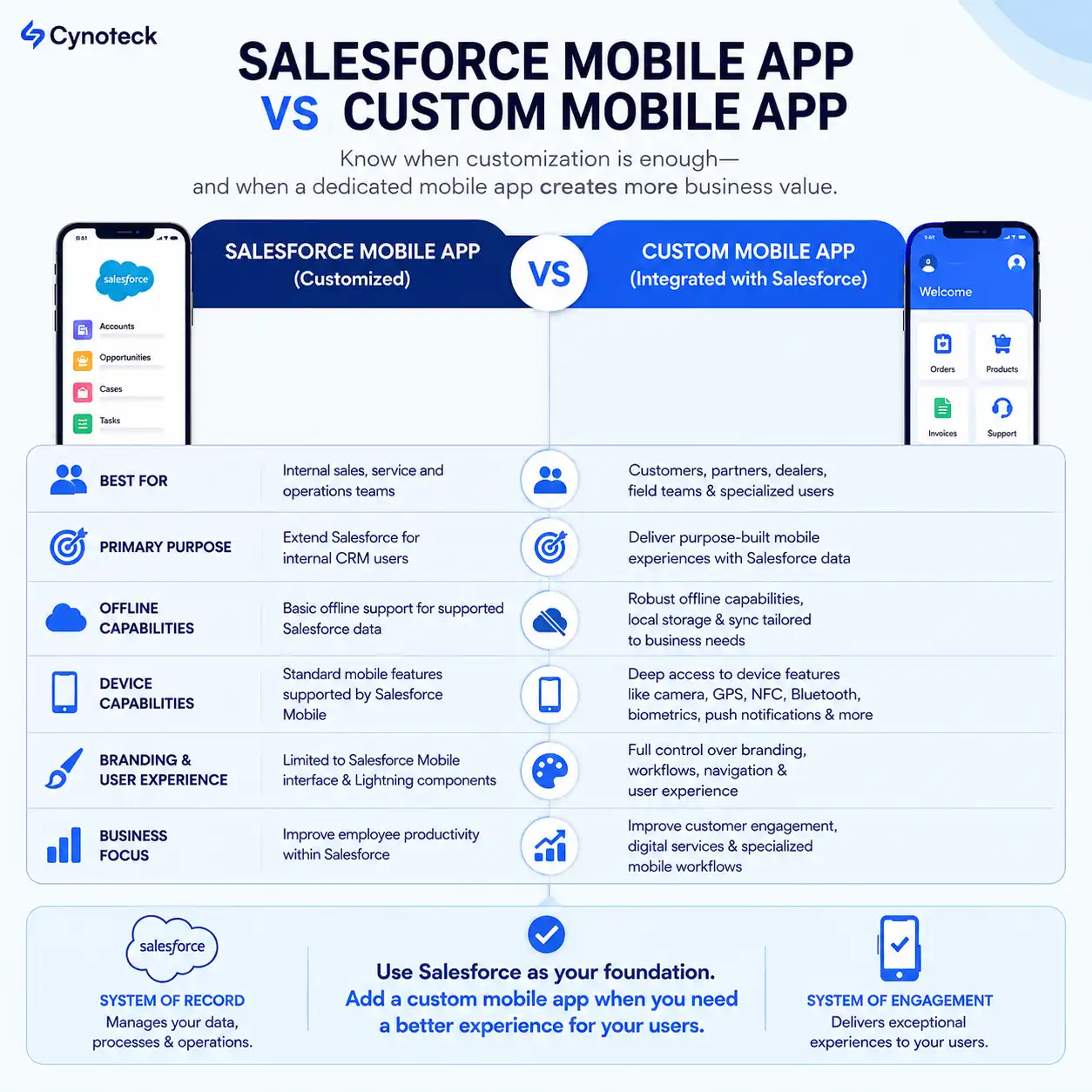
Before looking at the seven signs, it helps to understand when Salesforce Mobile customization is enough and when a separate custom app makes more sense.
Customize Salesforce Mobile when:
Your users are internal sales, service, or operations teams already working in Salesforce.
Your workflows can be handled using Salesforce objects, Lightning pages, and Flows.
You need a faster way to access and update CRM data on mobile.
Standard Salesforce mobile capabilities meet your offline and device requirements.
Build a Custom Mobile App when:
You need a purpose-built experience for customers, partners, dealers, field teams, or other specialized users.
Your app requires workflows designed specifically around how those users work.
You need deeper device capabilities such as barcode scanning, NFC, Bluetooth, biometrics, GPS, or advanced push notifications.
You need greater control over branding, navigation, offline workflows, or the overall mobile experience.
The app needs to connect Salesforce with other business systems or specialized platforms.
A custom app can still keep Salesforce at the center of your business data and CRM operations. The difference is that the mobile experience is built around the needs of its users rather than being limited to the standard Salesforce mobile experience.
If you're wondering whether your business has reached that point, the following seven signs can help you decide.
The 7 Signs Your Business Has Outgrown Standard Salesforce Mobile
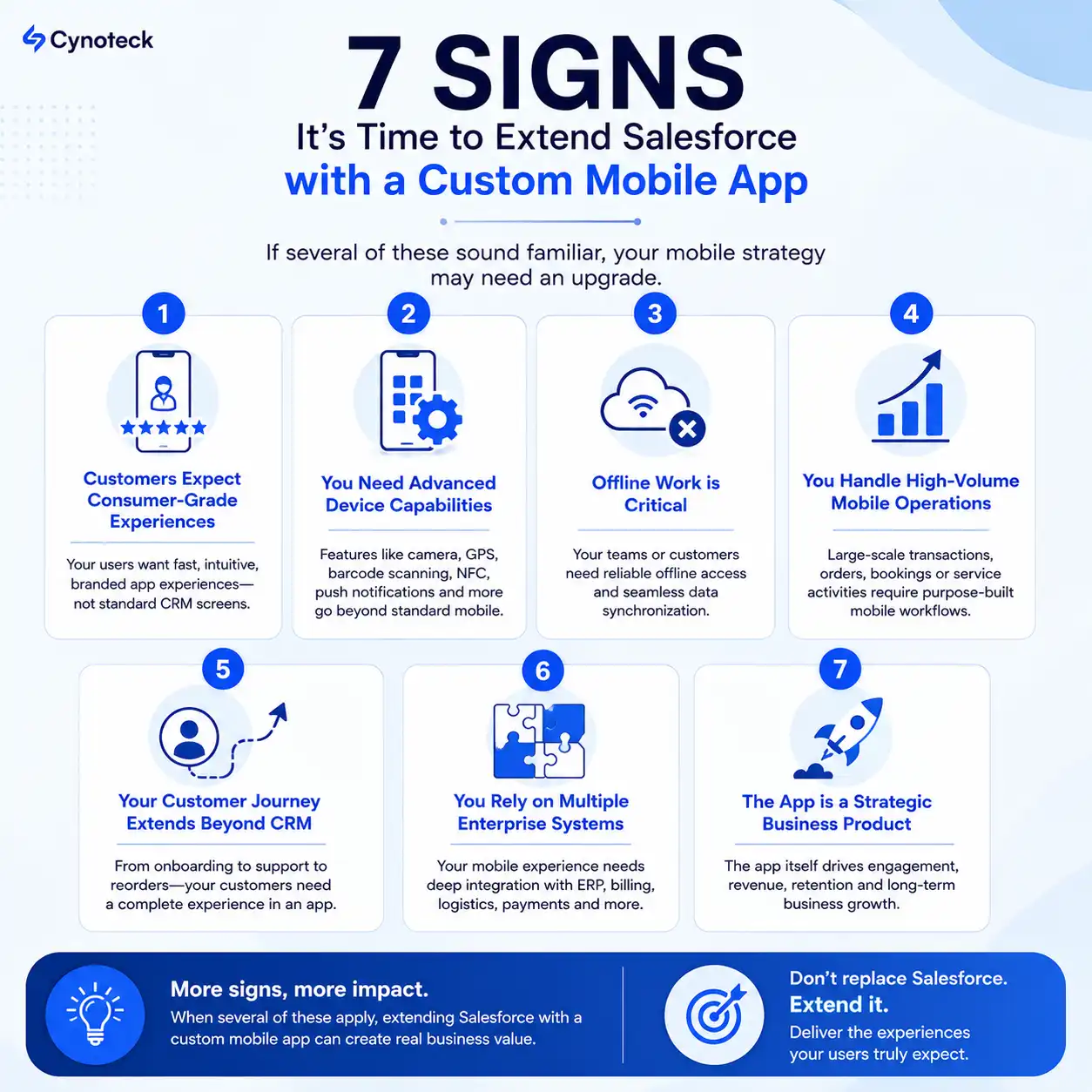
1. Your Customers Expect a Consumer-Grade Mobile Experience
Your customers are used to fast, intuitive mobile experiences in their everyday lives. If they use your mobile app to browse products, place orders, book services, manage accounts, or request support, they expect those interactions to be just as simple and convenient.
When the mobile experience feels slow, difficult to navigate, and limited to basic CRM functions, customers switch to other channels such as phone, email, and your website. This add friction to the customer journey and increase support effort.
A custom mobile app extend Salesforce by giving customers a purpose-built experience while Salesforce continues managing customer records, orders, service cases, and other business data in the background. Customer actions in the app synchronized with Salesforce, keeping your teams informed without creating a separate customer data system.
Business benefits:
Deliver a branded, mobile-first customer experience.
Make common customer actions faster and easier.
Increase self-service and reduce support requests.
Personalize the experience using Salesforce data.
If your customers need more than basic access to Salesforce data and expect a dedicated mobile experience, this may be a strong sign that your business is ready to consider a custom Salesforce-integrated app. |
2. Your Business Depends on Advanced Device Capabilities
Your customers, dealers, delivery partners, or field teams need the mobile device to do more than display Salesforce data. Their workflows might involve scanning QR codes, capturing proof of delivery, taking photos, verifying identity, collecting digital signatures, or connecting to Bluetooth or NFC devices.
When these activities require separate apps or manual steps, employees spend more time switching between systems and entering information. This increases operational effort and the risk of errors.
A custom mobile app integrates these device capabilities directly into the workflow while Salesforce continues to manage customer records, products, work orders, deliveries, warranties, and service history. Information captured through the app is synchronized with Salesforce, keeping business data accurate and connected.
Business benefits:
Reduce manual data entry and operational errors.
Complete field and customer workflows faster.
Bring device-based tasks into a single mobile experience.
Keep Salesforce records updated with information captured on the device.
If your business processes depend on device capabilities such as scanning, GPS, camera, NFC, Bluetooth, or biometrics, a custom Salesforce-integrated mobile app provides the control needed to build those workflows into one experience. |
3. Reliable Offline Workflows Are Becoming Mission-Critical
Your employees, technicians, delivery teams, or field representatives often work in locations where internet connectivity is unreliable. They still need to complete inspections, deliveries, service requests, or other critical tasks without waiting for a stable connection.
When these workflows depend entirely on internet access, teams often have to record information manually and update Salesforce later. This creates delays, duplicate entries, and a higher risk of inaccurate customer or operational data.
Salesforce supports offline access for many common use cases. However, businesses with complex offline workflows, large datasets, multi-step processes, or specific synchronization requirements often need a more tailored approach.
A custom mobile app allows users to access required information, complete workflows, and capture updates while offline. Once connectivity is restored, the app synchronizes the changes with Salesforce, keeping it as the central source of business data.
Business benefits:
Keep critical field operations running without reliable connectivity.
Reduce manual data entry and synchronization errors.
Update Salesforce records automatically when connectivity returns.
Deliver more consistent service in remote locations.
If your teams need to complete important workflows without a reliable internet connection, offline capability becomes a strong reason to consider a custom Salesforce-integrated mobile app. |
4. Your Mobile Processes Have Become High-Frequency, High-Volume Operations
As your business grows, customers, dealers, partners, or field teams may start handling hundreds or thousands of mobile transactions every day. Orders, service requests, product registrations, warranty claims, deliveries, and inspections can quickly turn into high-volume workflows.
At this scale, even a few extra steps in each transaction add up. Slow navigation, repeated data entry, and unnecessary screens can increase processing time and create operational bottlenecks.
A custom mobile app can simplify these high-frequency workflows around exactly what users need to do. It can reduce unnecessary steps, capture only the required information, and synchronize completed transactions with Salesforce.
Business benefits:
Process high volumes of mobile transactions more efficiently.
Reduce repetitive steps and manual data entry.
Improve response and processing times.
Support increasing transaction volumes without making workflows more complex.
Keep Salesforce updated with completed transactions.
When small inefficiencies are repeated across hundreds or thousands of mobile transactions, they become a real business cost. A purpose-built mobile app helps streamline these high-volume workflows while Salesforce continues managing the underlying business data. |
5. Your Customer Journey Now Extends Beyond CRM
Your customer relationship no longer ends with a sales or service interaction. Customers may want to browse products, place orders, make payments, book services, track deliveries, manage loyalty rewards, receive personalized recommendations, and request support from the same mobile experience.
When these activities are spread across websites, portals, emails, and separate applications, customers have to move between different channels. This adds friction and makes it harder to deliver a consistent experience.
Salesforce continues to manage customer profiles, purchase history, service cases, and business workflows. A custom mobile app extends that foundation by becoming the customer-facing experience for activities such as purchasing, booking, payments, loyalty, and self-service. Customer interactions then flow back into Salesforce, giving sales, service, and marketing teams a more complete view of the customer.
Business benefits:
Create a connected customer journey in one mobile experience.
Increase customer engagement and repeat interactions.
Personalize experiences using Salesforce customer data.
Bring customer activity from different touchpoints into Salesforce.
Strengthen sales, service, and marketing decisions with richer customer data.
When your customer journey includes digital experiences beyond sales and service, a custom mobile app extends Salesforce from a CRM platform into the foundation for a broader customer experience. |
6. Your Business Requires Enterprise-Grade Scalability and Integrations
As your business grows, Salesforce often becomes one part of a larger technology ecosystem. Your operations may also depend on ERP systems, payment gateways, logistics platforms, messaging services, analytics tools, or AI services.
The challenge is making these systems work together through one seamless mobile experience. When information is spread across multiple platforms, customers can experience delays, inconsistent information, or disconnected interactions.
A custom mobile app provides greater flexibility to connect these systems around your specific business workflows. It can integrate with payment platforms, ERP systems, mapping services, notification tools, or AI services while sending relevant customer and business data back to Salesforce.
Salesforce remains the system of record, while the custom app brings the different services together through a single mobile experience.
Business benefits:
Connect multiple business systems through one mobile experience.
Support complex workflows without replacing existing platforms.
Keep Salesforce at the center of customer and business data.
Build an integration architecture that supports future growth.
Deliver consistent experiences across different business services.
When your mobile experience depends on multiple business systems, a custom app provides the flexibility to connect them around your workflows while Salesforce continues managing the core customer and business data. |
7. Your Mobile Application Has Become a Strategic Business Product
What started as a way to extend Salesforce has now become a major customer and revenue channel. Customers use your mobile app to discover products, place orders, manage services, make payments, interact with your brand, or access ongoing support.
At this stage, the app is no longer just another business application. It needs its own product roadmap, regular improvements, new features, and the flexibility to respond quickly to changing customer expectations.
Salesforce continues to manage customer records, transactions, service history, and business data, while the custom mobile app becomes the product experience customers interact with. This gives your team greater control over features such as personalized onboarding, subscriptions, loyalty programs, analytics, and evolving customer journeys.
Business benefits:
Launch and improve customer experiences faster.
Build features around changing customer needs.
Support new revenue and engagement opportunities.
Capture richer customer behavior in Salesforce.
Turn the mobile app into a long-term business asset.
Key takeaway: When your mobile app becomes a core part of how your business attracts, serves, and retains customers, it needs the flexibility of a product rather than the limitations of a standard CRM extension. |
Industries That Benefit From Salesforce Custom Mobile Apps
A Salesforce-integrated custom mobile app is particularly useful when customers, partners, or field teams need mobile experiences that go beyond standard CRM access.
Manufacturing
Use Salesforce to manage products, customers, dealers, inventory, warranties, and service history while giving customers and distributors a branded mobile app for product registration, spare parts ordering, warranty tracking, and personalized product recommendations.
Healthcare
Keep patient records, appointments, and care history in Salesforce while providing patients with a secure healthcare mobile app for appointment booking, teleconsultations, medical reports, reminders, and personalized healthcare communication.
Financial Services
Use Salesforce to manage customer relationships, financial products, and service requests while delivering a secure mobile banking or customer portal experience with biometric authentication, personalized offers, transaction tracking, and real-time notifications.
Retail & E-commerce
Leverage Salesforce customer data to power personalized shopping experiences, loyalty programs, product recommendations, order tracking, and customer support through a branded mobile application.
Automotive
Manage vehicle ownership, service history, dealer interactions, and customer relationships in Salesforce while offering customers a mobile app for service booking, maintenance reminders, warranty management, and roadside assistance.
Real Estate
Use Salesforce to manage buyers, sellers, properties, and sales opportunities while enabling clients to browse listings, schedule property visits, upload documents, and receive personalized property recommendations through a mobile app.
Logistics & Distribution
Track customers, shipments, deliveries, and service requests in Salesforce while providing customers and delivery partners with real-time shipment visibility, delivery confirmation, route updates, and proof of delivery through a dedicated mobile app.
Travel & Hospitality
Store customer preferences, bookings, loyalty information, and support history in Salesforce while delivering a mobile experience for reservations, itinerary management, loyalty rewards, personalized offers, and customer support.
Education
Manage student, parent, and alumni relationships in Salesforce while offering mobile access to course information, attendance, assignments, notifications, fee payments, and personalized communication.
Utilities & Energy
Maintain customer support operations, accounts, service requests, billing, and asset information in Salesforce while enabling customers to report outages, monitor usage, pay bills, and receive service updates through a mobile application.
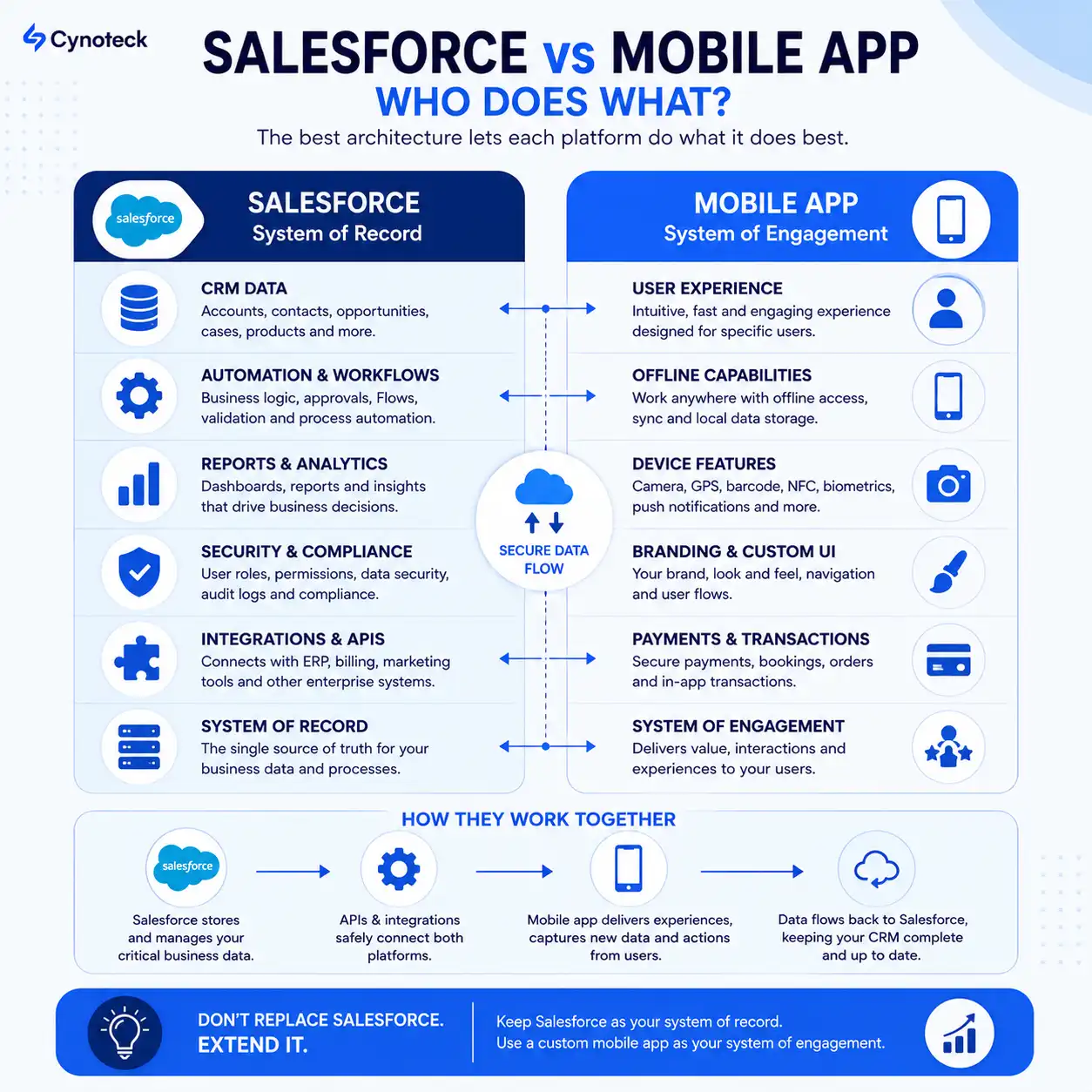
What Should Stay Inside Salesforce vs What Belongs in the Mobile App
Extending Salesforce with a custom mobile app does not mean moving your core CRM functionality elsewhere. The two platforms should have different responsibilities.
Salesforce remains the system of record, managing customer data, business processes, reporting, security, and enterprise integrations. The mobile app becomes the system of engagement, handling the mobile experiences and workflows used by customers, partners, or field teams.
Salesforce Responsibilities | Custom Mobile App Responsibilities |
Customer and business data (Accounts, Contacts, Opportunities, Cases, Products, Orders) | Branded customer experience, UI, navigation, and personalized interactions |
Business automation using Flows, approvals, and workflows | Customer-facing journeys, self-service, onboarding, and specialized mobile workflows |
Reporting, dashboards, analytics, and business insights | Offline capabilities, local data storage, and intelligent synchronization |
Security, permissions, sharing rules, and compliance | Integration with device capabilities such as camera, barcode scanning, GPS, NFC, Bluetooth, biometrics, and push notifications |
Customer relationship history and operational records | Payments, messaging, loyalty experiences, notifications, and other integrated digital services |
Integration with enterprise business systems | Fast, intuitive, purpose-built mobile experiences across those systems |
System of Record | System of Engagement |
Recommended Enterprise Architecture
Once you decide to extend Salesforce with a custom mobile app, the next question is how the app and Salesforce should work together.
A common architecture separates the mobile experience, backend services, and Salesforce so each layer has a clear role:
Customer / Partner / Field Mobile App
↓
Backend Services or API Layer
↓
Salesforce CRM
↓
Sales, Service & Operations Teams
The mobile app handles the user experience and mobile-specific functionality. The backend or API layer manages authentication, business logic, data exchange, and integrations with external systems where required. Salesforce remains the central system for customer and business data, while sales, service, and operations teams continue using Salesforce for their daily work.
This approach allows the mobile app to add new experiences and capabilities without disrupting the Salesforce processes your teams already depend on.
Self-Assessment Checklist
Before deciding whether to extend Salesforce with a custom mobile app, answer the following questions honestly. There isn't a fixed score that automatically means you need a custom app, but if several of these sound familiar, it may be time to evaluate your mobile strategy.
✓ Ask yourself:
Do your customers, partners, or dealers regularly interact with your business through a mobile experience connected to Salesforce?
Are your customers expecting features such as self-service, order tracking, loyalty programs, digital payments, or personalized recommendations within a single app?
Is your business planning to launch new digital services without replacing your existing Salesforce CRM?
Do your mobile workflows rely on capabilities such as barcode scanning, camera capture, GPS, biometric authentication, NFC, or digital signatures?
Would unreliable internet connectivity significantly disrupt your field operations or customer service?
Has your business grown to the point where mobile interactions have become a critical part of daily operations?
Does your mobile experience need to connect with multiple business systems such as ERP, payment gateways, logistics platforms, or AI services?
Has your mobile app become an important channel for customer engagement, revenue generation, or long-term business growth?
Have customers compared your mobile experience unfavorably with competitors or requested a more modern mobile app?
Do you want to make better use of the customer data already stored in Salesforce to deliver personalized mobile experiences?
Pro Tip: If you answered "Yes" to three or more of these questions, your business may be approaching the point where extending Salesforce with a custom mobile app is worth evaluating. The seven signs discussed above can help you identify which capabilities will deliver the greatest value while keeping Salesforce as the foundation of your business.
Not Sure Which Mobile Approach Fits Your Business?
Get expert guidance to determine whether Salesforce customization or a custom mobile app is the right next step.
Talk to Our ExpertsCommon Mistakes Businesses Make in Salesforce Custom Mobile App Development:
Even when a custom Salesforce mobile app is the right direction, poor planning can create unnecessary cost and complexity. These are the mistakes worth avoiding:
Building too early:
Don't start custom development before understanding whether your existing Salesforce setup, automation, or workflows already solve the problem. Fixing the underlying process first can avoid unnecessary development.Over-customizing Salesforce for customer-facing experiences:
Salesforce is well suited for managing customer relationships and business processes. Trying to build a highly customized consumer-facing mobile experience entirely within Salesforce can add complexity and limit future flexibility.Choosing the architecture too early:
Define your users, workflows, integrations, data requirements, and security needs before deciding how the app should connect with Salesforce. The right approach could involve direct integration, middleware, or backend services.Treating CRM data as the complete mobile experience:
Having access to accurate Salesforce data does not automatically create a good mobile experience. Navigation, performance, personalization, and ease of use need equal attention.Choosing technology before defining the product:
Don't choose a development technology before understanding what the app needs to achieve. Business goals, user needs, integrations, and long-term requirements should guide the technology decision.
The goal is not to add another layer of technology. It's to solve a specific business or customer problem that standard Salesforce experiences no longer address effectively.
Conclusion
If your Salesforce setup is working well for your internal teams but your mobile users need more from the experience, developing a custom mobile app gives you a way to extend what you've already built.
The key is to start with the mobile problem, not the technology. Look at what your customers, field teams, partners, or other users need to accomplish on mobile, where the current experience creates friction, and which workflows require capabilities beyond standard Salesforce customization.
From there, you can determine whether Salesforce customization is enough, a custom mobile app is justified, or a combination of both makes the most sense.
Frequently Asked Questions
Do I really need a custom mobile app if I already use Salesforce CRM?
Not necessarily. If your mobile users are internal staff performing standard CRM tasks, customizing the Salesforce Mobile App is usually sufficient and far less expensive to maintain.
Can the Salesforce Mobile App be customized enough for my business?
For many internal sales and service scenarios, yes. As mobile requirements become more specialized, such as highly branded customer experiences, advanced offline workflows, or deeper integration with device capabilities, a custom mobile app may offer greater flexibility.
What are the limitations of Salesforce Mobile customization?
The main limitations are restricted design flexibility, limited offline transaction support through Briefcase Builder, and constrained access to advanced device hardware like NFC or biometric sensors.
When should I hire a mobile app developer instead of relying only on Salesforce customization?
Once your mobile needs involve customer-facing branding, offline-first workflows, high transaction volume, or deep hardware integration, a dedicated mobile app developer working alongside your Salesforce team becomes the more sustainable path.
Which business problems are solved by a native mobile application?
Native apps solve problems related to consumer-grade user experience, reliable offline functionality, direct hardware access, and high-volume transaction handling that standard CRM mobile interfaces are not designed for.
Should Salesforce remain my CRM while my mobile app becomes customer-facing?
Yes, for most enterprise architectures. Salesforce continues to manage the underlying customer and business data, while the mobile app becomes the interface customers or field staff interact with directly.
Can Android and iOS apps integrate with Salesforce?
Yes. Both platforms can connect to Salesforce through its REST API, allowing a native app to read and write CRM data such as leads, cases, and opportunities in real time.
Which industries benefit the most from extending Salesforce with mobile apps?
Healthcare, financial services, retail, manufacturing, logistics, and utilities see the most benefit, largely because their mobile workflows depend on offline reliability, hardware access, or consumer-grade customer experiences.
How do I know my business has outgrown the standard Salesforce Mobile experience?
If you find yourself answering yes to several questions in the self-assessment checklist above, particularly around offline reliability, hardware access, or customer-facing UX, that is a reasonable signal to evaluate a custom build.
What is the safest enterprise architecture for Salesforce plus mobile apps?
A layered architecture works best: the mobile app handles the user interaction, a backend and API layer manages business logic and integrations, and Salesforce remains the system of record underneath both.
Build vs. Buy: Which Is Better for an Enterprise CRM Mobile Field Service App?
The right choice depends on your business requirements, existing CRM, budget, and need for customization. Buying a ready-made field service app can be faster and more cost-effective for standard workflows, while building a custom app provides greater flexibility, deeper CRM integration, and control over features, data, and user experience. For enterprises with complex field operations or unique CRM workflows, a custom-built mobile field service app may offer better long-term value.
What Mobile-First Self-Service App Features Should I Pay Extra For vs. Expect as Standard?
Standard features should include secure login, profile management, search, notifications, FAQs, and basic request or ticket submission. Consider paying extra for advanced mobile-first capabilities such as offline access, AI-powered assistance, personalized experiences, biometric authentication, real-time tracking, in-app payments, and deep CRM integration. These features can provide greater value when they directly improve customer experience, reduce support costs, or support complex business workflows.
What Are the Benefits of Salesforce Mobile App Plus?
Salesforce Mobile App Plus can offer customized mobile CRM workflows, better access to real-time Salesforce data, offline access for field teams, improved field productivity, mobile-specific features and experiences, deeper integration with Salesforce and other business systems, and greater flexibility for enterprise requirements.
Explore comprehensive blogs, best practices, and insights from our technology experts.
Benefits of Mobile Healthcare Apps: How mHealth Is Improving Patient Care
Mobile healthcare apps improve patient care by enabling remote monitoring, timely reminders, secure data access, better communication, and cost-efficient healthcare services through mHealth technology.


 Outsource Salesforce Development or Build In-House Which is the Best for Your Business.webp)
Outsource Salesforce Development or Build In-House? Which is the Best for Your Business
Outsourcing Salesforce development vs. building an in-house Salesforce team: 2026 cost insights, salary comparisons, key benefits, challenges, and the best hiring model for your business growth.
Turning expertise into action for your business.
We are more than just developers and consultants—we are your partners in navigating the digital landscape. Let us be the engine behind your next big success while you focus on your core vision.
Explore Opportunities!