What Is a Lightning Web Component? (And Do You Need One?)
Summary: This guide explains what a Lightning Web Component is, when your business needs one, and what it typically costs to build. |
Your team's daily workflow does not always fit Salesforce's standard record page. When that happens, a Lightning Web Component is usually the fix. This blog explains what it is, when it makes sense, and how it compares to older options like Visualforce.
A Lightning Web Component, or LWC, is a custom interface built using Salesforce's modern JavaScript framework. It replaces or extends a standard Salesforce screen with one designed specifically for how your team works.
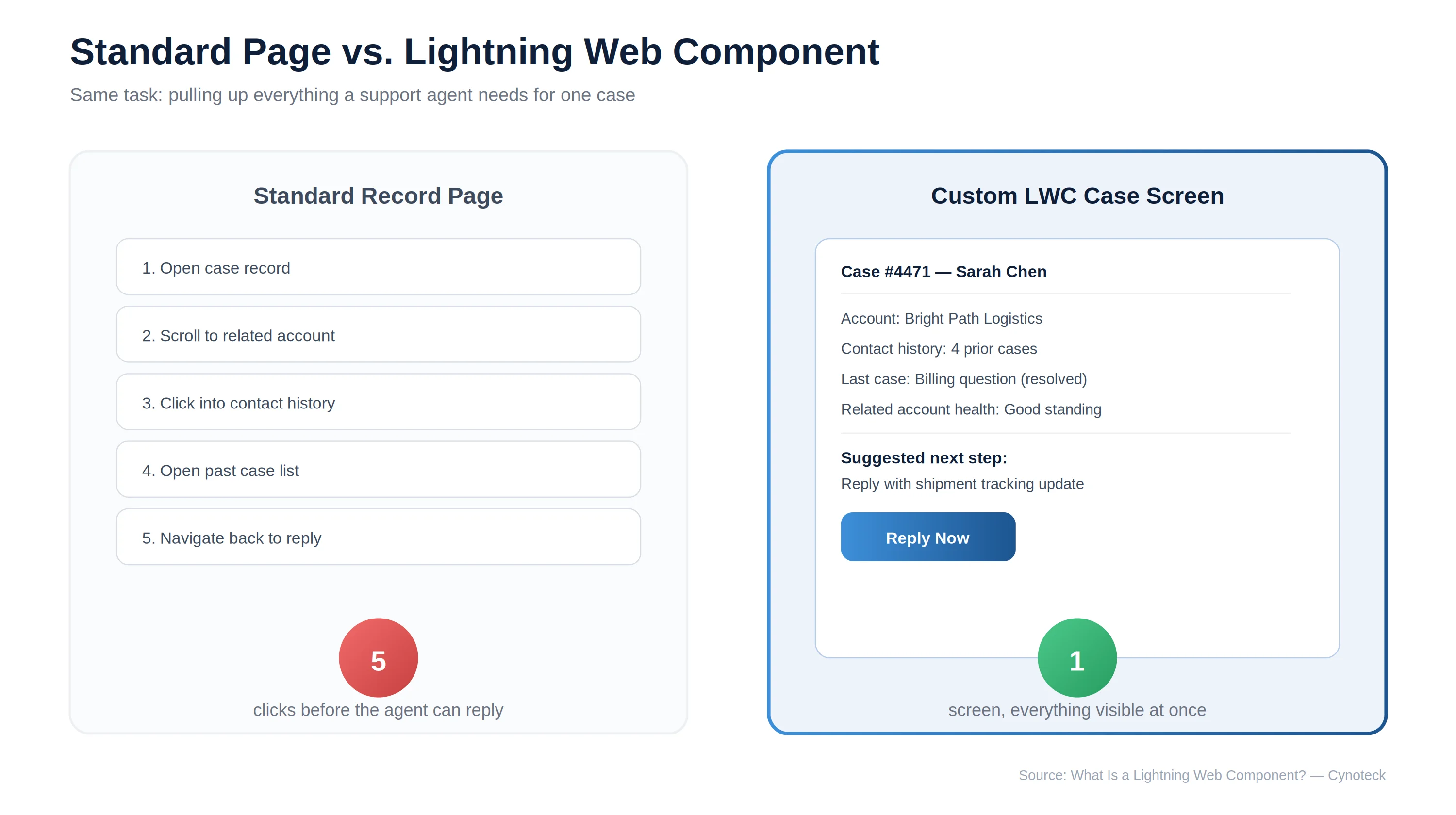
For example, instead of a sales rep clicking through five separate screens to build a quote, an LWC can put everything they need on one purpose-built screen. This means fewer clicks, faster tasks, and less training time for new hires.
Note: LWC has replaced Visualforce, Salesforce's older interface framework, for all new development. If your org still runs on Visualforce, it can typically still be maintained, but new builds should use LWC. |
Not every team needs a custom interface. However, certain signs point clearly toward needing one:
Your record page requires too many clicks: One task should not need five tabs and related lists. A custom screen can cut that down to one view.
Your team enters data that does not fit standard fields well: A quoting tool with live pricing calculations is a common example.
Different teams need very different views of the same record: Sales, support, and field service teams often need to see completely different information from the same case or account.
Mobile use is common: LWC components are built to be mobile-optimized from the start, which matters for field service or delivery teams working from a phone.
Pro Tip: Before commissioning an LWC, check whether the same problem could be solved with page layout changes or Dynamic Forms, which are configuration-level tools. If those solve it, you save the cost of custom development entirely.
Custom quoting tool: A sales team enters product and discount details on one screen, with pricing calculated live, instead of switching between multiple related records.
Field service scheduling dashboard: Technicians see their day's jobs, locations, and required parts in one mobile-friendly view.
Support case interface: Agents see case history, linked account details, and next steps together, instead of scrolling through a long standard page.
Find out whether Lightning Web Components, Dynamic Forms, or standard configuration best fit your Salesforce business requirements.
Speak With an LWC ExpertHere is how a custom-built component stacks up against the record page you already have, side by side. The right column only wins when the left column genuinely cannot do the job.
Factor | Standard Record Page | Lightning Web Component |
Setup effort | Minimal | Requires development |
Customization depth | Limited to layout and fields | Fully custom screen and logic |
Best for | Simple, standard workflows | Workflows the standard page cannot support |
Mobile optimization | Standard | Built to be mobile-first |
Who maintains it | Admin | Developer |
Building a Lightning Web Component usually follows a clear sequence, so there are no surprises once development starts. Knowing these five stages up front helps you set the right expectations with your own team before work begins.
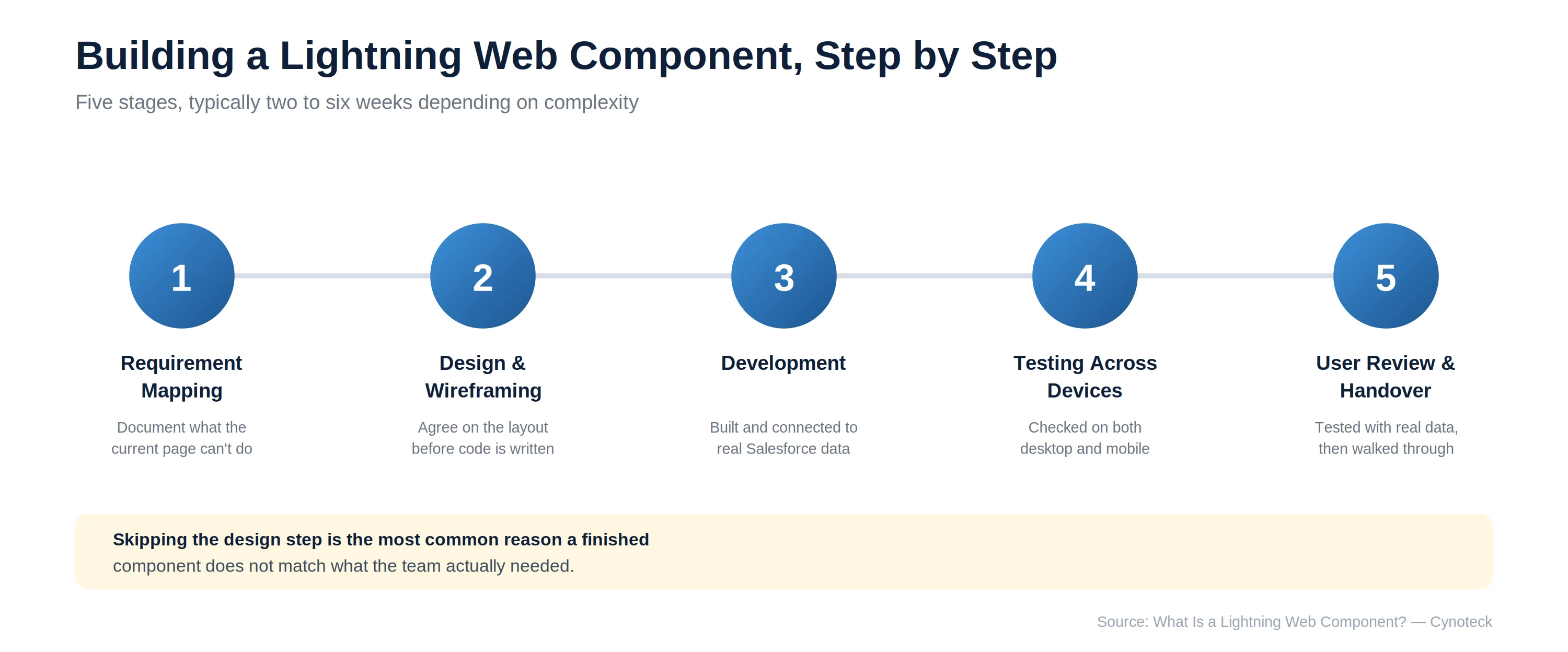
Requirement mapping: The specific workflow problem is documented in plain language, including exactly what the current record page cannot do.
Design and wireframing: A simple visual layout is agreed before any code is written, so you know what the finished screen will look like.
Development: The component is built and connected to the correct Salesforce data, following current LWC standards.
Testing across devices: Since most components are used on both desktop and mobile, testing covers both, not just one.
User review and handover: Your team tests the component with real data before it goes live, and receives a short walkthrough on using it.
Note: Skipping the design step is one of the most common reasons a finished component does not match what the team needed. Agreeing on the layout early avoids expensive rework later. |
Building a component for a problem configuration could solve: Always check page layouts and Dynamic Forms first, since these require no development cost at all.
Skipping mobile testing: A component that works well on desktop can behave differently on a phone if it is not tested on both from the start.
No plan for future changes: Components need a developer to update. Agree upfront on who maintains it and how change requests get handled.
Overloading one component with too many features: A focused component that does one job well beats one trying to replace an entire workflow.
A single, well-scoped Lightning Web Component typically falls within the mid-size Salesforce customization range, generally $8,000 to $25,000. The exact cost depends on complexity and how many related systems it needs to pull data from. Simpler components, such as a basic custom display panel, can cost less. For a full cost breakdown across all customization types, see our guide: How Much Does Salesforce Customization Cost in 2026?
Note: Cost depends heavily on how much logic sits behind the component. A component that only displays data costs far less than one that performs live calculations or calls an external system. |
Receive a tailored project estimate based on your workflows, complexity, integrations, and business goals before development begins.
Request a Free EstimateA Lightning Web Component that gets built by the wrong person usually looks fine in a demo and falls apart once real users touch it on a phone. Cynoteck's build team includes dedicated LWC Specialists among our 30+ certified experts. Every component is scoped first to confirm it is genuinely needed, not just requested.
That scoping discipline shows up across the 500+ projects we have delivered for teams with very different workflow needs, from healthcare case management to real estate listing tools. Every component we build is mobile-optimized by default. That shows up in our 90% client retention rate: teams keep coming back once they feel the difference in their day-to-day clicks.
30+ certified experts, including dedicated LWC Specialists who follow current Lightning standards on every build
500+ projects delivered across industries with very different interface needs
Mobile-first by default, tested on phone and desktop before handover
90% client retention rate, because the component reduces daily clicks
A Lightning Web Component is worth building once your team's actual workflow, not just the field layout, does not fit what Salesforce offers by default. If you are not sure whether your situation calls for a component or a simpler configuration fix, a short discovery call will tell you which one applies.
Talk to an LWC Specialist or explore our full Salesforce Customization Services.
If your project also involves automating what happens behind that new screen, our comparison guide on Flow vs Apex is a useful next read. For the full picture on how a Lightning Web Component fits into a broader project, see our Complete Guide to Salesforce Customization.
Partner with certified Salesforce developers to build fast, intuitive Lightning Web Components designed around your team's daily workflows.
Book a Free ConsultationAns: Visualforce is Salesforce's older interface framework, built before modern web standards existed. Lightning Web Components use current JavaScript standards, load faster, and are the recommended choice for all new development.
Ans: If your team needs a different arrangement of existing fields, a page layout change or Dynamic Forms configuration will likely solve it without any development cost. An LWC is needed when the workflow itself, not just the layout, does not fit the standard page.
Ans: A single, well-scoped component typically takes two to six weeks, depending on how much custom logic and data it needs to handle. Components that pull from multiple related objects or external systems sit toward the longer end of that range.
Ans: Yes. LWCs are built to be mobile-optimized from the start, which makes them a common choice for field service and delivery teams working from phones or tablets.
Ans: A certified developer typically maintains it, since changes require code updates rather than simple configuration changes an admin could make alone. This is worth factoring into your budget, since it is an ongoing cost rather than a one-time expense.
Ans: The most common mistake is building a custom component for a problem that page layout changes or Dynamic Forms could have solved. Checking configuration options first can save the entire development cost.
 Outsource Salesforce Development or Build In-House Which is the Best for Your Business.webp)
Outsourcing Salesforce development vs. building an in-house Salesforce team: 2026 cost insights, salary comparisons, key benefits, challenges, and the best hiring model for your business growth.
We are more than just developers and consultants—we are your partners in navigating the digital landscape. Let us be the engine behind your next big success while you focus on your core vision.
Explore Opportunities!