The Complete Guide to Salesforce Customization (2026)
.webp&w=3840&q=75)
Summary: This guide explains what Salesforce customization is, when your business needs it, and how much it costs. It covers custom objects, Lightning Web Components, Apex, Flow automation, and Agentforce agents in plain language, so you can make an informed decision before you spend a single dollar. |
Salesforce works well for average businesses running standard sales and support processes. However, most growing businesses do not run standard processes. This is why Salesforce customization services exist. So many companies end up needing them within the first year of using the platform. By the end of this guide, you will know what customization covers. You will also know how it differs from configuration and which parts your business needs right now.
Salesforce customization means changing the platform using code. This includes Apex (Salesforce's programming language), Lightning Web Components, and custom APIs. It builds features that the platform does not offer out of the box. This is different from configuration, which uses Salesforce's built-in, no-code tools. If you want a deeper breakdown of that difference, our Customization vs Configuration guide covers it in full.
Configuration adjusts what already exists. Customization builds what does not yet exist. A validation rule is a configuration. A custom pricing engine built for your exact discount structure is a customization.
Pro Tip: Always ask whether Salesforce Flow can solve the problem before agreeing to Apex development. A good Salesforce partner checks this first because it is faster to build and easier for your own admin to maintain later. |
Most businesses do not wake up and decide they need customization. Instead, they notice specific symptoms first. Here are the most common signs:
Your team works around Salesforce, not inside it: If reps keep spreadsheets on the side because Salesforce cannot track what they need, that is a data architecture gap.
Manual tasks eat hours every week: Follow-up emails, status updates, and record assignments that someone still does by hand point to an automation gap.
Your record pages do not match how your team works: A sales manager who needs pipeline by territory, or a support agent juggling five related records, needs a purpose-built interface.
Data lives in two systems that do not talk to each other: If your ERP, help desk, or billing tool cannot share data with Salesforce automatically, that is an integration gap.
Your industry has rules Salesforce was not built around: Healthcare, financial services, and property management all have data and compliance needs that standard Salesforce does not cover.
If two or more of these sound familiar, customization is likely worth exploring. If only one applies and it is minor, configuration alone may solve it. This is exactly the kind of question a short discovery call answers quickly.
Find out whether Salesforce configuration or customization is the right approach for your business with expert guidance.
Talk to Our ExpertsSalesforce's default data model covers leads, contacts, accounts, and opportunities. However, industry-specific work often needs more than that. A logistics company needs shipment tracking. A healthcare provider needs patient case records with strict access rules. A property manager needs inspection records linked to listings.
Note: Getting the data architecture right at the start matters more than any other decision in a customization project. A poorly planned object structure causes reporting and automation problems for years afterward. |
Custom objects and fields let you build the exact data structure your team needs. You get the relationships, access rules, and record types mapped to how your business operates. This means your reports, automation, and Agentforce agents all work from data that reflects reality, not a forced fit into standard fields.
A Lightning Web Component, or LWC, is a custom interface built using Salesforce's modern JavaScript framework. It replaces the standard record page when your team's daily workflow does not fit the default layout.
For example, a support team might need a case-handling interface that displays related records, past interactions, and next steps on a single screen instead of requiring five clicks. This means fewer navigation steps and faster resolution times. We cover this topic in full detail, including real examples and cost guidance, in our separate guide: What Is a Lightning Web Component? (And Do You Need One?)
Apex is Salesforce's server-side programming language. Developers use it to build business logic that Salesforce Flow cannot handle on its own, such as multi-source pricing calculations, complex multi-object updates, or scheduled batch jobs that process thousands of records overnight.
Every Apex class should be tested against Salesforce's governor limits, which are usage caps the platform enforces to keep every org running efficiently. A well-built Apex solution passes full test coverage before it ever reaches your team.
Salesforce Flow is the platform's main no-code automation tool. It handles record updates, approval routing, email notifications, and scheduled cleanups without a single line of code. As of the Summer 2026 release, Flow Builder also offers stronger control over branching logic, error handling, and loop conditions than earlier versions.
Pro Tip: Because Flow does not require a developer to maintain, it should always be your first option before Apex. This alone can significantly cut a project's ongoing maintenance costs. |
The real question most businesses face is not whether to automate, but which tool, Flow or Apex, fits the task. Our detailed comparison, Flow vs Apex: Which One Does Your Salesforce Actually Need?, walks through this decision with real examples.
Agentforce is Salesforce's platform for building autonomous AI agents inside your org. These agents handle repetitive tasks without a person driving every step, such as inbound lead follow-up, routine case resolution, or ticket summaries.
Agentforce 360 reached general availability in late 2025 and continued to expand through 2026. It gives every org four core capabilities:
Agentforce Builder for creating agents
Agent Script for defining what an agent can and cannot do
Agentforce Voice for AI-handled phone calls
Intelligent Context for grounding agents in real-time business data
This means an agent works from your actual records, rather than generic assumptions about your business. That grounding is what makes its answers and actions trustworthy enough to run without a person having to check every step.
If this is new territory for your team, our complete guide, What Is Agentforce? A Simple Guide for Business Owners breaks down exactly what it does and who it is useful for. If you're also weighing whether to use Agentforce at all versus building something custom, our guide on Salesforce Agentforce vs Custom AI Agents walks through when each option actually makes sense.
Salesforce rarely operates alone. Most businesses need it to share data in real time with an ERP, a billing platform, or a support desk. This is done through REST and SOAP APIs, or through middleware platforms such as MuleSoft, Dell Boomi, or Jitterbit.
Because of this, data stays in sync automatically, without someone manually exporting spreadsheets between systems. This removes duplicate records, delayed updates, and the errors that come with manual data entry.
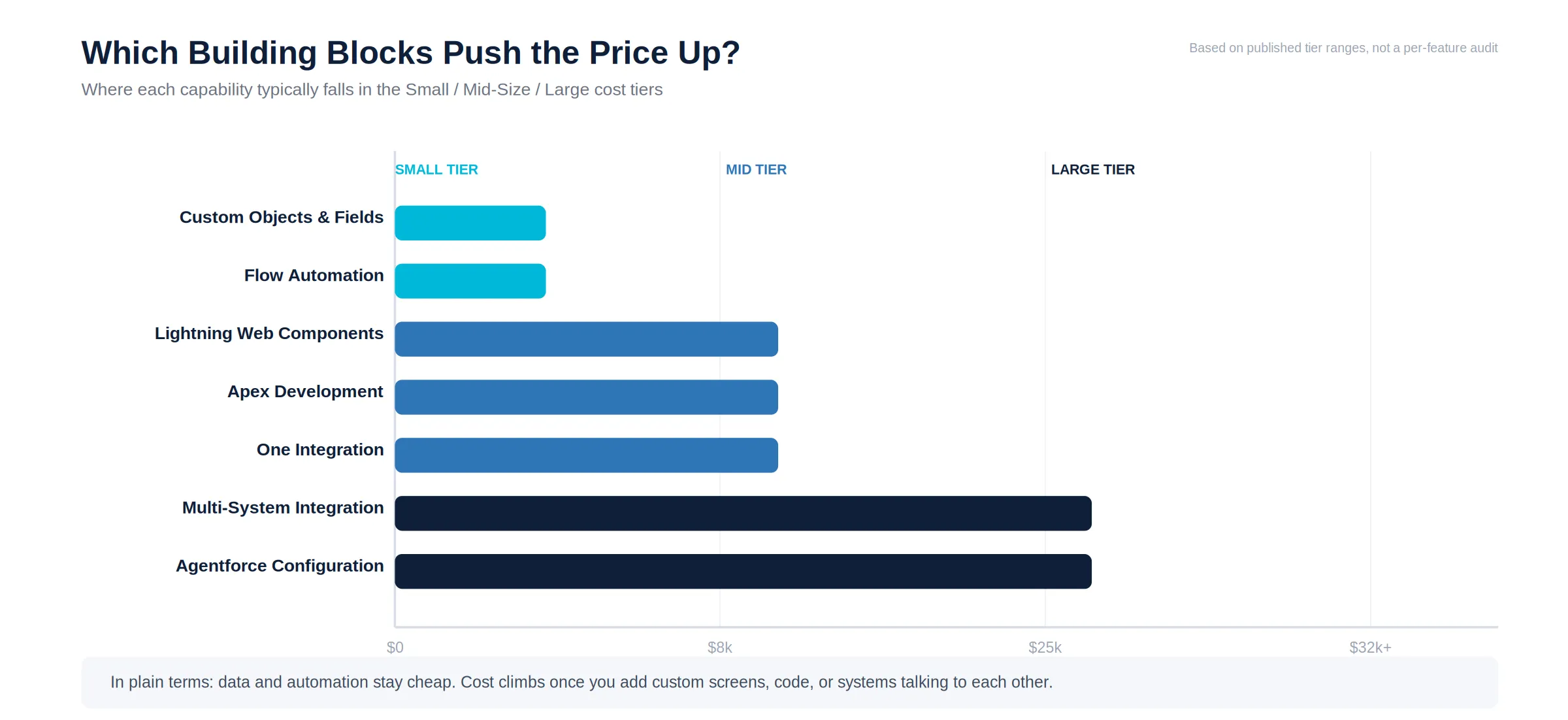
Costs and timelines vary based on scope. As a general guide:
Project Size | What's Involved | Typical Cost | Typical Timeline |
Small | Custom objects, fields, and basic Flow automation | $3,000 to $8,000 | 1 to 3 weeks |
Mid-size | Apex development, LWC builds | $8,000 to $25,000 | 4 to 8 weeks |
Large | Multi-system integration, Agentforce configuration, data architecture overhaul | $25,000 and up | 3 to 5 months |
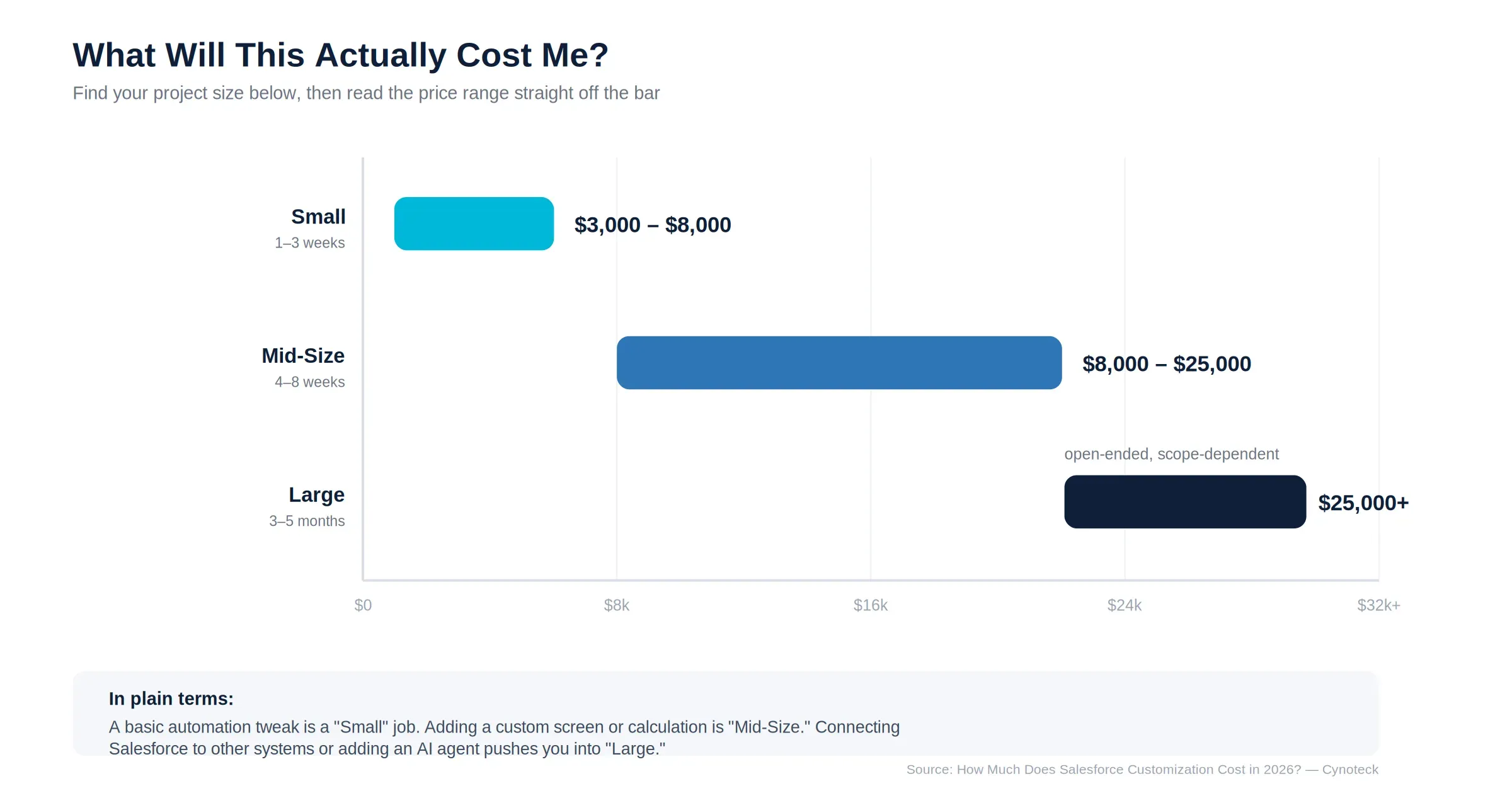
Note: These figures are starting benchmarks, not fixed quotes. Every project depends on your specific requirements. For a full breakdown of what drives cost up or down, see our dedicated guide: How Much Does Salesforce Customization Cost in 2026?
Get a tailored estimate based on your goals, complexity, integrations, and business requirements before development begins.
Request a Free EstimateA well-run customization project follows a consistent sequence, regardless of size:
Discovery and business analysis: Understanding your current setup and workflows before touching anything.
Requirements documentation: Writing every rule, field, and integration down in plain language, signed off before development starts.
Solution design: Mapping the technical architecture, including data models and security.
Development in short cycles: Building in two-week sprints so you see progress regularly, not once at the end.
Quality assurance and security review: Functional testing, governor limit checks, and a formal security review.
User acceptance testing: Your team tests the system with real scenarios before go-live is confirmed.
Deployment and handover: Full documentation and training, with post-launch support available.
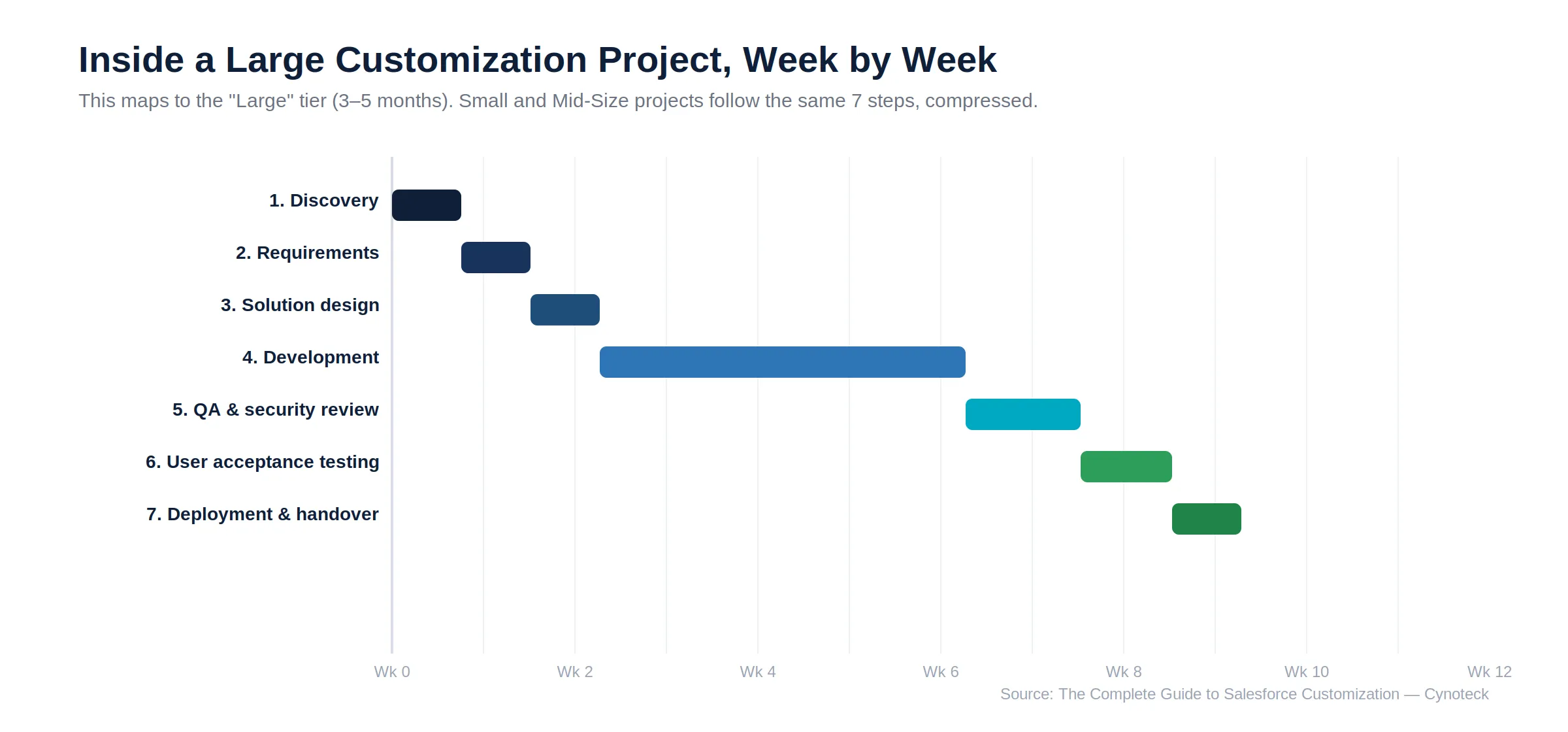
Skipping any of these steps is usually where post-launch problems come from. You can see this full process, along with our track record, on our Salesforce customization services page.
Every customization should live in a proper deployment pipeline, not get built directly in production. Tools like Salesforce DX (SFDX), Change Sets, Gearset, and Copado track every change, so a bad deployment can be rolled back cleanly instead of leaving your org in an unknown state.
Sandbox choice matters just as much. Salesforce offers four sandbox types, each suited to a different stage of testing:
Developer for individual code work on a single feature
Developer Pro for larger data volumes during active development
Partial Copy for testing against a representative slice of production data
Full Copy for an exact production replica, used before major releases
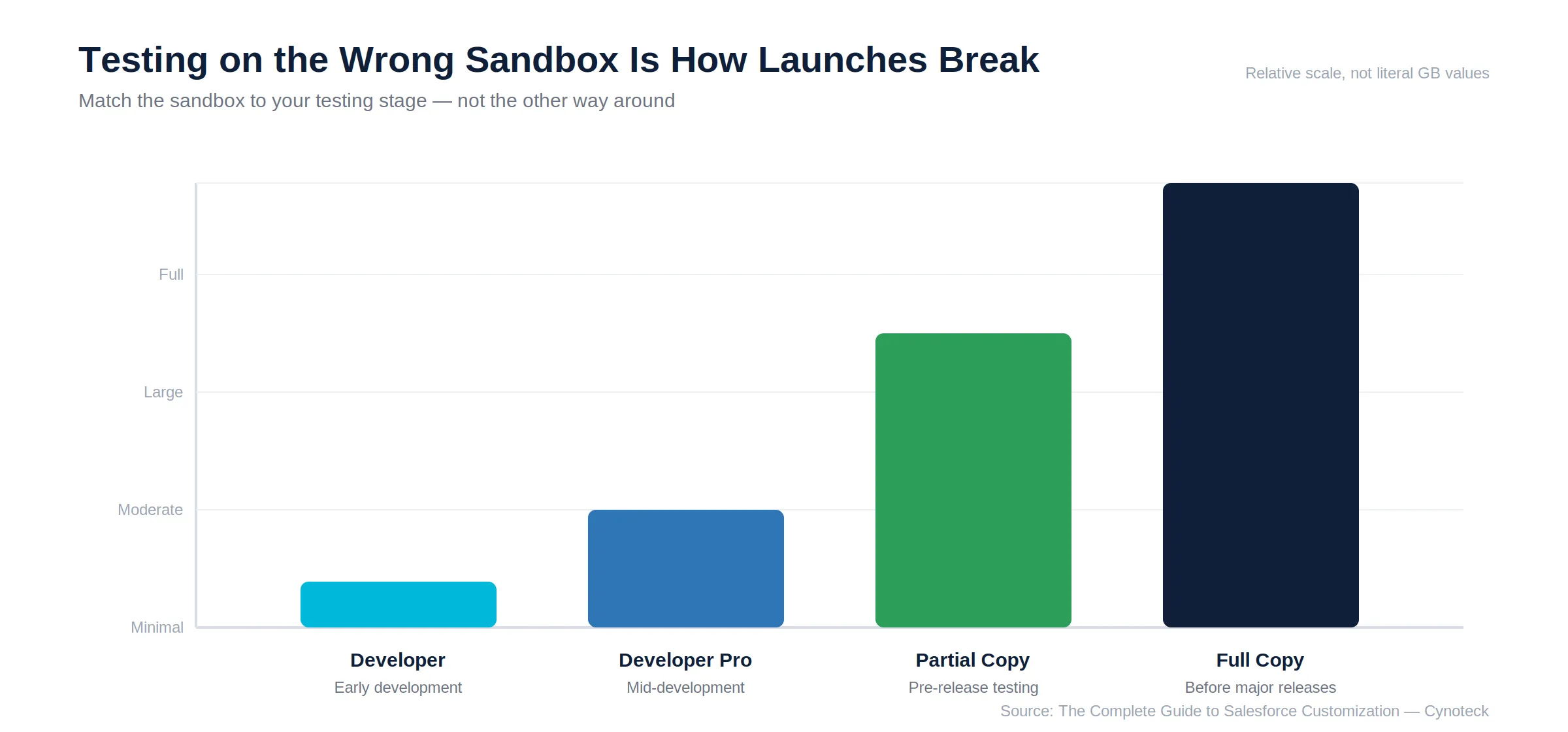
Note: Choosing the wrong sandbox type is one of the most common reasons a customization works fine in testing but breaks on the day it goes live. Your deployment plan should match the sandbox to the actual testing your project needs, decided before development starts, not after. |
This guide describes exactly the kind of work Cynoteck has spent 16+ years doing. We turn a standard Salesforce org into one built around how a specific business operates, not the other way around. As a certified Salesforce Select Partner, our team has handled every category covered above, from a single custom object to a full Agentforce deployment. We have done this for businesses ranging from 10-person startups to 2,000-person enterprises.
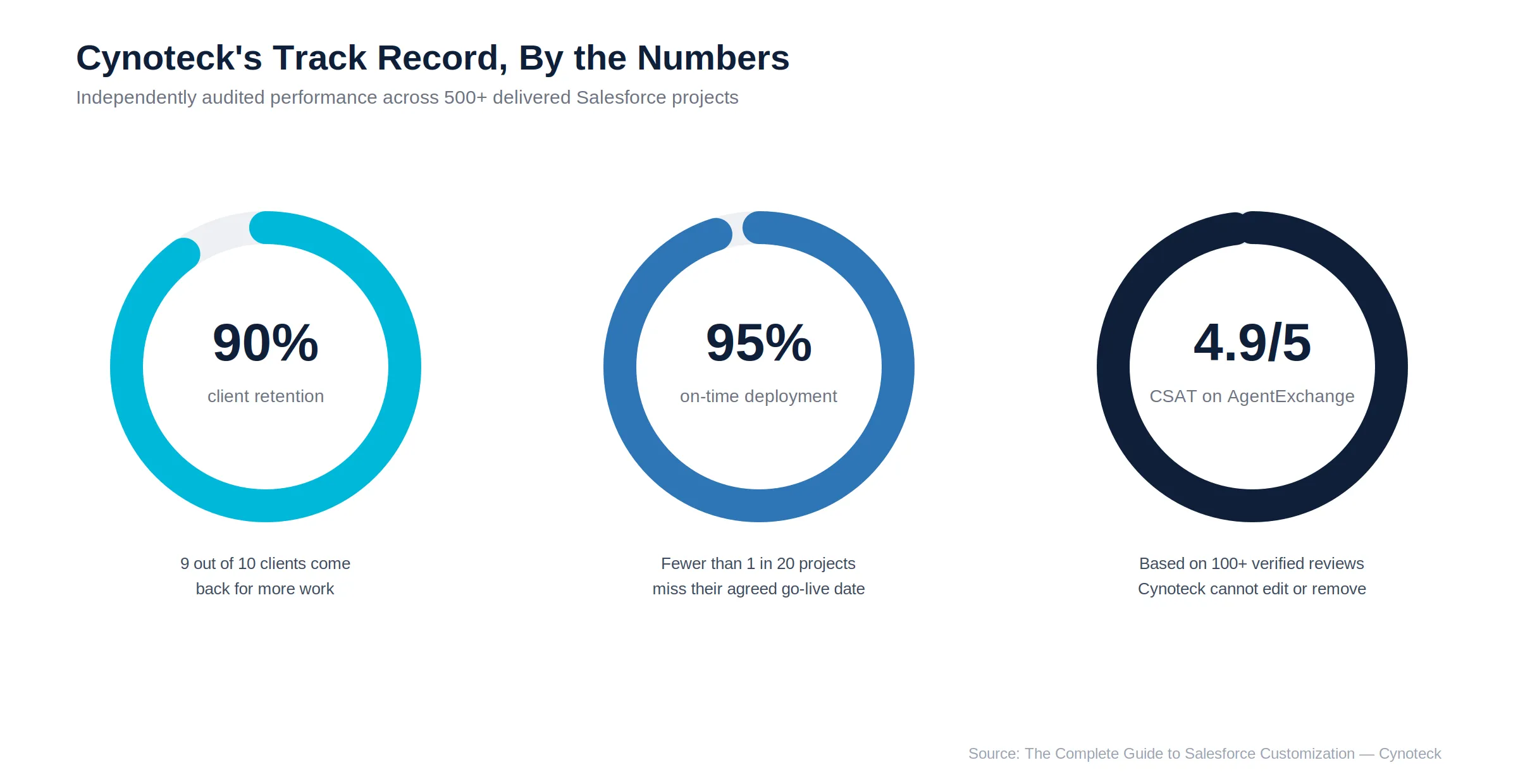
What sets a customization project up to succeed is having the right specialist for each piece, not one generalist covering everything. Our bench of 30+ certified experts includes Platform Developers, Integration Architects, and LWC Specialists. We have applied that structure across 500+ delivered projects. Most of our clients stay well past their first project. This shows up in our 90% retention rate and our 4.9 CSAT score on AgentExchange, independently audited by Salesforce.
500+ Salesforce customization projects delivered across custom objects, Apex, LWC, Flow, and Agentforce
30+ certified experts, including Platform Developers, Integration Architects, and LWC Specialists
90% client retention rate, with most clients returning for further work after go-live
95% on-time deployment rate, so your project timeline holds up in practice
4.9 CSAT on AgentExchange, independently audited by Salesforce
Work with certified Salesforce specialists to create scalable custom solutions that support your workflows, users, and long-term growth.
Schedule a Free ConsultationSalesforce customization is not something every business needs on day one. However, once your team is working around the system instead of inside it, the cost of waiting usually grows faster than the cost of fixing it. Start with a short discovery conversation. It costs nothing, and it tells you exactly which of the paths above applies to your business.
Book a Free Salesforce Consultation now or explore our full Salesforce Customization Services.
Ans: Configuration uses Salesforce's built-in tools to adjust settings without code. Customization uses code, such as Apex and Lightning Web Components, to build features the platform does not offer by default. An admin maintains the configuration. Customization needs a certified developer.
Ans: No. Many businesses solve their problems entirely with Flow and configuration. A developer is needed only when the requirements go beyond what no-code tools can handle, such as complex calculations or custom integrations.
Ans: Small projects start around $3,000. Mid-size projects involving Apex and Lightning Web Components typically run $8,000 to $25,000. Larger projects with integrations and Agentforce configuration can exceed $25,000, depending on scope.
Ans: Yes. Most customization projects involve extending or correcting work an existing vendor or internal team has already built. A short health check usually reveals what exists, what works, and what needs rebuilding.
Ans: Yes. Configuring AI agents to handle specific tasks, such as lead follow-up or case resolution, is now a standard part of customization projects.
 Outsource Salesforce Development or Build In-House Which is the Best for Your Business.webp)
Outsourcing Salesforce development vs. building an in-house Salesforce team: 2026 cost insights, salary comparisons, key benefits, challenges, and the best hiring model for your business growth.
We are more than just developers and consultants—we are your partners in navigating the digital landscape. Let us be the engine behind your next big success while you focus on your core vision.
Explore Opportunities!