What is Salesforce Sales Cloud? Features, Benefits, Pricing, Use Cases & How It Works
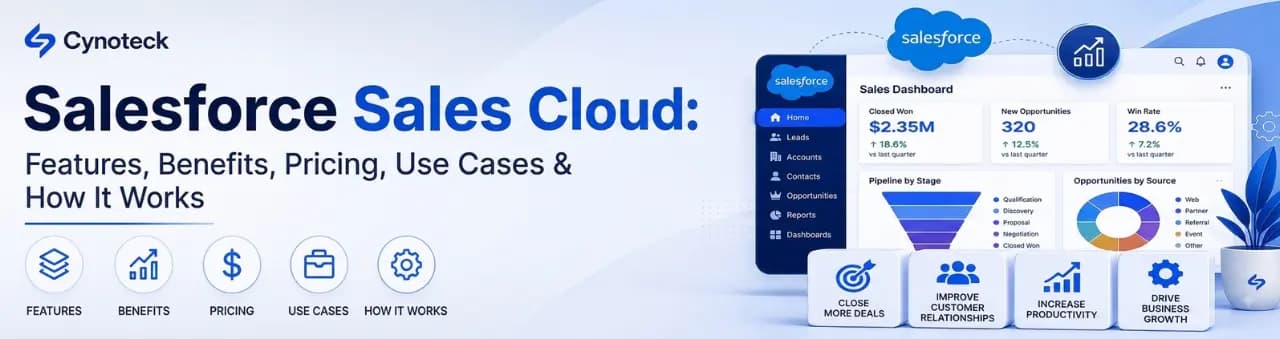
Salesforce Sales Cloud is a cloud-based CRM platform that helps sales teams manage leads, track opportunities, forecast revenue, and automate the sales process from first contact to closed deal. In one sentence: it replaces scattered spreadsheets and disconnected tools with one shared system that sales reps, managers, and leadership can all rely on.
One thing to know upfront: Salesforce has rebranded Sales Cloud as Agentforce Sales since 2025, reflecting a shift toward AI agents built directly into the platform. Most people still search for it as "Sales Cloud," and Salesforce still uses both names depending on the page, so this guide uses "Sales Cloud" throughout while clearly explaining the Agentforce naming where it matters.
This guide explains what Salesforce Sales Cloud is, how it works, its core features and benefits, what it costs in 2026, how it compares with other CRMs, and how the platform is evolving under Salesforce's Agentforce AI strategy.
Salesforce Sales Cloud is a customer relationship management (CRM) system built specifically for sales teams. It stores every account, contact, lead, and deal in one place, and gives reps and managers a shared, real-time view of what is happening across the pipeline.
Yes. It is Salesforce's flagship sales product and one of the two original products, alongside Service Cloud, that the entire Salesforce platform was built around.
The broader Salesforce platform includes many other clouds for service, marketing, commerce, and more. Sales Cloud specifically handles the sales side of the business; the other clouds handle everything else.
Four groups, each for a different reason: sales representatives managing daily activity, sales managers who need pipeline visibility, sales operations teams who configure and maintain the system, and revenue leaders who need accurate forecasting across the whole organization.
Sales Cloud is built around a simple business workflow: Lead → Qualification → Account/Contact → Opportunity → Activities → Pipeline → Forecast → Closed Deal → Reporting.
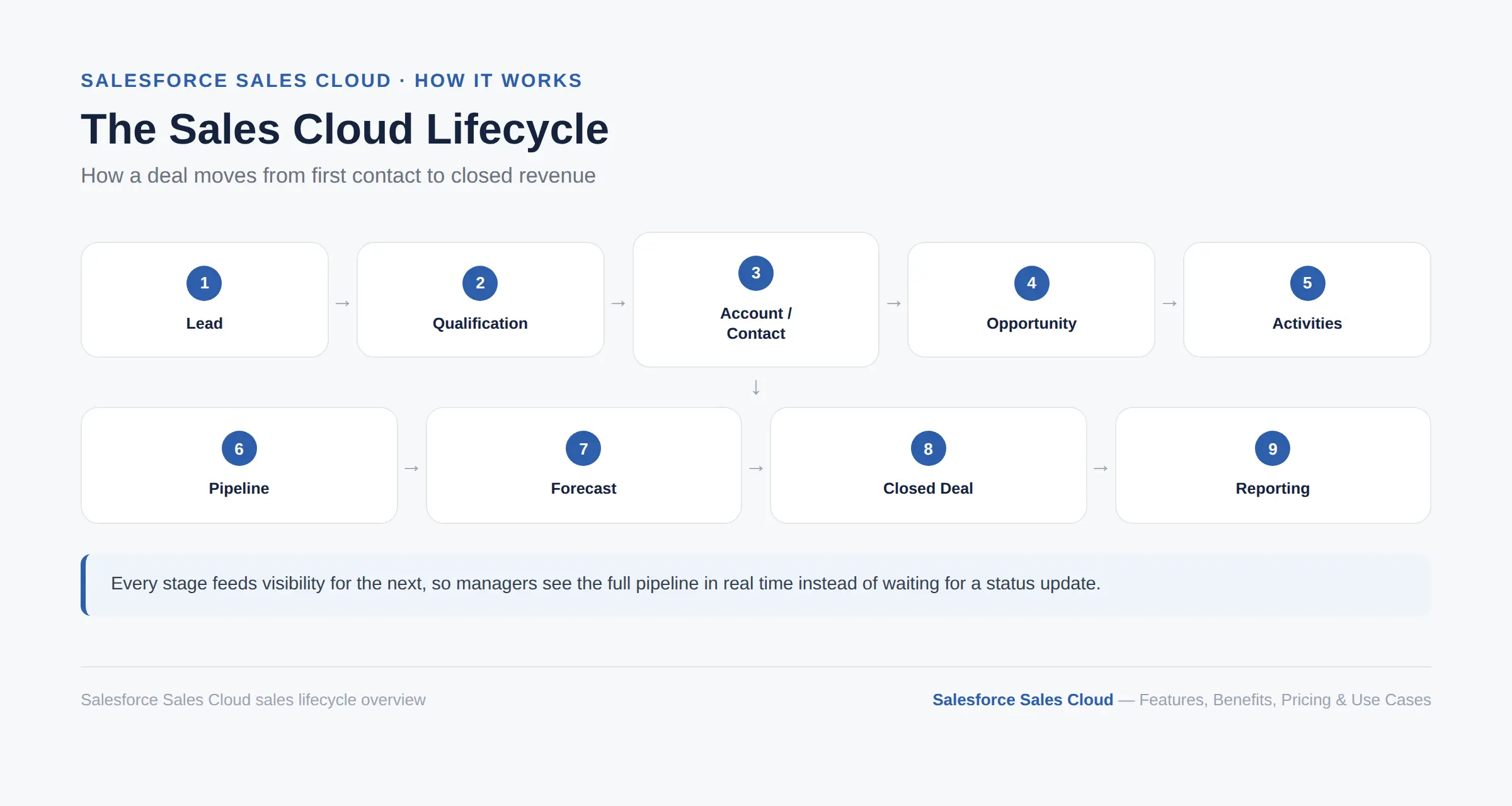
A lead comes in, whether from a website form, a trade show, or outbound prospecting. The system captures it, and either a rep or an AI-assisted qualification process determines if it is worth pursuing. Qualified leads get converted into an account, a contact, and an opportunity, which is Salesforce's term for an active deal in progress.
From there, the rep logs calls, emails, and meetings as activities tied to that opportunity, updating its stage as the deal moves forward. Managers watch this activity roll up into pipeline and forecast views, giving them a live read on what revenue is likely to close. Once a deal is won or lost, it flows into reporting, where the whole cycle becomes data for the next quarter's planning.
Sales Cloud's feature set covers everything a sales team touches day to day. Rather than a flat list, it helps to see them grouped the way Salesforce itself organizes them: three pillars covering Efficiency (the core tools reps use to run their day), Intelligence (analytics and AI that guide decisions), and Automation (rules and workflows that remove manual work).
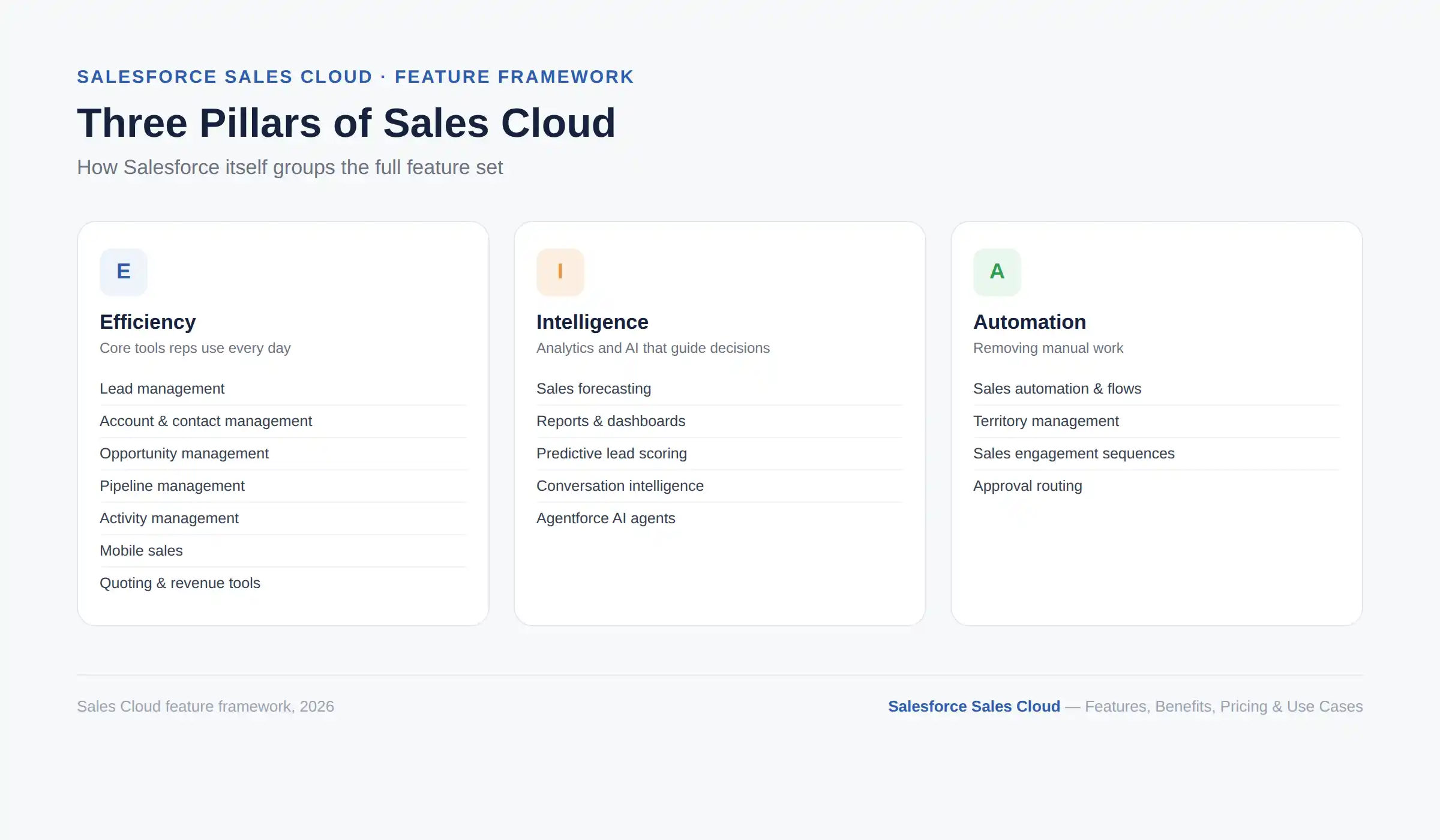
These are the tools a rep touches during a normal working day:
Lead management: Captures leads from web forms, campaigns, and manual entry, then automatically routes and scores them. This solves the problem of leads sitting untouched in an inbox, so a lead from a high-value account reaches the right rep within minutes instead of days.
Account management: Gives every company you sell to a single record showing its full history, contacts, and open deals. A rep walking into a renewal conversation sees the entire relationship instead of piecing it together from old emails.
Contact management: Tracks individual people at each account separately from the account itself, with their own communication history and role. This matters most in complex B2B deals where five or six stakeholders are involved in one purchase decision.
Opportunity management: Tracks every active deal by stage, value, close date, and probability. A sales manager reviewing the pipeline can immediately see which deals are moving and which have stalled.
Sales pipeline management: Groups all opportunities by stage, so a team can see its entire book of business at a glance. This turns a vague sense of "things feel busy" into an actual number of dollars at each stage.
Activity management: Logs calls, emails, meetings, and tasks against the right record automatically in most setups. This removes the manual work of remembering what was discussed and when.
Mobile sales: Gives field reps full access to accounts, opportunities, and activity logging from a phone or tablet through the Salesforce mobile app. This matters most for field sales teams that spend more time on the road than at a desk, and if your team needs something beyond the standard app, these signs point to when a custom CRM mobile app is worth building.
Quoting and revenue capabilities: Generates quotes, tracks contracts, and manages products and price books directly. More advanced pricing and billing needs are typically handled by Salesforce's dedicated Revenue Cloud, covered further down.
These capabilities turn raw CRM data into decisions:
Sales forecasting: Rolls up individual opportunities into team and company-level projections, refined by AI-driven predictive scoring. A VP of Sales can see whether the quarter is on track weeks before it closes, not after.
Reports and dashboards: Turns raw CRM data into visual dashboards without needing a separate analytics tool. A sales manager can build a dashboard showing win rate by rep in minutes, then check it every Monday.
AI-powered sales capabilities: Predictive lead and opportunity scoring, conversation intelligence, and increasingly autonomous Agentforce agents now sit on top of the core CRM, covered in detail in the Agentforce section below.
These features take tasks off a rep's plate entirely:
Sales automation: Rules and flows handle repetitive tasks like lead assignment, follow-up reminders, and approval routing. Reps spend less time on admin and more time actually talking to prospects.
Territory management: Larger sales organizations can split accounts and opportunities by region, industry, or account size, then automatically assign the right reps. This avoids the common problem of two reps unknowingly chasing the same account.
Sales engagement: Sequences guide reps through a structured series of calls, emails, and touchpoints for a given lead type. New reps ramp up faster because the tool already builds in the "what do I do next" decision.
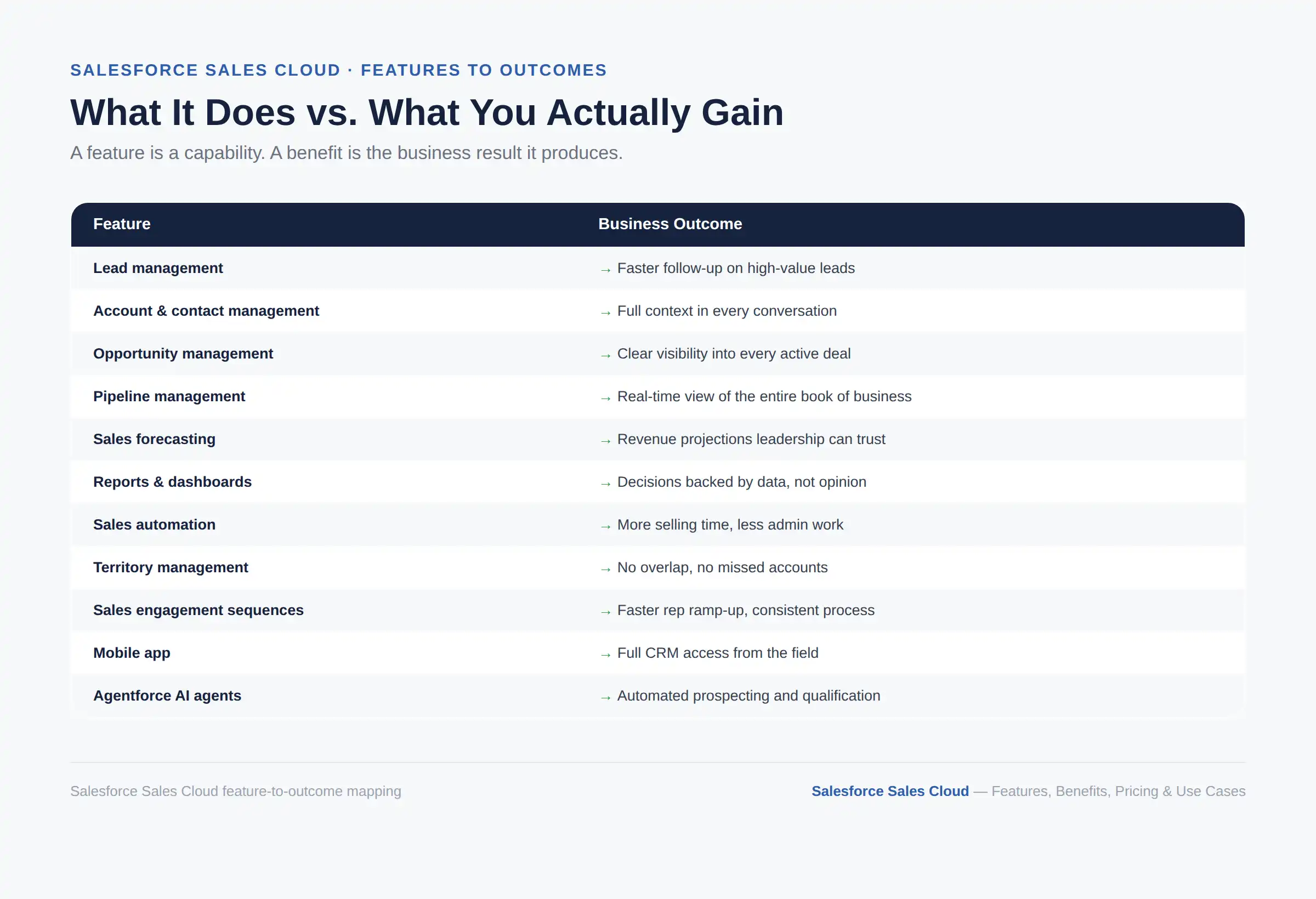
A feature is what Sales Cloud does. A benefit is what your business actually gets from it. Here is that translation.
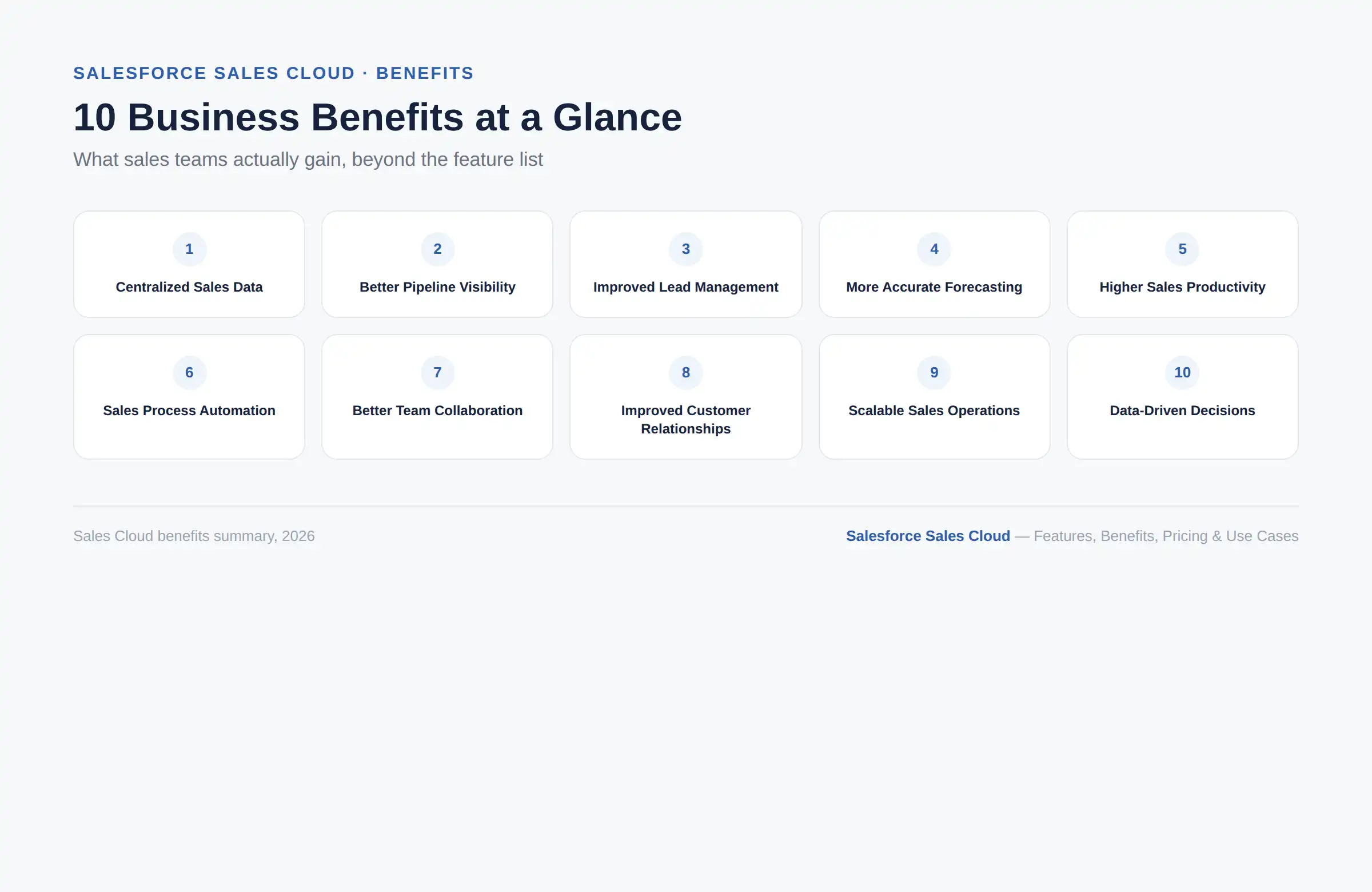
Every deal, contact, and account lives in one system instead of five different spreadsheets. This alone eliminates most of the "which version is correct" confusion that plagues sales teams without a CRM.
Real-time pipeline views mean managers do not have to wait for a Friday status email to know where things stand. Teams can review and course-correct deals while there is still time to save them.
Automated routing and scoring mean high-value leads get worked first, not whichever lead happened to land on top of the pile. Faster follow-up on hot leads directly improves conversion rates.
Combining live pipeline data with predictive AI gives sales leaders a forecast grounded in actual deal activity, not gut feeling. It will not guarantee accuracy, but it meaningfully improves the inputs leaders are working from.
Automation of routine tasks like data entry and follow-up reminders frees up real selling time. That time adds up fast across a team of even a dozen reps.
Flows and rules enforce a consistent process across the whole team, rather than leaving each rep to run their own version of "how we sell here." New hires ramp up faster because the process is built into the system itself.
Shared records mean a sales manager, an account executive, and a sales engineer working the same deal can all see the same information. Nobody is working from an outdated version of the story.
A complete history of every interaction means a rep can pick up a conversation with full context, even months later. Customers notice when they don't have to repeat themselves.
The same core structure that works for a 10-person sales team can be extended to support hundreds of reps across multiple regions. This means the CRM does not need to be replaced as the business grows, only reconfigured.
Dashboards and forecasting reports mean decisions get backed by numbers, not opinions. That shift changes how a sales leader defends a hiring plan or a territory change to leadership.
Improve pipeline visibility, automate repetitive sales work, and strengthen forecasting with Salesforce Sales Cloud configured around your team's actual sales process.
Talk to a Salesforce ExpertSales Cloud fits a wide range of sales motions, not just one type of business. Here is where it tends to deliver the clearest value, organized by scenario.
Multi-stakeholder deals with long consideration cycles benefit from account and contact management that tracks every person involved in the decision. This keeps a deal moving even when the primary champion changes roles mid-cycle.
Large organizations use territory management, advanced forecasting, and custom automation to run complex sales motions across thousands of accounts. The platform's scalability is one of its strongest selling points here.
High-call-volume teams rely on sequences, activity logging, and lead scoring to work through large lead lists efficiently. A rep can move through dozens of calls a day without losing track of where each prospect stands.
Reps who spend most of their time visiting customers in person depend on the mobile app to update records and prepare for meetings on the go. Nothing has to wait until they are back at a desk.
Teams targeting a defined list of high-value accounts use account management and custom scoring to coordinate outreach across multiple contacts at each target company. This keeps everyone aligned on who has been contacted and when.
Deals involving custom quotes, multiple approval stages, or long negotiation periods benefit from opportunity stages and automation that reflect the real process, not a generic template. Nothing falls through the cracks between a proposal and a signature.
Businesses processing large numbers of smaller transactional deals lean on automation and sales engagement sequences to keep throughput high without adding headcount. Volume becomes manageable instead of overwhelming.
Any organization that needs to report revenue projections to leadership or investors benefits from Sales Cloud's forecasting rollups and predictive scoring. It replaces guesswork with a number backed by actual pipeline data.
Teams drowning in repetitive manual tasks use flows and rules to automate lead routing, follow-up reminders, and approval chains. This is often the single highest-ROI reason a business adopts Sales Cloud in the first place.
Businesses selling through resellers or partners use Sales Cloud to track partner-sourced deals separately while keeping visibility into the full pipeline. Leadership still sees one unified view of total revenue regardless of the channel.
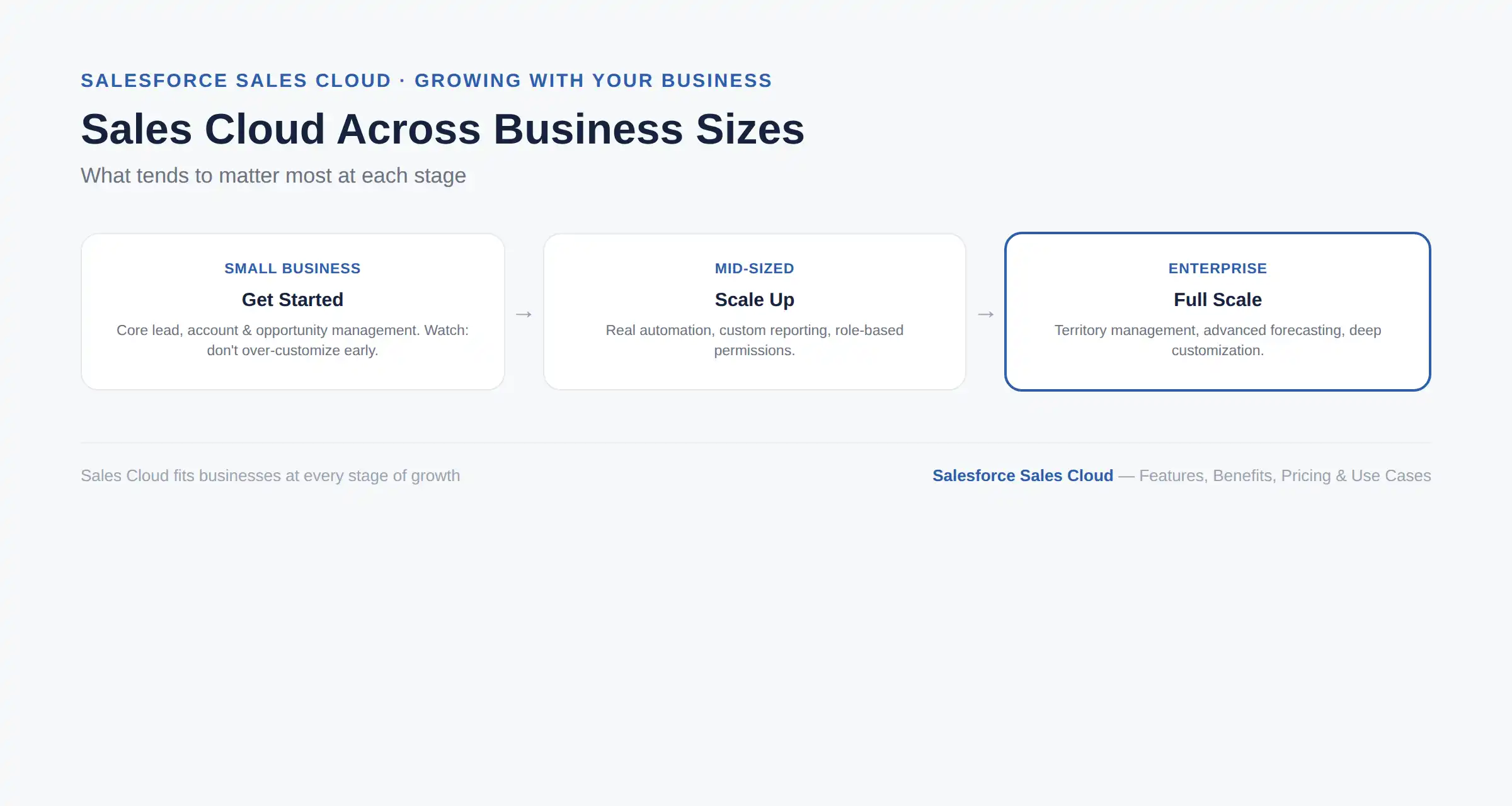
Sales Cloud is built to scale, but what it takes to get value from it looks different depending on how big your team is. Here is what tends to matter most at each stage.
Small businesses can start with a lower-cost edition covering core lead, account, and opportunity management. The main risk at this size is over-customizing a simple sales process before it needs it.
Mid-sized businesses typically outgrow basic CRM within a couple of years and start needing real automation, custom reporting, and role-based permissions. This is usually when a business moves up to a higher edition or brings in outside help to configure things properly.
Enterprises need the full range of territory management, advanced forecasting, and deep customization that only the higher editions unlock. At this scale, the CRM has to support hundreds or thousands of users without becoming unmanageable.
If your sales process regularly outgrows what your current edition supports, if reps are working around missing features with manual spreadsheets, or if reporting takes hours of manual work instead of a live dashboard, that is a sign it is time to move up an edition or bring in expert configuration help.
Salesforce sells several distinct clouds, and it helps to know where Sales Cloud ends and each one begins.
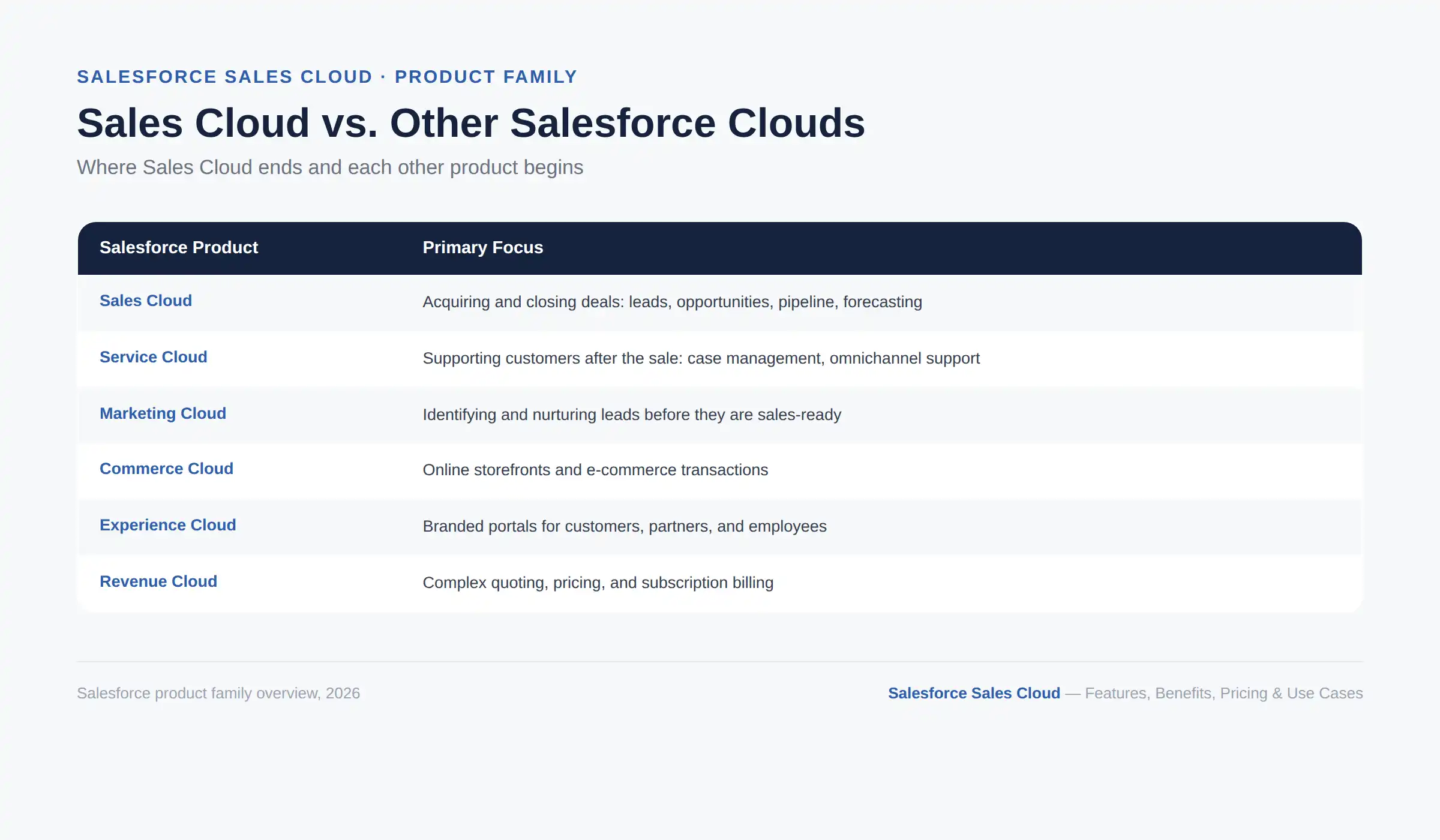
Sales Cloud is built to acquire and close deals. Service Cloud supports customers after the sale with case management and omnichannel support tools. Many businesses run both because they share core platform features and can share customer data seamlessly.
Marketing Cloud identifies and nurtures leads before they are sales-ready. Sales Cloud takes over once a lead is qualified, managing the deal through to close. They work best together, not as a choice between one or the other.
Commerce Cloud powers online storefronts and e-commerce transactions, while Sales Cloud manages relationship-driven, often higher-touch B2B selling. A business running both digital storefronts and a direct sales team frequently uses each for its respective channel.
Experience Cloud builds branded portals for customers, partners, or employees to interact with your business directly. Sales Cloud remains the internal system reps and managers use, while Experience Cloud extends parts of that data to external users.
Revenue Cloud (which includes what was formerly CPQ and Billing) handles complex quoting, pricing, and subscription billing. Sales Cloud manages the deal itself, while Revenue Cloud takes over for businesses with complicated pricing models or recurring billing needs.
Sales Cloud is not the only enterprise CRM on the market, and it is not always the right fit. Here is how it stacks up against the four platforms it gets compared to most often.
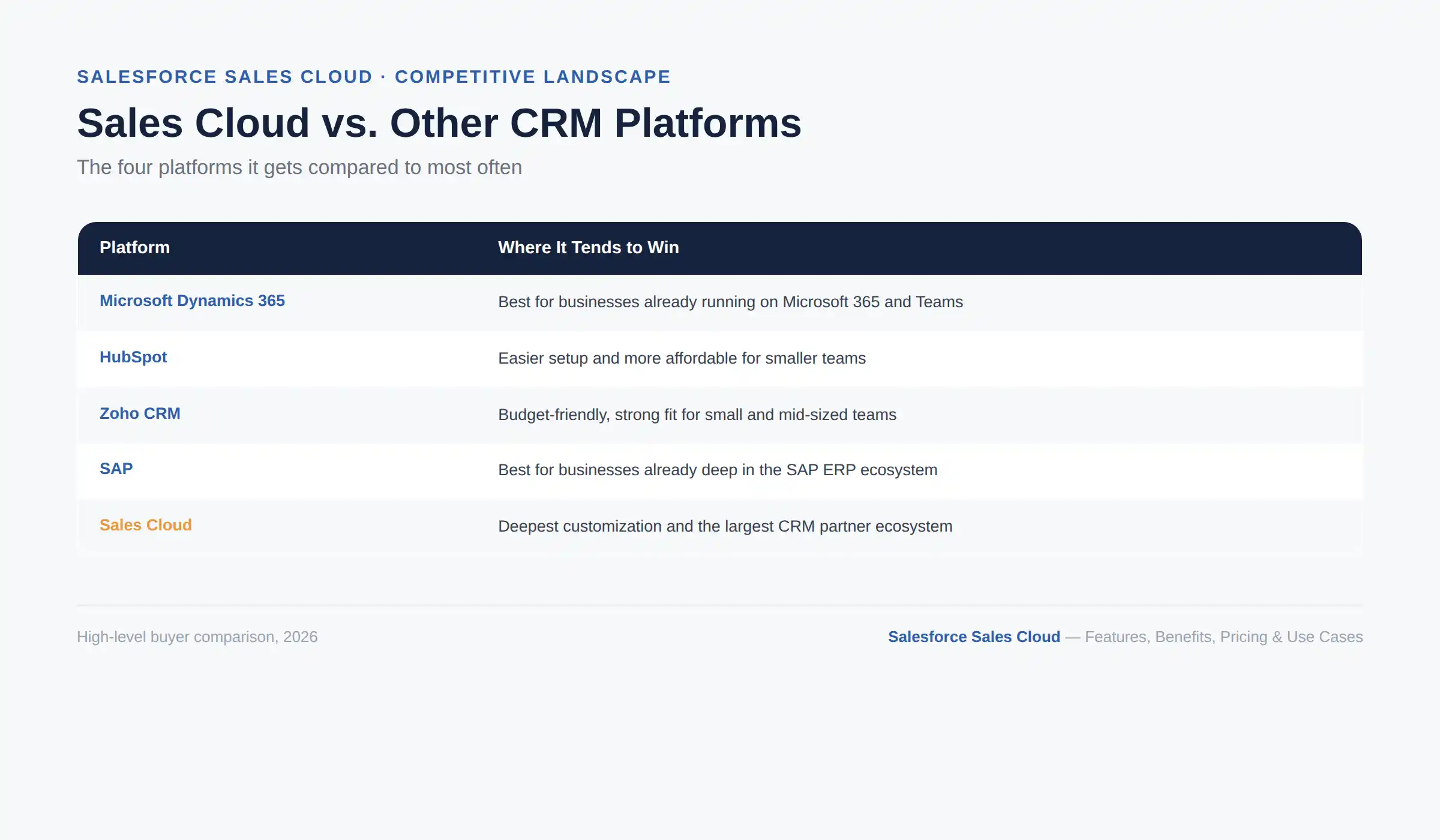
Both are enterprise-grade CRMs with strong AI investment, but Dynamics 365 has a natural advantage for businesses already running on Microsoft 365 and Teams, while Sales Cloud has a larger third-party app ecosystem through AgentExchange. For a full side-by-side breakdown, see this Salesforce vs Dynamics 365 CRM comparison.
HubSpot is generally easier to set up and more affordable for smaller teams, while Sales Cloud offers deeper customization and scales further for complex enterprise sales processes.
Zoho is one of the more budget-friendly options on the market and works well for small and mid-sized teams, while Sales Cloud's strength shows up more clearly once a business needs heavy customization or a large partner ecosystem.
SAP's CRM tools tend to fit businesses already deep in the SAP ERP ecosystem, while Sales Cloud is usually the stronger standalone choice for sales-first organizations not already committed to SAP.
For a broader look at how ten major CRM platforms stack up on price and features, see this comparison of cloud-based CRM platforms.
Salesforce prices Sales Cloud per user, per month, across five editions that step up in features and cost as your needs grow. Here is what each one includes and what to budget beyond the license fee itself.
Pricing verified against Salesforce's official Sales pricing page in August 2026. Salesforce updates editions and pricing periodically, so confirm current figures before budgeting.
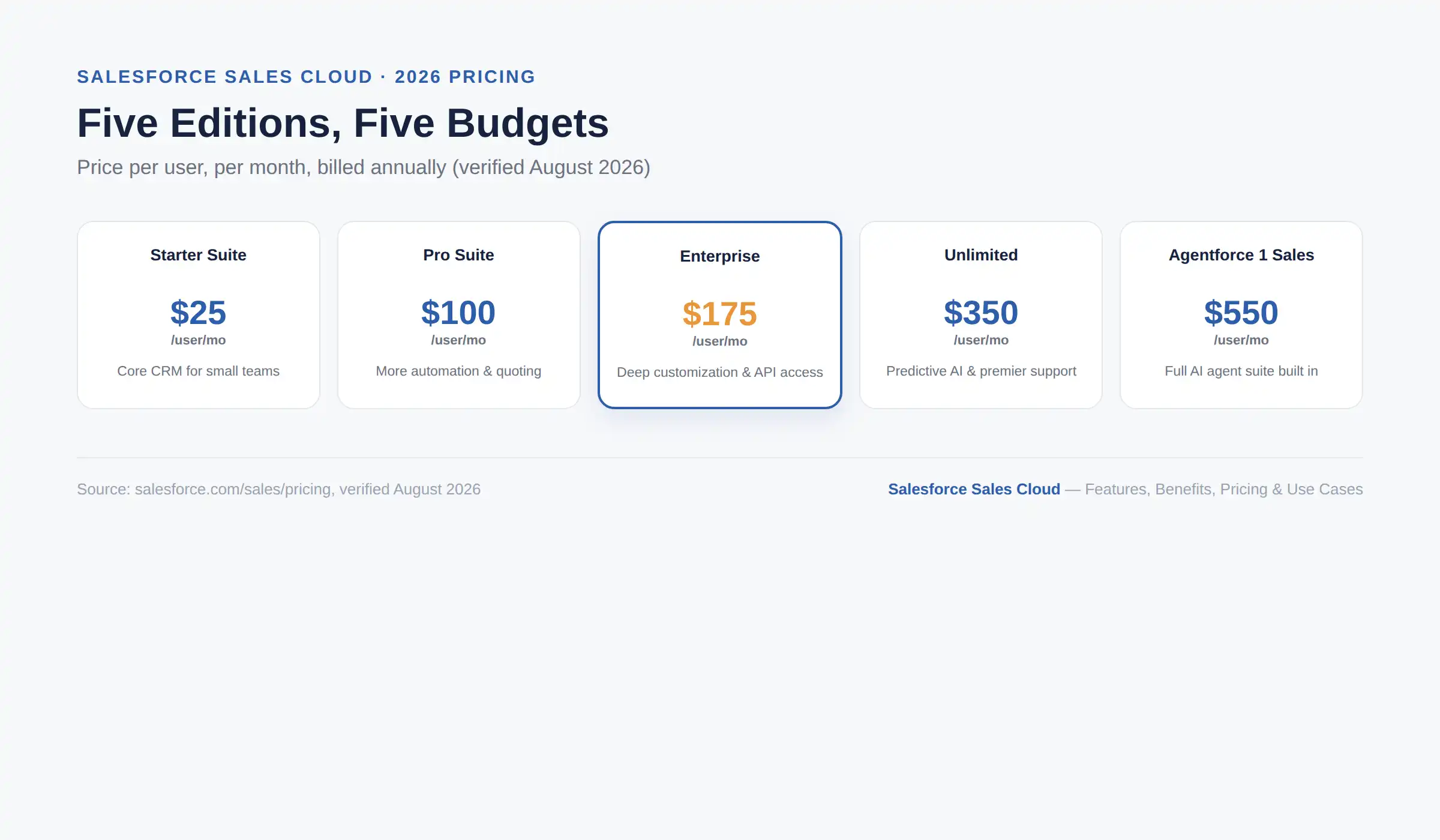
Salesforce licenses Sales Cloud per user, per month, across five editions:
Edition | Price per user/month | Best for |
|---|---|---|
Starter Suite | $25 | Small teams needing core CRM |
Pro Suite | $100 | Growing teams needing automation and quoting |
Enterprise | $175 | Mid-market teams needing deep customization and API access |
Unlimited | $350 | Larger teams needing predictive AI and premier support |
Agentforce 1 Sales | $550 | Businesses wanting the full AI agent suite built in |
The license fee is only one part of the total cost. Implementation, customization, integrations with other business systems, data migration from a previous CRM, training, and ongoing support are all separate line items that vary significantly based on project scope. Budget ranges for these services can move from a few thousand dollars for a simple setup to well into six figures for a complex, multi-cloud enterprise rollout.
Rather than presenting an average implementation cost that will not apply to most readers, it is worth getting a scoped quote based on your specific requirements. Salesforce also periodically restructures its editions and AI-related add-ons, so treat any pricing figures, including the table above, as a starting point for a conversation rather than a final number.
AI is no longer a bolt-on feature for Sales Cloud; it is becoming the core of how Salesforce positions the product. Here is what that means in practice and what to watch for.
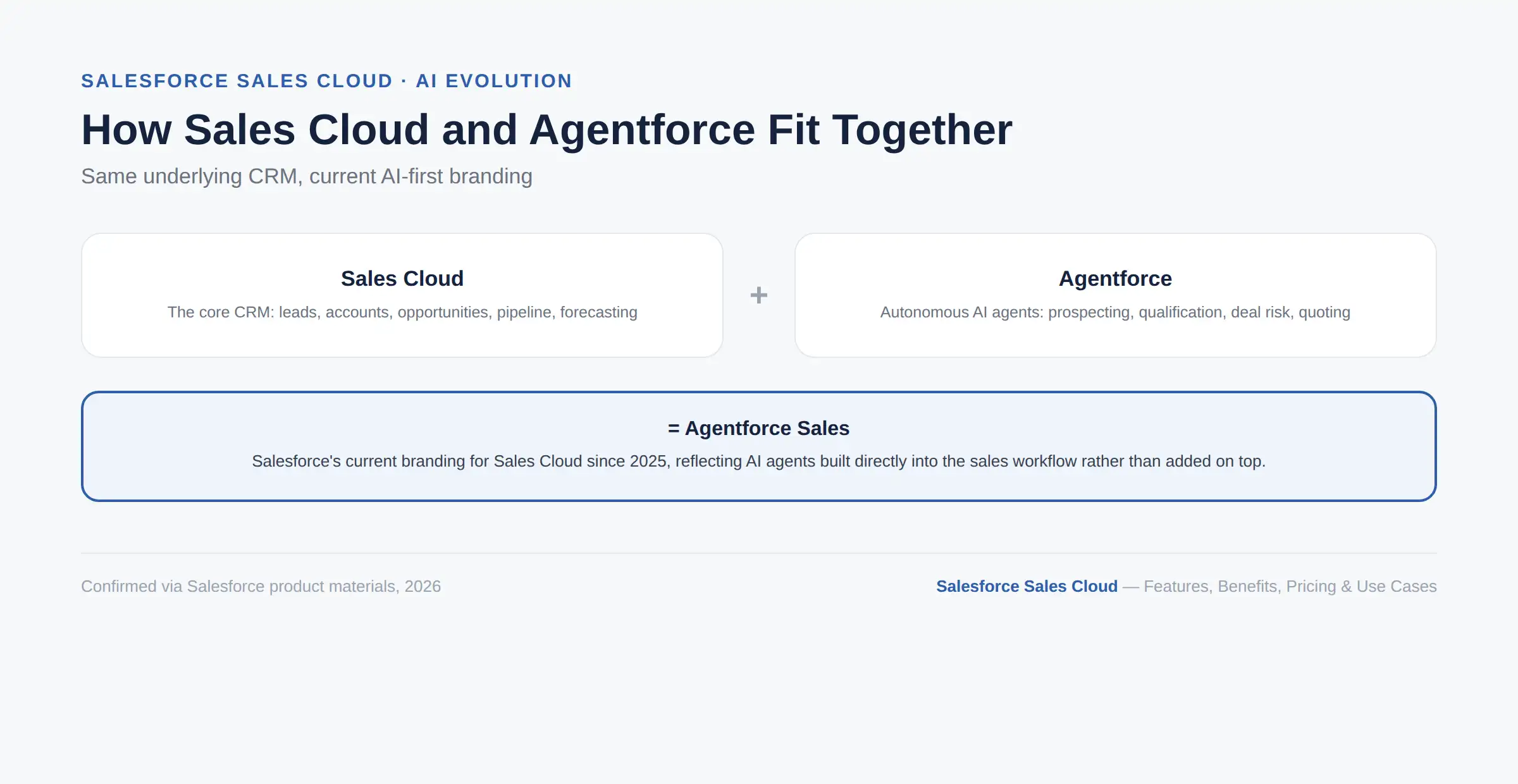
Salesforce has been actively rebranding Sales Cloud as Agentforce Sales since 2025, and the shift reflects more than a name change. The current product direction embeds autonomous AI agents directly into the sales workflow, rather than offering AI as a bolt-on feature.
In practical terms, this means agents that can research prospects, qualify leads against your ideal customer profile, draft outreach, book meetings, flag at-risk deals, and even generate quotes, largely without a rep manually triggering each step. Salesforce's own materials describe this as giving every seller a "digital workforce" working alongside them, handling the repetitive, high-volume parts of prospecting and follow-up.
This does not replace sales reps. The stated goal is to remove the administrative and research grind so reps spend more time on relationship-building and negotiation, the parts of selling that still require a human. A sales manager still owns strategy and coaching; the agents just take a large chunk of manual busywork off the table.
Because Salesforce's AI naming and capabilities have moved quickly through 2025 and 2026, verify current terminology and feature availability before making a purchasing decision. What is marketed as "Sales Cloud" on one page may be labeled "Agentforce Sales" on another, and the underlying capabilities continue to expand with each seasonal release. Even edition names have shifted as part of this transition (Starter Suite, Pro Suite, Enterprise, Unlimited, and Agentforce 1 Sales are current as of this writing), so a source using older names like "Professional Edition" is likely out of date.
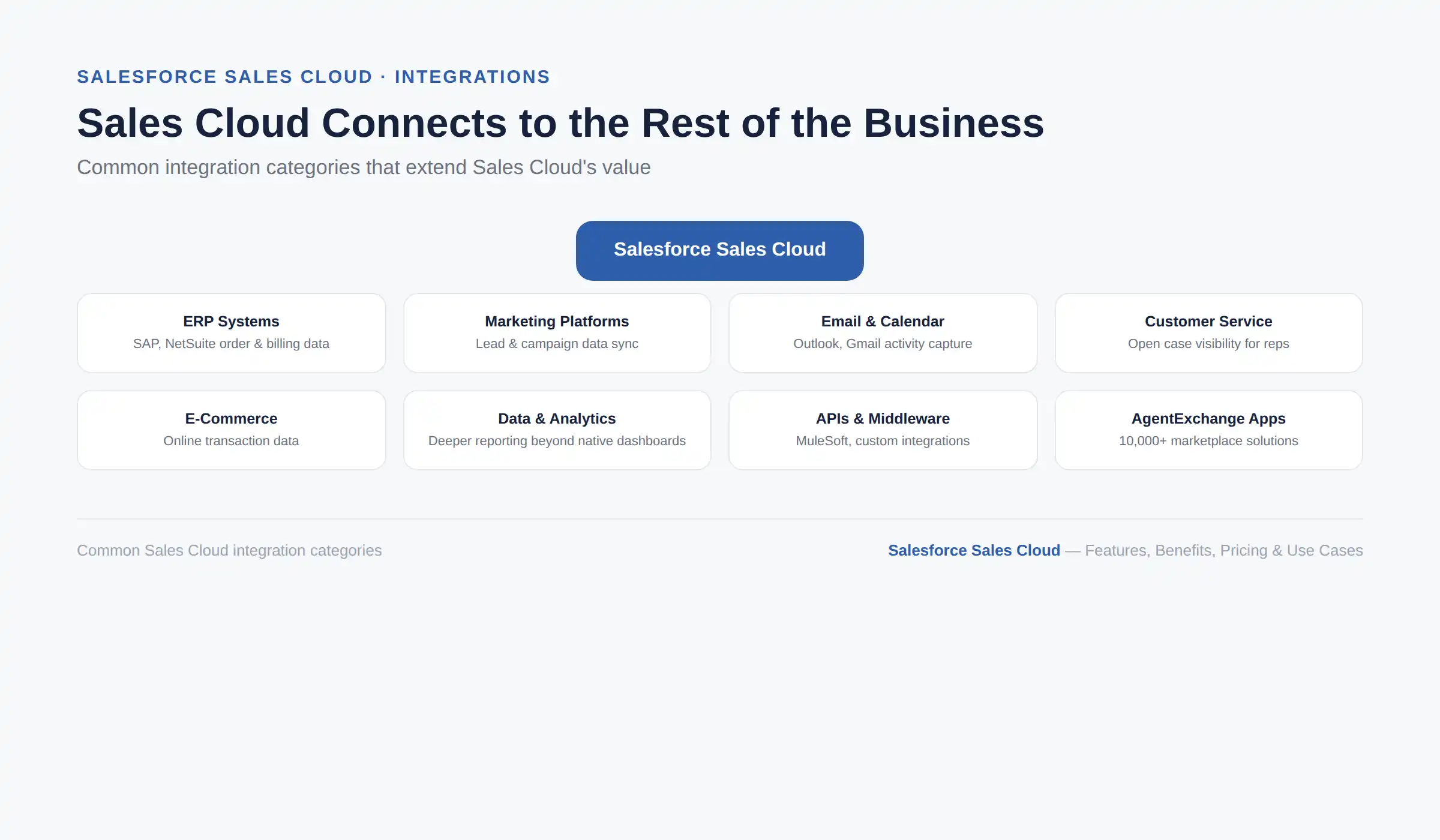
Sales Cloud rarely operates in isolation. Common integration categories include:
ERP systems like SAP or NetSuite, to sync order, inventory, and billing data with the sales side of the business
Marketing platforms, so lead and campaign data flows automatically between marketing and sales
Email and calendar tools like Outlook and Gmail, so activity capture happens without manual logging
Customer service systems, giving sales reps visibility into open support cases for their accounts
E-commerce platforms, connecting online transaction data with the broader customer record
Data and analytics systems, for deeper reporting than native dashboards provide
APIs and middleware such as MuleSoft, for custom or high-volume integration needs
The technical depth of any one of these integrations deserves its own dedicated guide. For now, the key point is that Sales Cloud's value increases substantially once it stops being an island and starts sharing data with the rest of your business systems.
Yes, Sales Cloud can be customized extensively, and it helps to understand the difference between configuration and customization before deciding how far to take it.
Configuration: changes you make using Salesforce's built-in tools without writing code, such as custom fields, page layouts, and automation built through Flow Builder. Most businesses can cover 70 to 80 percent of their needs this way.
Customization: goes further, involving custom objects, Apex code for business logic that configuration cannot handle, and custom-built interface components (Lightning Web Components) for specialized workflows. This is where the broader benefits of a more tailored CRM build become relevant, especially for businesses with a sales process that does not fit a standard template.
Sales process automation, whether through simple workflow rules or more advanced Flow orchestration, is usually where businesses see the fastest return, since it removes manual work reps were doing by hand every day. Custom reports and dashboards follow close behind, once the underlying data is structured well enough to report on.
Generally, once your sales process has stabilized and you can clearly describe what is not working with the standard configuration. Customizing before you understand your own process tends to produce expensive rework later. For deeper development work like custom Apex logic or Lightning components, Cynoteck's Salesforce development services cover this kind of build.
Getting Sales Cloud live is a process, not a single setup step, and skipping stages is where most rollouts run into trouble. Here is what the process typically looks like and how long it takes.
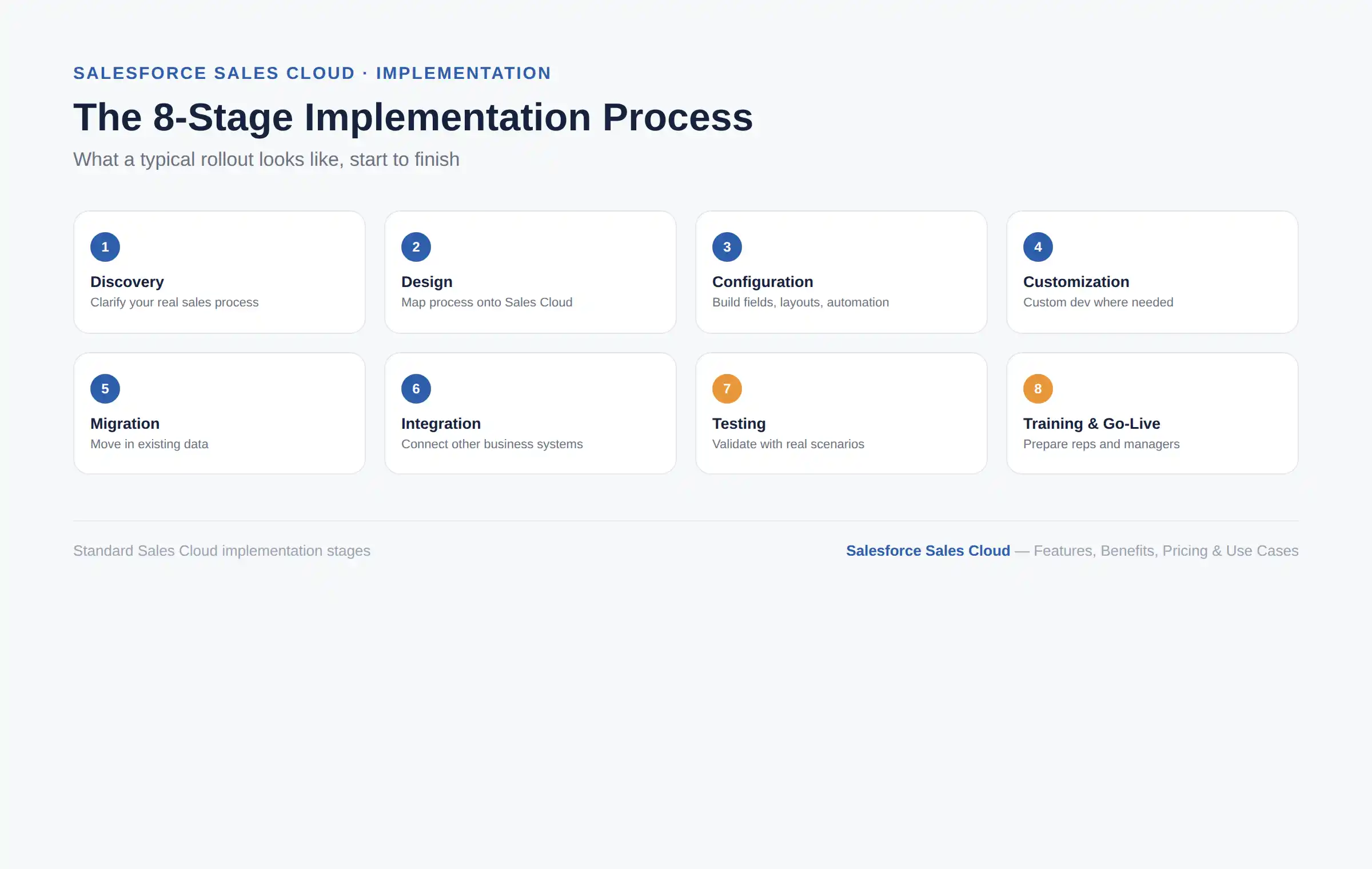
A typical implementation moves through eight stages, in order:
Discovery: clarifying your actual sales process and requirements.
Design: mapping that process onto Sales Cloud's structure.
Configuration: building out fields, layouts, and automation.
Customization: adding custom development where configuration alone cannot cover a requirement.
Migration: moving existing data in from spreadsheets or a legacy CRM.
Integration: connecting other business systems so data flows automatically.
Testing: having your own sales team validate real scenarios before go-live, which is where most critical issues surface.
Training and go-live: preparing reps and managers to actually use the system, which matters more for adoption than almost any other single factor.
How long this takes depends heavily on complexity. A straightforward setup for a small team can be measured in weeks, while a multi-cloud enterprise rollout with heavy customization and several integrations can run several months. Factors that add complexity include data migration from a messy legacy system, the number of integrations required, and how much custom development is involved versus standard configuration.
For a full breakdown of what implementation actually involves, see Cynoteck's Salesforce Sales Cloud consulting and implementation services.
Most Sales Cloud disappointments trace back to a handful of avoidable mistakes made early on. These practices consistently separate the implementations that stick from the ones that quietly get abandoned.
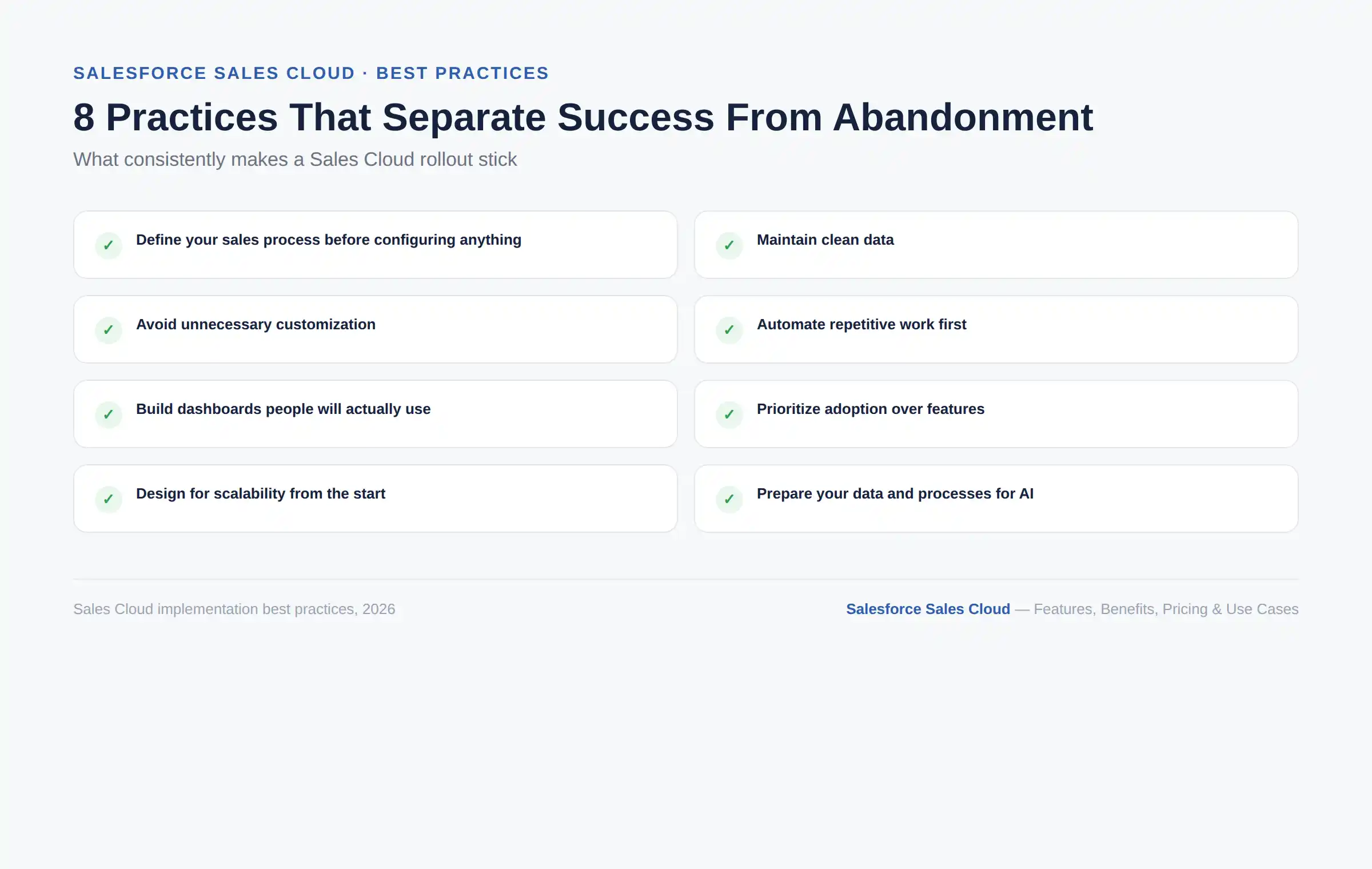
Define your sales process before configuring anything: configuring around an undefined process just encodes the chaos into software.
Maintain clean data: duplicate records and outdated contact information quietly undermine every report built on top of them.
Avoid unnecessary customization: every custom field and workflow is something your team has to maintain and eventually explain to a new admin.
Automate repetitive work first: this is usually where the fastest, most visible return shows up.
Build dashboards people will actually use: a dashboard nobody checks is wasted configuration time.
Prioritize adoption over features: a simple system your team actually uses beats a sophisticated one they avoid.
Design for scalability from the start: structuring data and permissions well early avoids painful rework as the team grows.
Prepare your data and processes for AI: Agentforce and other AI features perform only as well as the data quality behind them.
Avoid unnecessary customization, poor data structure, and adoption issues with a Salesforce Sales Cloud strategy designed around your processes and long-term goals.
Plan Your Salesforce ProjectThere is no universal answer here, and any article that claims otherwise is probably trying to sell you something. The honest approach is to work through your own situation against the lists below.
You have a sales team large enough to benefit from shared visibility and process
You manage multi-stakeholder or multi-stage deals
You need forecasting you can actually defend to leadership
You expect to scale your sales team meaningfully over the next few years
You want access to a large ecosystem of AppExchange integrations
You have a very small team with a short, simple sales cycle
You do not need advanced customization, territory management, or forecasting
You are early-stage and prioritizing low cost and fast setup over long-term scalability
Neither answer is wrong. The honest version of this decision comes down to how complex your sales process is today and how much more complex you expect it to get.
Sales Cloud is powerful enough to configure yourself for a simple use case, but complex sales processes, multiple integrations, data migration from a legacy CRM, or heavy automation needs are where most businesses benefit from expert help. A bad first implementation is expensive to unwind later, since reps build habits around whatever the system looks like on day one.
If any of that describes your situation, Cynoteck's Salesforce Sales Cloud consulting services cover strategy, implementation, customization, integration, migration, and ongoing support, handled by certified Salesforce consultants.
Salesforce Sales Cloud gives sales teams one connected system for managing leads, opportunities, and the entire pipeline, replacing the scattered spreadsheets and disconnected tools that slow most sales organizations down. Its real value shows up in better pipeline visibility, faster lead follow-up, and forecasting that leadership can actually trust.
The platform is evolving quickly under Salesforce's Agentforce AI strategy, with autonomous agents increasingly handling the repetitive parts of prospecting and pipeline management. Whether you are evaluating Sales Cloud for the first time or trying to get more value out of an existing setup, understanding both the core CRM and where AI fits in will help you make a better decision. If you want help figuring out what that looks like for your business, Cynoteck's Salesforce Sales Cloud consulting team is available for a free consultation.
Get expert help with Salesforce Sales Cloud consulting, implementation, customization, integrations, migration, and ongoing optimization tailored to your business.
Book a Free ConsultationIt is Salesforce's CRM platform for sales teams, used to manage leads, accounts, opportunities, and the sales pipeline in one connected system.
It is used to track the entire sales process, from capturing a lead through qualifying it, working the opportunity, and closing the deal, while giving managers visibility and forecasting across the whole pipeline.
Yes. It is Salesforce's original and most widely used CRM product, purpose-built for sales.
Deals move through a lifecycle from lead to qualification, activity tracking, pipeline management, forecasting, and finally reporting once closed.
Core features include lead, account, contact, and opportunity management, pipeline and forecasting tools, reports and dashboards, automation, territory management, mobile access, and AI-powered capabilities through Agentforce.
The main benefits are centralized data, better pipeline visibility, faster lead follow-up, more accurate forecasting, higher productivity, and decisions backed by real data instead of guesswork.
As of August 2026, Salesforce's published editions range from $25 to $550 per user, per month, billed annually, not including implementation, customization, or integration costs.
Yes, through the Starter Suite or Pro Suite editions, though very small teams with simple sales processes may find a lighter CRM sufficient.
Sales Cloud manages the sales process and closing deals. Service Cloud manages customer support after the sale. Many businesses run both together.
They are effectively the same underlying product. Agentforce Sales is Salesforce's current branding for Sales Cloud, reflecting the addition of built-in autonomous AI agents rather than a separate product.
 Outsource Salesforce Development or Build In-House Which is the Best for Your Business.webp)
Outsourcing Salesforce development vs. building an in-house Salesforce team: 2026 cost insights, salary comparisons, key benefits, challenges, and the best hiring model for your business growth.
We are more than just developers and consultants—we are your partners in navigating the digital landscape. Let us be the engine behind your next big success while you focus on your core vision.
Explore Opportunities!