Flow vs Apex in Salesforce: Which One Does Your Salesforce Need?

Summary: This guide compares Salesforce Flow and Apex development side by side, so you know which one fits your automation needs, how much each costs to build and maintain, and when you need both. |
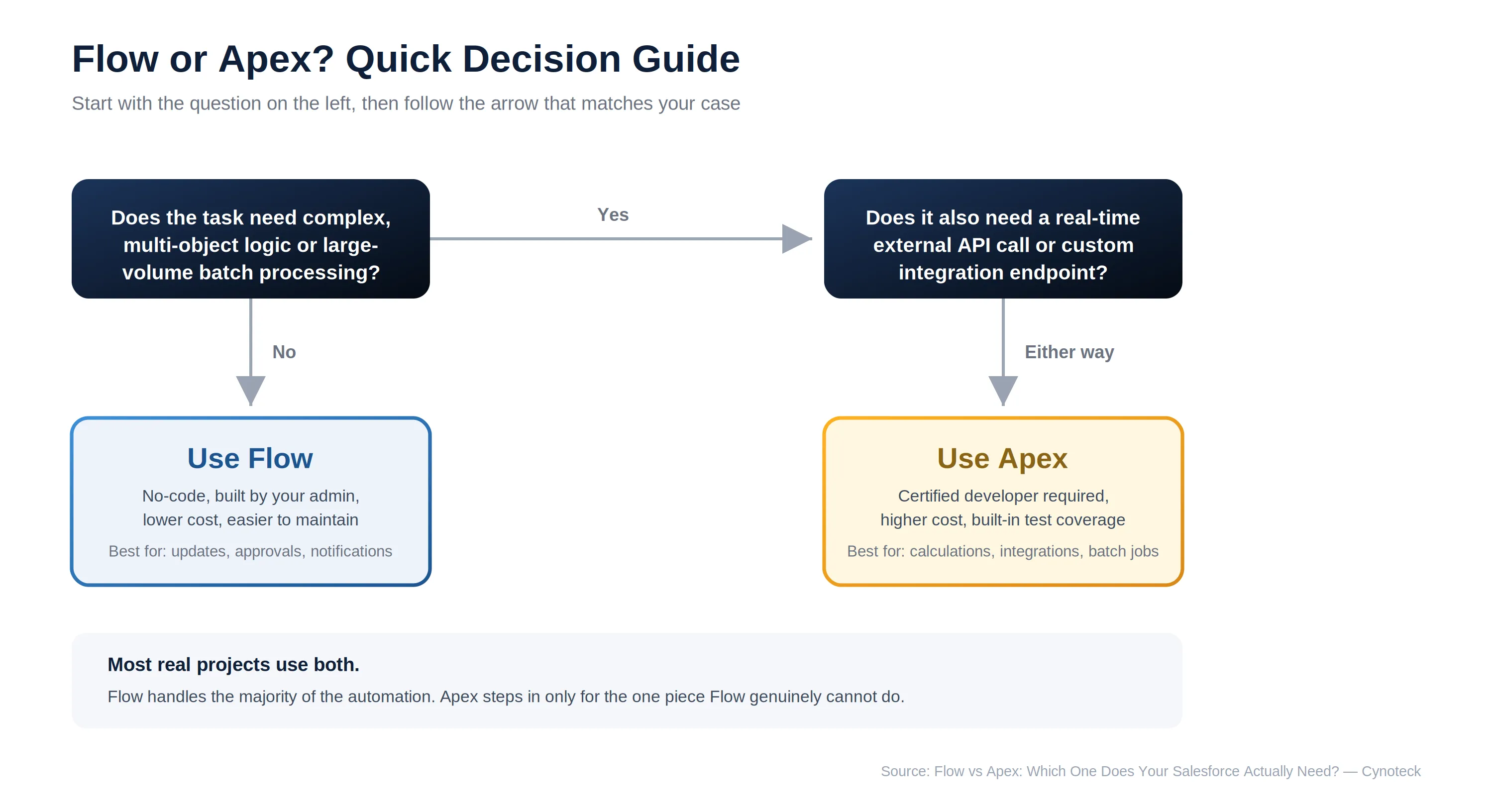
Salesforce gives you two ways to automate work: Flow, a no-code tool, and Apex, a full programming language. Many businesses pay for Apex development when Flow would have solved the problem for a fraction of the cost. This blog compares both on capability, cost, and maintenance, so you can make the right call before you spend anything.
Factors | Salesforce Flow | Apex |
Code required | No | Yes |
Who can build it | Salesforce admin | Certified developer |
Best for | Record updates, approvals, notifications, screen processes | Complex logic, batch processing, custom integrations |
Maintenance cost | Low | Higher |
Typical cost to build | Included in configuration work | $2,000 to $15,000+ depending on complexity |
Test coverage before deployment | Not currently required | Mandatory |
Salesforce Flow is the platform's main no-code automation tool. It lets your admin build record-triggered actions, screen-based forms, scheduled tasks, and approval processes without writing any code.
Record-Triggered Flow: Runs automatically when a record is created, updated, or deleted.
Screen Flow: Guides users through a step-by-step form, useful for structured data entry.
Scheduled Flow: Runs automatically at set times, such as nightly cleanup tasks.
Auto-Launched Flow: Triggered by other automation or by Apex, without user interaction.
As of the Summer 2026 release, Flow Builder also includes stronger control over branching conditions, error handling, and loop logic than in previous versions. This means many tasks that once needed Apex a few years ago can now be handled inside Flow instead.
Note: Workflow Rules and Process Builder, the older automation tools Flow replaced, reached end-of-life on December 31, 2025. Existing ones still run, but new automation should be built in Flow, not the tools it replaced.
Pros | Cons |
No developer needed | Struggles with very complex, multi-step logic |
Maintained by your own admin | Limited when calling external systems in real time |
Faster and cheaper to build | Can become hard to manage if overused for complex logic |
Apex is Salesforce's server-side programming language. It lets developers build custom business logic that runs inside the platform, for tasks too complex for Flow to handle on its own.
Apex Classes: Reusable blocks of custom logic.
Apex Triggers: Code that runs automatically before or after a record changes.
Batch Apex: Processes large volumes of records, such as thousands of records overnight, without hitting platform limits.
Future Methods and Queueable Jobs: Run processes asynchronously, useful for calling external systems without slowing down the user.
Every Apex class should be tested against Salesforce's governor limits, which are usage caps the platform enforces to keep every org running smoothly. Skipping this testing step is one of the most common reasons a custom Apex solution fails once real data volumes hit it.
Pros | Cons |
Handles complex, multi-object logic | Needs a certified developer to build and maintain |
Can process large data volumes efficiently | Costs more upfront and over time |
Supports custom API endpoints | Requires testing and version control discipline |
Don't let the wrong automation choice create technical debt later. Our Salesforce architects evaluate your business requirements and recommend the most scalable solution.
Get Expert AdviceFive things decide which tool you need: who can build it, what it can handle, what it costs over time, how it performs at scale, and how safely it deploys. The table below gives you the short version. The five sections after it explain why Flow wins on some of these and Apex wins on others.
Capability | Flow | Apex |
Simple record updates | Yes | Yes, but unnecessary |
Multi-object calculations | Limited | Yes |
Batch processing thousands of records | No | Yes |
Real-time external API calls | Limited | Yes |
Built and maintained by an admin | Yes | No |
Requires code deployment tools | No | Yes |
Flow uses a visual, drag-and-drop builder. This means your own admin can create and adjust automation without waiting on a developer or a deployment cycle. Apex, by contrast, requires writing and testing code, then deploying it through tools like Change Sets or Salesforce DX.
Winner: Flow, for ease of building and day-to-day changes.
Flow handles most automation needs: record updates, approval routing, email notifications, and scheduled cleanups. However, once the logic involves multiple related objects, external data lookups in real time, or processing thousands of records at once, Flow starts to strain.
Apex is built for exactly that complexity. For example, a multi-source pricing calculation that pulls data from three related objects and applies different discount rules is a job for Apex, not Flow.
Winner: Apex, for complex, high-volume, or multi-system logic.
Flow is typically included in standard configuration work and is maintained by your existing admin at no extra cost. Apex development requires a certified developer to build and maintain it across Salesforce's three yearly releases.
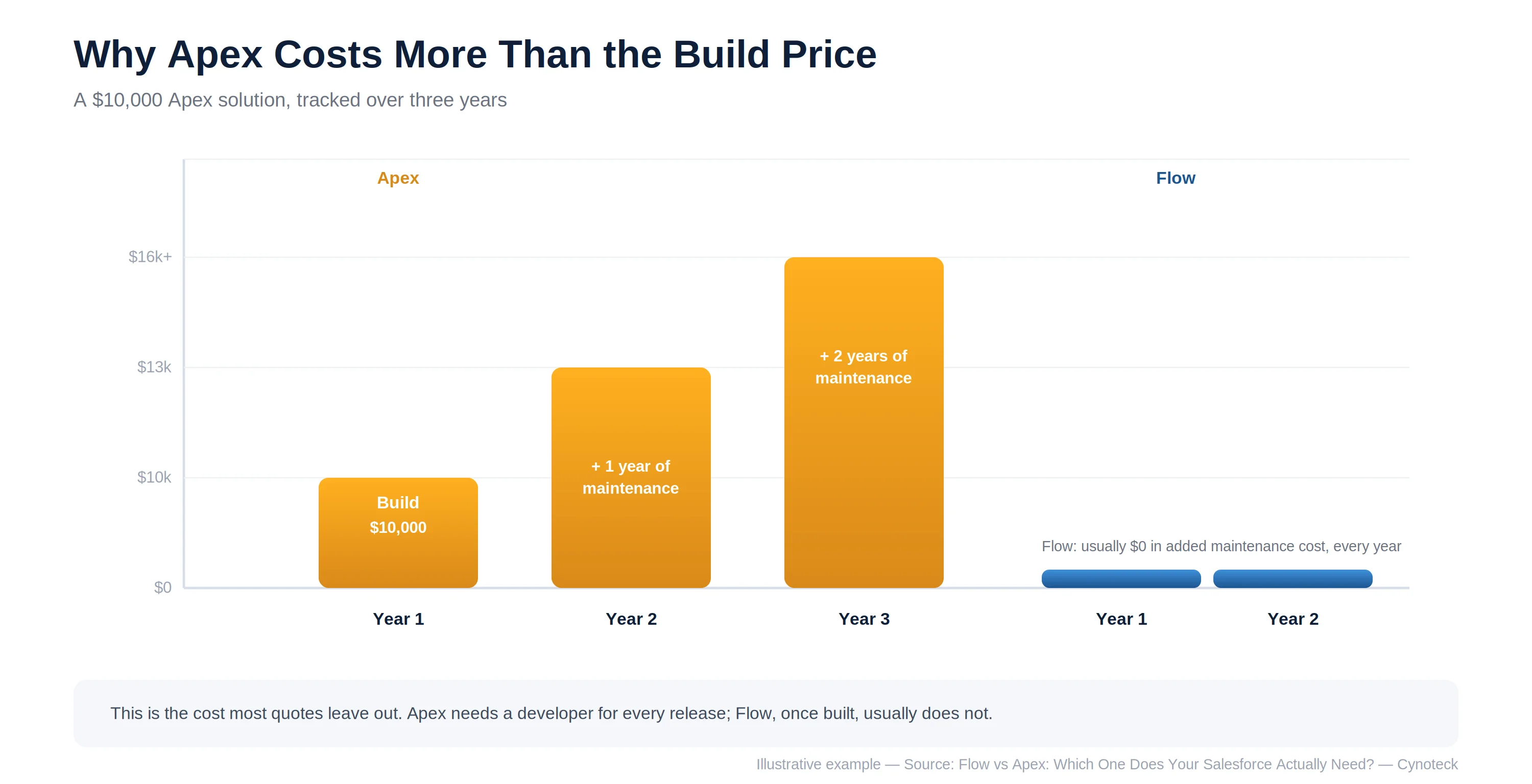
Note: This is the most overlooked cost difference. A $10,000 Apex solution can carry an ongoing maintenance cost every year, while a Flow-based solution usually does not.
Winner: Flow, for total cost of ownership.
For high-volume, repetitive processing, such as running calculations across 50,000 records overnight, Apex batch processing is built specifically for this. It also respects Salesforce's governor limits by design. Flow can technically process bulk records too, but it becomes inefficient and harder to troubleshoot at large scale. As a general benchmark, Flow queries are capped at 50,000 rows, while Apex can be built to handle datasets many times that size.
Winner: Apex, for large-scale batch processing.
Apex code cannot go from a sandbox into production without passing a test class. Salesforce enforces this at the platform level, so every Apex deployment carries a built-in safety check. Flow does not currently require this. A Flow can be built and activated directly in production, which is convenient but also easier to get wrong without anyone catching it.
Note: Even though Flow does not require testing today, building the habit of testing your Flows against real scenarios before activating them is worth doing anyway. Salesforce has signaled this may become mandatory in future releases.
Winner: Apex, for built-in deployment safety.
Talk to certified Salesforce consultants before investing time and development effort.
Book a Free ConsultationChoose Flow if: Your automation involves record updates, notifications, approvals, or guided data entry, and your team wants to maintain it without a developer.
Choose Apex if: Your logic spans multiple objects, needs real-time calculations, processes large data volumes, or requires a custom integration endpoint.
Choose both if: You need Flow for the majority of your automation, with a small piece of Apex handling the one calculation or integration Flow genuinely cannot.
Pro Tip: A properly scoped Salesforce project checks Flow first for every requirement and brings in Apex only for the specific pieces that need it. This keeps both your build cost and your long-term maintenance cost down. |
If you are also weighing whether your team needs a custom interface alongside this automation, our guide on Lightning Web Components covers that decision separately. Many projects end up needing a mix of automation and interface work, so it helps to look at both before finalizing scope.
Recommending Apex when Flow would have worked is an easy way for a partner to inflate a project's price. Cynoteck's Salesforce developers are trained to check Flow first on every request and bring in Apex only when a requirement genuinely exceeds what Flow can handle.
That judgment call comes from having built both extensively. We have delivered 500+ projects across declarative automation and custom code, backed by 30+ certified experts, including Platform Developers and Integration Architects who know exactly where the line sits. Whichever tool your project needs, our 95% on-time deployment rate means it goes live on the schedule we agree to upfront.
Flow checked first, always, before any Apex development is proposed
30+ certified experts, including Platform Developers and Integration Architects
500+ projects delivered across both declarative automation and custom code
95% on-time deployment rate, regardless of which tool the project needs
Flow should always be your starting point, and Apex should only step in where Flow genuinely cannot go. Getting this decision right at the start is one of the simplest ways to keep both your Salesforce budget and your long-term maintenance cost under control.
Talk to a Certified Salesforce Developer about your automation needs, or view our full Salesforce Customization Services.
For a broader look at customization decisions like this one, see our Complete Guide to Salesforce Customization. It walks through cost, timelines, and every other building block, including Flow and Apex, in one place.
Get practical recommendations from Salesforce experts—not guesswork.
Talk to Our Salesforce ExpertsAns: Flow is included with your Salesforce license and does not require separate licensing costs. Building with it does not require a developer, which keeps costs low compared with Apex.
Ans: No. Flow handles most standard automation well, but it cannot efficiently process very large data volumes, handle deeply complex multi-object logic, or build custom API endpoints. Those tasks still need Apex.
Ans: No. A trained Salesforce admin can build and maintain Flow automation without coding knowledge, which is one of its biggest advantages over Apex.
Ans: You end up with a solution that costs more to build, needs a developer for future changes, and creates ongoing maintenance costs that a Flow-based solution would not have required. This is why a proper scoping conversation before development starts matters so much.
Ans: If the requirement involves calculations across several related objects, processing thousands of records at once, or connecting to an external system in real time, it is likely an Apex requirement. A quick way to check is to ask whether your admin could build and maintain it alone using Flow's visual tools.
 Outsource Salesforce Development or Build In-House Which is the Best for Your Business.webp)
Outsourcing Salesforce development vs. building an in-house Salesforce team: 2026 cost insights, salary comparisons, key benefits, challenges, and the best hiring model for your business growth.
We are more than just developers and consultants—we are your partners in navigating the digital landscape. Let us be the engine behind your next big success while you focus on your core vision.
Explore Opportunities!