How Do You Connect Claude to Salesforce Hosted MCP Servers?
Summary: This guide explains what Salesforce Hosted MCP Servers are and how they let Claude work with your Salesforce data without logging into Lightning Experience. You will learn the difference between standard and custom MCP servers, the exact setup steps for Claude Desktop and Claude Code, and what to check before you roll this out to your team. |
Most Salesforce users still open Lightning Experience, click into a report, and wait for a dashboard to load just to answer a simple question. This is slow, and it puts the burden of finding data on the person, not the tool. Salesforce made Hosted MCP Servers generally available in April 2026, and this changed the picture. Now, you can connect Claude directly to your org.
This guide explains what Salesforce Hosted MCP Servers are, why businesses are adopting them, and how to connect Claude to your org, step by step. By the end, you will know enough to activate your first server and test it safely.
MCP stands for Model Context Protocol. In simple terms, it is a shared language that lets an AI tool, like Claude, talk to outside systems, like Salesforce, without custom-built connections for every single tool. It is a practical example of the agentic AI pattern we break down in Agentic AI Explained: an AI system reads a situation, decides what to do, and takes action rather than just answering a question.
Before MCP, every AI vendor had to build its own one-off integration with every business system it wanted to support. This was slow and expensive for everyone involved. MCP fixes this by giving Salesforce one standard way to describe what it can do, so any MCP-compatible AI client can use those abilities right away.
A Salesforce Hosted MCP Server is Salesforce's own ready-to-use version of this connection. This means Salesforce builds, hosts, and secures the server for you, so your team does not need to manage that infrastructure. Once it is active, Claude can run SOQL queries, read records, and even trigger business logic, all without anyone logging into the platform.
Pro Tip: If you have heard the term "Headless 360," this is Salesforce's name for the broader idea of using agents like Claude to work with Salesforce, Data 360, Tableau, and MuleSoft without a traditional login screen in the middle. |
The short answer is speed. Instead of building a report, waiting for a dashboard, and clicking through Lightning Experience, your team can just ask Claude a question in plain language and get an answer immediately.
Here is what this looks like in practice:
Faster reporting: A sales operations manager can ask, "Show me open opportunities closing this quarter, grouped by owner," and get a table back in seconds, without building a report first.
Bulk actions with a safety check: A support team lead can ask Claude to find every case matching a condition, review the list, and then confirm before Claude updates them in bulk.
Fewer logins for routine work: Field teams who only need a quick answer no longer have to open Salesforce, navigate to the right object, and apply filters manually.
Consistent access rules: Because Claude authenticates as the logged-in user, it only sees what that person is already allowed to see in Salesforce.
This is why more Salesforce admins are treating MCP as a practical productivity upgrade, not just a developer experiment. As a result, the setup work is worth understanding properly before you roll it out to a wider team.
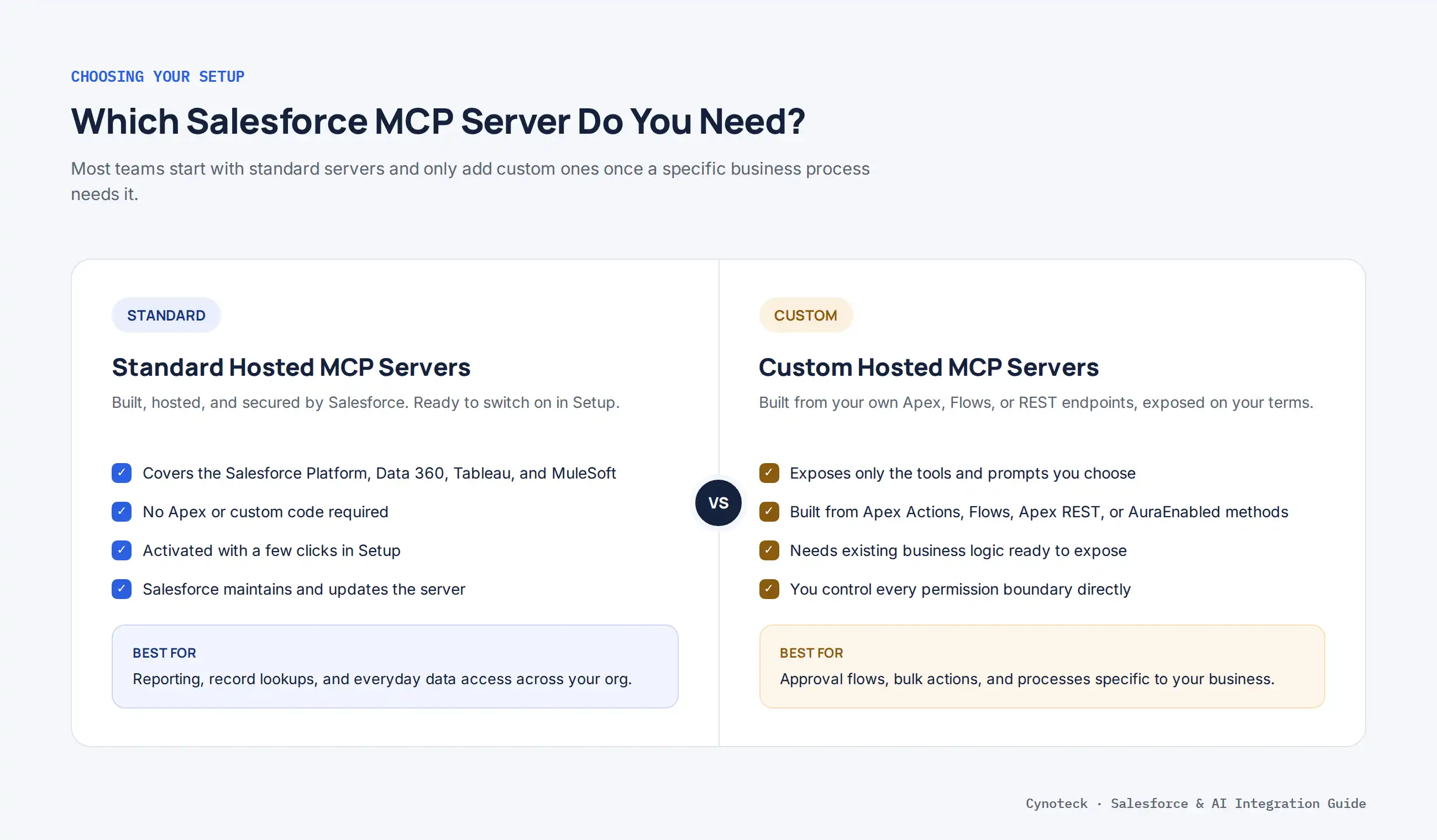
Salesforce gives you two paths for exposing your data and logic to Claude. Understanding the difference early will save you time during setup.
Aspect | Standard Hosted MCP Servers | Custom Hosted MCP Servers |
|---|---|---|
Who builds it | Salesforce, ready to activate | You, using your own logic |
Best for | Reading and writing records, Data 360, Tableau, MuleSoft, Slack | Business-specific processes and approvals |
Setup effort | Low, mostly configuration | Moderate, requires existing Apex, Flow, or REST logic |
Example use | "Show me daily bookings by date" | "Cancel these 12 bookings using our approval flow" |
Standard Salesforce Hosted MCP Servers cover the daily operations most teams need, including the Salesforce DX MCP Server for development work and servers for the Salesforce Platform, Data 360, Tableau, and MuleSoft. You can also connect directly to the Slack hosted MCP server if your team lives in Slack.
Custom Salesforce Hosted MCP Servers exist when the standard servers don't cover a process specific to your business. In addition, custom servers give you tighter control over exactly which tools and prompts get exposed to Claude. Building one usually means the same Apex, Flow, and REST work covered in our complete guide to Salesforce customization, just packaged as a tool Claude can call. You can build custom MCP tools from four sources:
Apex Action – Exposes invocable Apex methods (methods marked @InvocableMethod) as tools Claude can call.
Lightning Flow – Exposes an autolaunched flow as a tool, useful for approval steps or multi-object updates.
Apex REST – Exposes a custom Apex REST endpoint you have already built.
AuraEnabled – Exposes Apex methods marked @AuraEnabled as a tool.
You can also turn a Prompt Builder template into a custom MCP prompt. This means Claude can run a parametrized, pre-approved prompt as a simple command, instead of you retyping the same instructions every time.
Our Salesforce Customization team gets your Apex, Flow, and REST logic ready to become a tool.
Book a Free ConsultationBefore you activate anything, make sure you have the following in place. Skipping this step is the most common reason setup takes longer than expected.
Salesforce Setup access: You need permission to activate MCP servers and create an External Client App, which usually means a System Administrator profile.
A Salesforce edition that supports Hosted MCP Servers: This includes Developer Edition orgs, sandboxes, and production orgs on supported editions.
A Claude account with connector access: Claude Desktop, Claude Code, or Claude.ai, depending on which surface your team prefers.
An email inbox you can access: Salesforce and the OAuth verification steps will send confirmation messages here.
A clear idea of which object or process you want Claude to touch first: Starting narrow, such as one object or one flow, makes it much easier to review permissions before you expand access.
Note: Standard access permissions still apply on top of this setup. Connecting Claude does not grant it any access that the logged-in user does not already have in Salesforce. |
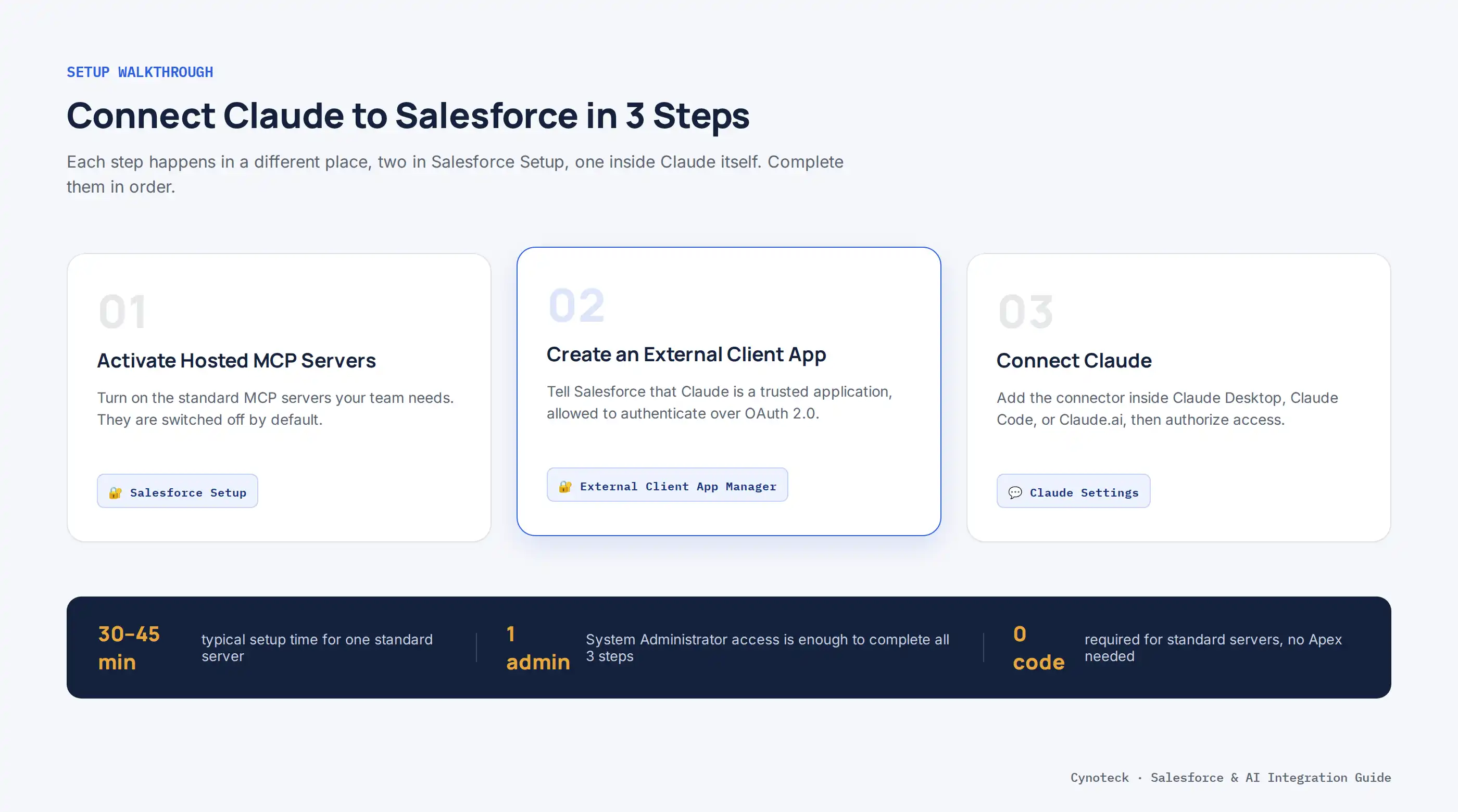
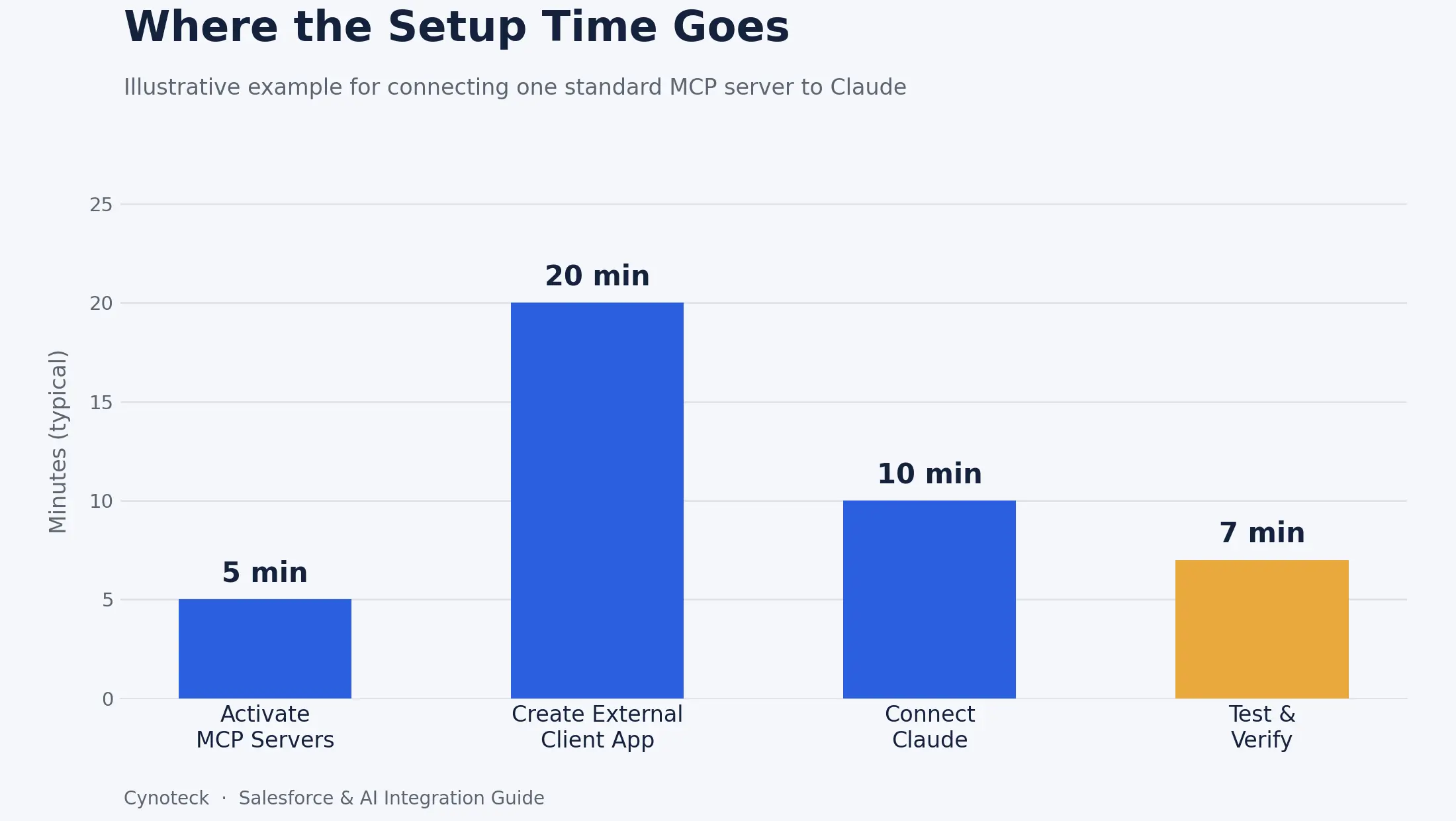
Connecting Claude to Salesforce Hosted MCP Servers is a three-step process. First, you activate the servers you want to use. Next, you create an External Client App so Salesforce knows Claude is allowed to connect. Finally, you link Claude itself to those servers.
An External Client App (ECA) is simply Salesforce's record of which outside applications can connect to your org, and what they are allowed to do once connected. Think of it as a gatekeeper that sits in front of your data. This is also the direction Salesforce has moved integrations in generally, as we cover in our Salesforce integration best practices guide, which walks through the shift from older Connected Apps to the current External Client App standard.
Standard MCP servers are switched off by default, so this is always your starting point. You will need Setup access to complete this step.
In Setup, search for MCP Servers.
Click the Salesforce Servers tab.
For each server you want to use, click on its name, then click Activate.
Copy the server's API Name (drop the platform. prefix) and its Server URL. You will need both in Step 3.
Pro Tip: Start by activating only the object or data server your team needs first, such as sobject-reads. You can always activate more servers later once your team is comfortable with the workflow.
This is where you tell Salesforce that Claude is a trusted, authorized application. Without this step, Salesforce has no way to know Claude should be allowed to connect at all.
In Setup, search for External Client App Manager, then click New External Client App.
Under Basic Information, enter an app name such as Claude MCP Client and your contact email.
Expand API (Enable OAuth Settings), check Enable OAuth, and set the callback URL:
Use https://claude.ai/api/mcp/auth_callback for Claude Desktop.
Use http://localhost:38000/callback for Claude Code.
Under Selected OAuth scopes, add Perform requests at any time (refresh_token, offline_access) and Access Salesforce Hosted MCP Servers (mcp_api).
Under Security, uncheck "Require secret for Web Server Flow" and "Require secret for Refresh Token Flow." Then check "Require Proof Key for Code Exchange (PKCE)" and "Issue JSON Web Token (JWT)-based access tokens for named users."
Click Create to save the app.
Go to the Settings tab, expand OAuth Settings, and click Consumer Key and Secret. Complete the verification step, then copy both values somewhere safe.
Note: Keep your Consumer Secret private. Treat it the same way you would treat a password, because anyone with it can authenticate as your app. |
The exact steps depend on whether your team uses Claude Desktop or Claude Code. Both use the same Consumer Key and Server URL from the previous steps.
Open Claude and go to Settings, then Connectors.
Click the + icon, then Add custom connector.
Enter a name and paste in the Server URL you copied in Step 1.
Open Advanced settings and paste the Consumer Key into OAuth Client ID.
Click Connect. Claude will redirect you to Salesforce to log in and approve access.
Once you log in, Claude returns you to the connector list, now showing as connected.
Open a terminal and run the following command, replacing the placeholders with your own server name, server URL, and Consumer Key:
claude mcp add --transport http MY_MCP_SERVER_NAME MY_MCP_SERVER_URL --callback-port 38000 --client-id "MY_ECA_CONSUMER_KEY" --client-secretWhen prompted, paste your Consumer Secret.
Launch Claude Code by typing claude in your terminal.
Run /mcp to see your list of connected servers.
Select the new server, choose Authenticate, and approve the access request when prompted.
Once authorized, Claude Code will list the server as connected, and you are ready to start using it. From here, you can repeat Step 1 and Step 3 for each additional server you want Claude to reach.
Reading data is useful, but the real value shows up once Claude can also act on it, with you reviewing the outcome first. Here are a few examples of what that looks like day-to-day.
Example: Weekly pipeline review - Instead of building a report and a dashboard, a sales manager can simply ask, "Show me this week's closed-won opportunities grouped by rep, with total value." Claude queries the data directly and returns a clean summary table, along with any patterns worth flagging, such as one rep closing well above the team average.
Example: Bulk case updates with a safety check - A support lead notices a batch of cases logged under the wrong category after a form issue. Instead of fixing each one manually, they ask Claude to find all matching cases, review the list Claude returns, confirm it looks correct, and then approve the bulk update. Claude doesn't run the change until the person confirms it, keeping a human in the loop for anything irreversible.
Example: Custom approval flow. A finance team exposes an existing discount-approval flow as a custom MCP tool. Now, a request that used to require someone to open Salesforce, find the record, and click through an approval screen can be triggered and confirmed directly inside a chat conversation.
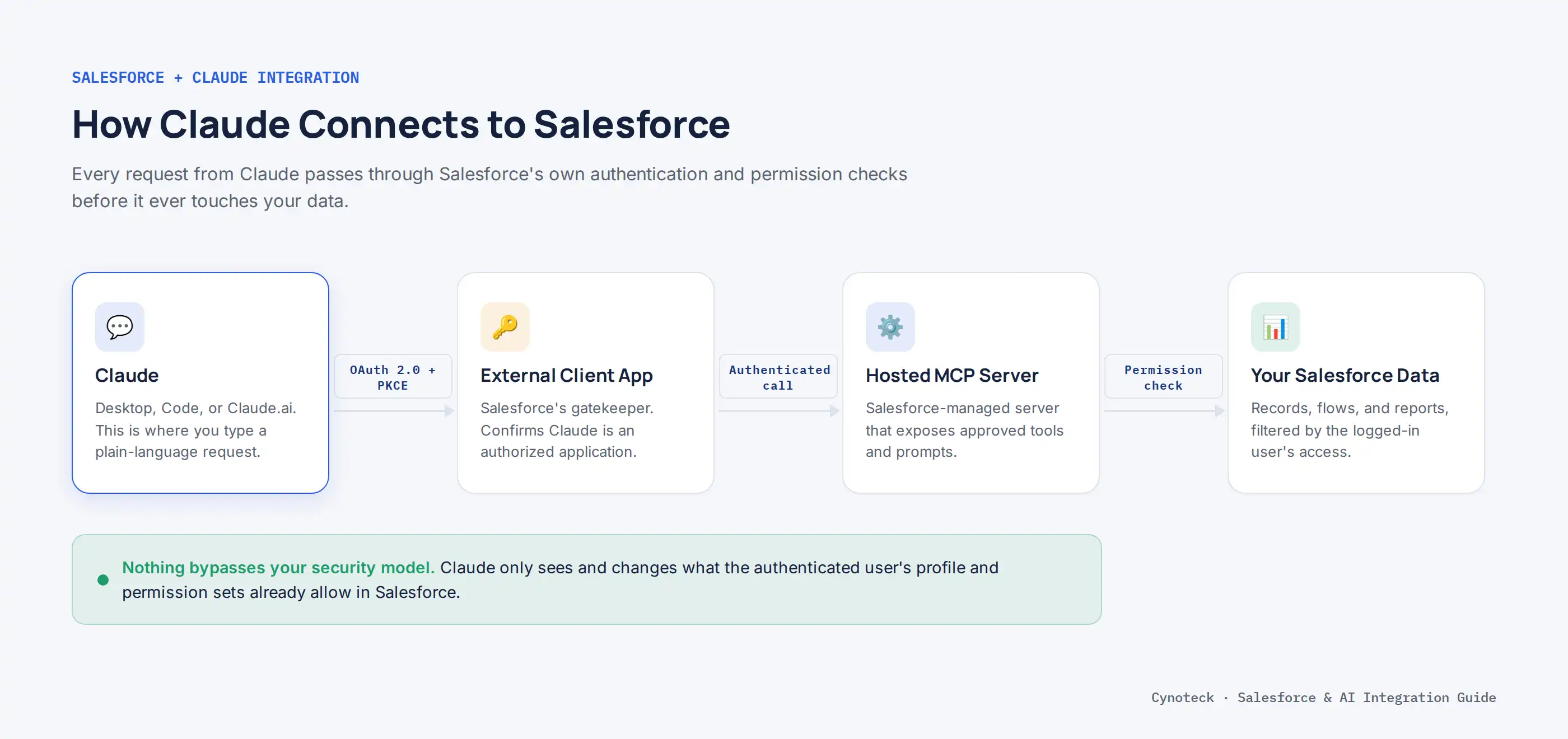
This is the question every Salesforce admin asks before rolling this out, and it is a fair one. The good news is that Claude doesn't bypass your existing security model.
Claude doesn't get a separate, all-access account in your org. Instead, it authenticates through the OAuth 2.0 flow and the External Client App you created, and it can only see and do what the logged-in user's profile and permission sets already allow. This means your existing sharing rules, field-level security, and role hierarchy still apply.
That said, a few practices reduce risk further:
Start with read-only servers first, such as sobject-readsbefore activating servers that can write or delete data.
Review the permission set of the user account Claude will authenticate as, especially if it is a dedicated integration user rather than a personal login.
Keep bulk or destructive actions behind a confirmation step, the same way the flow-based examples above require a human to approve before anything is changed.
Audit which MCP servers are active on a regular basis, the same way you would review connected apps today.
Because of this, most businesses treat this rollout the same way they would treat any new integration. It is worth reviewing carefully, but it does not require reinventing your security model from scratch.
We can review the permission set Claude will authenticate as before you roll this out.
Request a Security ReviewA few setup issues come up often enough that it is worth knowing about them in advance. None of them mean your setup is broken, and most resolve with a quick fix.
"Invalid client ID" right after saving the connector: This is usually not a mistake on your part. OAuth credentials can take a short while to fully register on Salesforce's side. If this happens, wait around 15 minutes and try connecting again.
Server URL points to the wrong environment: Server URLs differ between production, sandbox, and scratch orgs. Double-check that the URL you copied in Step 1 matches the org you are trying to connect to.
The connector shows "needs authentication" and will not clear: Re-run the authentication step and make sure you approve the access request in the browser window that opens. This step is easy to miss if the window opens behind your main browser tab.
Note: If none of these steps resolve a connection issue after a couple of attempts, it is often a sign that the External Client App settings need a second look, which is exactly the kind of configuration review a certified Salesforce partner can usually resolve quickly. |
No, and this is a common point of confusion. Agentforce is Salesforce's own platform for building autonomous agents that live inside Salesforce and act on triggers you define.
Salesforce Hosted MCP Servers solve a different problem. They let external tools you already use, like Claude, reach into Salesforce from the outside, on demand, in response to a person typing a request. In other words, Agentforce is about building and running agents inside Salesforce. MCP lets outside agents talk to Salesforce safely. Many businesses use both, depending on whether the work needs to run inside the platform automatically or be triggered by someone asking a question directly. If you are still weighing the two approaches for a specific project, our Agentforce vs custom AI agents guide breaks down the decision in more depth.
Connecting Claude to Salesforce Hosted MCP Servers turns routine reporting and repetitive updates into a short conversation instead of a string of clicks. The setup itself is a manageable three-step process: activate the servers you need, create an External Client App, and connect Claude.
The part that takes real judgment is deciding which servers to activate first, which processes are safe to expose as custom tools, and how to keep a human reviewing anything that changes real records. If your Salesforce org's data model, permission sets, or automation need a cleanup pass before you hand any of it to an AI agent, that groundwork is worth doing properly, and it is exactly where Cynoteck's agentic AI development services can help you move faster without cutting corners on security.
Tell us the process you're automating, and we'll recommend Agentforce, MCP, or a custom build.
Talk to Our ExpertsAns: MCP is an open standard that lets AI tools like Claude connect to Salesforce and run queries, read records, or trigger actions without a custom-built integration. Salesforce Hosted MCP Servers are Salesforce's own ready-to-use version of this connection.
Ans: No. Salesforce Hosted MCP Servers are managed by Salesforce, so you only need to activate them and set up an External Client App. Self-hosting is only necessary if you need behavior the hosted servers do not support.
Ans: No. Claude authenticates as a specific Salesforce user through OAuth 2.0, and it only sees and can act on what that user's profile and permission sets already allow.
Ans: An ECA is Salesforce's record of which outside applications are allowed to connect to your org and what they can do once connected. Claude needs one so Salesforce can authenticate it through OAuth 2.0 and enforce access rules.
Ans: Yes. Each one uses a slightly different callback URL during setup, but both can connect to the same activated MCP servers using the same Consumer Key.
Ans: Wait about 15 minutes before trying again. OAuth credentials sometimes take a short time to fully register on Salesforce's side after you create the External Client App.
Ans: No. Agentforce builds agents that run inside Salesforce automatically. MCP lets external tools like Claude reach into Salesforce on demand, in response to a direct request from a person.
Ans: For a single standard server, most admins can complete activation, the External Client App setup, and the Claude connection within 30 to 45 minutes. Custom servers take longer, since they depend on the Apex, Flow, or REST logic already being ready.

What is Artificial Intelligence? Artificial intelligence (AI) is intelligence demonstrated by machines, which makes it possible for machines to learn from experience, adjust to new inputs and perform human-like tasks.
We are more than just developers and consultants—we are your partners in navigating the digital landscape. Let us be the engine behind your next big success while you focus on your core vision.
Explore Opportunities!

 What Al Services Does a Business Actually Need in 2026.webp)