Salesforce Integration Best Practices for the Agentforce Era

Summary: This guide breaks down the six proven ways to connect Salesforce with your other business systems, what has changed now that Salesforce's AI agents can trigger those connections on their own, and the specific limits and deadlines you need to plan around in 2026. You will finish this article knowing which pattern fits your situation and which mistakes to avoid. |
If you are planning to connect Salesforce with your ERP, your billing system, or any other business tool, you are making a decision that will shape your data for years, not just picking a piece of software. This guide covers the Salesforce integration patterns that matter, what changed in 2026, and the best practices that keep a Salesforce integration project from becoming a source of ongoing rework.
Quick Answer: The right way to connect Salesforce to another system comes down to one question: does someone need an answer right now, or can the update wait a while? That single question points you toward one of six proven integration patterns, all explained below.
Salesforce integration means connecting your Salesforce org (your company's own Salesforce environment) with external systems, such as an ERP, a payment platform, or a marketing tool, so that data and processes flow between them automatically rather than being retyped by hand.
Fewer duplicate records and fewer typing mistakes
One dependable view of the customer that every team can trust
Less time spent reconciling numbers between systems by hand
Broken syncs that fail quietly instead of loudly
Mismatched records that nobody notices until a report looks wrong
A support team that spends its week firefighting instead of building
This is why the stakes are higher in 2026 than they were a few years ago. Salesforce Agentforce, the platform's set of AI agents, can now check inventory, create orders, and update records without anyone having to click a button. If your integration was built on the old assumption that a person is always on the other end of the connection, it is worth a second look.
Note: A poorly planned integration does not fail all at once. It usually fails quietly, one mismatched record at a time, until the cost of fixing it is far higher than the cost of planning it properly. |
Before you choose a tool or write a line of Apex (Salesforce's programming language for custom logic), it helps to know a handful of patterns that cover almost every integration scenario. Most real projects end up combining two or three of these rather than relying on just one.
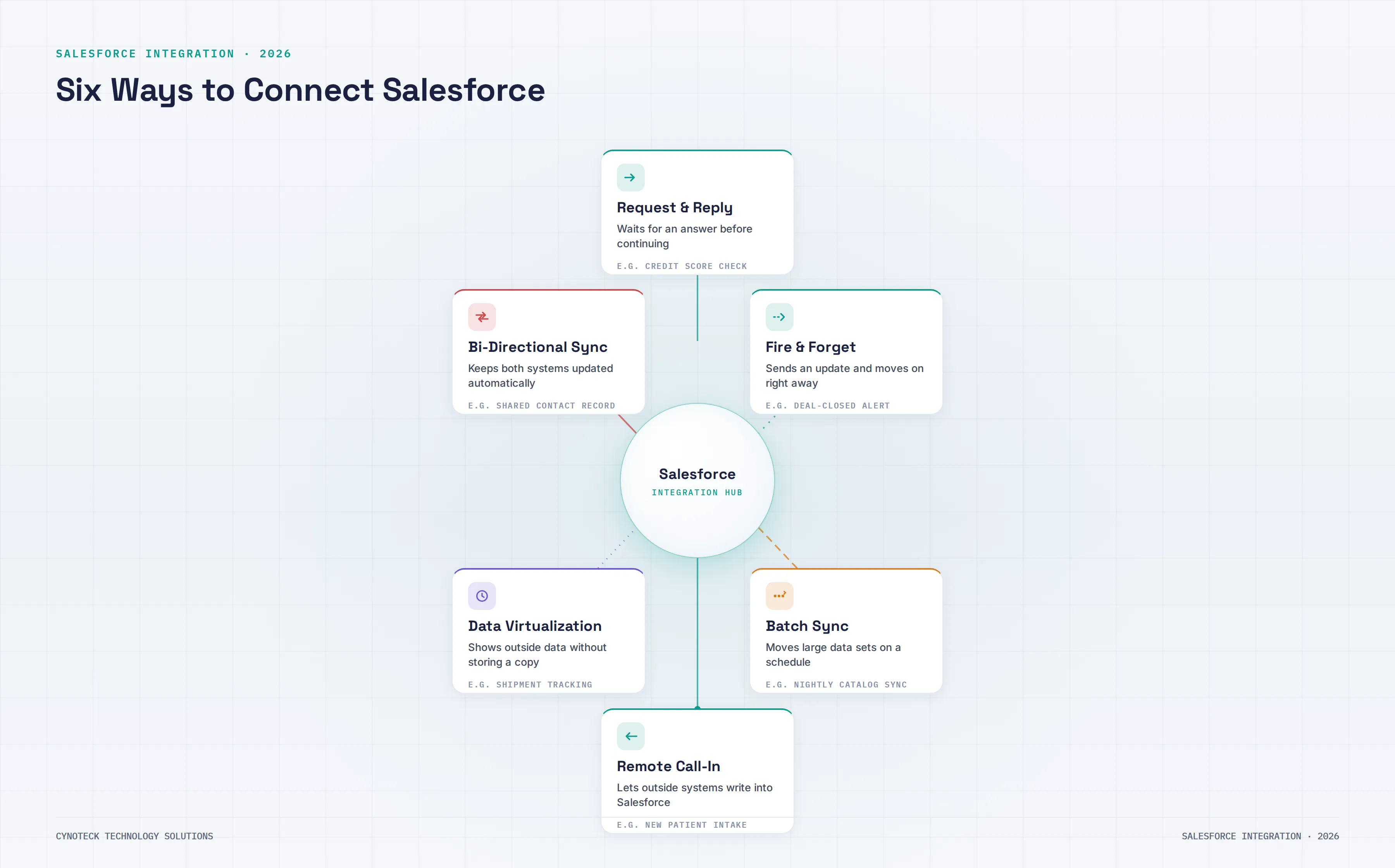
Request and Reply is a live, two-way exchange. Salesforce sends a request to an external system and waits for a response before proceeding, similar to a phone call rather than a text message.
Real example: A sales rep checks a customer's credit score during an opportunity review, and Salesforce pauses until the result comes back.
Use it when: Someone genuinely cannot continue without an answer, such as checking shipping rates at checkout.
Avoid it when: The task can wait. Holding a connection open adds delay and risk if the other system is slow to respond.
Here, Salesforce sends a message and moves on without waiting for a reply, more like dropping a letter in the mailbox than staying on the phone.
Real example: A retail business publishes an update the moment a deal closes, and both a marketing tool and a data warehouse pick it up independently.
Built using: Salesforce Platform Events (business alerts that Salesforce publishes and other systems subscribe to), outbound messages, or background Apex jobs.
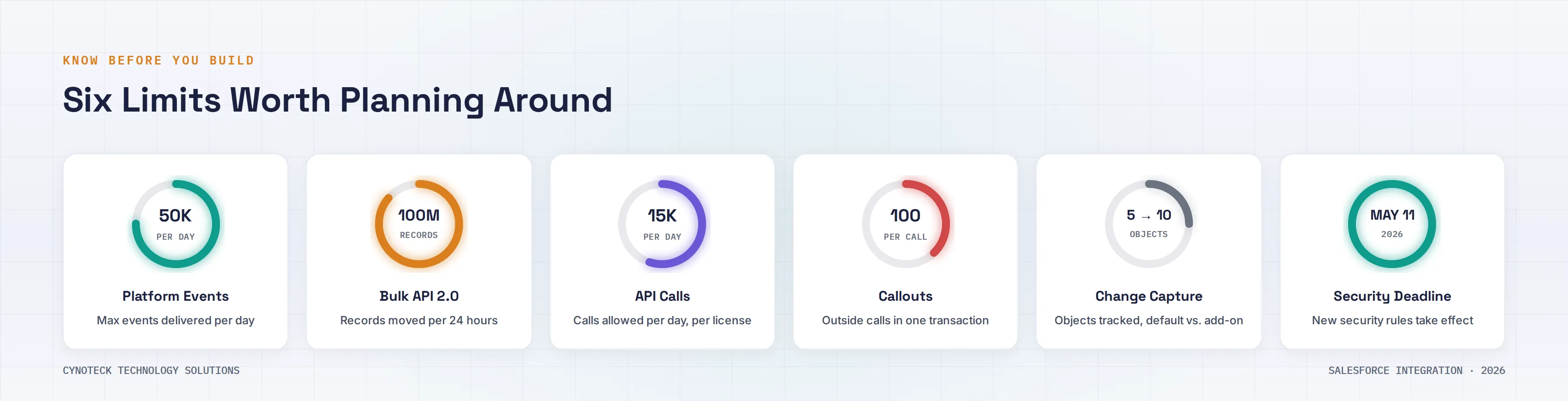
Good to know: The default org allocation is 50,000 externally delivered Platform Events per rolling 24 hours so that high-volume use cases may need add-on capacity.
Batch synchronization moves large volumes of data between systems on a schedule rather than instantly.
Real example: A manufacturer runs a nightly job pulling product catalog updates from its ERP into Salesforce using Bulk API 2.0.
Good to know: Bulk API 2.0 handles up to 100 million records in 24 hours, processed in batches of 10,000 records, with a 15 GB limit per query.
Use it when: You are doing a first-time data load or a large reconciliation where instant accuracy is not critical.
Avoid it when: Your business genuinely needs up-to-the-minute numbers, since even an overnight batch leaves a gap where the two systems briefly disagree.
This pattern works in the other direction. An external system creates, updates, or retrieves Salesforce records via the API (the connection point that lets two systems communicate), usually within seconds of something happening on its end.
Real example: A hospital's patient intake system pushes new patient details straight into Salesforce Health Cloud the moment a form is submitted.
Why it matters: Remote call-in sits behind most large Salesforce integrations, since most businesses have several systems that need to write to Salesforce, not just read from it.
Good to know: API request limits are pooled per 24-hour period and scale with edition, roughly 15,000 calls per Enterprise Edition license and 5,000 per Unlimited Edition license, plus any add-on capacity purchased. Heavy remote call-in traffic can burn through that pool faster than teams expect.
Data virtualization lets Salesforce display information that lives entirely outside its own database, fetched fresh each time someone opens the record. Salesforce Connect is the built-in tool for this.
Real example: A logistics company shows live shipment tracking on a customer record, pulled straight from the carrier's system each time the page loads.
Trade-off: You avoid duplicate storage, but response times depend entirely on the outside system, so access and performance need careful planning.
Good to know: Salesforce Connect callouts follow the same governor limit as any other Apex callout, up to 100 synchronous callouts per transaction, so a page or component that touches several external objects at once can hit that ceiling faster than a page built on native Salesforce data.
Bi-directional sync keeps data in sync in both directions, so a change made in Salesforce or the connected system automatically shows up in the other. This matters for shared records, like contacts, that multiple teams update from different tools.
The hard part: Handling collisions. If a sales rep updates a contact's email in Salesforce at the same moment a marketer updates it elsewhere, something has to decide which change wins.
Fix it before you build: Decide which system owns each field up front, not after the first conflict happens.
Here is how the six patterns compare at a glance:
Pattern | Best For | Speed | Real Example |
Request and Reply | Answers someone needs right now | Real-time | Checking a customer's credit score |
Fire and Forget | Updates nobody is waiting on | Real-time, one-way | Notifying marketing when a deal closes |
Batch Data Sync | Large data loads and migrations | Scheduled | Nightly product catalog update |
Remote Call-In | Outside systems writing into Salesforce | Near real-time | Patient intake form creates a record |
Data Virtualization | Viewing external data without storing it | Real-time, read-only | Live shipment tracking |
Bi-Directional Sync | Shared records updated from multiple tools | Real-time, two-way | Contact record shared by sales and marketing |
Not every integration follows the same approach. Get expert guidance to select the best Salesforce integration strategy for your business.
Talk to Our ExpertsThe six patterns above have not changed. What has changed is the environment they operate in, and four shifts are worth your attention this year.
Agentforce agents can set off integrations without a person in the loop.
Real example: A service agent handling a complaint calls your billing system to process a refund on their own.
Real example: A sales agent pulls live pricing from an external quoting tool while working a deal.
What this changes: Agent-driven traffic tends to be bursty and less predictable than human-triggered requests. Build in retry logic, idempotency (designing a system so that repeating the same request does not create a duplicate record), and clear failure handling for every callout.
Model Context Protocol (MCP) is an open standard that lets AI agents find and use external tools while they are running, rather than requiring a custom-built connection for each capability.
Before MCP: Connecting an Agentforce agent to five different tools meant building five separate integrations.
With MCP: You build one server that exposes a capability, such as an order lookup, and any MCP-compatible agent can use it without extra integration code.
Good to know: Salesforce has added native MCP support to Agentforce, including a registry for governance and access control. This does not replace your existing APIs, since most MCP tools still call an API behind the scenes.
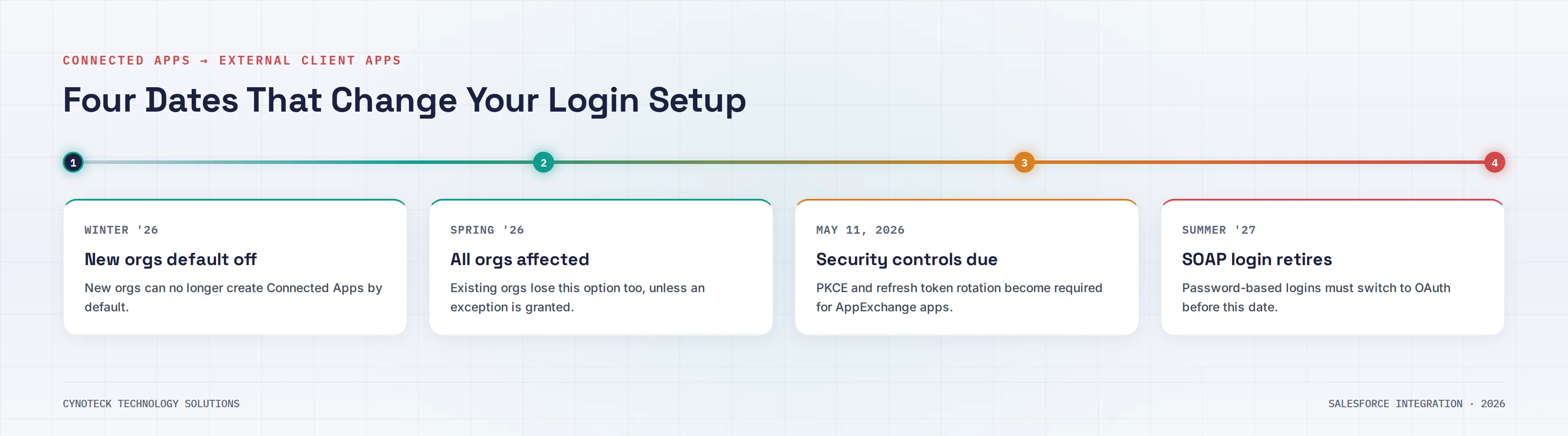
Salesforce has been phasing out Connected Apps in favor of External Client Apps (ECAs) as the standard way for outside systems to authenticate with the Salesforce API, and the timeline is now firm rather than optional.
Winter '26: Connected App creation was disabled by default in new orgs, with an option for admins to re-enable it.
Spring '26: New Connected App creation was disabled across all orgs, including existing ones, unless Salesforce Support grants a temporary exception.
May 11, 2026: Salesforce set a firm deadline requiring five new security controls, including PKCE and refresh token rotation, on any Connected App or External Client App used by an AppExchange package.
Summer '27: SOAP API login() authentication, the older username-and-password method, is scheduled for retirement. Integrations that still use it will need to switch to OAuth-based authentication before then.
Note: ECAs do not yet support the Username-Password OAuth flow or mobile push notifications. If your integration depends on either, it needs to stay on a Connected App for now and get flagged for a future review. |
Platform Events, Change Data Capture (a feature that automatically notifies when Salesforce records change), and the Pub/Sub API have matured to the point where many tasks that used to rely on batch processing can now run on near-real-time event data instead.
Still right for batch: Historical migrations and large reconciliations.
Better as events: Nearly everything else, since an event-driven approach gives you lower delay and better visibility into what happened and when.
Good to know: Change Data Capture defaults to 5 monitored objects per org, expandable to 10 with an add-on license, and shares the same 25,000 to 50,000 daily event delivery pool as Platform Events, depending on the edition. Plan which objects matter most before you turn this on.
Pro Tip: If you are not sure whether a process needs to be real-time or batch, ask whether a person is actively waiting for the result. If nobody is watching the screen for it, batch or event-driven design is almost always the cheaper and more resilient choice. |
With the patterns and the current landscape in mind, here is what separates an integration that holds up under real business pressure from one that quietly builds up technical debt.
Get clear on what success looks like before picking a pattern or a tool. A gap analysis comparing where things stand today with where they need to be should shape your requirements.
Decide how the integration will log in, rotate credentials, and manage identity before touching a single API endpoint. Treat External Client Apps and integration-user setup as an early decision, not a setting configured at the end.
Build in idempotency, retry safety, and response checks for every callout, even the ones that seem low-risk today.
Platform Events and Change Data Capture should signal something meaningful, such as an order being confirmed, rather than serving as a generic stand-in for anything asynchronous.
Request and Reply should only be used when someone truly cannot continue without an immediate answer. Everything else should be decoupled.
A single, simple connection between two systems can often run as a direct point-to-point link. Once you have three or more systems, large data volumes, or a need to reshape data, a middleware platform like MuleSoft earns its cost.
Every piece of data exchanged between systems needs a single clear owner and a documented rule for handling update conflicts. Skip this, and integrations drift toward silent overwrites.
Spell out the fallback for timeouts, duplicate deliveries, and outages before go-live, not after the first one happens.
Track latency and error rates, but tie them back to what matters: are orders going out on time, are cases closing faster, is pricing staying accurate.
IT, operations, and the team that will use the resulting data every day all need a seat at the table before build starts, not after launch.
Design secure, scalable Salesforce integrations that support Agentforce, AI automation, and long-term business growth without unnecessary complexity.
Book a Free ConsultationMost established Salesforce setups end up running several patterns side by side, matched to different processes based on urgency, data volume, and whether a person or a piece of software is starting the request.
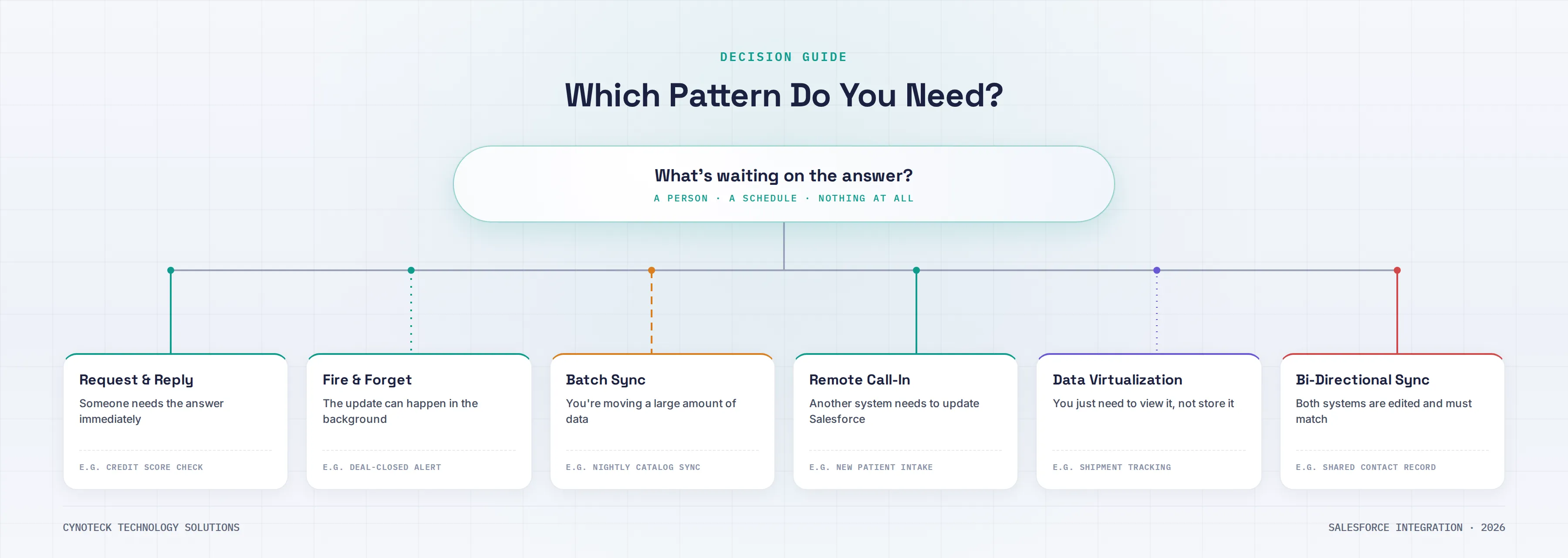
The starting question is always the same: what is waiting on the other end, a person, a scheduled job, or nothing at all? Answer that first, then use this as a quick starting point:
Someone is waiting on a screen for an answer → Request and Reply
The update can happen quietly in the background → Fire and Forget or an event-driven approach
You are moving a large volume of historical or catalog data → Batch Data Sync
An outside system needs to create or update Salesforce records the moment something happens → Remote Call-In
You only need to view outside data occasionally and do not want to store a copy → Data Virtualization
Two systems both get edited independently, and both need to stay current → Bi-Directional Sync, with field ownership agreed on first
Even experienced teams run into the same handful of problems.
Point-to-point overload: Connecting every system directly to Salesforce without middleware creates a tangled web where one small change ripples into unrelated failures.
A logistics company that starts with two direct integrations often finds itself with eight within a couple of years, each one a little harder to maintain than the last.
Underestimating the true cost of ownership: Point-to-point integration is fast to build, which makes it tempting, but the maintenance burden compounds over time in a way a well-planned middleware layer avoids.
Skipping the system-of-record decision: Many teams never formally decide which system owns a shared field, which leads directly to the edit collision problems described earlier in bi-directional sync.
Treating integration as purely technical: Leaving out the business teams who will actually use the connected data tends to produce technically sound integrations but misses what the business actually needs.
Cynoteck Technology Solutions is a Salesforce Select Partner and Microsoft Solutions Partner, ranking in the top 15% of Salesforce consulting partners globally. That standing comes from treating integration as an architecture decision, not a one-off technical task.
When Cynoteck works with a business on Salesforce integration, the process starts with the actual business goal, whether that is connecting Salesforce to an ERP, building an Agentforce-ready integration layer, or modernizing an older Connected App setup to meet the current External Client App standard.
The right combination of patterns gets matched to your systems, data volumes, and timeline.
Authentication, failure handling, and data ownership get planned in from day one instead of patched in after launch.
Existing Connected App inventories get reviewed against the Spring '26 and May 2026 deadlines, so nothing breaks without warning.
Planning a new integration or upgrading an existing one? Our Salesforce specialists help you build reliable, AI-ready integration architecture.
Schedule Your Strategy CallSalesforce integration has never been just a technical checkbox, and in 2026 that is truer than ever. The six patterns covered here, Request and Reply, Fire and Forget, Batch Sync, Remote Call-In, Data Virtualization, and Bi-Directional Sync, remain the foundation. What has changed is the environment around them: AI agents triggering integrations on their own, MCP emerging as a new way for agents to access tools, and External Client Apps replacing the login model on which most existing integrations were built.
Getting this right starts with the business goal, a pattern chosen on purpose rather than by habit, and identity, event, and failure-handling decisions made early rather than patched in later. If you are planning a new Salesforce integration or reassessing one built a few years ago, a focused architecture review is the fastest way to find out where you stand. Schedule a free Salesforce integration consultation with Cynoteck to walk through your systems and get a clear, practical recommendation.
Ans: Salesforce integration patterns are proven, repeatable ways to connect Salesforce with outside systems. They give your team a starting framework for deciding how data and processes should flow between Salesforce and tools such as an ERP, a payment platform, or a custom application.
Ans: The biggest shift is that AI agents built on Agentforce can now trigger integrations directly, without a person having to click a button. This underscores the importance of retry logic, idempotency, and failure handling, since agent-driven traffic differs from requests initiated by a person.
Ans: No. A simple, one-way connection between two systems can often work as a direct point-to-point link. Middleware becomes worth the cost once you have three or more connected systems, large data volumes, or a need to reshape data, since it centralizes control and makes future changes easier.
Ans: Model Context Protocol (MCP) is a standard that lets AI agents find and use external tools without requiring a custom integration for each one. If you are not yet building Agentforce agents that call external tools, it is not urgent, but it is worth understanding since it is quickly becoming a standard part of AI agent architecture.
Ans: Existing Connected Apps continue to work, but Salesforce disabled new Connected App creation across all orgs starting Spring '26, and set a May 11, 2026 deadline for added security controls on any that remain in use through AppExchange packages. New integrations should be built on External Client Apps.
Ans: Ask whether a person or process is actively waiting on the result. If someone needs an answer to continue, such as checking live inventory before a quote, real-time integration through Request and Reply is the right fit. If the update can wait, such as a nightly catalog sync, batch synchronization through Bulk API 2.0 is usually more efficient and easier to maintain.
Ans: It will keep working until Summer '27, when Salesforce retires the SOAP login() authentication operation. The SOAP API itself is not going away, but you will need to switch to OAuth-based authentication, typically through an External Client App, before that date.
 Outsource Salesforce Development or Build In-House Which is the Best for Your Business.webp)
Outsourcing Salesforce development vs. building an in-house Salesforce team: 2026 cost insights, salary comparisons, key benefits, challenges, and the best hiring model for your business growth.
We are more than just developers and consultants—we are your partners in navigating the digital landscape. Let us be the engine behind your next big success while you focus on your core vision.
Explore Opportunities!