What Is Salesforce Consulting? Everything You Need to Know
Summary: This guide gives a simple explanation of Salesforce consulting, clears up the misconceptions that confuse most first-time buyers, and walks through what a real engagement looks like, including honest cost and timeline ranges. |
Search "what is Salesforce consulting," and most results either sell you something before answering the question, or bury the answer under a list of vague benefits. Here's Salesforce consulting explained in a direct and detailed way.
What Does Salesforce Consulting Actually Mean?
Salesforce consulting means paying someone who knows the platform to figure out how your business should use it, then build that setup for you.
The Core Idea
Salesforce, on its own, is a blank, flexible system. Two companies can buy the exact same license and end up with completely different setups, because their sales process, team size, and reporting needs are different.
A consultant is the person who translates "here's how we actually work" into "here's how Salesforce should be configured to match that."
Note: The word "consulting" makes people picture someone who only gives advice. In Salesforce work, it usually means something broader: advice, plus the actual hands-on building. |
A Useful Analogy
Buying Salesforce is like buying a plot of land and a pile of building materials. Both are genuinely valuable, but neither one is a house yet.
A consultant is closer to an architect and a contractor combined. They figure out what kind of house actually fits your business, then build it, instead of just handing you a blueprint and walking away.
Two Quick Clarifications
Salesforce and Salesforce consulting aren't the same thing. Salesforce is the platform. Consulting is the service that turns that platform into something that solves your specific problem.
You'll also hear this called CRM consulting, since Salesforce is one CRM platform among several. The core idea doesn't change: someone who understands both the software and your business, translating one into the other.
Also, Read: What Does a Salesforce Consultant Do?
What Salesforce Consulting Is Not: 4 Common Myths
Before hiring any Salesforce consulting partner, go through the points below that help to clear up four assumptions that confuse most first-time buyers.
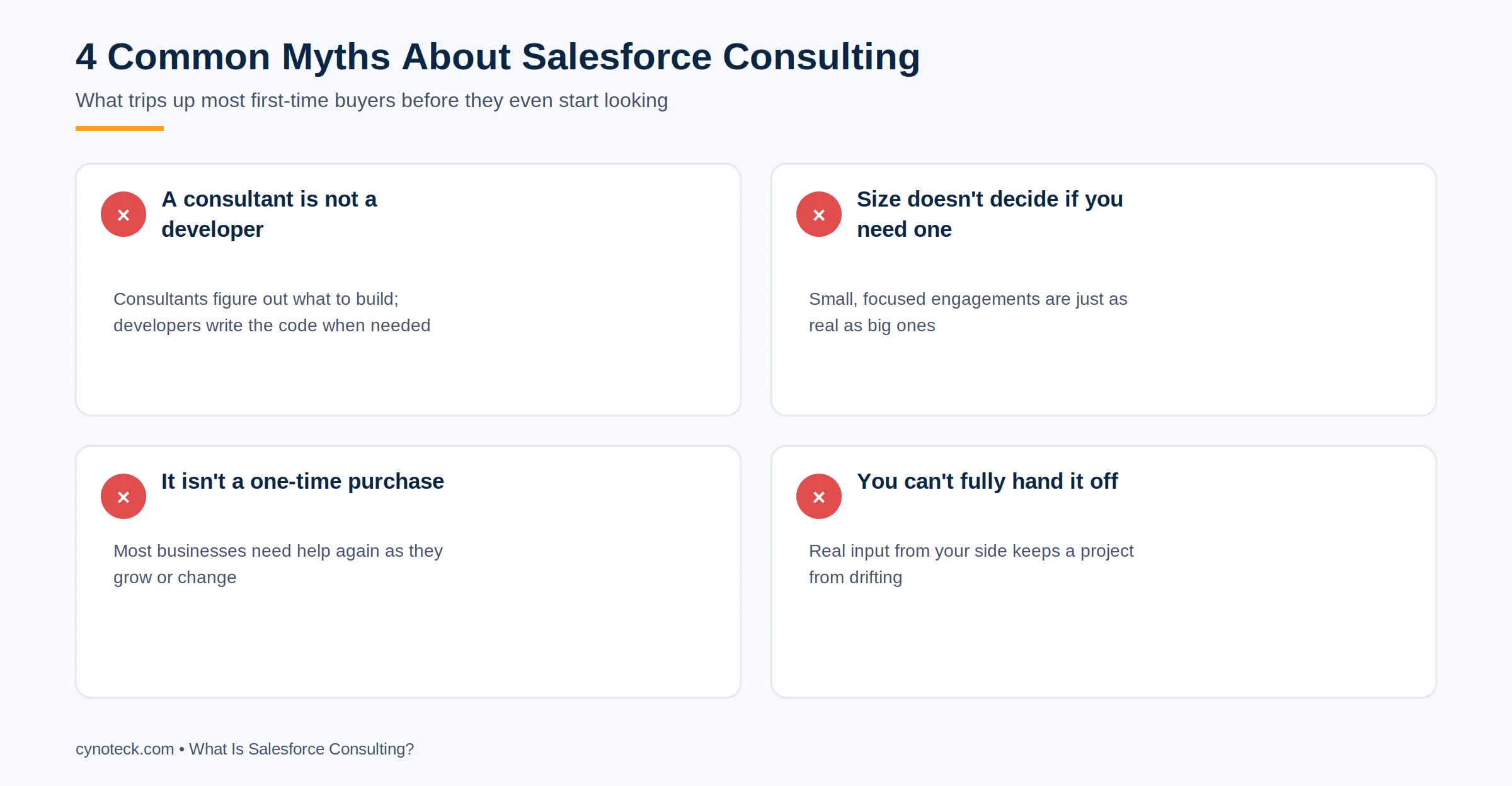
A consultant is not a developer: A developer writes code. A consultant figures out what needs to be built in the first place, and often builds it using Salesforce's no-code tools instead of writing custom code at all. Some consultants can also code; many projects don't need any.
Company size doesn't decide whether you need one: Plenty of consulting engagements involve a single person, a specific automation, or a two-week strategy sprint. The idea that consulting means a six-figure, year-long project is a leftover from how the biggest firms market themselves, not a rule about the work itself.
This isn't a one-time purchase: Buying a consulting engagement isn't like buying software. Most businesses need some level of consulting help again later, whether that's six months after launch or three years down the line when the business has changed shape.
You can't fully hand it off and forget about it: Even the best consultant needs input from your side: someone who knows the business well enough to answer questions, make decisions, and sign off on design choices. A project with no engaged stakeholder on the client side tends to drift, regardless of how good the consultant is.
Pro Tip: If a "consultant" you're talking to can't explain what they'd actually build for you in the first conversation, without you signing anything, that's worth noticing. A real discovery conversation should generate real, specific ideas, not just a sales pitch.
Need Salesforce Consulting for Your Business?
Discover how Salesforce consulting can simplify implementation, improve user adoption, and align your CRM with your business goals from the very beginning.
Talk to a Salesforce ConsultantThe Three Layers of a Salesforce Consulting Engagement
Most Salesforce consulting work happens across three layers, and knowing them helps you understand what you're paying for.
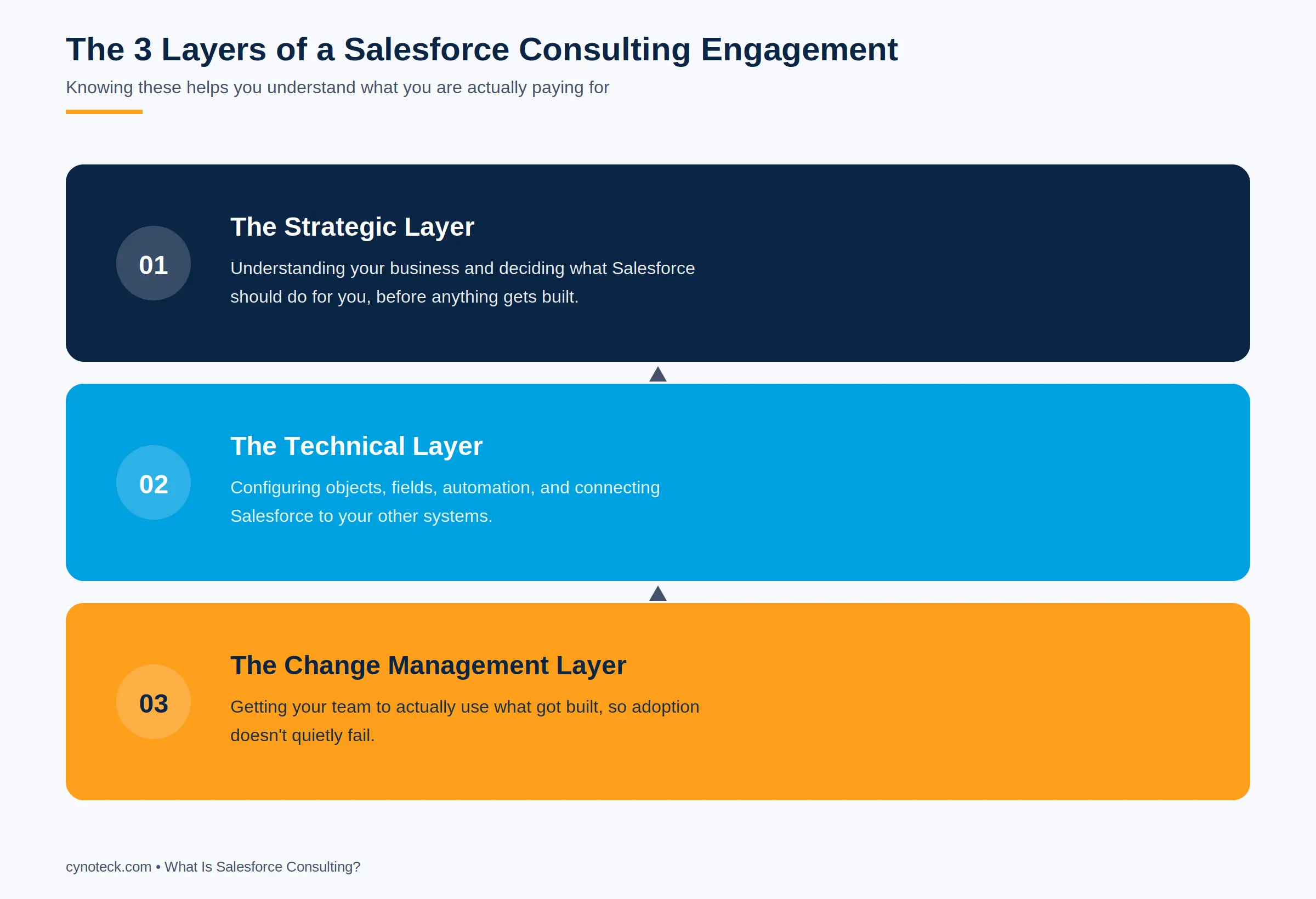
The Strategic Layer
This is the thinking part: understanding your business, mapping your current process, and deciding what Salesforce should do for you. This is where a consultant earns their fee before a single screen gets built. Skip this layer, and everything downstream gets built on a shaky foundation.
The Technical Layer
This is the build: configuring objects and fields, setting up automation, connecting Salesforce to other systems you use. This is the part most people picture when they think of "Salesforce work," but it's genuinely the smaller half of a good consultant's actual value.
The Change Management Layer
This is getting your team to use what got built. It includes training, but it's more than that: it's designing the system to fit how people already work, so adoption doesn't quietly fail six weeks after launch.
This layer is the one competitors' marketing pages almost never mention. It's usually the real difference between a Salesforce project that works and one that becomes shelfware.
Also, Read: Types of Salesforce Consulting Services Explained
Why Not Just Use Salesforce's Own Setup Tools?
Salesforce's built-in setup assistants and Trailhead training are genuinely useful, but they're built for the average business, not your specific one.
Salesforce ships with guided setup flows and an enormous free learning platform called Trailhead. For a very small, simple use case, that's often enough.
The gap shows up once your business has more than one team using the system, a sales process that doesn't match a standard template, or a need to connect Salesforce to other software you already run.
The setup wizard can get you to a working system. It can't tell you whether "working" matches how your business operates, since it has no way of knowing your specific sales cycle, team structure, or the reporting your leadership needs to see.
That gap between "technically functional" and "actually fits the business" is where consulting earns its cost.
Pro Tip: A reasonable middle ground for a very small team is to start with Salesforce's own setup tools, then bring in a consultant for a focused review a few months in, once real usage has revealed where the gaps are. |
What a Real Engagement Actually Looks Like
Here is a condensed, realistic walkthrough of a small business hiring a Salesforce consultant for the first time. A 25-person logistics company is running sales on spreadsheets, and deals are falling through the cracks because nobody has a shared view of the pipeline. They bring in a consultant.
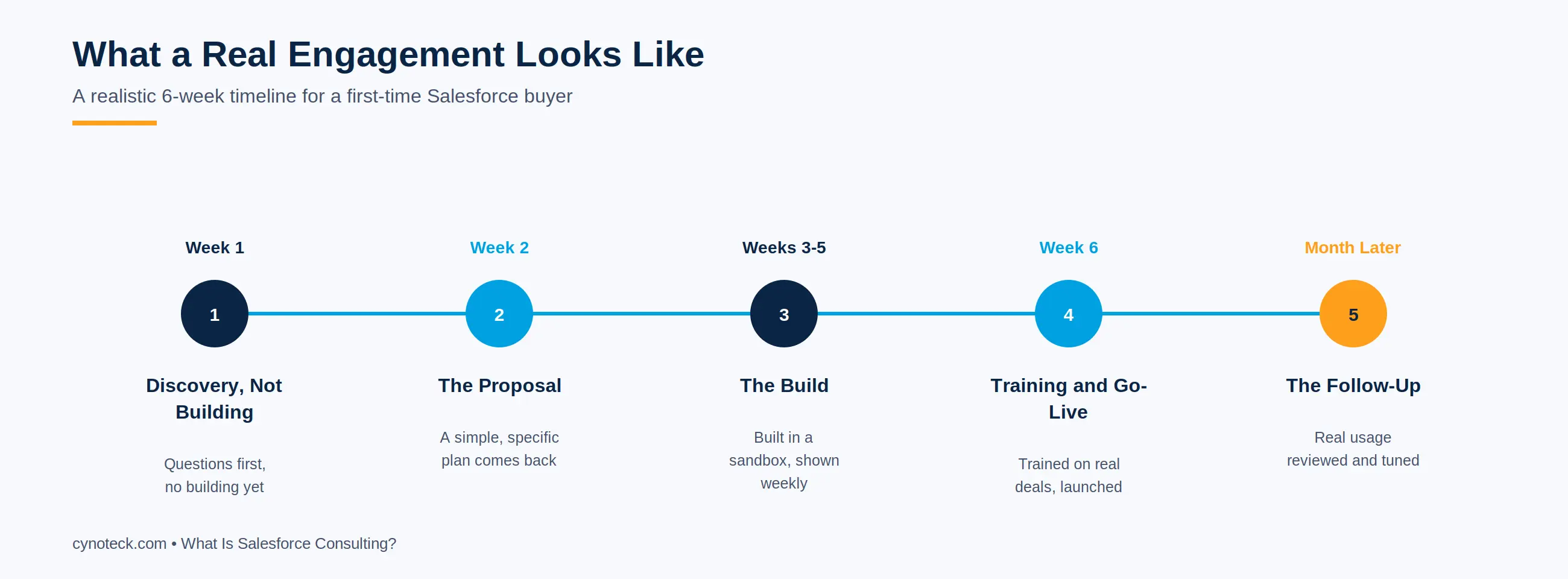
Week 1: Discovery, Not Building
The consultant spends most of the time asking questions rather than building anything. They talk to the sales team, the ops manager, and the owner separately, since each one describes the problem slightly differently.
Week 2: The Proposal
The consultant comes back with a simple proposal: a Sales Cloud setup with custom fields for shipment tracking, an automated stage-based pipeline, and a dashboard the owner can check without asking anyone for a status update.
Weeks 3-5: The Build
The build happens in a sandbox, a safe test version of Salesforce, not the live system. The sales team gets shown progress at the end of each week, not just once at the very end.
Week 6: Training and Go-Live
The team trains on the finished system, using their own real deals as examples instead of a generic demo. The system goes live the following Monday, deliberately not during their busiest shipping week.
One Month Later: The Follow-Up
The consultant checks in, looks at actual usage data, and tweaks two fields that turned out to be more trouble than they were worth in daily use.
Nothing in that timeline is unusual. It's what a properly run, modest-sized engagement looks like in practice, not a special case.
What It Costs and How Long It Takes
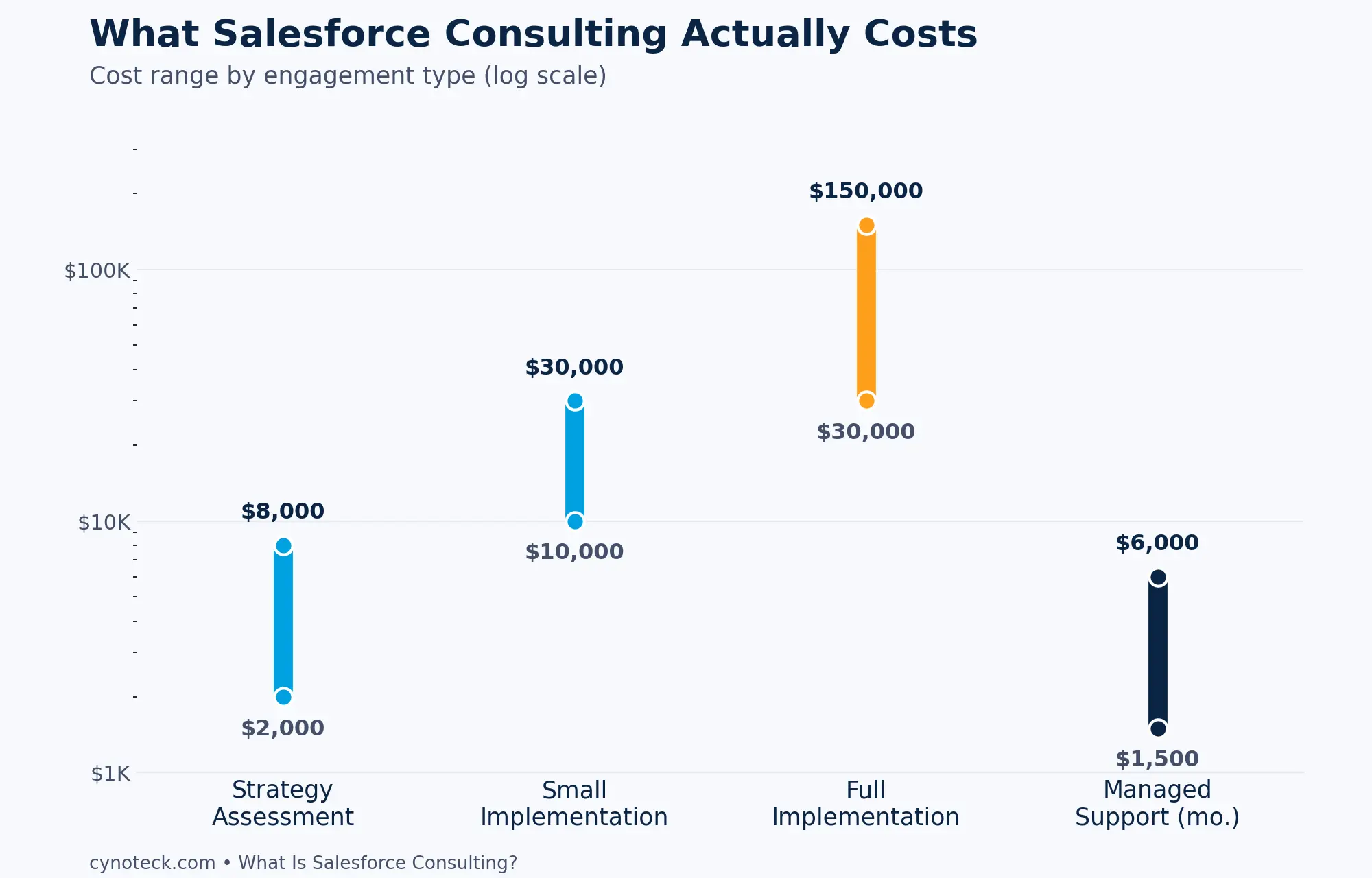
A small, focused engagement can run a few thousand dollars and a few weeks. A full implementation typically lands between $30,000 and $150,000 and takes one to four months, depending on complexity.
The honest driver of implementation cost isn't the size of your company. It's how many decisions need to get made, how many systems need to connect to Salesforce, and how much custom logic your business rules require.
A 10-person company with a genuinely unusual sales process can cost more to configure than a 100-person company running a standard sales cycle.
Engagement Type | Typical Cost | Typical Timeline |
Focused strategy assessment | $2,000 - $8,000 | 1-2 weeks |
Small implementation (single team) | $10,000 - $30,000 | 3-6 weeks |
Full implementation with integrations | $30,000 - $150,000 | 1-4 months |
Ongoing managed support | $1,500 - $6,000/month | Ongoing |
Note: Be cautious of a quote that arrives before any real discovery conversation has happened. An accurate number depends on understanding your specific situation first. |
Also, Read: Salesforce Consulting Cost Guide (2026)
Plan Your Salesforce CRM Investment
Get expert Salesforce consulting guidance to estimate project costs, define realistic timelines, and build a CRM strategy tailored to your business needs.
Schedule a Free ConsultationSigns You Need It, and Signs You Don't
The honest signal isn't your company size; it's whether your current setup matches how your team works today.
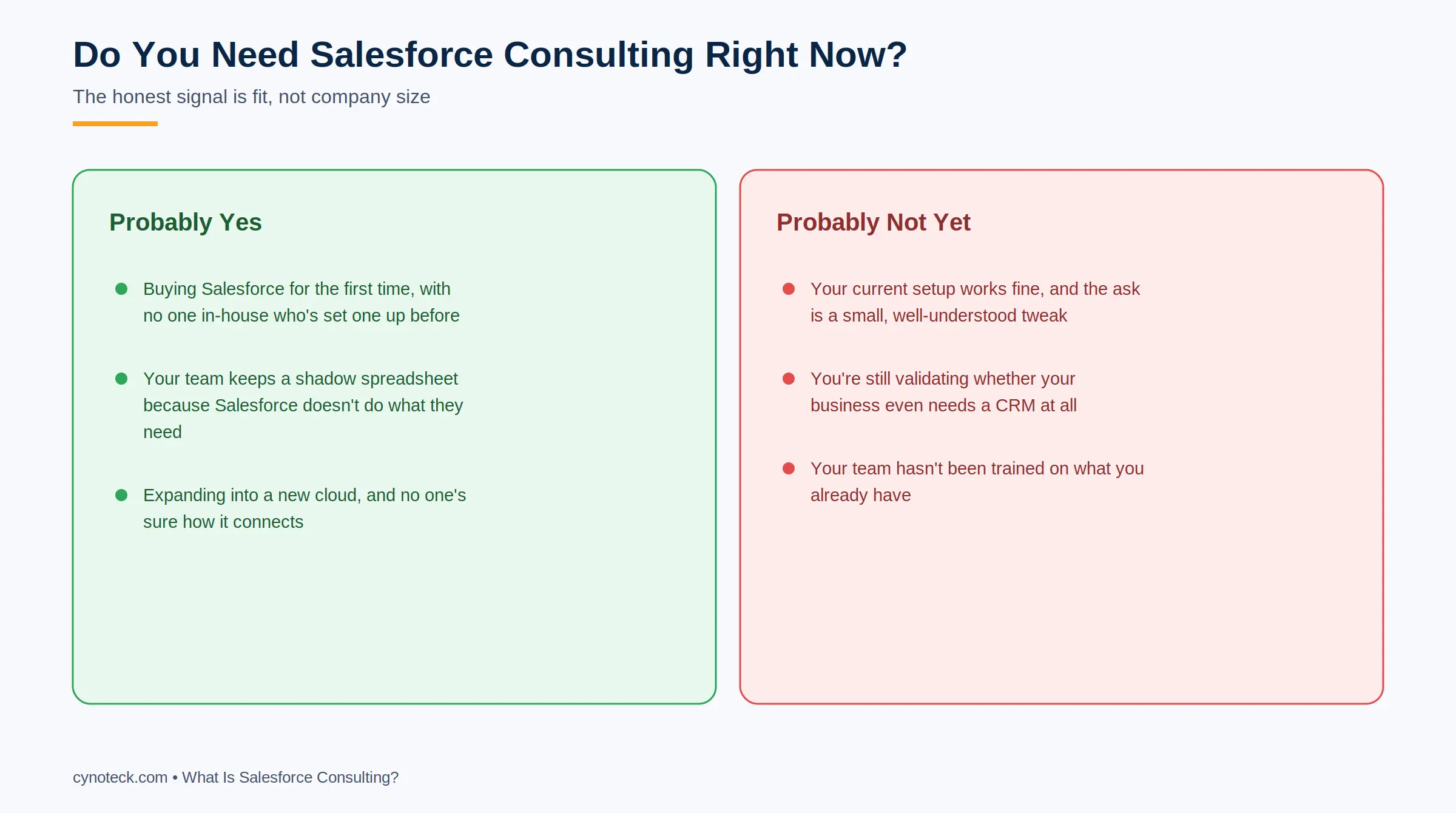
Signs You Probably Need Consulting Help
You're buying Salesforce for the first time and don't have anyone in-house who's set one up before.
Your team has started keeping a shadow spreadsheet because Salesforce doesn't meet their needs.
You're expanding into a new Salesforce cloud, and nobody's sure how it should connect to what you already have.
Signs You Probably Don't Need It Yet
Your current setup works fine, and your ask is a small, well-understood tweak your in-house admin can handle.
You're still validating whether your business even needs a CRM at all.
Your team hasn't been trained on what you already have, since more consulting won't fix an adoption problem rooted in training, not configuration.
Also, Read: The Complete Guide to Salesforce Consulting (2026)
Where the Three Layers Show Up in Cynoteck's Own Work
The strategic, technical, and change management layers described above aren't just a framework for explaining Salesforce consulting in the abstract. They're the three things we get judged on, project after project.
On the strategic layer: Discovery isn't a formality before the "real work" starts. It's usually the single biggest reason a project we take over from another vendor went wrong the first time, and it's the first thing our team spends real time on.
On the technical layer: Our consultants are certified across Sales Cloud, Service Cloud, and beyond, matched to your specific project rather than whoever happens to be free that week.
On the change management layer: This is where our 90% client retention rate actually comes from. Clients stay because the system we hand off gets used, not because of a long-term contract.
Note: As a Salesforce Select Partner with ISO 27001 certification, both of those are checked by outside auditors, not something we wrote about ourselves. |
Start Your Salesforce Journey
Partner with experienced Salesforce consulting experts to design, implement, and optimize a CRM solution that grows with your business and delivers measurable results.
Book a Free ConsultationThe Decision Is Yours Now!
If this guide answered your question on Salesforce consulting, that's genuinely the point. If it raised a more specific question about your own setup, that's the kind of thing a 30-minute conversation clears up faster than any article can.
Talk to a Salesforce Consultant Today
Frequently Asked Questions
Q: Is Salesforce consulting the same thing as Salesforce support?
Ans: No. Support keeps an existing, already-working system running. Consulting is about deciding what the system should be and building it, which usually happens before ongoing support even becomes relevant.
Q: Can a very small business realistically use Salesforce consulting?
Ans: Yes. Engagement size scales down with need. A small business might only need a few days of focused consulting for a specific automation, not a full multi-month project.
Q: Do I need to know already what I want before talking to a consultant?
Ans: No, and a good consultant expects that. Figuring out what you need is part of the job, not a prerequisite for hiring one.
Q: What happens if I hire a consultant and the result still doesn't fit my business?
Ans: This is usually a sign the strategic layer got skipped, meaning the build started before your actual process was understood. It's worth asking any consultant directly how much discovery time is built into their process before you sign anything.
Q: Is it possible to do Salesforce consulting work myself instead of hiring someone?
Ans: For very small, simple setups, yes, especially with Salesforce's own free Trailhead training. Once multiple teams, integrations, or non-standard workflows are involved, the learning curve tends to cost more time than hiring a consultant would.
Q: What's the difference between Salesforce consulting and Salesforce implementation?
Ans: Consulting is the broader umbrella term. Implementation is one specific type of consulting engagement, the part where a plan gets built and launched. A consulting relationship can include strategy work, implementation, and ongoing support all at once.
Q: Does every Salesforce consulting engagement end with new features being built?
Ans: No. Some engagements are purely diagnostic, such as a health check on an existing org, and end with a report and recommendations rather than any new build. Whether building happens depends entirely on what the discovery phase finds.
Explore comprehensive blogs, best practices, and insights from our technology experts.

 Outsource Salesforce Development or Build In-House Which is the Best for Your Business.webp)
Outsource Salesforce Development or Build In-House? Which is the Best for Your Business
Outsourcing Salesforce development vs. building an in-house Salesforce team: 2026 cost insights, salary comparisons, key benefits, challenges, and the best hiring model for your business growth.

Turning expertise into action for your business.
We are more than just developers and consultants—we are your partners in navigating the digital landscape. Let us be the engine behind your next big success while you focus on your core vision.
Explore Opportunities!