How to Improve Salesforce CRM Adoption in Your Organization? 10 Strategies

Summary: Your company bought Salesforce. Your team was trained. And somehow, reps are still working in spreadsheets three months later. This guide explains exactly why Salesforce user adoption fails and gives you 10 practical strategies to fix it, whether you are rolling out the platform for the first time or trying to recover from a go-live that did not land. |
Salesforce is the world's number one CRM platform, used by over 150,000 companies globally. But paying for licenses does not mean your team will use them. Low Salesforce user adoption is the most common reason CRM projects fail to deliver their expected results, and it costs organizations far more than the license fees they paid.
This blog covers what Salesforce user adoption means, why it goes wrong, and 10 specific strategies that will help your organization improve it. Whether you are a business leader, a Salesforce admin, or a sales manager trying to get your team on board, these steps are written for you.
Salesforce user adoption refers to how consistently and how completely your team uses Salesforce as part of their actual daily job. It is not about logging in. It is not about completing the onboarding checklist. It is about whether deals are updated in real time, cases are logged and closed within the platform, and managers make decisions from Salesforce dashboards rather than from emailed spreadsheets.
There is a difference between surface-level adoption and true behavioral adoption. A sales rep with 100% login frequency who still tracks their real pipeline in a notebook has not adopted Salesforce. A service agent who opens every case inside Salesforce, follows up through the platform, and closes it with resolution notes has.
True adoption shows up in the completeness of your CRM data, the accuracy of your pipeline reports, and whether the platform is the first place your team reaches for customer information.
49% of all CRM projects fail to achieve their planned objectives. Of those failures, 22% are directly linked to people-related issues, including poor user adoption.
Fewer than 40% of organizations using CRM software achieve end-user adoption rates above 90%.
83% of senior executives say that getting their staff to consistently use CRM software is their single biggest operational challenge.
The overall CRM failure rate sits at approximately 50%, with poor user adoption identified as the primary driver, not platform limitations.
If the stats above look familiar, the fix is usually simpler than you think. Start with a free org review and we will show you exactly where things went wrong.
Get a Free Salesforce Org ReviewMost organizations treat low Salesforce adoption as a training problem. They run a go-live session, hand out a user guide, and then wonder why engagement drops within 60 days. Training matters, but it is rarely where the problem starts.
The real causes of low Salesforce user adoption almost always come down to these three things:
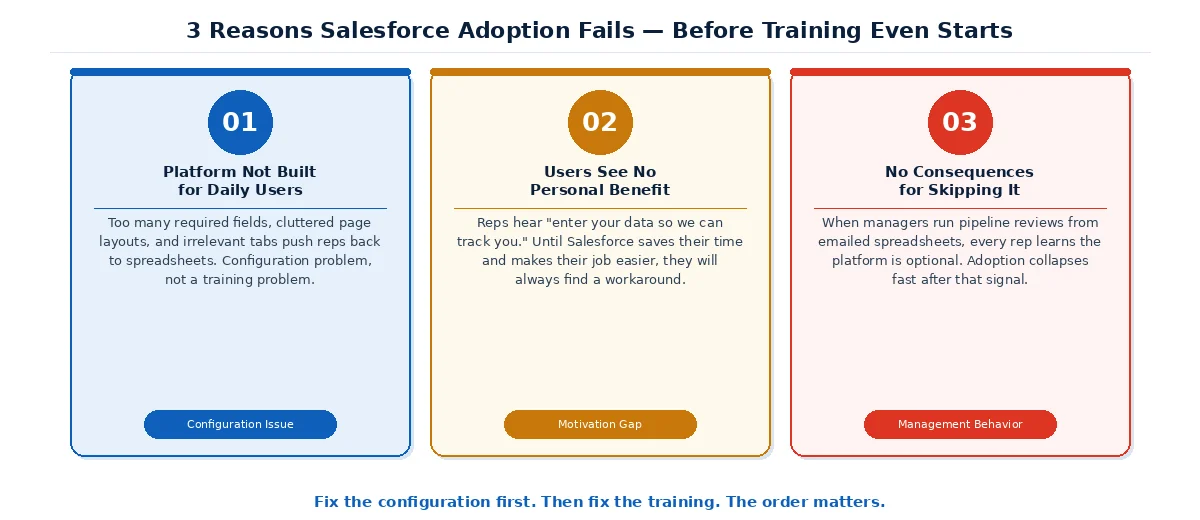
The platform was not built for daily users: Too many required fields, wrong page layouts, and irrelevant tabs push reps back to spreadsheets. That is a configuration problem, not a training problem.
Users see no personal benefit: Reps hear "enter your data so we can track you." Until Salesforce saves their time and makes their job easier, they will avoid it.
There are no real consequences for skipping it: When managers run pipeline reviews from emailed spreadsheets, every rep learns the platform is optional. Adoption collapses fast after that signal.
Before running another training session, look at how Salesforce is configured for the people who use it daily. If configuration issues trace back to the original implementation, it may be worth reviewing how to evaluate a Salesforce implementation partner before investing in further fixes, especially if you are planning a major expansion or rebuilding a broken org.
Salesforce has hundreds of features. Most of your team needs about ten of them to do their job. Launching with every object, field, and tab visible is one of the most reliable ways to overwhelm users and kill adoption before it starts.
Sit with two or three representatives from each team. Ask them to walk through a typical day. Find out what information they need fast, what they enter most often, and what they always have to look up manually. Then configure the platform around those answers.
For a sales team, this usually means:
Trimming page layouts to show only the fields actively used.
Removing required fields that serve no active reporting purpose.
Setting smart default values wherever most records will have the same entry.
A rep who opens an opportunity and sees exactly what they need, in the order they need it, is far more likely to keep that record current.
If you want to understand why Salesforce adoption is low, look at what your managers do in their weekly meetings.
A manager who starts every pipeline review by asking the team to email a spreadsheet signals to every rep that Salesforce data does not matter. That single behavior undoes months of training and configuration work.
The managers who drive the highest Salesforce user adoption share one habit:
They run everything from the platform.
Also, they open the pipeline dashboard in team meetings.
Moreover, they ask reps to pull up open opportunities live.
They say "let me check Salesforce" rather than "let me ask your rep."
Before any user training happens, brief your leadership team on the dashboards and reports they will use. Show them the three questions they should ask every week that only Salesforce data can answer. When managers are fluent and visible in Salesforce, their teams follow.
The standard Salesforce training approach is a one-time group session, a guide nobody reads, and a help email that takes three days to get a response. This does not work because people do not learn software by watching someone else use it. They learn it by doing their actual work inside it.
Effective Salesforce training and onboarding works in three layers.
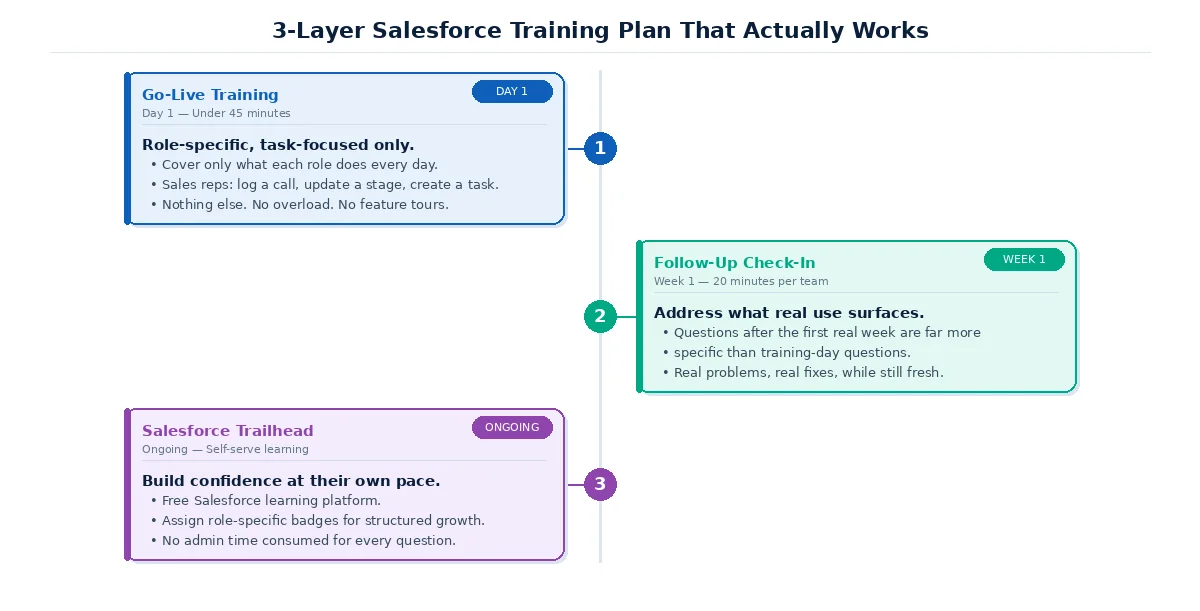
Layer 1: Role-specific go-live training, under 45 minutes. Cover only what each role does daily. Sales reps need to log a call, update a stage, and create a task. Nothing else on day one.
Layer 2: A 20-minute team check-in one week after go-live. Real use surfaces real problems. The questions users ask after their first week are far more specific and useful than anything raised in training.
Layer 3: Ongoing self-serve learning through Salesforce Trailhead. Trailhead is Salesforce's free learning platform. Assign role-specific badges so users build skills at their own pace without consuming admin time for every question.
Salesforce has built-in tools that most organizations never use specifically to support adoption. Three are worth knowing about.
A sales rep who opens Salesforce and sees their quota attainment, open opportunities, and overdue tasks has a personal reason to check it every morning. Build these dashboards before go-live and walk users through them in training. A person who sees their own numbers in the platform has a stake in keeping those numbers accurate.
Salesforce Flow is the platform's automation tool. It requires no code and removes many of the manual steps that frustrate users most. When a rep moves an opportunity to "Proposal Sent," a Flow can automatically create a five-day follow-up task and send a notification to the contact. The rep does less manual work, not more. Every step removed through Flow is one less reason to avoid the platform.
Chatter is Salesforce's built-in collaboration feed. When managers post deal updates and celebrate closed wins inside Chatter rather than a separate chat app, it creates a daily reason to open Salesforce for something other than data entry.
Data entry is the number one daily complaint from Salesforce users. When updating a record takes longer than the actual work it represents, users stop updating records.
Three practical fixes reduce this friction without reducing data quality:
Review required fields every quarter: Every required field must serve an active report, workflow, or decision. If nobody can name which report uses it, remove the requirement.
Set smart default field values: If 80% of leads share the same source, set it as the default. Users change only what differs from the norm, saving time on every record.
Enable Einstein Activity Capture: This Salesforce feature automatically syncs emails and calendar events from Gmail or Outlook to the right records. No manual logging, no missed interactions, no extra effort.
Most admins measure Salesforce adoption by counting logins. This is the least useful metric available. A user can log in daily and update nothing.
Here are the four metrics that show whether your team is working inside Salesforce.
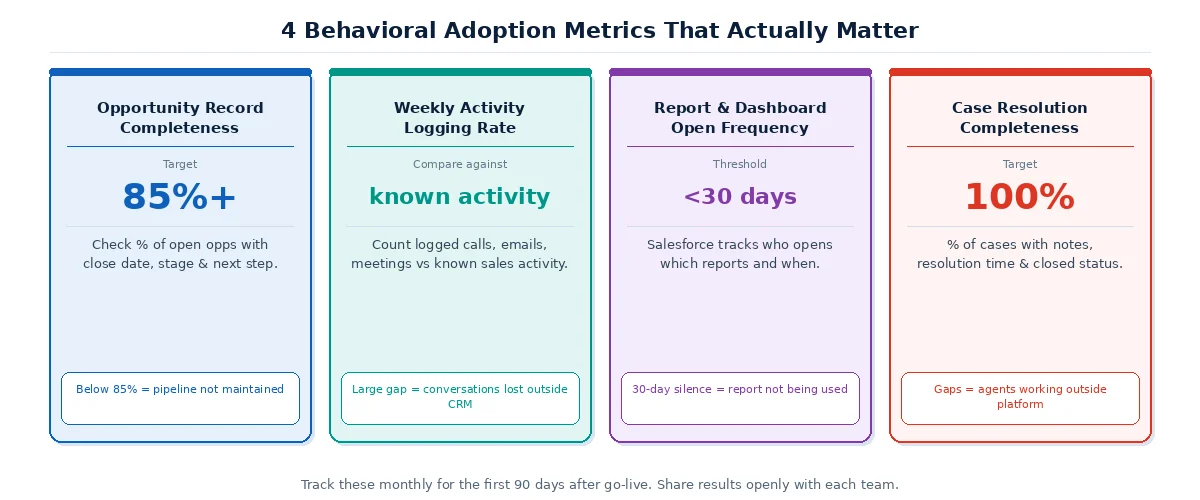
Opportunity record completeness: Check what percentage of open opportunities have a close date, active stage, and next step filled in. Target 85% or above for real pipeline health.
Weekly activity logging rate: Count logged calls, emails, and meetings against known sales activity. A large gap means conversations are happening but disappearing outside Salesforce every single week.
Report and dashboard open frequency: Salesforce tracks which reports are opened and by whom. A pipeline report unopened for 30 days is not running the business. Someone is working around it.
Case resolution completeness: For service teams, check what percentage of cases have resolution notes, resolution time, and a closed status. Incomplete cases mean agents are resolving issues outside the platform.
Salesforce adoption does not plateau. It either grows slowly or declines slowly. The difference is whether users feel the platform is working for them or against them.
The most effective maintenance habit is simple. Once a month, ask each team one question: "What is one thing in Salesforce that takes longer than it should?" Fix at least one item from the feedback. Then tell the team what changed and why.
This has two benefits:
It surfaces friction points the admin cannot see because they do not do the day-to-day work.
And it shows users that their input produces visible results.
When users see that reporting a problem leads to a fix within 30 days, they stop working around the platform and start investing in improving it.
Managers need clear guidance on what they are expected to enforce about Salesforce use. Vague expectations produce inconsistent adoption.
Define three things clearly for every manager:
First, which questions in team meetings must be answered using Salesforce data, not memory or email.
Second, what constitutes an incomplete record and when it should be flagged.
Third, what the process is when a rep consistently fails to update the platform.
When managers have specific rules to work with, they reinforce adoption consistently. Without those rules, most managers default to the path of least resistance, which is usually a spreadsheet.
A phased Salesforce rollout reduces resistance and builds confidence over time. And how you sequence that rollout depends entirely on decisions made earlier in the Salesforce implementation process. Launching the full platform on day one is one of the most common causes of adoption failure.
Start with the core objects each team uses daily:
For a sales team, that means Accounts, Contacts, Opportunities, and Tasks.
For a service team, that means Cases, Knowledge Articles, and Queues. Let users build confidence with these before introducing additional features.
Add new capabilities based on team feedback rather than a fixed schedule. When users ask for a feature because they understand how it would help them, adoption of that feature is significantly higher than when it is added on a timeline they had no input on.
There are situations where low Salesforce adoption is a symptom of a deeper configuration problem that internal resources cannot fix on their own.
Consider bringing in a certified Salesforce consulting partner when adoption has not improved after 60 days of focused effort:
When your org has significant technical debt from a previous implementation that is creating ongoing friction.
When a major expansion such as adding Service Cloud is being planned.
When admin turnover has left the configuration in a state that no longer reflects how the business operates.
A certified partner audits your existing configuration, identifies the specific friction points driving resistance, and rebuilds the parts of the org that are creating the most problems. This is usually faster and more cost-effective than trying to solve adoption issues through training alone when the underlying configuration is actively working against the user.
Cynoteck is a Salesforce CREST Partner with 500+ projects delivered. We start with your org, identify what is blocking adoption, and fix it.
Book a Free Adoption ConsultationCynoteck is a Salesforce CREST Partner with 500+ projects delivered across 15+ countries. We help businesses in healthcare, financial services, retail, and manufacturing fix Salesforce user adoption through targeted configuration, role-based training, and change management support.
We do not start with training. We start with understanding why your team is not using the platform. Contact us today to get reliable Salesforce implementation support services and improve Salesforce user adoption.
Low Salesforce user adoption is not a technology failure. It is almost always a combination of configuration friction, missing personal value for the user, and management behavior that signals the platform is optional.
Start by understanding why your team is resisting. Fix the configuration friction first. Build role-specific training that covers only what each person needs on day one. Make sure your managers are running meetings from Salesforce dashboards, not spreadsheets. Measure behavioral adoption, not login rates. And review feedback from your users every month.
If adoption has not moved after 60 to 90 days of focused effort, that is the right time to bring in a certified Salesforce partner who can audit your org and give you a clear, prioritized plan.
Ans: Salesforce user adoption refers to how consistently and completely your team uses Salesforce as part of their daily work. It matters because when adoption is low, CRM data becomes unreliable, pipeline forecasts become inaccurate, and the business loses the visibility it paid for. According to Forrester Research, 49% of CRM projects fail to achieve their planned objectives, with poor user adoption as the leading cause.
Ans: Most organizations target 80% or above on behavioral metrics such as opportunity record completeness and weekly activity logging. According to CSO Insights, fewer than 40% of organizations achieve end-user adoption rates above 90%, which means sustained progress toward 80% behavioral adoption already puts you ahead of the majority of comparable businesses.
Ans: Training alone rarely fixes low adoption. If the platform has too many required fields, page layouts that do not match how teams work, or no visible connection to how performance is discussed in meetings, users will find ways around Salesforce no matter how good the training was. Start with a configuration review before investing more in training.
Ans: Adoption is a shared responsibility. Your Salesforce admin owns the configuration. Your managers own daily enforcement through their behavior in meetings and reviews. Your leadership team owns the expectation that Salesforce is the system of record. When adoption accountability sits with the admin alone, it almost always falls short because the admin has no authority over how managers run their teams.
Ans: Look beyond login rate. The most meaningful adoption metrics are opportunity record completeness, weekly activity logging rate compared to known sales activity, report and dashboard open frequency, and case resolution completeness for service teams. These tell you whether your team is working inside Salesforce, not just whether they opened it.
Ans: Bring in a partner when adoption has not improved after 60 days of internal effort, when your org has significant configuration issues from a previous implementation, or when you are planning a major expansion. A certified partner can identify the specific friction points driving resistance and fix them faster than trying to work through them without specialized experience.
 Outsource Salesforce Development or Build In-House Which is the Best for Your Business.webp)
Outsourcing Salesforce development vs. building an in-house Salesforce team: 2026 cost insights, salary comparisons, key benefits, challenges, and the best hiring model for your business growth.
We are more than just developers and consultants—we are your partners in navigating the digital landscape. Let us be the engine behind your next big success while you focus on your core vision.
Explore Opportunities!