How Do You Implement Salesforce? A Step-by-Step Guide (2026)
Salesforce implementation means configuring the platform around how your business works. Most failures trace back to low user adoption, messy data, and vague goals, not to the platform itself. A typical mid-market implementation takes three to six months and costs $30,000 to $150,000, while small businesses can often go live in six to eight weeks for less.
Salesforce implementation works when you make the right decisions in the first few weeks, not when you rush straight to configuration. Nearly 70% of CRM implementations fail to meet expectations not because Salesforce is the wrong tool, but because teams skip or rush those early decisions.
This guide walks you through every step of the Salesforce implementation process, including the ones most companies skip, so you can build a system your team uses.
Salesforce implementation means configuring the platform to match how your business actually works, not how a demo makes it look. That includes setting goals, cleaning data, building workflows, connecting other tools, training your team, and keeping the system healthy after launch.
Most people hear "Salesforce implementation" and think it is a technical setup job. It is a lot more than that.
The Salesforce implementation process is about making the platform work the way your business works. Not the way a sales demo makes it look. This isn't how it works for someone else. The way your teams operate every day.
That means setting real goals before anyone opens a configuration screen. It means cleaning your data before moving it. It means building workflows your people will follow, connecting Salesforce to the other tools your business runs on, training people for the actual tasks they do, and keeping the system healthy long after launch day.
Here is a simple way to think about it. Buying a Salesforce license is like buying an empty building. The implementation is everything that turns it into a place your team wants to work. Done right, it becomes the center of your sales, service, and marketing operations. Done wrong, it becomes the most expensive tool your company owns that nobody opens.
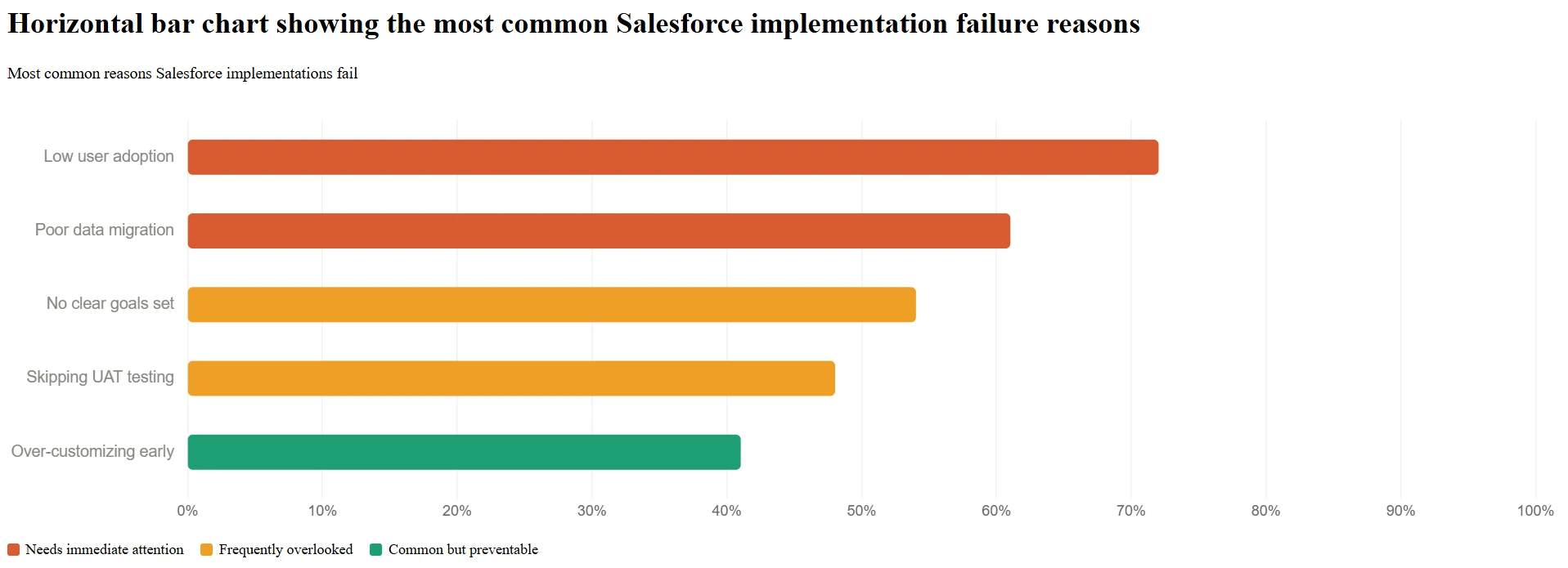
Most failures trace back to low user adoption, messy data nobody accounted for, and vague goals set before the project started, not to a flaw in the platform itself.
Before getting into the steps, it is worth understanding what actually goes wrong. The same problems show up in failed projects across all company sizes, industries, and budgets.
The most common failure is low Salesforce user adoption. Teams stop using the system weeks after launch because they were left out of the build, trained too late, or handed something that does not match how they work. Next comes bad data. Most companies have no idea how messy their records are until they try to move them. Duplicate contacts, missing fields, outdated entries, and inconsistent formats all show up the moment migration starts.
Beyond data, two more problems keep coming up. The first is vague goals. Phrases like "better visibility" and "improve sales" sound fine, but give your team nothing specific to build toward. Without clear, agreed-upon outcomes before configuration starts, you end up with a system that technically runs but fixes nothing. The second is building too much too fast. Piling on customizations before anyone has used the system creates technical debt. That means every future change gets slower and more expensive before you even know what the team actually needs.
Every one of these problems can be spotted early. The process below is designed to catch them before they cost you.
Get a free Salesforce health check from our certified experts and find out exactly what needs fixing before it costs you more.
Book a Free Consultation TodayYou're choosing between three approaches: Big Bang (one go-live date for everyone, fastest but riskiest), a phased rollout by team or department, or a hybrid. The right choice depends on your data quality, team size, and risk tolerance.
This is a decision that shapes every timeline, budget, and risk conversation that follows. There are three ways to roll Salesforce out, and choosing the right one matters more than anything else.
Big Bang means one go-live date for the whole organization. All teams, all data, all workflows switch over at once. The old system goes dark. This is the fastest and lowest-cost path, but the risk is high. If something breaks, it breaks for everyone at the same time. This approach works best for smaller businesses with clean data, simple processes, and a well-prepared team before launch day.
Phased Rollout breaks the project into stages, usually by team or department. Sales goes live first, then customer service, then marketing. Each phase gives you time to learn what works, fix what does not, and carry those lessons into the next group. Most large organizations go this route because each team gets proper support before the next one starts.
Parallel Running means your team uses both Salesforce and the old system at the same time until the switch is confirmed stable. It is the safest option and the most expensive. Running two systems side by side costs money and creates confusion, but it gives you a fallback if something goes wrong. This approach suits regulated industries and businesses where data accuracy cannot be compromised.
Big Bang | Phased | Parallel | |
Speed | Fastest | Moderate | Slowest |
Risk | Higher | Lower | Lowest |
Cost | Lower | Moderate | Highest |
Best for | SMBs, simpler setups | Large orgs, multiple teams | Regulated or data-heavy environments |
Pick your deployment approach before any planning conversation happens. It sets the timeline, the budget, and the level of change management your team needs.
Talk to our Salesforce team for 30 minutes and walk away knowing exactly which rollout approach fits your size, timeline, and budget.
Book a Free Strategy CallThe process runs from setting goals and assembling the right team, through data migration, configuration, integration, testing, and training, to go-live and ongoing improvement. Skipping an early step is the most common reason later steps go wrong.
Setting up Salesforce does not have to feel overwhelming. Here are the 10 steps that take you from zero to a fully working CRM your team will actually use.
Every failed implementation has one thing in common. The configuration started before the goals were clear. Teams spend weeks building something without ever agreeing on what a good outcome looks like.
Before a single setting gets changed, bring your key decision-makers into one room. That means sales leadership, department heads, IT, and the people who will use the system every day. These questions need written answers before anything else moves forward:
What is specifically broken right now? Not "improve sales." What exact problem needs fixing?
Which teams will use Salesforce daily, and for which tasks?
What does success look like at 90 days? At 12 months?
Which tools must Salesforce connect to?
Where does the current data live, and who is responsible for cleaning it?
Write the answers down. This becomes the project brief that guides every decision from here on. If a configuration choice or an integration idea cannot be connected to a goal in that document, it should probably wait until Phase 2.
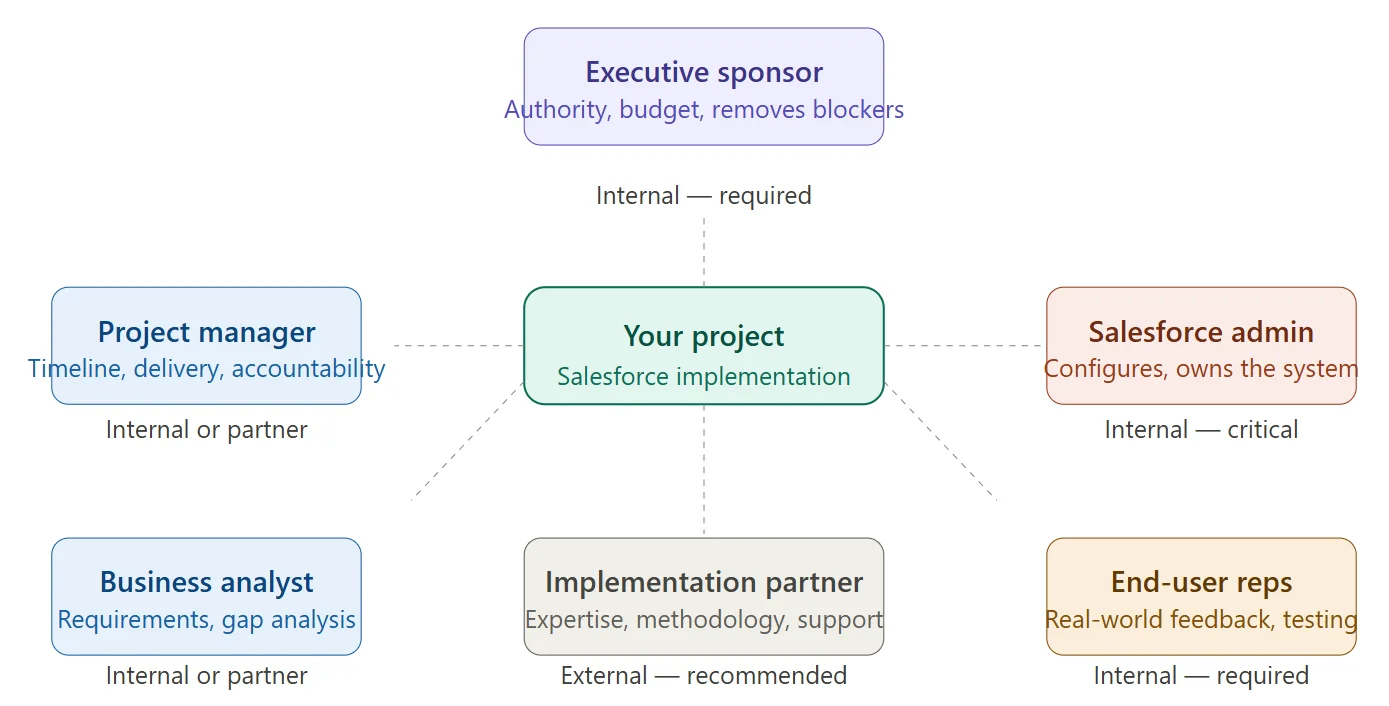
Salesforce implementation is not an IT task to hand off to a vendor and check in on at launch. It needs the right internal people, with real decision-making authority, involved from day one.
Every project needs an executive sponsor who can make final calls and remove obstacles. Without one, every disagreement becomes a delay. You need a project manager who owns the timeline and keeps people accountable. You need a Salesforce admin who will own the system long after the implementation partner is gone. This role is not optional. Please ensure at least one person from each team uses the platform daily, as the people doing the actual work will catch problems that no one else spots.
If your team has no prior Salesforce experience, this is the right time to bring in a certified Salesforce implementation partner, but choosing the right one is a decision that deserves as much care as the implementation itself. A good partner brings real methodology, product knowledge, and experience in recognizing problems early. What a partner cannot replace is your internal admin. Without that person, you pay for outside help every time a field label needs to change.
Salesforce is not a single product. It is a platform with multiple clouds, edition tiers, and add-ons. Picking the right combination is not just a purchasing decision. It shapes what your team can build and how complicated the project becomes.
Here is a plain-English breakdown of the most commonly used Salesforce products:
Sales Cloud is for sales teams. It handles leads, pipelines, sales forecasting, and deal tracking. This is where most businesses start.
Service Cloud is for customer support teams. It manages cases, support tickets, SLA tracking, and knowledge bases.
Marketing Cloud is for marketing teams. It runs email campaigns, customer journeys, and audience segmentation.
Revenue Cloud (CPQ) is for businesses with complex pricing. CPQ stands for Configure-Price-Quote. It handles contracts, pricing rules, and quote management.
Experience Cloud is for building portals. It lets you create online spaces for customers, partners, or employees.
For the edition tier, Enterprise is the most common pick for mid-sized and large organizations. It includes workflow automation, API access to enable Salesforce to share data with your other tools, and flexible user permissions. Professional edition works for simpler setups with fewer customization needs.
One thing worth planning for now is Agentforce, Salesforce's AI platform. It lets businesses set up AI agents that handle tasks like service case resolution, lead qualification, and routine follow-up on their own, without someone doing it manually. Salesforce closed over 3,000 paid Agentforce deals in its most recent fiscal quarter. Even if you are not using AI features on day one, the way you design your data model during implementation will decide how easily you can switch them on later. Bring this into the planning conversation with your partner early, not after go-live.
If there is one step where implementations go wrong most often, it is this one. Moving data looks simple on paper. Export from the old system and import into the new one. In practice, it is the step that uncovers every data problem your business has been sitting on for years.
Most companies discover their records are a mess the moment they try to export them. Duplicate contacts with slightly different names. Accounts with half the fields empty. Leads last touched three years ago, and nobody deleted them. Different teams, each typing things differently for years. All of it shows up in the export file at once.
The right approach is to treat data migration as a mini-project of its own. Start by listing every system that holds customer records: old CRM, spreadsheets, ERP, and marketing tools. Then clean the data before you move it, not after. Remove duplicates, fill in critical gaps, and make the formats consistent in the source system, where it is easier to fix. Map your old fields to their Salesforce equivalents so records land in the right place. Run a test migration on a small batch first, check the results carefully, fix anything that landed wrong, and then move the full dataset.
For the actual migration, Salesforce's Data Import Wizard works for simple, single-object imports of up to 50,000 records. Data Loader handles larger and more complex jobs. MuleSoft supports ongoing, high-volume data syncs between multiple systems. Whatever tool you use, one rule applies: never move raw, dirty data. Whatever mess goes in becomes what your team deals with every single day.
This is the hands-on build phase. Your admin and implementation team take everything from Step 1 and build it inside Salesforce. It is the longest part of most projects, and the discipline that matters most here is knowing the difference between configuration and customization.
Configuration means using the tools Salesforce already gives you. Page layouts, user roles, sales stages, validation rules, automated flows. No code needed. This is where your admin should spend most of the build time. Customization means writing code, usually Apex or Lightning Web Components, to do something the built-in tools cannot do. It requires a developer, costs more, takes longer, and creates something you will maintain for years.
Building custom code too early is one of the most common mistakes in any Salesforce project. Every line of code you write today is a line someone has to manage tomorrow. Start with what Salesforce already does. Please move to custom development only after real-world use shows that the configuration genuinely cannot meet the need.
This phase also sets up user roles, profiles, and permission sets. In plain terms, that means deciding who can see which records and who can change what. Getting this right during the build prevents serious security headaches after the system goes live.
Most configuration mistakes happen in the first four weeks. Our certified admins review your setup and catch problems before they slow you down.
Request An Expert ReviewA Salesforce setup that operates in isolation is only part of the solution. Your team gets much more out of the platform when it is connected to the other tools they use every day. That means customer data flows automatically between systems, without anyone having to enter the same information twice.
The most common connections businesses set up include:
Email: Microsoft Outlook, Google Workspace / Gmail
ERP systems: SAP, Oracle, Microsoft Dynamics
Marketing automation: HubSpot, Marketo, Pardot
Collaboration: Slack, Microsoft Teams
Accounting: QuickBooks, NetSuite
Customer support: Zendesk, Freshdesk
How you connect these systems depends on the complexity of the data flows. Salesforce has native connectors for many popular tools, which is the simplest place to start. The AppExchange marketplace has pre-built integrations that are often faster and cheaper than building something from scratch. MuleSoft handles enterprise-level needs where data flows are large, complex, or go both ways. Custom API development is for systems without a pre-built option.
Just a heads-up: integration planning should be in Step 1, not Step 6. Integrations discovered late in the project cause delays and budget problems more reliably than almost anything else. If a system needs to talk to Salesforce, that conversation has to happen before any configuration begins.
Skipping proper testing is one of the most expensive shortcuts a company can take. A problem caught in testing takes an hour to fix. The same problem caught on launch day costs you something harder to get back: your team's trust in the system.
The most important type of testing is User Acceptance Testing (UAT). This is where real users from each team, not just IT or your admin, work through real tasks in a sandbox environment. A sandbox is a separate copy of your Salesforce setup that is completely cut off from live data. Nothing done there touches real records. Every change should go through a sandbox before reaching the system your team actually uses.
To run UAT well, write test scenarios based on the real tasks your team handles every day. Have sales reps work through their actual pipeline steps. Have support agents handle a real case type from beginning to end. Write down every problem, every confusing moment, and every gap between what was built and what the team needs. Fix the critical issues. Then get a formal sign-off from each department lead before the go-live date is confirmed. Run performance testing, security testing, and integration testing at the same time, so nothing is left to the last minute.
This step gets cut short more than any other, and it is where the difference between a successful implementation and a failed one becomes most obvious. You can set up a technically perfect Salesforce environment and still have it fall apart if your team is not properly prepared. Research shows that 53% of organizations say better CRM training would have made their system far more effective.
Generic training is the main problem. A sales rep, a sales manager, and a system admin all need to learn different things. Putting everyone in the same session and running through a product overview leaves every group with gaps. Good training is built around specific roles, uses real scenarios in a sandbox instead of slide decks, and happens close enough to launch day that people remember it when they need it.
Salesforce Trailhead is a free learning platform provided by Salesforce. It has role-specific learning paths, guided modules, and hands-on exercises. It is genuinely useful and worth using. Simple reference guides for the tasks your team does most often are also helpful. Something a person can open in 30 seconds when they get stuck, instead of submitting a support ticket.
One move that consistently makes a real difference is naming a Salesforce Champion on each team. This is someone who undergoes deeper training and becomes the first person their colleagues ask when they have a question. People go to a familiar face before they go to IT. A champion inside the team drives adoption in a way that no formal training schedule can match.
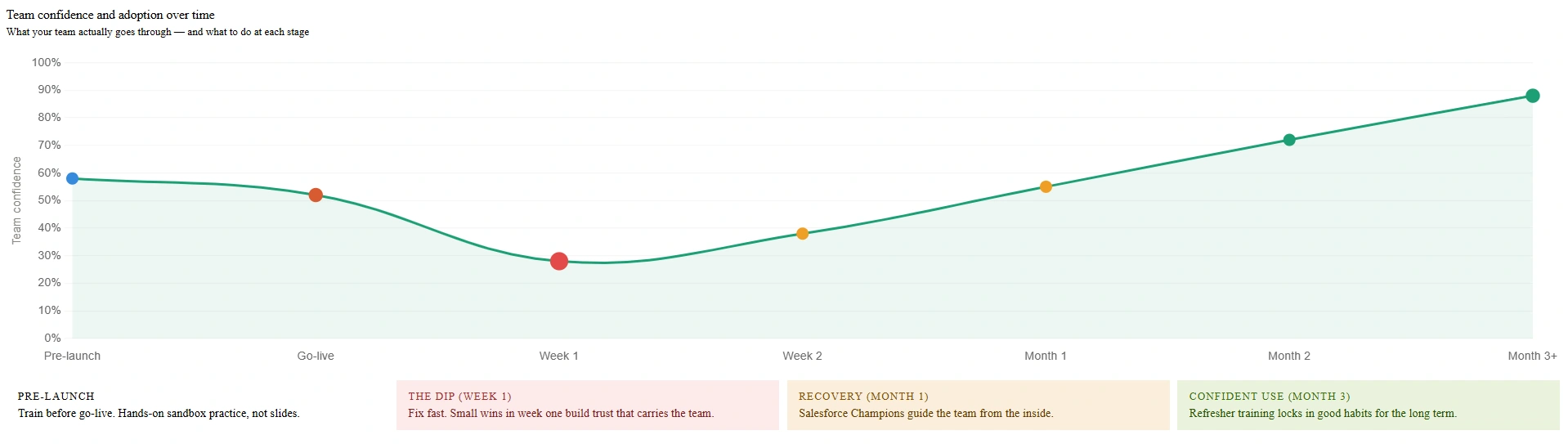
Most implementations treat go-live like a destination. It is better to treat it like a handoff point that needs its own preparation and, wherever possible, a gradual approach.
Rather than turning everything on for everyone at the same time, start with one team. Support them closely for the first few weeks. Fix what breaks. Take note of what they learn. Then apply all of that to the next team's launch. A typical phased go-live for a mid-market business might bring Sales Cloud live in month one, add Service Cloud in month two, and roll out marketing automation and integrations from month three onward.
Before opening access on launch day, go through this checklist:
Final data load is complete, and every record has been checked.
All integrations are live and tested in the production environment.
User roles and permissions have been confirmed correct.
Every user knows who to call or message if something does not work.
Admin and IT support are available and ready to respond on the same day
Launch day is not the end of the project. It is the start of a different kind of work. The first 30 to 90 days after go-live are when usage patterns form. This is when people decide, often without thinking, whether Salesforce is something that helps them or something they work around.
Pay close attention to how the system is being used. Login rates, record creation, and dashboard activity all tell you where things are working and where people need support. Give users a simple way to report problems and make sure that feedback reaches someone who can act on it. Small fixes in the first few weeks build confidence. Slow responses in that same window erode it just as quickly.
Also plan for Salesforce's three annual platform updates: Spring, Summer, and Winter. Please have your admin review the release notes before each release and test anything significant in a sandbox first. An untested update reaching your production environment is how strange behavior appears without warning on a random workday.
As your team gets more comfortable, this is also the right time to look at Agentforce more seriously. AI features, such as automated service responses, lead scoring, and pipeline recommendations, work best when your core data and workflows are already solid. Rushing into AI before the foundation is stable creates confusion, not results.
Most mid-market implementations take three to six months from kickoff to go-live. Small business projects can finish in six to eight weeks, while large, multi-cloud enterprise builds often run nine to twelve months or longer.
A typical Salesforce implementation for a mid-market business takes three to six months from kickoff to go-live. Smaller, simpler projects for small businesses can go live in six to eight weeks. Large enterprise projects with multiple clouds, complex integrations, and heavy customization often run nine to twelve months or longer.
The single biggest factor affecting the timeline is not Salesforce complexity. It is how fast your organization makes decisions. When key people are hard to reach, requirements keep changing, or data cleanup takes longer than expected, timelines stretch, no matter how capable the implementation team is.
Phase | Typical Duration |
Discovery and Planning | 2 to 3 weeks |
System Design | 1 to 2 weeks |
Configuration and Customization | 4 to 8 weeks |
Data Migration | 2 to 4 weeks |
Integrations | 2 to 6 weeks |
Testing and UAT | 2 to 3 weeks |
Training | 1 to 2 weeks |
Go-Live and Stabilization | 2 to 4 weeks |
Budget $5,000-$30,000 for a small business, $30,000-$150,000 for mid-market, and $150,000-$500,000+ for large enterprise implementations. These figures cover partner fees, migration, integrations, and training, not Salesforce's own licensing.
Company Size | Typical Cost Range |
Small (under 25 users) | $5,000 to $30,000 |
Mid-market (25 to 200 users) | $30,000 to $150,000 |
Large enterprise (200+ users) | $150,000 to $500,000+ |
These figures cover partner fees, data migration, integrations, and training. They do not include Salesforce licensing, which is a separate ongoing subscription cost. For a full breakdown of what drives these numbers up or down, see our complete guide to Salesforce implementation costs.
Here is what most people miss when comparing quotes. The cheapest implementation is rarely the most cost-effective one. A project that needs to be rebuilt 18 months later because of poor adoption, bad data, or a system nobody trusts ends up costing far more than getting it right the first time. When you review implementation partners, track record, and business understanding, the lowest price on the proposal matters less.
Work with a Salesforce partner if your team has no prior implementation experience, the project involves multiple clouds or complex integrations, you're on a tight deadline, or a past implementation already stalled or went over budget.
You can run a Salesforce implementation internally if your team has the experience and the time. For most organizations, a certified partner is faster, lower risk, and more cost-effective in the long run.
Work with a partner if any of the following apply:
Your team has no prior experience implementing Salesforce.
Your project involves multiple clouds, custom development, or complex integrations.
You are working against a tight deadline and cannot afford a slow learning curve.
A previous Salesforce implementation stalled, went over budget, or did not deliver
A good partner brings a proven methodology from dozens of similar projects, the ability to catch problems before they grow, and dedicated people across admin, developer, and project management roles. A strong partner also sets up your internal team to own the system after launch, rather than keeping you dependent on outside help for every small change.
Cynoteck Technology Solutions is a certified Salesforce implementation partner with hands-on experience across Sales Cloud, Service Cloud, and custom Salesforce development. We work with your team from the first planning conversation through go-live and beyond, building a setup that fits how your business actually runs.
Cynoteck is a certified Salesforce implementation partner. Tell us about your project and we will tell you honestly what it takes.
Start Your Implementation TodaySuccessful Salesforce implementations agree on goals before configuration starts, involve real users during the build, and measure success by adoption, not just the go-live date. Struggling ones rush early stages, skip testing, and treat go-live as the finish line.
Successful implementations share a few habits. They agree on goals before configuration starts, involve real users during the build, clean their data before migration, and measure success by adoption, not just whether go-live happened on schedule.
The ones that struggle rush the early stages, skip testing, and treat go-live as the finish line instead of the starting point.
None of this is unavoidable. It is predictable. The difference almost always comes down to the process and the people involved at each stage.
If you are planning a Salesforce implementation and want a team that has done this across dozens of organizations, talk to Cynoteck. We will give you a straight answer on what your project involves, what it will realistically take, and what to expect at the end.
A mid-market project typically takes three to six months. Smaller implementations can go live in six to eight weeks. Enterprise rollouts with complex integrations and multiple clouds usually run nine to twelve months.
Low user adoption. Teams stop using the system because they were not involved in building it, were trained too late, or received a setup that does not match how they actually work. The fix is to bring end users into the process early and treat adoption as just as important as the technical build.
A sandbox is a separate copy of your Salesforce environment that is completely cut off from your live system. Nothing you do there affects real records or real users. Every change should be built and tested in a sandbox before it reaches the system your team works in every day.
Yes, if you have experienced Salesforce admins and the project is relatively simple. For anything involving custom development, multiple integrations, or multiple clouds, a certified partner reduces risk and almost always delivers a better result.
Agentforce is Salesforce's AI platform. It lets businesses set up AI agents that handle tasks like resolving service cases, qualifying leads, and sending follow-up messages without someone doing it manually. The way you design your data model and workflows during implementation will determine how easy it is to use Agentforce later. It is worth planning for now, even if you are not turning it on right away.
Sales Cloud is for sales teams managing leads, pipelines, and deals. Service Cloud is for support teams managing cases, tickets, and service agreements. Many businesses implement both. If that describes yours, plan for both from the start. Connecting them later is harder than designing them together up front.
 Outsource Salesforce Development or Build In-House Which is the Best for Your Business.webp)
Outsourcing Salesforce development vs. building an in-house Salesforce team: 2026 cost insights, salary comparisons, key benefits, challenges, and the best hiring model for your business growth.
We are more than just developers and consultants—we are your partners in navigating the digital landscape. Let us be the engine behind your next big success while you focus on your core vision.
Explore Opportunities!