How Salesforce Helps Small Businesses Grow: Benefits, Use Cases, and Implementation Guide (2026)
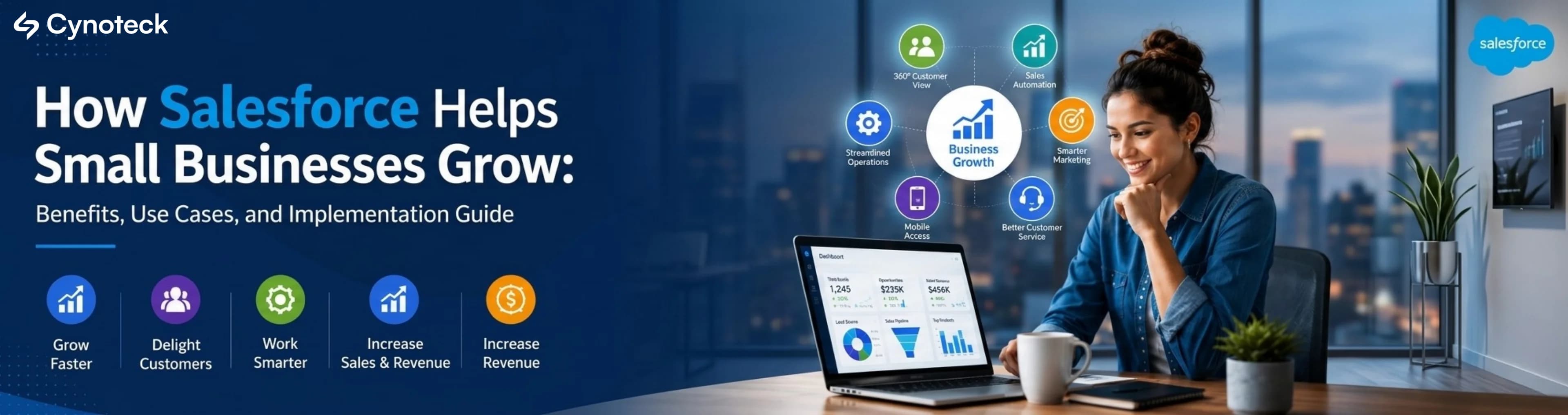
Salesforce CRM gives small businesses one shared system for sales, marketing, and support, replacing scattered spreadsheets and disconnected tools. Pricing starts free for 2 users, with Starter Suite at $25/user/month covering sales, service, marketing, and a built-in AI assistant.
Running a small business means managing sales, customer follow-ups, marketing, and support all at once. Most small business owners handle all of this using spreadsheets, separate email tools, and a growing list of mental reminders. That system works at five customers. It breaks at fifty.
Salesforce for small businesses is a cloud-based CRM, which stands for Customer Relationship Management. In simple terms, it is a platform that brings your sales, customer data, marketing, and support into one place. Instead of jumping between five different tools to check on a lead, your whole team can see everything from one screen.
This guide explains what Salesforce does for small businesses, which features matter most, real examples by industry, honest pricing, and a step-by-step guide to getting started.
If you are already losing leads, missing follow-ups, or working across too many disconnected tools, you do not need to wait until the end of this guide. Tell us where your business is today and we will show you exactly how Salesforce can fix it, what it will cost, and how long it will take to get up and running.
Start the ConversationSalesforce CRM stores every customer interaction- calls, emails, sales, and complaints- in one place, so anyone on your team can see a customer's full history instantly instead of asking around. |
A CRM is a tool that stores all your customer information in one place and tracks every interaction your team has with them. Salesforce is the world's most widely used CRM platform. It is cloud-based, so you don't need to install any software. Your team can access it from any device, anywhere.
In simple terms: every time someone on your team contacts a customer, whether it is a phone call, an email, a sale, or a complaint, that interaction is saved in Salesforce. The next time anyone on your team speaks to that customer, they can see the full history right away.
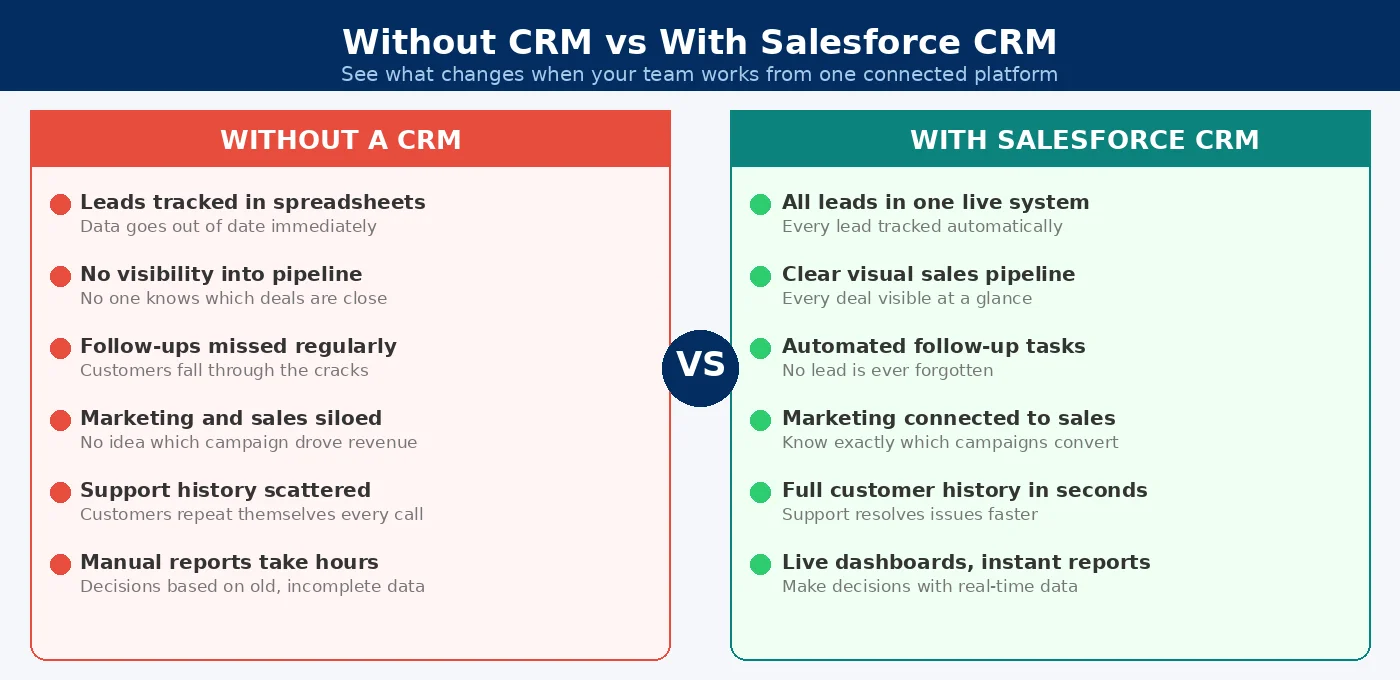
This is what makes Salesforce so useful for small businesses. A small team cannot afford to lose leads, repeat work, or miss follow-ups. Salesforce removes those problems by keeping everyone on the same page.
Salesforce centralizes customer data, gives you a clear pipeline view, automates repetitive work, connects marketing and sales, speeds up support, simplifies reporting, and scales as you grow seven benefits that mostly come from replacing disconnected tools with one shared system.
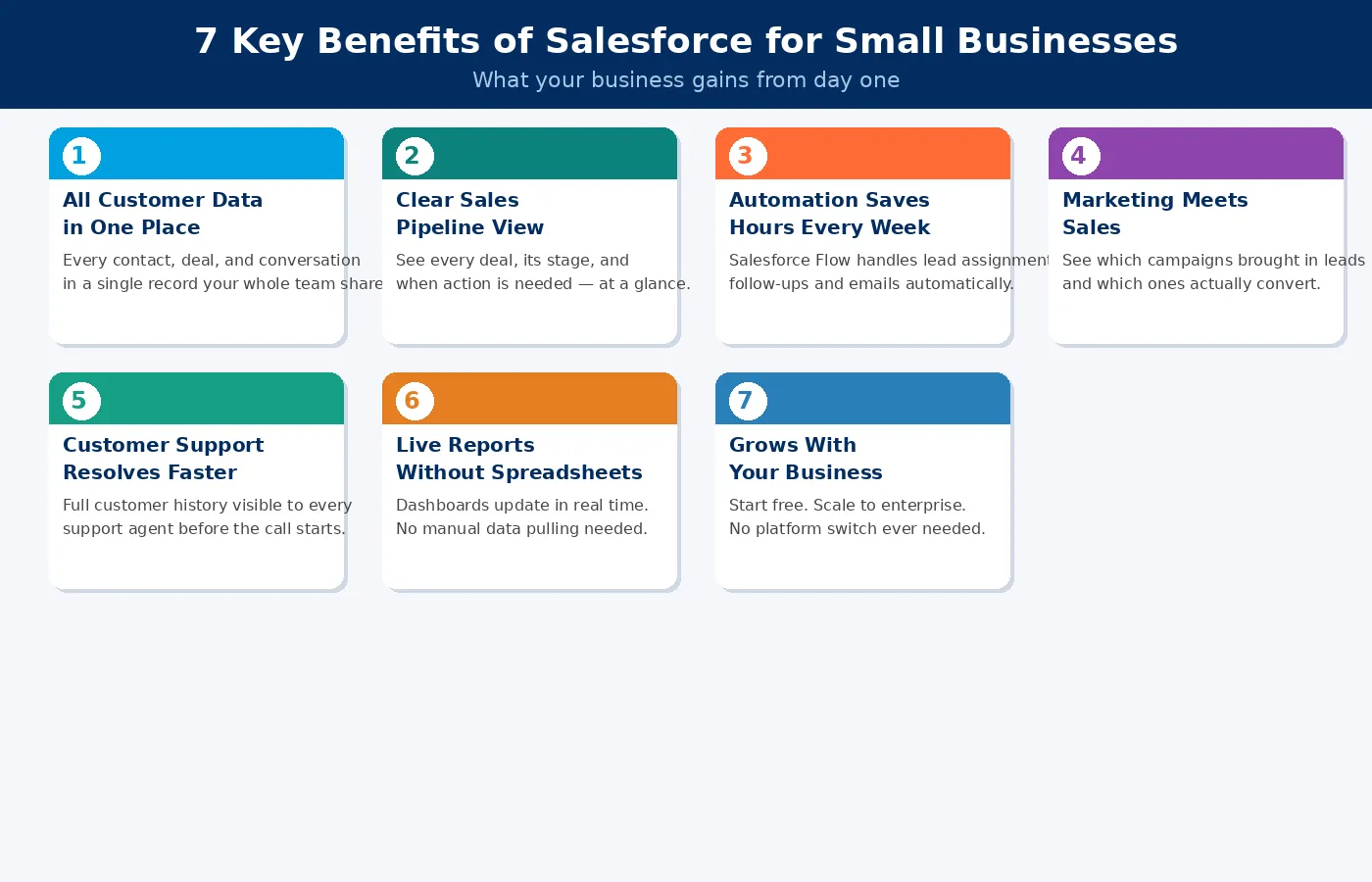
Most small businesses use a mix of different tools. One for email, one for contacts, one for billing, and a spreadsheet for tracking deals. The problem is that these tools do not connect with each other. Your support team does not know what your sales rep told a customer last week. Your sales rep does not know the customer already called in with a complaint.
Salesforce stores every contact, deal, email, and conversation in a single customer record. Your whole team sees the same information at the same time. This means fewer mistakes, faster responses, and customers who feel genuinely taken care of.
Without a CRM, your sales pipeline usually lives in someone's memory or on a spreadsheet that no one keeps fully up to date. Deals go quiet. Follow-ups get missed. You often do not know if you are on track for the month until the month is nearly over.
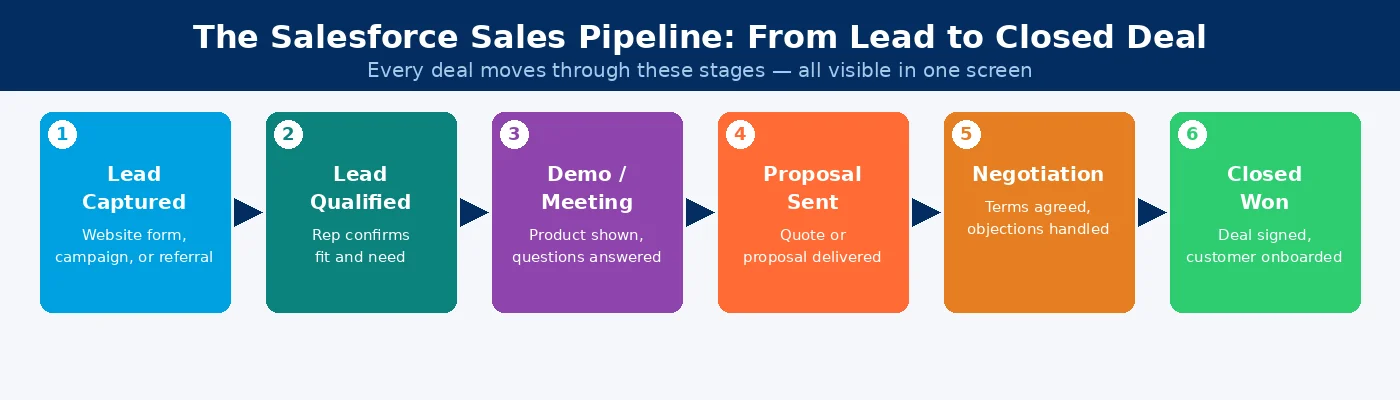
Salesforce gives you a visual pipeline that shows every deal, which stage it is in, who owns it, and when the next action is due. Sales managers can spot stuck deals before they go cold. Business owners can forecast revenue with real data. Reps always know what they should be doing next.
Small teams simply do not have time to manually send follow-up emails, assign incoming leads to reps, update deal stages, or send renewal reminders. Salesforce Flow is Salesforce's built-in automation tool. It handles all of that automatically based on rules you set up once.
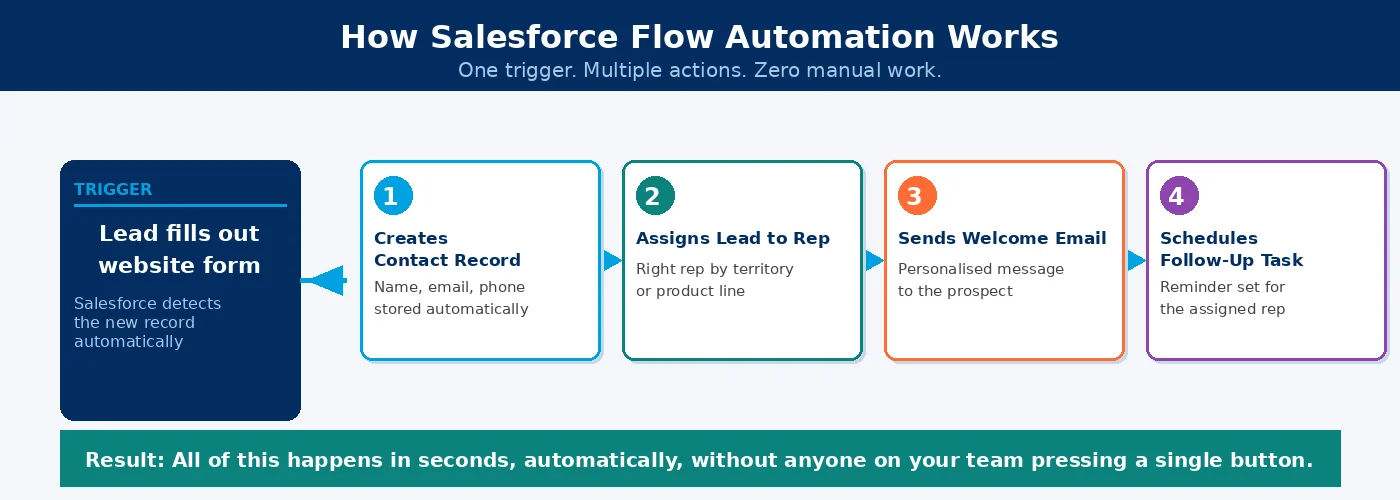
For example, when a new lead fills out your website form, Salesforce can automatically create a contact record, assign the lead to the right rep, send the prospect a welcome email, and schedule a follow-up task. All of that happens without anyone on your team pressing a button. This is how a small team can work with the speed and output of a much bigger one.
Most small businesses run marketing and sales as two completely separate activities. Marketing sends emails but has no idea which leads ended up buying. Sales calls leads but does not know which emails they opened or which pages they visited.
Salesforce connects your marketing activity directly to your sales pipeline. You can see which campaign brought in a specific lead, whether they opened your emails, and where they are in the buying process. This helps your sales reps contact the right people at exactly the right time, and it helps your marketing team understand which campaigns are bringing in revenue.
When a customer contacts your support team, the person answering the call needs to understand the full history fast. What did they buy? When did they last contact you? What was promised to them before? Without a CRM, that information is scattered across inboxes and notes on different computers.
Salesforce Service Cloud is Salesforce's customer support tool. It gives every support agent a complete view of the customer before they even start the conversation. Every case is tracked from the moment it is opened to the moment it is resolved. Nothing gets lost, and no customer has to explain their problem more than once.
One of the biggest practical benefits of Salesforce for small businesses is how easy it makes reporting. Instead of pulling data from five different tools and building spreadsheets manually, Salesforce creates reports and dashboards automatically using the data already in the system.
You can see how many leads came in this week, which sales rep is closing the most deals, how long it takes to resolve a support case on average, and which products are generating the most revenue. All of this information updates in real time. Business owners can make decisions based on real data, not guesswork.
Many small business owners worry about buying a tool they will quickly outgrow. Salesforce was designed to grow with you. You can start free with two users. Add your sales team on the Starter Suite at $25 per user per month. Move to Pro Suite as your team expands. When you reach fifty or more employees and need advanced automation, AI features, and complex integrations, Salesforce can still handle it all without you ever needing to switch platforms.
This means all the data, workflows, and customer history you build in year one carries forward into year five. That continuity is one of the most underrated benefits of choosing Salesforce from the start.
For a small team, two features matter most: Salesforce Flow, which automates tasks like lead assignment and follow-ups, and Einstein AI, which scores leads and flags deal risk based on historical patterns.
Not every Salesforce feature is relevant to a small team. These are the ones that deliver the most day-to-day value.
Salesforce Flow is the platform's automation engine. It handles repetitive tasks automatically once you set up the rules. It handles tasks like assigning leads, sending emails, updating records, and creating follow-up tasks. For a small team, this is the feature that saves the most time every single week.
Einstein AI is Salesforce's artificial intelligence layer built into the platform. It gives your sales reps lead scores and deal risk alerts based on historical patterns. In plain terms, it tells your team which leads are most likely to convert and which deals need attention right now. For a small sales team, this works like having an experienced sales coach built directly into the tool.
Agentforce is Salesforce's newer AI agent capability, first launched in 2024 and significantly expanded in 2025 and 2026. Agentforce agents can handle routine sales and service tasks on their own. They can qualify leads, answer common customer questions, and schedule follow-ups without a human needing to be involved every time. For small businesses with limited staff, this extends what a small team can realistically deliver.
AppExchange is Salesforce's marketplace of pre-built apps and integrations. Need to connect Salesforce to your accounting software, your e-signature tool, or your project management platform? Thousands of ready-made connections are available. Most small businesses do not need custom-built integrations at the start. AppExchange covers the most common needs out of the box.
Salesforce Reports and Dashboards turn your live data into visual charts and summary tables without any formulas or manual work. Business owners and team managers can check the state of the business at any moment. No waiting, no building spreadsheets.
Salesforce starts free for up to 2 users with basic contact management. Most small businesses begin on Starter Suite at $25 per user per month, which includes sales, service, marketing, commerce tools, Slack, and a built-in AI assistant.
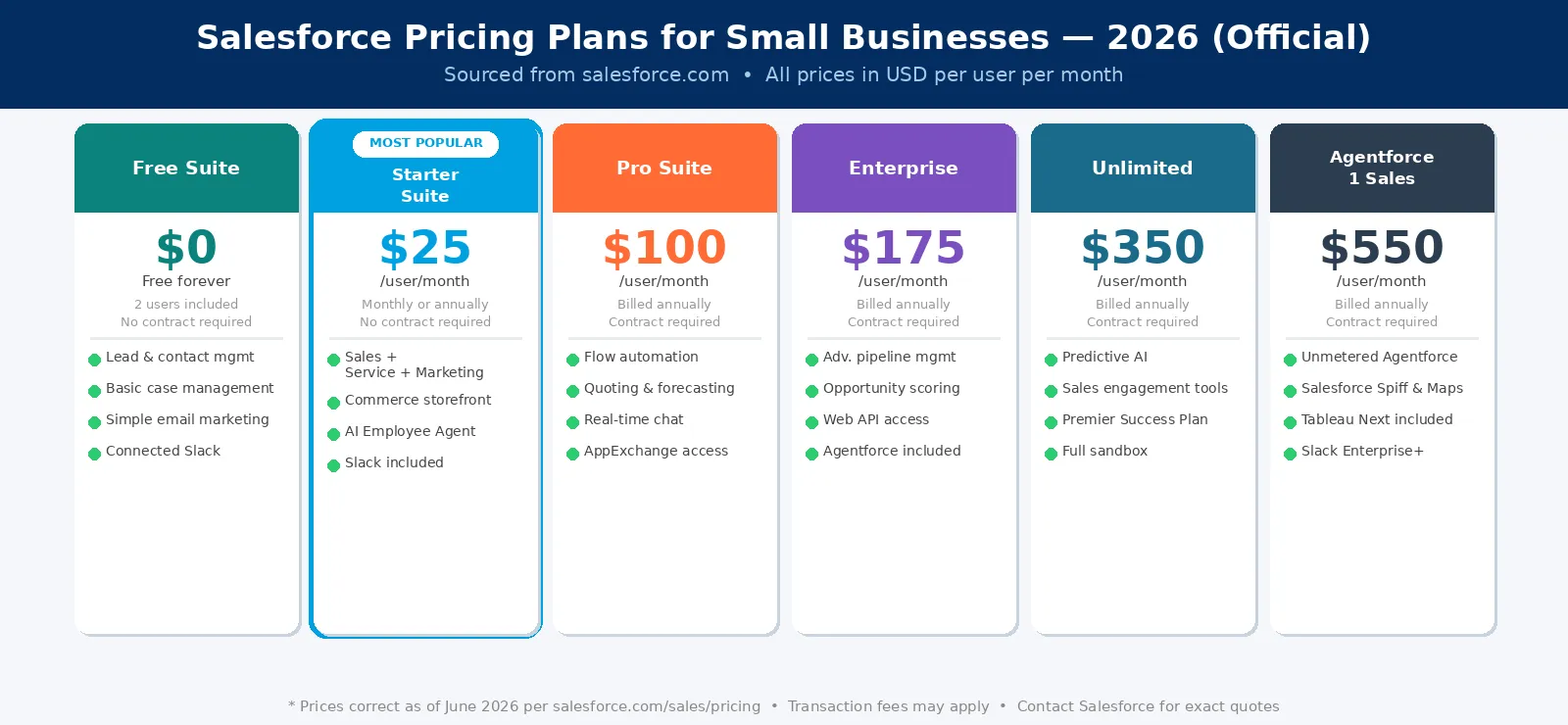
Free Suite is completely free for up to 2 users. It includes basic contact management and a simple sales view. This is a useful starting point for very early-stage businesses that want to try the platform before committing.
Starter Suite costs $25 per user per month with no user cap. It can be billed monthly or annually, with no contract required. It includes sales, customer service, marketing, commerce tools, Slack, and a built-in AI assistant. This is where most small businesses begin. It covers everything a growing team needs without being overwhelming.
Pro Suite costs $100 per user per month with no user cap. It requires an annual contract. It adds Salesforce Flow automation, sales quoting and forecasting, real-time chat, deeper customization, and full AppExchange access. This is the right plan for businesses with a growing sales team and a more complex sales process.
Enterprise costs $175 per user per month, billed annually. It includes everything in Pro Suite plus advanced pipeline management, forecasting, opportunity scoring, conversation intelligence, full web API access, and Agentforce. Most businesses move to this plan when they grow beyond 20 to 30 people.
Unlimited costs $350 per user per month, billed annually. It adds predictive AI, sales engagement tools, conversation intelligence, the Premier Success Plan, and a full sandbox environment. This is designed for fast-scaling businesses with high complexity and larger teams.
Agentforce 1 Sales costs $550 per user per month. It includes AI-powered autonomous agents that work alongside your team, handling routine tasks automatically. This plan is designed for businesses that want AI actively working in their sales and service processes.
One important point: the license cost is separate from the implementation cost. For small businesses, setting up Salesforce correctly typically costs between $5,000 and $20,000 as a one-time investment. Read our detailed Salesforce implementation cost guide for a full breakdown by business size and project type.
Choosing the wrong plan is one of the most common mistakes small businesses make. You either pay for features you do not need yet, or you start on a plan that limits you within six months. Our certified Salesforce consultants work with small businesses every day. We will look at your team size, your sales process, and your goals, and tell you exactly which plan makes sense right now and what your setup would actually cost.
Get a Free Plan RecommendationMarketing agencies track client retainers and deliverables, retail businesses follow up with repeat customers automatically, and similar patterns show up across real estate, healthcare, and tech startups, each adapting the same core system to their own sales process.
Different types of small businesses use Salesforce in different ways. Here are the most practical examples.
A ten-person marketing agency uses Salesforce to manage every client relationship, track retainer renewals, and record every call, email, and deliverable against the right client account. Account managers can review the full history before any client meeting without having to chase emails or ask colleagues.
A small online store uses Salesforce to track repeat customers, send follow-up emails after purchases automatically, and manage customer service queries in one place. When a customer emails about a missing delivery, the support agent can see the full order history instantly without switching between tools.
A small property agency uses Salesforce to capture leads from multiple listing websites, assign them to the right agent, track viewing appointments, and send automatic follow-ups to prospects who did not convert. Agents spend time with clients rather than managing their own spreadsheets.
A private clinic uses Salesforce Health Cloud, which is Salesforce's healthcare-specific module, to manage patient records, appointment follow-ups, and referral tracking. Every patient interaction is visible to the full care team in one place.
A software startup uses Salesforce to manage free trial users converting to paid accounts, track customer health scores, and automate renewal reminders before subscriptions lapse. The sales team can see which trial users are most likely to convert based on their product usage, brought into Salesforce from the product's own data.
Successful implementations start by writing down the specific problems you're solving, not the platform's features. From there, map your sales process, clean your data before import, and roll out features gradually instead of all at once.
Many small businesses get Salesforce wrong because they skip planning and jump straight into the platform. Here is a process that works.
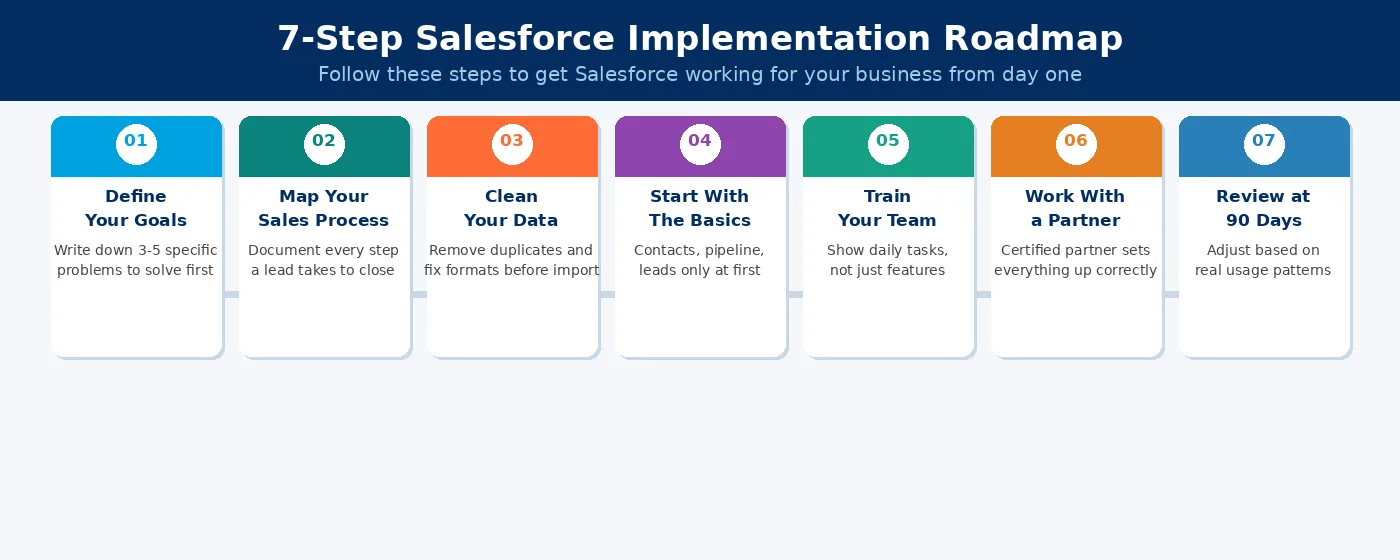
Before you touch the platform, write down three to five specific business problems. For example: "We lose track of leads after the first call" or "We have no idea which marketing campaign brings in the most revenue." Your implementation should solve those specific problems. If you do not define them first, you end up with a system that has many features and solves none of your actual needs.
Salesforce models your sales process as a series of stages from first contact to closed deal. Before you build anything, write down every step a lead takes in your business before they become a customer. This becomes your Salesforce pipeline. The more accurately this reflects how your business works, the more useful the system will be.
Poor data quality is the most common reason Salesforce implementations fail. Before you import any contacts or records, clean your spreadsheets. Remove duplicate entries. Fill in missing fields. Make sure phone numbers, email addresses, and company names follow a consistent format. Clean data going in means accurate reports coming out.
Salesforce has hundreds of features. Do not try to turn them all on at once. Start with the core: contacts, accounts, leads, and your sales pipeline. Once your team uses those comfortably, introduce automation. Then reporting. Then marketing tools. A phased approach builds confidence and drives genuine adoption. Trying to go live with everything at once usually leads to confusion and low usage.
The biggest factor in whether Salesforce succeeds in a small business is whether the team uses it. Run a training session focused on the specific tasks each person will carry out in the platform every day. Show them how it makes their individual job easier. Adoption starts with people seeing personal value, not just being told it is good for the company.
If your team goes back to spreadsheets after go-live, our guide on Salesforce user adoption strategies covers 10 specific steps to fix it.
For most small businesses, working with a certified Salesforce partner is the smartest investment in the process. A good partner sets up the platform correctly from day one, builds the automation your team needs, connects Salesforce to your other tools, and trains your staff. Not sure how to evaluate one? Our guide on how to choose a Salesforce implementation partner gives you a full vetting framework.
Three months after going live, sit down and review how the system is being used. Are reps recording their activities? Are the reports showing you the information you need? Are leads moving through the pipeline correctly? Small adjustments at the 90-day mark prevent bigger problems at the 12-month mark.
We have implemented Salesforce for small businesses across industries including professional services, real estate, retail, healthcare, and technology. We handle everything: data migration, pipeline setup, automation, integrations, and team training. You focus on running your business. We make sure Salesforce works for it.
Talk to a Salesforce Implementation ExpertHubSpot's free tier suits very early-stage teams under five people with a simple sales process. Salesforce becomes the stronger choice once your team grows past 20 to 30 people or your sales process has multiple stages.
This is the question small businesses ask most often when comparing CRM platforms. Here is a clear, honest comparison of Salesforce vs HubSpot for small businesses.
HubSpot has a genuinely useful free tier for very early-stage businesses with basic needs. It is quicker to set up without technical help and less expensive at the entry level. If you have fewer than five people and a simple sales process, HubSpot free is a reasonable place to start.
Salesforce is the better long-term choice when your team is growing beyond 20 to 30 people, your sales process has multiple stages or product lines, you need deep customization that matches exactly how your business operates, or you want AI capabilities built into your CRM from the foundation up.
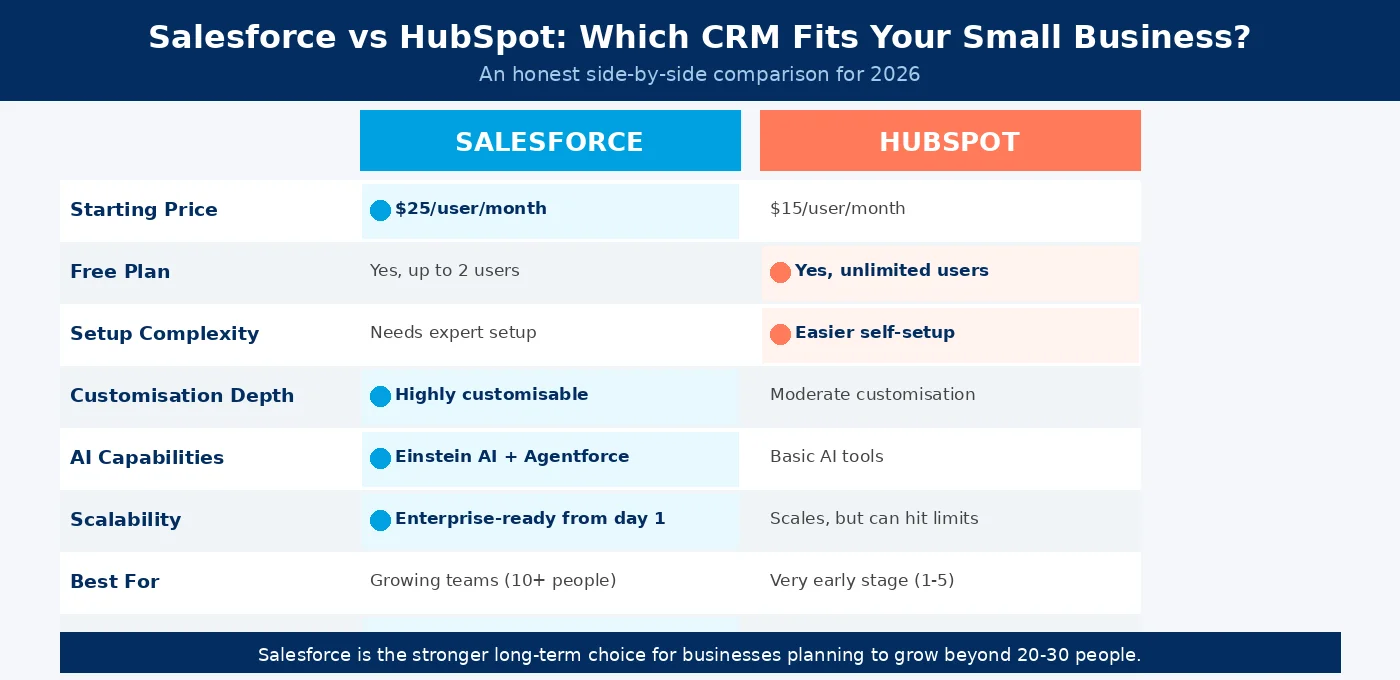
The key difference comes down to where you want to be in three years. Many businesses start on HubSpot and eventually migrate to Salesforce as they grow. Starting on Salesforce and setting it up correctly from day one means you avoid that migration entirely.
The most common mistakes are buying too many licenses before the team is ready, importing messy data, and turning on too many features at once; all three make the system harder to use, not easier.
Knowing what to avoid will save you time, money, and frustration.
Buying too many licenses before the team is ready: Start with the users who will genuinely use the platform from day one. Add more licenses once the system is working and proving its value.
Importing messy data: Bringing in duplicate, incomplete, or inconsistently formatted records makes every report unreliable from day one. Clean your data before the import.
Turning on too many features at once: The more you try to configure before going live, the longer the setup takes and the harder the system is for new users to learn. Start with the essentials and build from there.
Not assigning a system owner: Salesforce works best when one person in your business is responsible for maintaining it, managing users, and keeping data clean. This does not need to be a full-time role, but it must be someone's clear responsibility.
Choosing a partner based only on certifications: A partner with the right badges but no experience working with small businesses in your sector can still set Salesforce up in a way that does not match how you work. Always ask to see examples of similar business setups before you engage anyone.
Salesforce fits if your sales process has more than one step, you're losing track of leads, or your team wastes time on manual work. It's probably not worth it yet if you're a solo operator with fewer than ten contacts.
Salesforce is a strong fit for your business if any of these apply:
You have a sales process with more than one step and more than one person involved.
You are losing track of leads and follow-up tasks.
Your team spends too much time on manual, repetitive work.
You need clearer visibility into revenue and sales performance.
You are planning to grow and want a CRM that can grow with you without being replaced.
Salesforce is probably not the right choice right now if you are a solo operator managing fewer than ten contacts, you need a free tool with zero setup investment, or your business does not yet have a defined sales process.
For most growing small businesses, Salesforce, when set up correctly, pays for itself within the first year through recovered leads, faster sales cycles, and hours saved on manual tasks every week.
Salesforce is not just for large enterprises. It was built to scale from day one, which means it works just as well for a ten-person team as it does for a ten-thousand-person company. The features that matter most for small businesses, including clear pipeline visibility, automated follow-ups, connected customer data, and real-time reporting, are all available from the Starter Suite at $25 per user per month.
The businesses that get the most out of Salesforce are the ones that start with a specific goal, keep the setup simple, and invest in getting it right from the beginning. That approach turns a CRM into a genuine business growth tool rather than software that sits unused after the first month.
If you are thinking about Salesforce for your small business in 2026, the best first step is a conversation with a certified Salesforce implementation partner who has worked with businesses your size. The right partner will give you an honest view of whether Salesforce is the right fit right now, and what a proper setup would involve.
You have read the guide. Now the real question is whether Salesforce fits where your business is today. In a free 30-minute call, our team will review your current setup, understand your goals, and give you a direct answer. Which plan to start on. What a realistic implementation looks like. And whether Salesforce is the right move right now or not.
Book Your Free Salesforce ConsultationYes. Salesforce offers a free plan for up to 2 users and a Starter Suite at $25 per user per month. Even a 5-person team can get real value from the platform if they have a structured sales process and want to grow.
A basic Salesforce setup for a small business typically takes 4 to 8 weeks. This includes data migration, pipeline setup, basic automation, and team training. More complex setups with integrations and custom workflows can take 8 to 16 weeks.
Not always. The Starter Suite and Pro Suite can be configured without writing any code. However, if you need custom integrations, complex automation logic, or workflows that the standard tools cannot handle, working with a certified Salesforce developer or implementation partner is the right call.
The Starter Suite is designed for very small teams with no user cap. It includes basic CRM, email marketing, Slack, a built-in AI assistant, and simple case management. It can be billed monthly or annually with no contract required. Pro Suite requires an annual contract and adds Salesforce Flow automation, advanced sales tools, quoting and forecasting, AppExchange access, and real-time chat. Pro Suite is the better choice for growing teams with a more complex sales process.
Yes. Through AppExchange, Salesforce's official marketplace, the platform integrates with thousands of tools. These include accounting software, email platforms, e-signature tools, project management apps, and phone systems. Most commonly used business tools have a ready-made Salesforce connector available to install in minutes.
Salesforce includes Einstein AI, which provides lead scoring, deal risk alerts, and activity suggestions based on your historical data. The newer Agentforce feature adds AI agents that can handle routine tasks on their own, including qualifying leads, answering common customer questions, and booking follow-ups. This is especially useful for small teams where every hour of time matters.
 Outsource Salesforce Development or Build In-House Which is the Best for Your Business.webp)
Outsourcing Salesforce development vs. building an in-house Salesforce team: 2026 cost insights, salary comparisons, key benefits, challenges, and the best hiring model for your business growth.
We are more than just developers and consultants—we are your partners in navigating the digital landscape. Let us be the engine behind your next big success while you focus on your core vision.
Explore Opportunities!