What Does Salesforce Marketing Cloud Implementation Involve?

Salesforce Marketing Cloud implementation means configuring the platform around your marketing data, audiences, and journeys, not installing generic software. Most projects take six weeks to six months and cost $15,000 to $150,000, depending on scope and complexity. The work runs through ten steps, from defining goals through data architecture, Business Units, and sender authentication, before Journey Builder and go-live.
Salesforce Marketing Cloud implementation means configuring the platform around your marketing data, audiences, and journeys. It's not just installing software. It touches data architecture, Business Units, sender authentication, segmentation, and how everything connects to the rest of your Salesforce org. This guide walks through each stage in the same order real projects follow.
Salesforce Marketing Cloud implementation is the process of configuring Marketing Cloud around your specific data, audiences, and campaigns. It's not a generic, out-of-the-box tool. Instead, it covers the data model, Business Units, sender setup, content, and the journeys that send messages to real people.
A few things get built during this process. First comes the data foundation: how subscriber and behavioral data flow in and stay clean. Next comes the sending infrastructure. Think authenticated domains and deliverability rules. Then comes the marketing layer itself: segmentation, content, and journeys.
Several roles typically sit around the table for this. First, a marketing operations lead usually owns the day-to-day decisions. A Salesforce admin or architect handles the technical build. IT gets involved too, mainly for integrations and security. And a data or CRM owner represents the systems Marketing Cloud will pull from.
Most organizations need this kind of implementation in one of three moments. They're adopting Marketing Cloud for the first time. Or, they're adding a new Business Unit or region. Or, they've finally outgrown ad hoc campaign sends built on manual lists.
This is a different job from a general Salesforce implementation. A CRM rollout centers on sales and service records. This one centers on something else entirely. Think marketing data, consent, and message delivery. If you're planning a broader Salesforce rollout alongside this, our Salesforce implementation guide covers that separate process. For the fundamentals of the platform itself, see what Salesforce Marketing Cloud is.
A Marketing Cloud implementation includes eleven core areas: strategy, data architecture, Business Units, sender authentication, segmentation, content, automation, journeys, integrations, consent, and QA. So, the table below breaks down what gets built in each one.
Area | What Gets Built |
Strategy | Goals, use cases, and KPIs tied to real business outcomes |
Data architecture | Data Extensions, Contact Builder relationships, subscriber keys |
Business Units | Structure, roles, permissions, naming conventions |
Sender authentication | Domains, SPF, DKIM, DMARC, sender profiles |
Segmentation | Audience definitions, suppression lists, engagement rules |
Content | Templates, content blocks, dynamic content, personalization |
Automation | Automation Studio workflows, SQL queries, data imports |
Journeys | Entry sources, decision splits, goals, and exits in Journey Builder |
Integrations | Sales Cloud, Service Cloud, Data 360, commerce, and external APIs |
Consent | Preference centers, suppression, and compliance rules |
QA and deployment | Testing, approvals, and go-live monitoring |
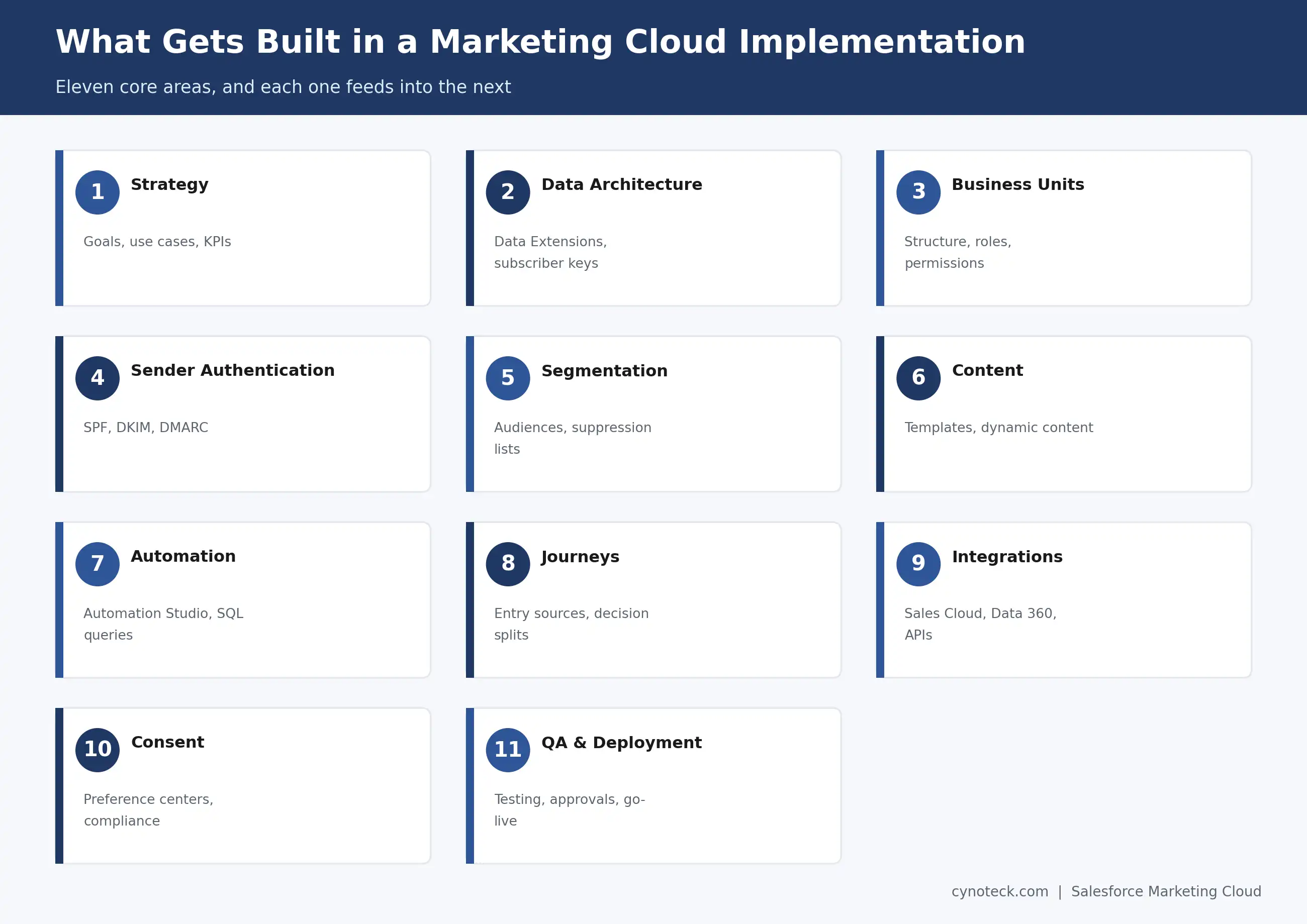
Each row above feeds the next. Weak data architecture undermines segmentation. Rushed segmentation, in turn, undermines journeys. That's why the order in this guide matters as much as the individual steps.
Before you start any configuration, you need answers to seven things. Skipping these is the single fastest way to end up rebuilding work later.
Always start with the business outcome, not the feature. Five use cases show up in nearly every implementation: lead nurturing, onboarding, retention, re-engagement, and cross-sell. Each one should trace back to a metric someone in the business tracks.
First, list every distinct audience your marketing already serves, or plans to. New leads need one kind of treatment. Existing customers need another. Churned customers and internal stakeholders often need their own data and consent rules too.
Name every system holding data Marketing Cloud will need. Think your CRM, e-commerce platform, support system, and any third-party data provider. Each one becomes a decision point in your data architecture later.
First, decide which systems need to sync in real time. Then decide which can sync on a schedule, and which are just one-time imports. This decision shapes your entire technical build in Step 9.
Different regions and industries carry different rules here. GDPR, CAN-SPAM, and CASL all affect how you collect, store, and honor consent preferences inside Marketing Cloud.
List every current tool touching marketing data or sends. Some of these will get replaced. Others will need to keep running alongside Marketing Cloud. Knowing which is which now avoids a messy surprise mid-project.
Always agree on what "working" looks like before launch, not after. Good starting points include your deliverability rate, journey completion rate, and revenue tied back to campaigns.
If your data, integrations, and consent requirements are unclear, get the implementation scope defined before configuration begins.
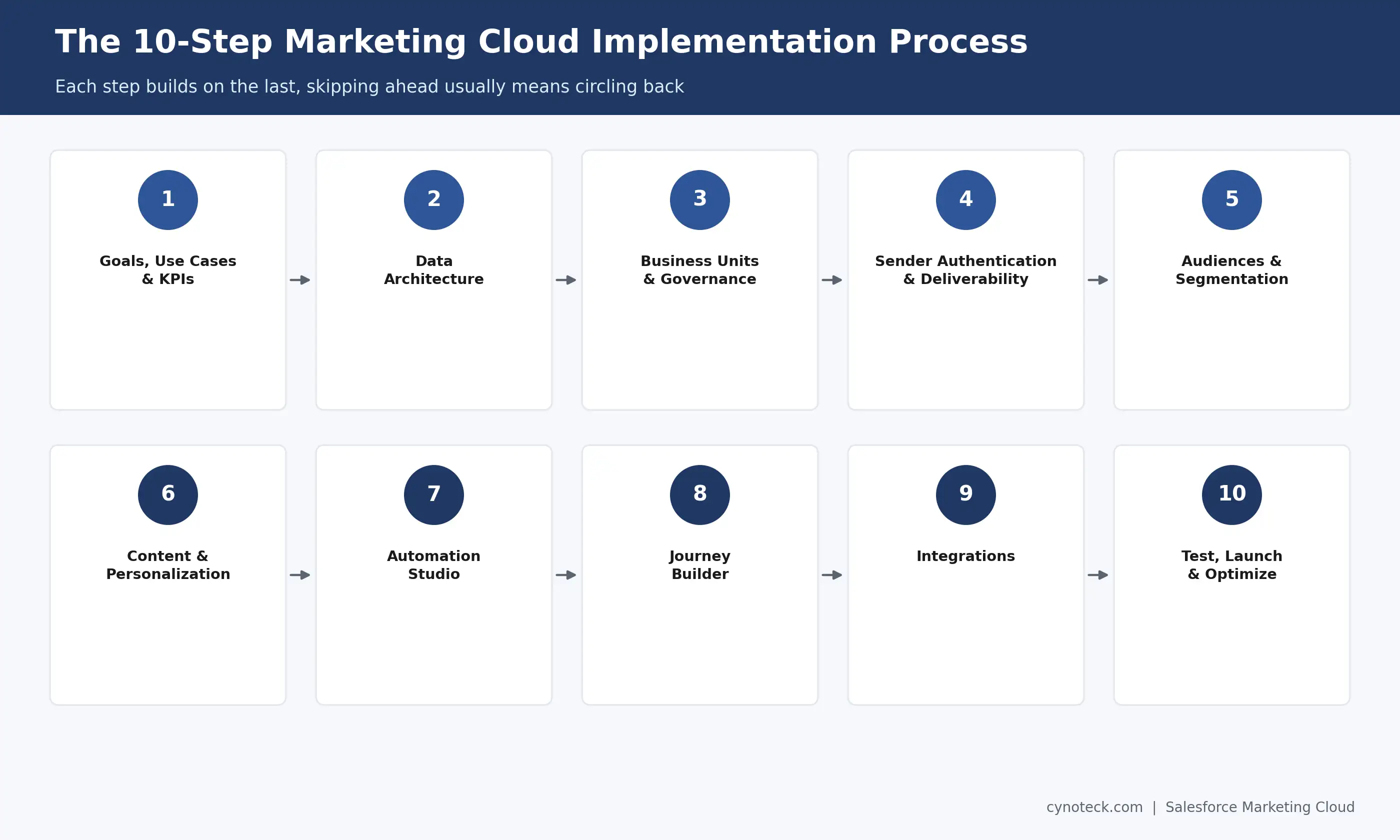
Plan Your ImplementationThe Salesforce implementation follows ten steps: goals, data architecture, Business Units, sender authentication, audiences, content, automation, Journey Builder, integrations, and finally testing and go-live. Each one builds on the last. So, skipping ahead usually just means circling back later.
Every implementation should start with the business outcome first, then work backward toward the technical build. The chain looks like this: goal, then use case, then audience, then journey, then data, then KPI. A goal like "reduce onboarding drop-off" turns into a use case (a welcome series), an audience (new signups), a journey (the actual email sequence), the data needed to trigger it, and a KPI to measure whether it worked.
Teams that skip this step tend to build journeys first and ask "what should this measure" afterward. That order rarely produces a clean KPI.
Your data architecture decides how well everything after it performs. This step covers CRM data, external data, data quality, and the relationships between records inside Contact Builder.
Data Extensions hold your real marketing data. Think contacts, purchases, behavioral events, and preferences. Contact Builder links these extensions together around a subscriber or contact key. That way, a single person's data stays connected across every table. Get this key wrong, though, and segmentation and personalization both suffer later. Marketing Cloud can no longer reliably tell that two records belong to the same person.
Retention and syncing matter here too. Decide how long each Data Extension keeps its records. Then decide how often it refreshes from source systems. We'll cover deeper Data Extension design in a dedicated guide. For now, this step focuses on the architectural decisions that affect everything downstream.
Business Units let one Marketing Cloud account act as several separate marketing setups. Each one gets its own subscribers, content, and Data Extensions, while still rolling up to one parent account. So, organizations managing multiple brands, regions, or divisions almost always need more than one.
This step also covers access, permissions, naming conventions, and folder structures, all before the real building starts. These decisions should happen before large-scale content or journey builds start. Based on our implementation experience, teams that skip naming conventions here often pay for it later. Within six months, dozens of journeys and content blocks make the folder mess impossible to navigate, and the whole structure needs a rebuild.
Deliverability starts here, not after your first send looks weak. This step covers sending domains, sender profiles, and three key records: SPF, DKIM, and DMARC.
IP considerations and sender reputation both affect whether your emails land in an inbox or a spam folder. Unsubscribe handling and suppression lists need configuration now too. Retrofitting them after your first campaign is far messier than building them in from the start. Deliverability troubleshooting, in full detail, deserves its own guide. This step just covers what you need at the implementation stage.
Segmentation is what turns your data architecture into something marketers can use. This step covers five audience types: demographic, behavioral, CRM-based, engagement-based, and suppression.
The link between audience setup and everything downstream matters more than it looks. A messy audience setup makes personalization harder. It also makes journeys less accurate and reporting less trustworthy. So, build this layer with the journeys you already scoped in Step 1 in mind, not as one generic list.
This step covers content templates, content blocks, dynamic content, and personalization, including AMPscript where the use case genuinely needs it. The focus here stays on implementation decisions, not a tool tutorial. Specifically, which content should repeat across journeys? And which personalization rules depend on the data work from Step 2?
Reusable content blocks save real time later on. A single offer block, referenced across ten journeys, is far easier to update than the same offer copied into ten separate emails.
Automation Studio does the operational work behind your marketing. Think scheduled automations, SQL queries, data imports, and segmentation refreshes. This is where raw data gets prepared, well before a journey ever touches it.
Dependencies matter here. An automation that refreshes a segment needs to run before the journey that uses it, not after. Based on our implementation experience, sequencing errors like this are one of the most common causes of a journey sending to the wrong, outdated audience.
Journey Builder is where most of the actual customer experience gets defined. Every journey needs three things first: a clear objective, an audience, and an entry source or trigger, in that order.
From there, activities, decision splits, and wait steps shape the path a subscriber follows. Goals and exit criteria define when someone leaves the journey, successfully or otherwise. Personalization pulls from the content and data work in Steps 2 and 6. Testing and activation close out the build. Teams under deadline pressure skip this far too often. We'll cover deeper journey patterns in a separate, dedicated guide. This step just focuses on what implementation needs to launch safely.
In practice, Marketing Cloud rarely runs alone. Specifically, this step covers connections to Sales Cloud, Service Cloud, Data 360, commerce platforms, and other systems through APIs.
Here, the focus stays on architecture, not API syntax. Which system owns which data? How do records map between systems? How does synchronization stay reliable under real data volume? Data 360 has become central to 2026 implementations in particular. It unifies identity across Salesforce products. Then, it feeds that unified profile back into Marketing Cloud for segmentation. Testing this mapping well before go-live prevents duplicate records and conflicting automations down the line.
Testing here covers more ground than a typical CRM launch. Check data accuracy first. Then check email rendering, links, personalization, and unsubscribe handling. Check segmentation, automations, and journey paths too. Check integrations and deliverability last, before a single real send goes out.
Go-live itself needs approvals and a monitored first send, not a silent flip of a switch. Once live, the work shifts. Engagement tracking, journey performance, and deliverability monitoring take over, along with ongoing optimization. Implementation doesn't really end at go-live. It just shifts into a lighter, continuous mode.
Seven checklists cover the full project: strategy, data, configuration, marketing and journeys, integrations, QA, and go-live. Use each one to confirm readiness at that stage, not just at the very end.
Document business goals and use cases, and get sign-off from stakeholders.
Define success metrics before the build starts, not after.
Identify every data source, and confirm access to each one.
Define subscriber and contact keys, and keep them consistent everywhere.
Structure Business Units, roles, and permissions before you build.
Verify sender authentication: SPF, DKIM, and DMARC- all three.
Build and test audiences and segments against real data.
Document content blocks and personalization rules as you build them.
Define a system of record for every shared data field.
Test data mapping between systems using real records, not samples.
Test email rendering across every major email client.
Test journeys end-to-end with real sample subscribers.
Collect approvals before the first live send goes out.
Set up monitoring for the first 48 hours after launch.
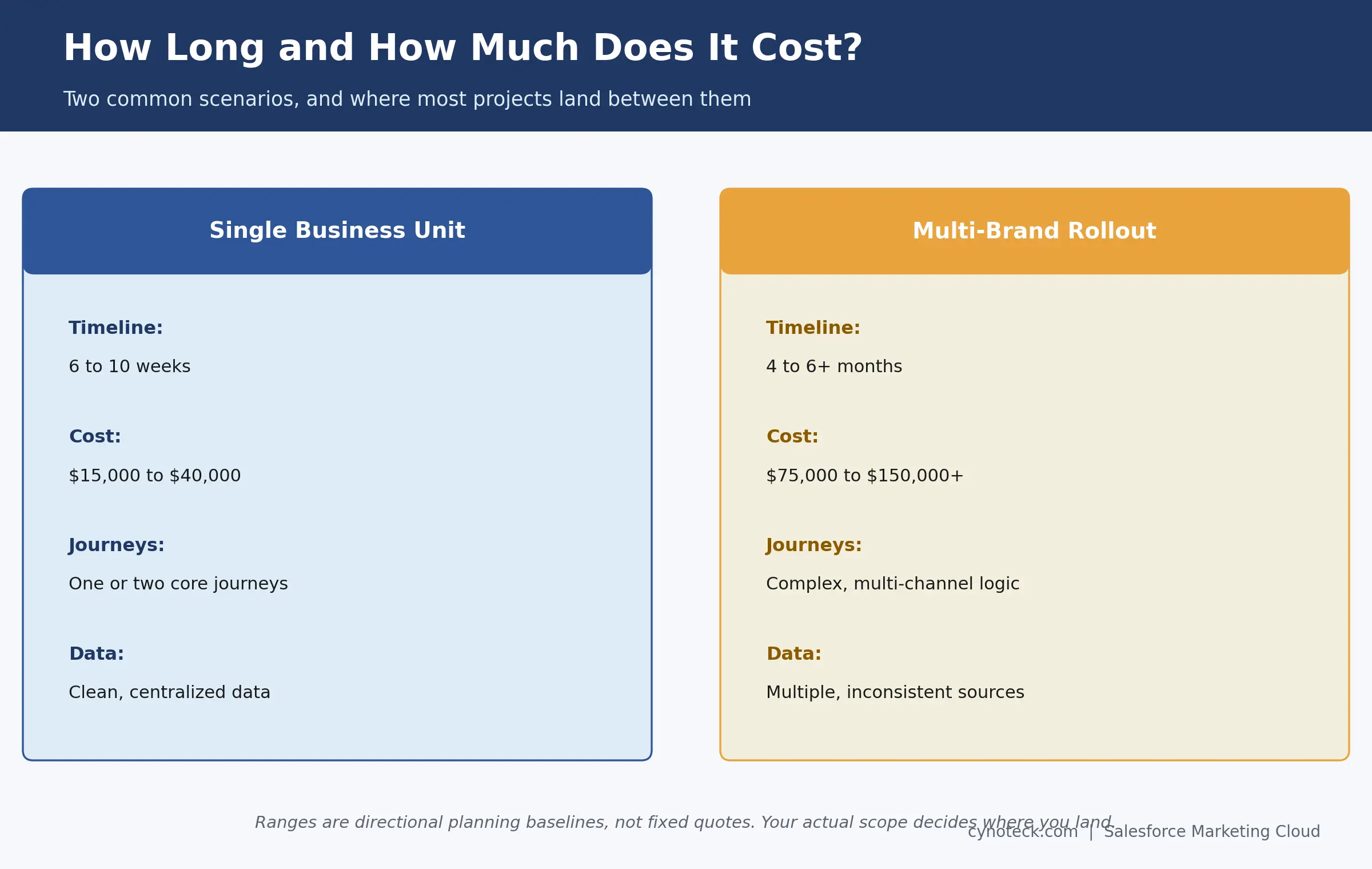
Most Salesforce Marketing Cloud implementations take six weeks to six months, depending on scope. A single-Business-Unit setup with one or two core journeys and clean data often launches in six to ten weeks. A multi-brand rollout with several Business Units, deep integrations, and complex journey logic typically runs four to six months, sometimes longer once heavy data migration enters the picture.
Timeline still depends on scope, data complexity, integrations, journey count, and testing depth, so treat the ranges above as a starting point, not a quote. A focused, single-Business-Unit implementation with clean data typically moves faster than a multi-brand rollout with several integrations, for the same reasons a smaller house takes less time to build than a larger one.
As a general pattern, simpler implementations complete in a matter of weeks. Enterprise-scale, multi-Business-Unit projects with heavy customization, though, often take several months. We're building a dedicated guide on implementation timelines with more detailed benchmarks, so check back for that deeper breakdown.
Salesforce Marketing Cloud implementation typically costs between $15,000 and $150,000, separate from platform licensing. A focused, single-Business-Unit implementation with a handful of journeys often lands between $15,000 and $40,000. A multi-brand rollout with several integrations, custom personalization, and complex journey logic can run $75,000 to $150,000 or more.
Cost still depends on several things beyond scope alone. Licensing, consulting hours, data migration, integration work, and testing all play a part. Licensing and implementation sit as separate line items too, so it helps to budget for both from the start, rather than assuming one figure covers everything.
Consulting cost scales with complexity more than with company size alone. A single-Business-Unit implementation with a handful of journeys costs far less than a multi-brand rollout with several integrations. We're building a dedicated cost guide with clearer benchmarks. For now, treat the ranges above as a planning baseline, and the drivers as your checklist for where your project might land within it.
Get a realistic Marketing Cloud implementation estimate based on your Business Units, integrations, journeys, data migration, and testing needs.
Get a Project EstimateTen issues account for nearly every implementation problem: poor data quality, incorrect contact architecture, weak segmentation, consent and governance gaps, deliverability problems, overcomplicated journeys, automation conflicts, integration issues, insufficient QA, and no post-launch governance. Still, each one is avoidable with the right planning.
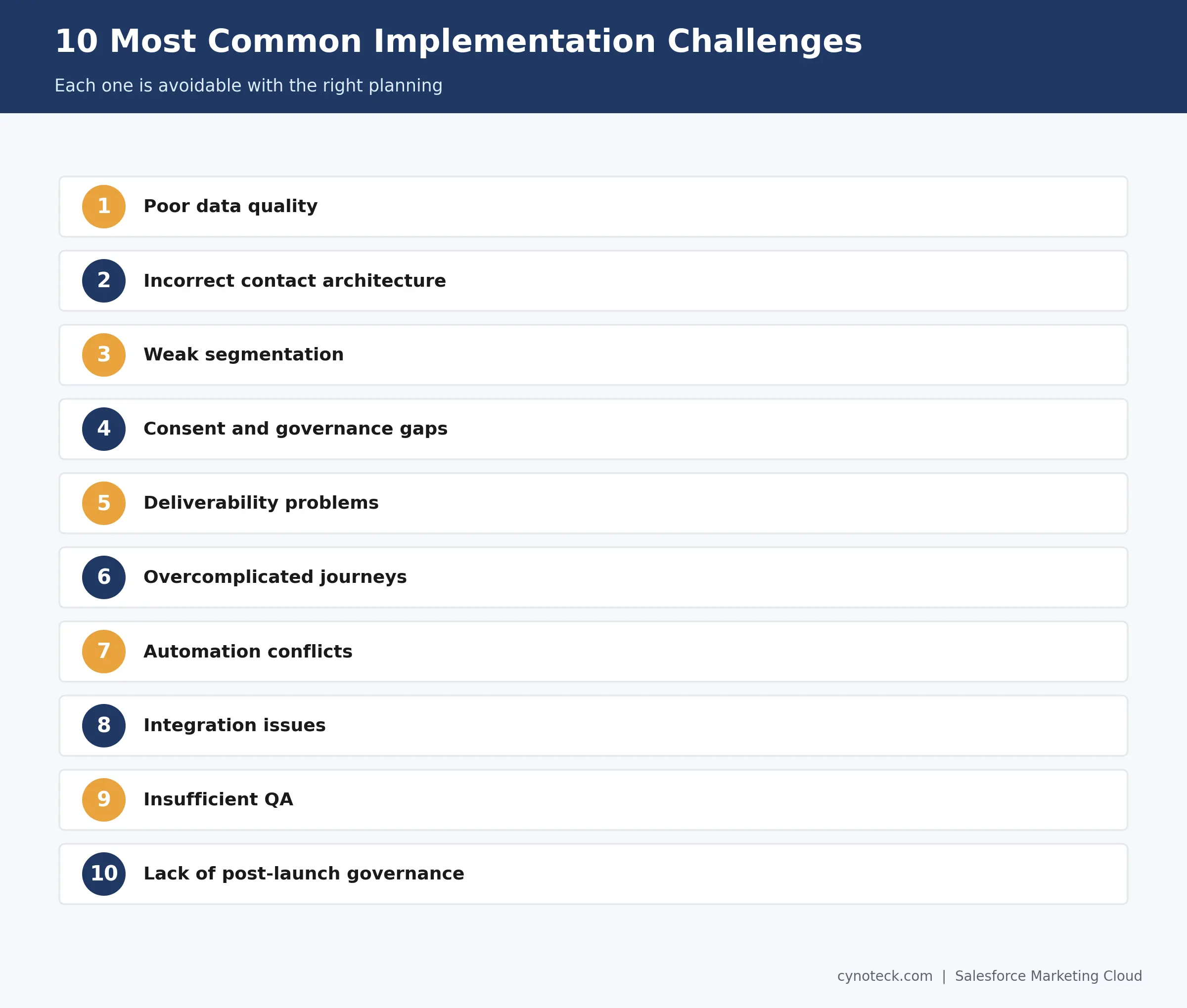
Poor data quality happens when source systems hold duplicate, outdated, or incomplete records. Fix it by auditing and cleaning data before migration, not after.
Incorrect contact architecture shows up when subscriber keys aren't consistent across Data Extensions. Fix it by defining and testing your key structure in Step 2, before content or journey work begins.
Weak segmentation happens when audiences get built generically instead of around real use cases. Fix it by tying every segment back to a specific journey or campaign goal.
Consent and governance gaps show up when compliance requirements get reviewed too late. Fix it by including consent rules in your prerequisites, not as an afterthought before launch.
Deliverability problems happen when sender authentication gets rushed or skipped. Fix it by completing SPF, DKIM, and DMARC setup well before your first production send.
Overcomplicated journeys happen when a single journey tries to handle too many outcomes at once. Fix it by keeping each journey focused on one clear objective.
Automation conflicts happen when automations run out of sequence or overlap. Fix it by mapping out dependencies before you activate anything.
Integration issues show up when no system of record gets defined for shared data. Fix it by assigning clear ownership for every field before you build the integration.
Insufficient QA happens when testing gets compressed under launch pressure. Fix it by building QA time into the project timeline from day one, not squeezing it in later.
Lack of post-launch governance happens when nobody owns the platform after go-live. Fix it by naming an owner before the project officially closes.
The strongest implementations share three habits: they sequence decisions correctly, they document as they go, and they test before every activation, not just once at the end. The nine practices below break that down into specifics.
Start with use cases, not platform features, so every build decision ties back to a real business outcome.
Design data architecture before building journeys, since journeys built on shaky data need rework later.
Establish governance early, especially naming conventions and how Business Units are structured.
Keep journeys focused on one clear objective instead of one journey trying to do everything.
Build reusable content blocks instead of duplicating the same offer across multiple emails.
Plan deliverability before production sends go out, not after your first campaign underperforms.
Test before activation, every time, even for what feels like a minor journey update.
Document automations and integrations, so the next person on your team isn't reverse-engineering your work.
Monitor after launch, since implementation quality really shows in the weeks after go-live, not on launch day itself.
We're building a dedicated best-practices guide with deeper detail on each point above.
The two processes share a platform vendor, and little else in practice. So, the table below shows where they genuinely diverge.
Area | General Salesforce Implementation | Marketing Cloud Implementation |
Core architecture | CRM objects: accounts, contacts, opportunities | Marketing data: Data Extensions, subscriber keys |
Core workflows | Sales and service process automation | Marketing automation and customer journeys |
Testing focus | Record accuracy, workflow logic, permissions | Email rendering, deliverability, journey paths, personalization |
Deployment unit | Configuration changes, user rollout | Campaign and journey activation, sender authentication |
If your project spans both, then plan for two coordinated workstreams, not one combined effort. Our Salesforce implementation guide covers the CRM side in full detail.
Overall, a partner earns its cost fastest in eight specific situations. It's not a blanket requirement for every project.
Your data architecture spans multiple, inconsistent source systems.
You need several integrations running reliably at once.
You're migrating a large volume of historical subscriber or campaign data.
Your journeys involve complex branching logic across multiple channels.
Deliverability requirements can get strict too, due to volume, industry rules, or past reputation issues.
Your use case depends on advanced personalization tied to real-time data.
Your internal team has limited hands-on Marketing Cloud experience.
Your implementation spans multiple Salesforce clouds at once.
If two or more of these sound familiar, it's worth a scoped conversation. A Salesforce Marketing Cloud consulting partner tends to save far more in rework than it costs upfront.
If your project involves complex data, integrations, journeys, or limited internal experience, get help before costly rework begins.
Talk Through Your ProjectEvery step in this guide assumes the same thing. Implementation quality shows up months after launch, not on launch day itself. Data architecture decided well in Step 2 keeps paying off in Step 8. Sender authentication handled early in Step 4 keeps your deliverability healthy long after go-live.
So, if you're planning a Salesforce Marketing Cloud implementation and want a team that's built this architecture before, talk to Cynoteck's Salesforce Marketing Cloud Consulting Services team. We'll help you scope the real work before you commit to a build.
General Salesforce implementation configures CRM objects, such as accounts and opportunities, for sales and service teams. Marketing Cloud implementation focuses on marketing data, audiences, content, and customer journeys. The two have different technical focuses.
Not always. Data 360 helps when you need to unify identity across multiple Salesforce products and external systems. A single-Business-Unit implementation with clean, centralized data can often launch without it.
It depends on how many distinct brands, regions, or divisions your marketing serves. Each one typically needs its own Business Unit with its own subscribers, content, and data, all rolling up to one parent account.
Yes. Migration volume and data quality affect the timeline and complexity. Old engagement data rarely migrates cleanly, so most implementations start segmentation fresh instead of importing old engagement history wholesale.
Most implementations use it. Even simple welcome or re-engagement sequences benefit from its entry logic and decision splits. Only a very narrow, single-send use case might not need it initially.
Based on our implementation experience, unclear data architecture is the most common cause. Reworking Data Extensions and subscriber keys after journeys already exist costs far more than getting the structure right early.
Before. Sender authentication needs time to propagate and verify. Starting it early helps avoid launch delays caused by waiting for DNS changes.
 Outsource Salesforce Development or Build In-House Which is the Best for Your Business.webp)
Outsourcing Salesforce development vs. building an in-house Salesforce team: 2026 cost insights, salary comparisons, key benefits, challenges, and the best hiring model for your business growth.
We are more than just developers and consultants—we are your partners in navigating the digital landscape. Let us be the engine behind your next big success while you focus on your core vision.
Explore Opportunities!