How Much Does Salesforce Implementation Cost in 2026? Pricing Guide

Planning a Salesforce implementation but unsure what it will actually cost? You're not alone. Salesforce pricing is layered — licenses, consulting, customization, data migration, and hidden fees all add up quickly. Most businesses budget for the license cost and underestimate everything else.
This guide breaks down every cost involved in a Salesforce implementation in 2026. Whether you're a small business evaluating Salesforce for the first time or an enterprise planning a multi-cloud rollout, you'll find real numbers, clear tables, and practical guidance to build a budget that holds.
Salesforce implementation costs in 2026 typically range from $10,000 to $500,000+, depending on your business size, the edition you choose, the level of customization you need, and the complexity of your data and integrations.
Here's a quick reference by business size:
Business Size | Users | Typical Implementation Cost | Timeline |
|---|---|---|---|
Small Business | 1–10 | $10,000 – $50,000 | 4–8 weeks |
Growing SMB | 10–50 | $50,000 – $150,000 | 2–4 months |
Mid-Market | 50–200 | $75,000 – $250,000 | 4–6 months |
Enterprise | 200+ | $150,000 – $500,000+ | 6–12+ months |
Keep in mind — these figures cover only implementation services. License fees are a separate, ongoing cost on top of this. We cover both in detail below.
In simple terms, most businesses underestimate Salesforce costs by 40–80% because they only plan for licenses. A realistic Year 1 budget should account for consulting, customization, data migration, training, and ongoing support — not just seats.
Get a clear understanding of implementation costs and timelines before your Salesforce investment.
Get Your Free Cost AssessmentIn the business landscape, some organizations continue to operate without a CRM, often due to a lack of awareness regarding the benefits of Salesforce.
Globally recognized as one of the exclusive CRM platforms, Salesforce empowers small businesses with a robust tool to enhance operational efficiency, boost growth, and cultivate enduring customer relationships. Let us dive deeper into the advantages of Salesforce implementation:
Salesforce excels in maintaining accurate and comprehensive customer information, addressing a prevailing issue in the customer service domain—misleading or incomplete data. Such inaccuracies can hamper sales and marketing efforts and adversely impact customer experiences.
Salesforce CRM enables continuous data collection, providing valuable market, industry, and audience insights. This, in turn, empowers users to formulate specialized and relevant communications, enhancing customer engagement.
The platform's capabilities furthermore extend to the creation of automated email series tailored for specific audiences, initiating targeted actions.
Effective data collection from different sources, including Google Analytics, social media, apps, business software, and CRM technologies, is essential for modern digital businesses.
However, the actual value of data emerges when it undergoes sorting, cleansing, analysis, and transformation into actionable insights for teams with varied perspectives on customer information.
Salesforce deployment is a planned investment enabling organizations to create personalized dashboards for each customer.
These dashboards enable customers to easily access data relevant to their workflows, eliminating the need for extensive searching, sorting, or report generation.
As a powerful cloud-based CRM, Salesforce logs real-time customer interactions, conversations, contact details, and notes. This helps organizations to achieve sales objectives through exceptional service effortlessly.
With integrated collaboration and communication tools, Salesforce also enables users to monitor document status and collaborate in real time.
This results in efficient teamwork on sales opportunities, service cases, campaigns, and projects, all driven by personalized actions.
Salesforce improves outreach for sales and customer support teams while automating personalized engagement across the marketing funnel, simplifying customer relationship management.
This enables businesses to understand unique client interests, proactively address needs, and take quick action to resolve issues.
Salesforce CRM also reduces the time sales reps spend managing customer information. This helps them to effortlessly engage in activities such as sending emails, viewing LinkedIn profiles, and other client interactions.
Salesforce software serves as a powerful tool for analyzing historical and current sales trends, providing valuable insights into the number of opportunities.
It enables accurate predictions of future sales possibilities, allowing the sales team to forecast lead prospects with precision, leading to improved revenue generation.
With instant access to 360-degree information, sales reps can deliver prompt service to customers, such as proactive updates on product delivery status, thereby improving overall service value.
Salesforce's cloud technology enables automated lead conversion and access from any device or location, eliminating the need for sales reps to return to the office for information.
You might also be interested in: The Guide to Salesforce Deployment Checklist
Recognizing the difficulties and costs associated with Salesforce implementation highlights the importance of evaluating factors influencing both cost and success.
The price can vary significantly based on different criteria, making it crucial to consider these factors carefully.
So, engaging with an experienced Salesforce implementation partner is the key to navigating this process successfully. Let us now explore the key variables impacting the cost of implementation in detail:
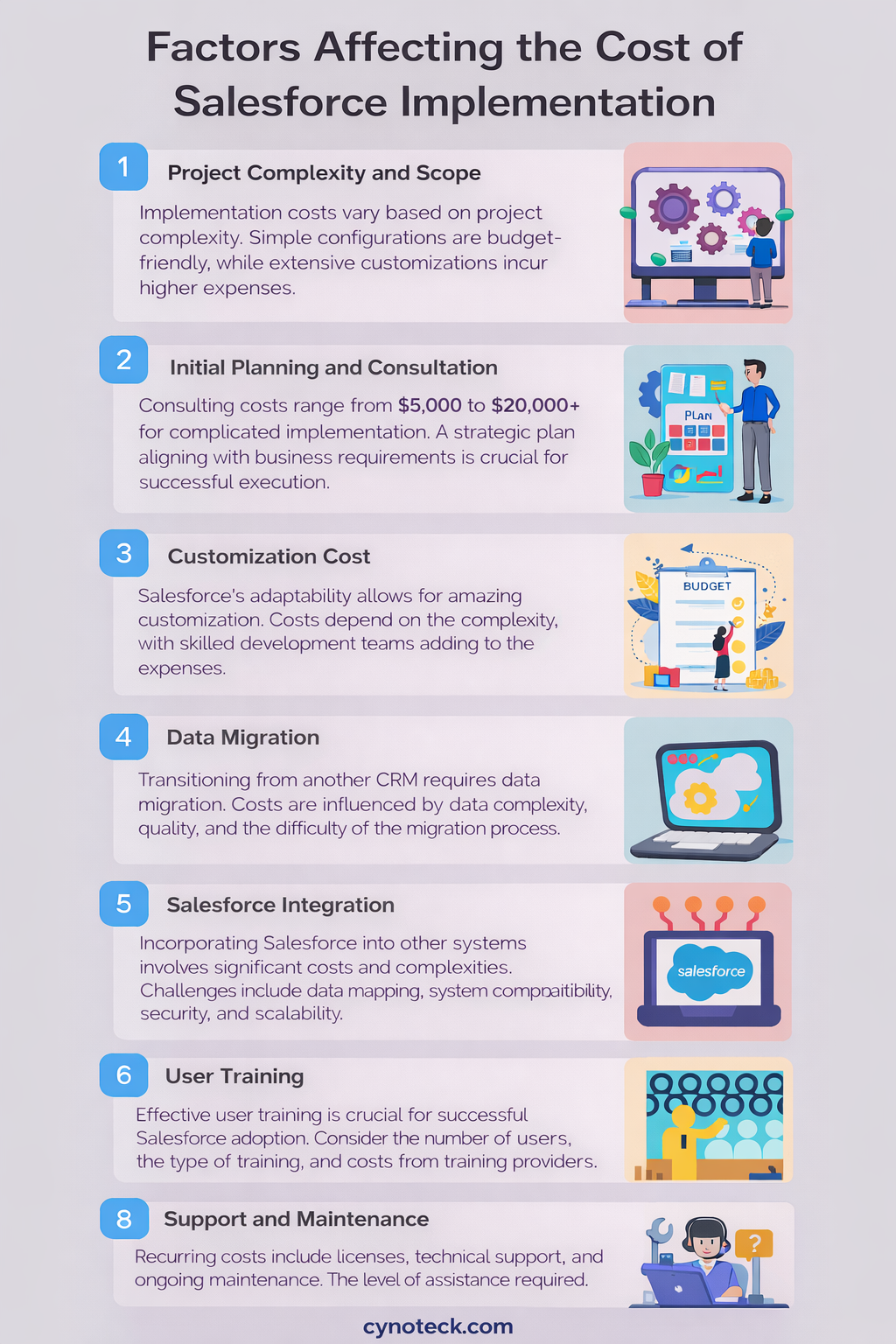
The cost of your Salesforce implementation is shaped by its scope and complexity. Projects with straightforward configurations, minimal customization, and basic features tend to be more budget-friendly.
Contrarily, more complex initiatives involving extensive customizations, data migration, and integration with external systems incur higher costs. As your requirements and business processes become more complicated, so does the associated cost.
The consulting firm determines the consulting cost for your Salesforce implementation or the freelance consultant you engage. For a complicated implementation, costs can range from $5,000 to $20,000+, with a timeframe of up to six weeks.
The initial expense is hiring a Salesforce consulting firm to develop a strategic plan to ensure successful project execution. The firm will evaluate the business requirements and formulate a tailored Salesforce implementation strategy aligning with those requirements.
Salesforce's adaptability to tailor to your business needs is amazing. Nevertheless, the extent of customization, including the creation of custom fields, objects, or process automation, contributes to the implementation cost.
The involvement of a skilled development team for Salesforce customization adds to the overall project expenses. Basic customizations incur lower costs, while more complex ones demand a higher investment, maybe more than the expenses associated with data migration.
In transitioning from a different CRM to Salesforce, data migration is an everyday necessity. Ensuring data integrity in the new system requires undertaking tasks like data cleaning, mapping, and transformation.
The cost of migration is subject to variation, influenced by factors such as data complexity, quality, and the level of difficulty involved in the migration process.
Incorporating Salesforce into other systems, such as ERP, Marketing Automation, and Accounting Software, can include high costs and complexities. The complexity of integration requirements directly influences the associated expenses.
Specific challenges such as data mapping and transformation, system compatibility, security considerations, and scalability are crucial during the integration process. Addressing these aspects ensures a seamless Salesforce integration with other software systems.
Effective user training is essential for the successful adoption and implementation of Salesforce. Utilizing the CRM software to its fullest potential depends on well-trained users.
Salesforce implementation extends beyond technical proficiency to include user adoption, change management, and user management.
Factors such as the number of individuals requiring training, the type of training needed, and the associated costs from training providers should all be carefully considered.
Salesforce has a subscription-based pricing model, with costs influenced by required licenses and editions. Different user types, such as sales, marketing, and service, necessitate varying permit quantities.
Furthermore, geographic location can significantly affect labor and consulting costs, while industries with strict regulations may incur additional compliance and security costs. These factors collectively contribute to the overall cost of Salesforce implementation.
Included in the recurring cost are licenses, technical support, ongoing maintenance, necessary additions, and programming costs. The post-implementation support and maintenance service ensures smooth operation and prompt problem-solving.
Again, the cost of this kind of service is based on the level of assistance required, e.g., round-the-clock assistance. Remember, ongoing support and maintenance costs can include updates, upgrades, bug fixes, and any other enhancements for your Salesforce instance.
Also, Read: What Is Salesforce and What Does It Really Do? A Complete Guide for Professionals
This is where Salesforce budgets most commonly fall short. These costs are predictable — but they're rarely included in the initial quote of Salesforce implementation.
1. AppExchange Add-Ons: Many features businesses expect to come standard — advanced reporting, deduplication, document management, and e-signatures — require paid apps from the Salesforce AppExchange. Each carries its own monthly or annual subscription fee.
2. Premier Support: 24/7 live support is only bundled with the Unlimited edition. For all other editions, Premier Support must be purchased separately — typically at 30% of your annual license cost.
3. Sandbox Environments: Full sandbox environments for development and testing come at additional cost, especially for organizations running multiple development cycles simultaneously.
4. Data Storage Overages: Salesforce includes limited data storage per edition. As your database grows, storage overages add up — particularly for companies with large historical datasets. Additional storage costs approximately $125/month per 500MB.
5. Data Cleanup Before Migration: If your existing data has duplicates, inconsistencies, or gaps, expect to invest in cleanup before migration begins. This is rarely included in standard implementation quotes — and skipping it makes everything else cost more.
6. Dedicated Admin Salary: Salesforce needs day-to-day management. Most businesses hire a full-time or part-time administrator once the system is live. Admin salaries typically range from $70,000 to $120,000+ per year, depending on your location.
7. Consulting Partner Rates: Certified Salesforce consulting partners typically charge $100 – $300 per hour, depending on their tier, specialization, and location.
8. The reliable rule of thumb: Budget 40–80% above your license cost for true Year 1 total cost of ownership. If you're spending $60,000 on licenses, your real Year 1 cost is likely $84,000 – $108,000 when everything is factored in.
Most businesses budget for Year 1 and underestimate what comes after. Here's a realistic 3-year total cost-of-ownership picture by business size.
Cost Item | Amount |
|---|---|
Annual Licenses (5 × $25 × 12) | $1,500 |
Implementation | $10,000 – $20,000 |
Training | $3,000 |
AppExchange Add-Ons | $1,200/yr |
Year 1 Total | ~$17,000 – $27,000 |
Year 2–3 Annual | ~$5,000 – $8,000 |
Cost Item | Amount |
|---|---|
Annual Licenses (50 × $175 × 12) | $105,000 |
Implementation | $75,000 – $150,000 |
Integrations | $20,000 – $50,000 |
Training | $10,000 |
Admin (part-time) | $40,000 – $60,000 |
Year 1 Total | ~$250,000 – $375,000 |
Year 2–3 Annual | ~$150,000 – $200,000 |
Cost Item | Amount |
|---|---|
Annual Licenses (200 × $350 × 12) | $840,000 |
Implementation | $150,000 – $500,000 |
Integrations and Custom Dev | $100,000+ |
Training and Change Management | $25,000 – $50,000 |
Full-Time Admin | $80,000 – $120,000 |
Year 1 Total | $1.2M – $1.6M+ |
Keep in mind — implementation expenses typically run 1.5 to 3 times your annual license cost. Factor that ratio into your planning before you sign any contract.
The CRM market in 2026 is more competitive than ever, with platforms offering a wide range of features, pricing models, and business fit. Before committing to a platform, it makes sense to understand exactly what you are paying for and what you could get elsewhere. If you're still evaluating whether Salesforce is the right choice, here's how it compares to top alternatives.
CRM | Starting Price | Enterprise Tier | Typical Implementation Cost |
|---|---|---|---|
Salesforce | $25/user/mo | $175 – $350/user/mo | $10,000 – $500,000+ |
HubSpot | Free | $100 – $150/user/mo | $5,000 – $50,000 |
Microsoft Dynamics 365 | $65/user/mo | $95 – $162/user/mo | $20,000 – $250,000 |
Zoho CRM | $14/user/mo | $40/user/mo | $5,000 – $40,000 |
Pipedrive | $14/user/mo | $49 – $99/user/mo | $3,000 – $25,000 |
Freshsales | $15/user/mo | $69/user/mo | $5,000 – $30,000 |
In simple terms: Salesforce costs more than most alternatives at every tier — and delivers more too. The cost premium makes sense when your business has complex processes, multiple teams, and a need for deep customization and integrations.
For small businesses with straightforward sales processes, HubSpot or Zoho often deliver better ROI at a lower total cost. Don't pay for Salesforce's complexity if your business doesn't need it yet.
Salesforce pricing is not one-size-fits-all. Depending on the size and nature of your organisation, the cost can look very different — and so can the value you get in return. Here is a breakdown of what small businesses, nonprofits, and startups can expect to pay in 2026.
The Starter Suite at $25/user/month is designed for small teams. It includes basic CRM, contact and lead management, email tools, and workflow automation. For a 5-user team, that's $1,500/year in licenses — plus implementation.
The Pro Suite at $100/user/month adds forecasting, advanced reporting, campaign management, and more automation. For a 10-user team, that's $12,000/year in licenses.
Is Salesforce worth it for a small business? It depends. If your sales process is simple, HubSpot or Zoho will likely deliver better value at lower cost and complexity. If your business is growing fast with complex workflows or integration needs, Salesforce's scalability makes it worth the investment.
Salesforce offers the Power of Us Program for eligible registered nonprofits — providing 10 free Salesforce licenses and significantly discounted pricing on additional licenses and products. This program can reduce licensing costs substantially for qualifying organizations.
Early-stage startups may be eligible for discounted or deferred licensing through Salesforce's startup programs via the Salesforce Ventures ecosystem. Contact a certified Salesforce partner to explore what's available for your stage of growth.
Salesforce implementation does not have to break the bank. With the right approach and a little planning, you can significantly reduce your total spend while still getting a platform that works well for your business. Here are seven practical ways to keep your Salesforce costs under control without compromising on quality.
1. Start with Core Features Only: Implement what your team needs now. Defer advanced customizations, complex integrations, and AI features until after your team is using the platform consistently. Over-building in Phase 1 is one of the biggest drivers of cost overruns.
2. Right-Size Your Edition: Don't buy Unlimited if Enterprise covers your needs. Carefully evaluate which features you'll actually use. Salesforce account teams often recommend higher editions — it's worth pushing back with specific requirements.
3. Negotiate Your Contract: Everything above approximately 25 seats is negotiable. Multi-year contracts typically yield 10–25% discounts. End-of-quarter deals are common — Salesforce's fiscal quarters end in January, April, July, and October. Buyers who time their purchase well consistently report savings of 10–20%.
4. Work with a Certified Partner: Counter-intuitive but true — a certified Salesforce partner typically reduces total cost of ownership by preventing rework, scope creep, and failed adoption. DIY implementations look cheaper upfront, but often cost significantly more to fix later.
5. Clean Your Data Before Migration: Data cleanup done before migration is significantly cheaper than cleaning it inside Salesforce afterward. Invest here early — it reduces migration time, reduces errors, and prevents ongoing data quality issues that are expensive to fix post-launch.
6. Audit Licenses Regularly: Many companies pay for licenses that aren't actively used. A quarterly license audit can free up significant budget by right-sizing seat counts as your team changes.
7. Phase Your Rollout: A phased rollout — starting with one team or use case and expanding from there — reduces upfront implementation cost, improves adoption, and lets you learn what your team actually needs before committing to the full build.
Salesforce extends beyond its outstanding sales CRM tool, offering a diverse range of products. Within the Salesforce product line, there are four distinctive tiers: Salesforce Essentials, Salesforce Professional (Pro Suite), Salesforce Enterprise, and Salesforce Unlimited. It is crucial to note that not all options are universally applicable across all Salesforce products.
These products can function independently or integrate seamlessly with other Salesforce offerings to create a comprehensive solution for businesses. Additionally, Salesforce CRM, a cloud-based service, enables team collaboration through its diverse Cloud Offerings.
Price: $25 per user each month (billed annually)
Ideal for a small business with one or two employees that just requires essential CRM features.
A basic set of default functionalities that meet the requirements of basic sales is provided by Essentials:
Lead, opportunity, contact, and account management
Salesforce CRM mobile access
Chatter is used to enable employee collaboration
Tasks related to sales, along with event management
Sales reporting using dashboards and reports that are customizable
Automating sales processes with Flow Builder and Automation Studio
Price: $80-$100 per user per month (billed annually). (Salesforce transitioned from "Professional" to "Pro Suite" branding).
An optimal choice for businesses with fewer than 10 users.
Some basic set of functionalities provided is:
Lead scoring according to rules
Products and Price Books
Contract management
Order and quote administration
Einstein Insights and Advanced Sales Forecasting
To test and create new functionality in a separate setting without affecting the production environment, you can use a developer sandbox
Price: Approximately $175 per user/month after 6% increase per user each month (billed annually).
(Note: As of August 2025, Salesforce increased Enterprise and Unlimited pricing by 6%.)
Ideal for businesses with more than ten employees who wish to use all of Salesforce's features and automation.
Some basic set of functionalities provided is:
Opportunity Teams to enable sales representatives to work together on the same deal
Advanced Workflow and Approval Automation
Revenue sharing through opportunity splits and enterprise territory management
Features for advanced reporting (cross-filtering, joining reports, tracking history)
Einstein Studio for building AI-powered solutions using code or low-code tools
The possibilities for automation using Flow Builder and Einstein Automation are endless
The infinite number of record kinds per object, user roles and permissions, and user profiles and page layouts
APIs to connect Salesforce to external platforms
Multiple developer sandboxes to work on and test new features
Price: Approximately $350 per user per month (billed annually) after 6% increase.
(Note: As of August 2025, Salesforce increased Enterprise and Unlimited pricing by 6%.)
For businesses with big or multiple sales teams, this edition offers the most features.
Some basic set of functionalities provided is:
24/7 help at no cost
Access to top-notch resources for success
Access to configuration services managed by a specialized Salesforce administrator
Dedicated developer support
Access to private coaching sessions with a Salesforce specialist, one-on-one
Also, Read: Salesforce Vs SAP: Which CRM Software is Better
Our Salesforce experts will guide you through edition selection and implementation strategy for your organization.
Speak With a SpecialistHere's a side-by-side view of all current Salesforce Sales Cloud editions, including the 6% price increase applied to Enterprise and Unlimited editions in August 2025.
Edition | Price Per User/Month | Best For |
|---|---|---|
Starter Suite | $25 | Small businesses testing Salesforce |
Pro Suite | $100 | Growing teams need automation and forecasting |
Enterprise | $175 | Mid-size businesses needing API access and customization |
Unlimited | $350 | Large teams needing advanced AI and priority support |
Agentforce 1 Sales | $550 | AI-first enterprises using Agentforce at scale |
Note: Enterprise and Unlimited require annual contracts. Starter and Pro Suites are available monthly at rates 20–30% higher. Enterprise is the first edition with full API access — if you plan to integrate Salesforce with other tools, that's your starting point.
Edition | Price Per User/Month |
|---|---|
Starter Suite | $25 |
Pro Suite | $100 |
Enterprise | $165 |
Unlimited | $330 |
Product | Starting Price |
|---|---|
Marketing Cloud (Growth) | $1,500/org/month |
Marketing Cloud (Advanced) | $3,250/org/month |
CPQ (Configure, Price, Quote) | $75/user/month |
Field Service (Starter) | $25/user/month |
Agentforce AI Credits | ~$2 per 1,000 credits |
Data Cloud | ~$1,000 per 100K credits |
Salesforce offers a range of products to meet the needs of both basic and advanced CRM implementations. Check out the exclusive Salesforce solutions and editions available:
The rise of cloud-based applications has revolutionized sales processes, empowering sales teams to work more efficiently and intelligently. By delivering customer-specific data, automating sales tasks, and seamlessly tracking interactions, these applications improve overall productivity.
Salesforce Sales Cloud can help; it provides real-time visibility into team activities and streamlines sales forecasting. This enables personalized sales approaches, expedites deal closures, supports informed decision-making, and enables suitable remote access and updates to dashboards.
· Lightning Starter Suite (annually priced at $25 per user/month)
· Lightning Pro Suite (annually priced at $100 per user/month)
· Lightning Enterprise (annually priced at $175 per user/month after August 2025 increase)
· Lightning Unlimited (annually priced at $350 per user/month after August 2025 increase)
Salesforce.com CPQ: By automating and streamlining the quote-to-close process, you can sell more effectively by integrating this sales solution directly with your CRM. CPQ pricing varies based on usage and customization needs.
Einstein Sales Cloud: Sales Cloud's advanced AI capabilities will enable you to help your business make more intelligent sales decisions. Einstein/Agentforce capabilities are now sold as add-ons starting at $125 per user/month (as of August 2025).
Salesforce's Service Cloud empowers users to streamline service processes and workflows effectively. It provides access to articles, experts, and key topics, enabling customer service agents to facilitate high-quality one-to-one relationships across different devices and channels.
This platform furthermore simplifies cross-selling and upselling through process automation and customization, improves customer self-service, boosts agent productivity with specialized tools, and delivers real-time business insights.
Starter Suite: $25 per user/month (basic case management and email-to-case).
Pro Suite: $100 per user/month (advanced routing and reporting).
Enterprise: $175 per user/month (after August 2025 increase - full customization and advanced features).
Unlimited: $350 per user/month (after August 2025 increase - 24/7 support and advanced analytics).
Field Services: Priced at approximately $69/month. Salesforce Field Services is an integrated extension of the Salesforce platform, offering a comprehensive view into workforce management, optimization of field services, and advanced scheduling tools.
Digital Engagement: Salesforce does not publish fixed pricing; custom quotes required. Salesforce Digital Engagement is designed for businesses seeking customer service solutions. It allows continuous client interaction through web chats, messaging apps, and social media channels.
Service Cloud Einstein: Service Cloud AI capabilities are now included in Agentforce add-ons (starting at $125/user/month). Service Cloud Einstein is an advanced artificial intelligence (AI) platform packed with time-saving AI features, helping service professionals deliver exceptional customer service.
Salesforce Marketing Cloud is an advanced digital marketing platform designed to automate marketing campaigns across diverse channels, including social media, SMS, mobile apps, and emails.
With a focus on delivering reliable customer data for engagement campaigns, automating campaign lifecycles with AI, and enhancing marketing ROI, Salesforce Marketing Cloud enables thorough evaluation, measurement, and assessment of marketing efforts.
This platform enables personalized, impactful customer interactions while upholding high standards of trust and reliability.
Marketing Cloud provides four distinct suites tailored for email marketing, social media engagement, advertising, and B2B marketing automation. Subscriptions are available annually, starting from $1,500/organization/month.
With Experience (Community) Cloud, you can use collaboration tools to connect customers, partners, and employees with the expertise, apps, and information essential for success.
This helps you establish a branded internal community tailored to the unique needs of stakeholders, improve customer self-service experiences, and expedite sales channels through direct links with distributors and resellers.
You can furthermore boost employee productivity and engagement with custom user groups designed specifically for employees and partners alike.
Also, Read: Top 20 Salesforce Consulting Companies in 2026: A Complete Global Guide
Typically, the implementation of one of the core Salesforce products, such as Sales Cloud, takes around 6 to 14 weeks on average, depending on your business requirements. However, if you opt for add-ons or require extensive customization, the process may extend to several months.
Engaging a Salesforce Implementation Partner is beneficial for defining project scope, business goals, and understanding the duration of implementation more accurately. Keep in mind that the timeline can vary based on specific business needs, goals, and consulting considerations.
Also, Read: Salesforce Outlook Integration: A Step-by-Step Guide
Obtain a clear understanding of the expenses associated with Salesforce implementation. Factor in essential resources, time commitments, and budgetary considerations.
Ensure all requirements are in place before initiating Salesforce implementation. Plan meticulously, considering time, resources, and financial aspects.
Seek guidance from a reputable Salesforce implementation company. Leverage their expertise to navigate budgetary concerns and ensure successful implementation.
Assist non-tech individuals and even tech-savvy professionals who may require support. Cultivate a collaborative environment to address budget-related queries and other concerns.
Also, Read: Examples of Sales Reports: From Daily to Advanced
Salesforce is one of the most powerful CRM platforms available. It's also one of the most complex to implement well.
The businesses that see the strongest returns are not necessarily those that spend the most. They're the ones that plan carefully, right-size their edition, partner with the right team, and treat Salesforce as an ongoing product — not a one-time IT project.
Use the cost data in this guide to build a realistic budget before you commit. And when you're ready to get a specific estimate based on your actual requirements, team size, and business goals — that's a conversation worth having before you sign anything.
Get in touch with a renowned Salesforce Consulting Company like Cynoteck Technology Solutions today for a seamless and successful implementation of Salesforce and ensure optimal results for your business.
Also, Read: An overview of what is Account Teams in Salesforce
Partner with experienced Salesforce consultants to ensure successful deployment and maximize your return on investment today.
Schedule Your ConsultationA: Salesforce implementation costs range from $10,000 for simple small business setups to $500,000+ for large enterprise deployments. Most mid-market implementations land between $50,000 and $150,000. The final number depends on your edition, user count, customization needs, integrations, and data complexity.
A: Salesforce Sales Cloud starts at $25/user/month for the Starter Suite. Pro Suite is $100/user/month. Enterprise is $175/user/month. Unlimited is $350/user/month. The Agentforce 1 Sales tier is $550/user/month. Enterprise and Unlimited require annual contracts. Monthly billing is available only on Starter and Pro Suites at a 20–30% premium.
A: The most commonly missed costs include AppExchange add-on subscriptions, Premier Support (30% of license cost on non-Unlimited plans), sandbox environments, data storage overages ($125/month per 500MB), data cleanup before migration, and ongoing admin salaries ($70K–$120K/year). Budget 40–80% above your license cost for a realistic Year 1 total cost of ownership.
A: Certified Salesforce partners typically charge $100 – $300 per hour depending on their tier, specialization, and location. Freelance consultants charge $50 – $150 per hour. Fixed-price contracts work best for a clearly defined scope. Time and materials (T&M) contracts work better for evolving requirements.
A: Small businesses can start on the Starter Suite at $25/user/month. A 5-user team pays $1,500/year in licenses. Including basic implementation, training, and first-year support, the total Year 1 cost for a small business typically ranges from $15,000 to $30,000.
A: Salesforce's Power of Us Program provides 10 free licenses and significantly discounted pricing for eligible registered nonprofits. Contact a certified Salesforce partner or visit Salesforce.org to check eligibility for your organization.
A: Start with core features only. Right-size your edition — don't buy Unlimited if Enterprise covers your needs. Negotiate your contract, especially for contracts with more than 25 seats. Clean your data before migration. Work with a certified partner to reduce rework. Audit licenses quarterly to eliminate unused seats. Phase your rollout to reduce upfront cost and improve adoption.
A: HubSpot starts free and scales to $100–$150/user/month for advanced hubs. Salesforce starts at $25/user/month and scales to $350+/user/month. HubSpot implementations typically cost $5,000–$50,000. Salesforce implementations typically cost $10,000–$500,000+. HubSpot is easier to start with. Salesforce delivers more power for complex, growing businesses with advanced requirements.
A: Small business implementations take 4–8 weeks. Growing SMB implementations take 2–4 months. Mid-market projects typically take 4–6 months. Enterprise programs take 6–12+ months. The timeline depends on the scope's clarity, data quality, and how quickly your team makes decisions during the project.
A: For a mid-market company on Enterprise edition with 50 users, expect $250,000–$375,000 in Year 1, including implementation, followed by $150,000–$200,000 annually in Years 2 and 3. Enterprise organizations on Unlimited can exceed $1M in Year 1 when licenses, implementation, integrations, and admin costs are combined.
A: Agentforce is Salesforce's AI-powered platform for autonomous agents — launched as a rebranding and expansion of Einstein AI. The Agentforce 1 Sales bundle is priced at $550/user/month. AI credits for Agentforce are also available on a consumption basis at approximately $2 per 1,000 credits, allowing businesses to use AI features without committing to the full bundle.
A: Yes — but it's generally slower, riskier, and often more expensive in the long run. Certified partners bring expertise in customization, data migration, integration, and change management that reduces errors and improves adoption. For anything beyond a basic Starter Suite setup, a certified partner typically reduces the total cost of ownership despite the higher hourly rate.
A: Telecom implementations typically range from $75,000 to $300,000 for mid-size operators, depending on integration complexity with billing, provisioning, and customer service systems. Industry-specific compliance requirements and high data volumes often push telecom projects toward the higher end of cost ranges.
A: It depends on your complexity. If your sales process is straightforward and your team is small, HubSpot or Zoho often delivers better ROI at lower cost and complexity. If your business is growing fast, has complex workflows, or needs advanced integrations, Salesforce's scalability justifies the investment. The honest answer is — don't buy more platforms than your current processes require.
 Outsource Salesforce Development or Build In-House Which is the Best for Your Business.webp)
Outsourcing Salesforce development vs. building an in-house Salesforce team: 2026 cost insights, salary comparisons, key benefits, challenges, and the best hiring model for your business growth.
We are more than just developers and consultants—we are your partners in navigating the digital landscape. Let us be the engine behind your next big success while you focus on your core vision.
Explore Opportunities!