How Natural Language Processing Integration Makes Mobile Apps More Useful
TL;DR
Natural Language Processing (NLP) in mobile app development enables applications to understand, interpret, and respond to human language through text and voice interactions. It helps businesses create smarter mobile experiences with AI chatbots, voice assistants, intelligent search, language translation, and sentiment analysis. By integrating NLP into iOS and Android applications, businesses can simplify user interactions, automate customer support, and extract actionable insights from customer conversations and feedback.
- Key Applications: AI chatbots, voice commands, smart search, text analysis, and multilingual support.
- Business Benefits: Improve user engagement, personalize experiences, reduce support workload, and understand customer sentiment.
- Implementation: Prioritize language accuracy, data privacy, integration capabilities, and scalable NLP models.
A few years ago, finding something in an app often meant tapping through multiple screens. Today, users expect to type a question, speak a command, search in their own words and get a useful response. Natural Language Processing (NLP) helps mobile apps understand this human language and turn it into actions, answers, relevant results.
NLP in mobile apps helps users with features such as:
Conversational search,
Voice commands,
AI chatbots,
Translation,
Text analysis,
And sentiment analysis.
Quick Summary: NLP helps mobile apps understand what users mean from the words they type, speak. It is most useful when users need to ask questions, search freely, communicate with the app, interact with large amounts of text, language-based information. |
Why Modern Mobile Apps Need to Understand Human Language
Today's users are busy and expect things to be quick and easy. They want to find answers faster, solve problems sooner, get personalised help, and interact with apps in a way that feels natural to them.
That's why modern mobile apps need to understand human language. Users want to ask questions, search in their own words, give voice commands, and get responses based on their needs instead of following fixed steps.
This makes the app easier to use and creates a more natural connection between the user, the app, and the business behind it.
What Is Natural Language Processing (NLP)?
Natural Language Processing (NLP) is the technology that helps an app understand human language. It reads text, listens to speech, understands what the user means, and helps the app respond accordingly.
For example, a user types, “Why hasn’t my order arrived yet?” A basic search might only detect the word “order” and show general shipping information. An NLP-powered app understands that the user is asking about a delayed delivery and can provide the relevant tracking information.
This is important because users don't always use the exact words an app expects. They ask questions in different ways, use their own vocabulary, and often provide information in natural sentences. NLP helps the app understand these variations and connect the user's request with the right response or action.
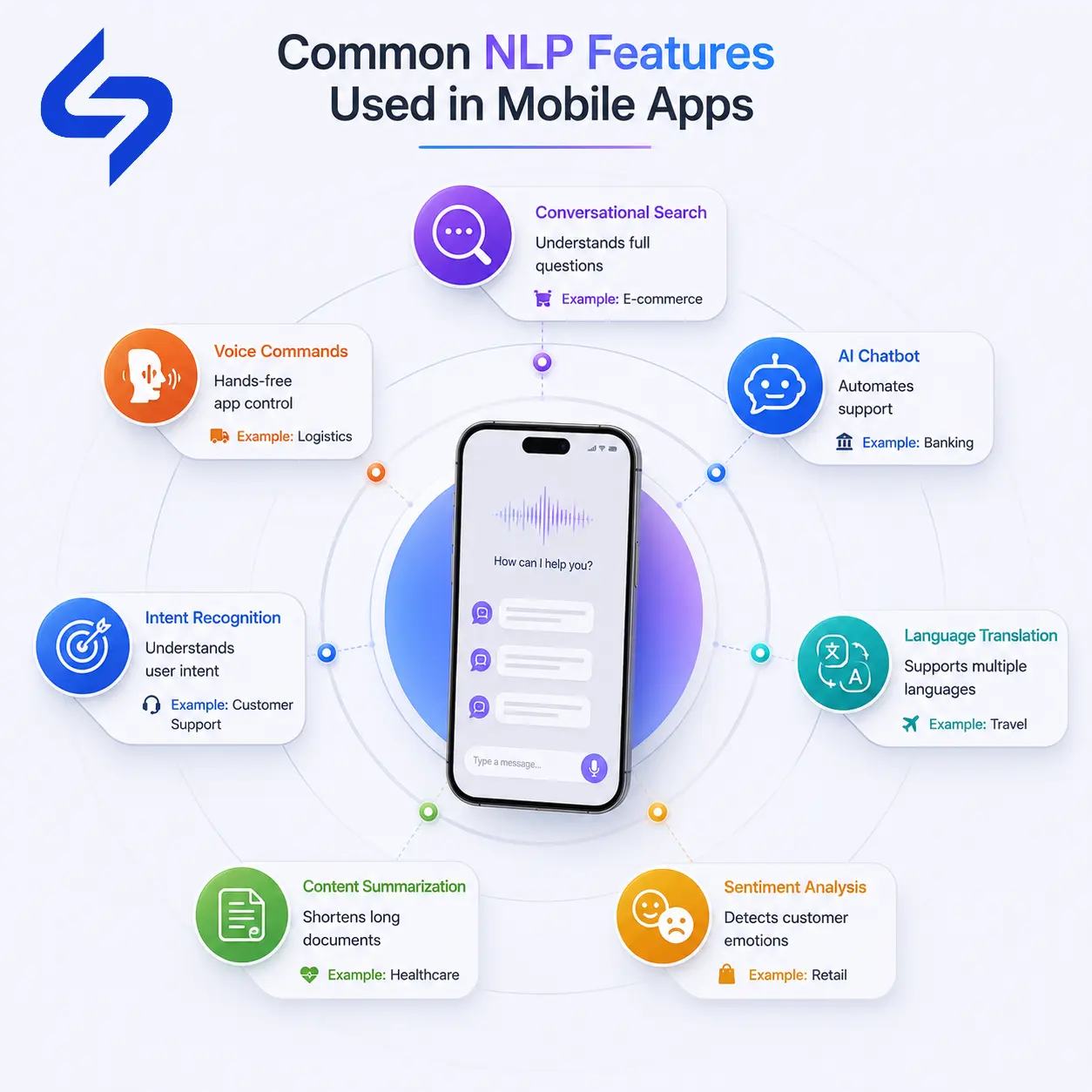
Common NLP Features Used in Mobile Apps
The most common NLP features help users search, communicate, translate, and get useful information with less effort.
Conversational Search
Conversational search lets users search in their own words instead of selecting multiple filters.
For example, a user on a real estate app types, “2 bedroom flat near a metro station under ₹40 lakhs.” The app understands the requirements and shows relevant properties quickly. This makes searching faster, easier, and more natural.
Voice Commands
Voice commands let users control an app and get information without typing. This is especially useful when users are busy, driving, cooking, working, or have their hands occupied.
For example, a delivery driver while riding say, “Show my next delivery,” and get the required information without stopping to type.
AI-Powered Customer Support
AI chatbots help users get answers quickly when they have questions about an app, product, order, payment, appointment, and other services.
A good chatbot focuses on common user questions and provides relevant answers. When a question needs human support, the conversation should be passed to a support team.
Language Translation
Language translation helps users interact with an app when they do not understand the language used in its content.
This is especially useful for travel, retail, education, and other apps serving users across different regions. Users can understand product information, instructions, messages, and other content in their preferred language.
Sentiment Analysis
Sentiment analysis helps an app understand the emotion behind user feedback.
For example, a customer write, “The app works, but I expected much better service.” The words appear neutral at first, but the overall message shows dissatisfaction.
Businesses use this information to identify unhappy customers, understand feedback, and spot recurring problems.
Smart Text Suggestions and Autocomplete
Smart text suggestions help users type faster with less effort. They are useful in search, chat, forms, customer support, and other areas where users enter text frequently.
Content Summarization
Content summarization turns long text into a shorter version containing the main points.
This is useful when users need to quickly understand lengthy support conversations, documents, reports, notes, and other text-heavy information.
Intent Recognition
Intent recognition helps an app understand what the user actually wants to do.
For example, these two messages mean almost the same thing:
“My payment failed, but the money was deducted.”
“The order failed, but the amount was taken from my account.”
NLP helps the app recognize that both users are describing the same payment problem and respond accordingly. Intent recognition works behind many NLP features. It helps the app focus on the meaning of the user's request, not just individual words.
Quick Table for Common NLP Features
Feature | What It Does |
Conversational Search | Interprets full sentences to return relevant results. |
Voice Commands | Lets users control the app hands-free. |
AI-Powered Customer Support | Resolves routine questions automatically. |
Language Translation | Lets users interact in their preferred language. |
Sentiment Analysis | Reads emotional tone in text. |
Smart Text Suggestions | Speeds up typing and data entry. |
Content Summarization | Condenses long text into a short version. |
Intent Recognition | Identifies what a user is trying to accomplish. |
Download and Share Infographic for "Common NLP Features Used in Mobile Apps"
How NLP Works Alongside Other AI Technologies
NLP usually works together with other ai technologies, in a mobile app. Each technology handles a different type of input, while NLP focuses on understanding human language.
Large Language Models (LLMs)
Large Language Models Large Language Models (LLMs) are advanced AI models used in Natural Language Processing (NLP) to understand, process, and generate human language. NLP provides the broader methods for working with language, while LLMs use these capabilities to handle the tasks such as answering questions, summarizing text, translation, and generating natural-sounding responses.
Computer Vision
Computer Vision and NLP work together when an application needs to understand both visual and language information. Computer Vision analyzes images and videos, while NLP understands text and voice input. Together, they can help applications answer questions about images, describe visual content, and process documents containing both text and images.
Predictive Analytics
Predictive Analytics and NLP work together when predictions are based on text data. NLP analyzes and extracts useful information from text, while Predictive Analytics uses that information to identify patterns and predict future outcomes. For example, NLP analyze customer feedback, while Predictive Analytics use those insights to predict customer churn.
AI Agents
NLP helps AI Agents understand what a user says or writes. Then the AI Agent uses this information to understand the user's request, decide what to do, complete the task, and give a useful response.
Business Problems NLP Solve in Mobile Apps
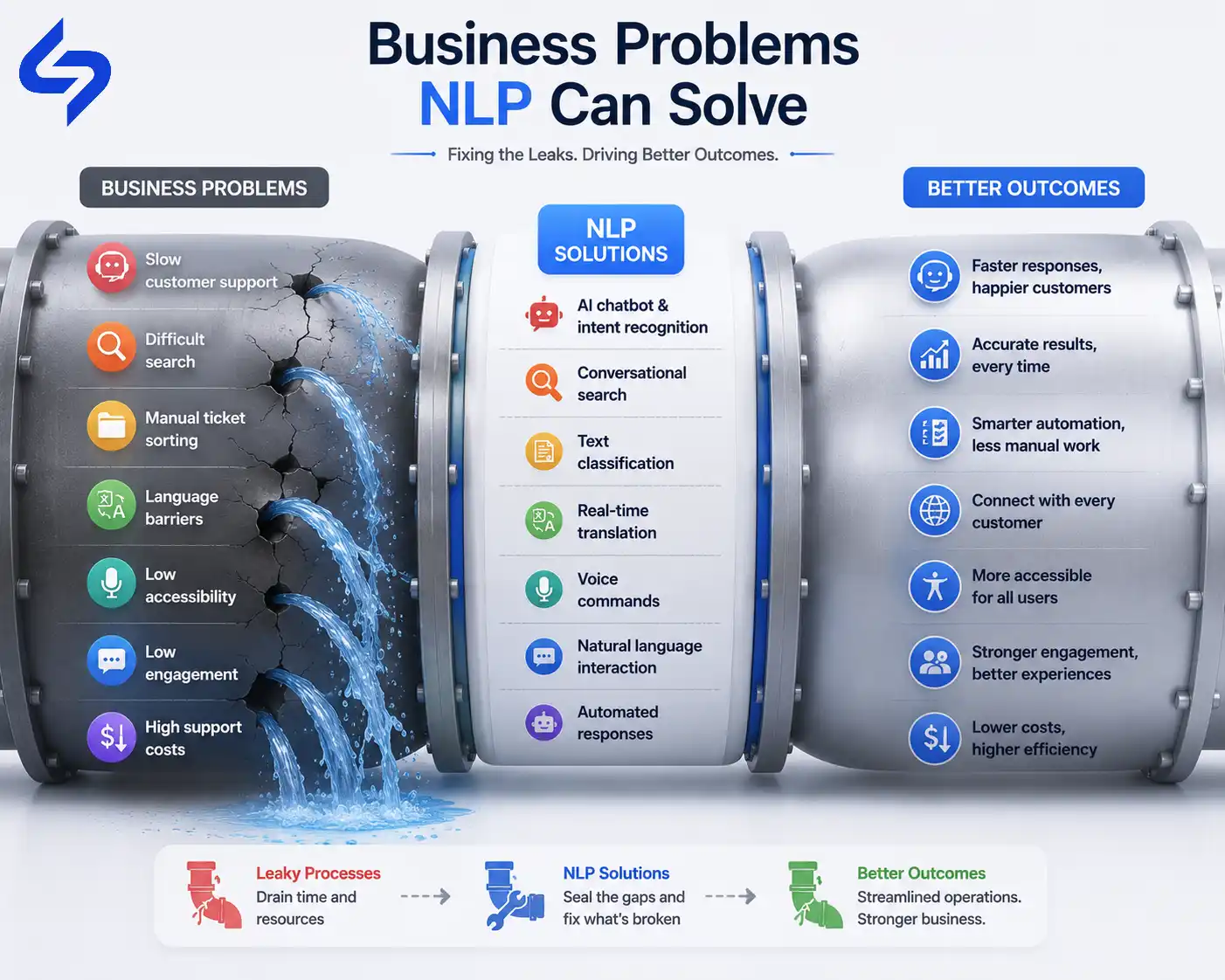
NLP becomes valuable when users need to ask questions in their own words, search without exact keywords, communicate through voice, understand content in another language, and when the business needs to process large amounts of text automatically. In these situations, NLP reduces manual effort, removes unnecessary steps, and helps the app respond more accurately to what users need.
Business Problem | Why It Happens | How NLP Addresses It |
Slow customer support | Support teams spend time answering the same common questions repeatedly. | NLP understands common questions and provides relevant answers automatically, while complex issues go to the support team. |
Difficult search experiences | Users struggle when the app requires specific keywords, filters, and predefined search terms. | Conversational search understands what users mean and returns relevant results from natural-language queries. |
Manual text processing | Employees spend time reading and categorising tickets, reviews, forms, and other text manually. | NLP classifies and organises text automatically, reducing repetitive work. |
Language barriers | Some users find typing difficult because of their situation, physical limitations, or literacy level. | Voice-based interaction gives users a simpler way to interact with the app. |
Poor app accessibility | Some users can't easily type, due to a physical constraint, literacy, or context | Voice commands provide a hands-free, text-free alternative |
Low user engagement | Users leave when completing simple tasks requires too many steps. | Natural-language input reduces unnecessary steps and makes common tasks easier. |
Turn Everyday Conversations Into Better User Experiences.
Build smarter apps that understand your users and respond naturally.
Talk to an ExpertIndustries Using NLP in Mobile Apps
NLP has practical uses across industries wherever mobile apps need to understand what people type, say, or ask. NLP reduces the need for users to search through menus and helps the app respond to what they actually mean.
Industry | How NLP Is Used in Mobile Apps |
Healthcare | Understands symptom descriptions, supports initial triage, and summarises consultation notes for healthcare professionals. |
Banking | Understands customer questions about balances, transactions, payments, and disputes, then explains information in simple language. |
Retail | Enables conversational product search and analyses customer reviews to understand what customers like, dislike, and expect. |
Education | Analyses written answers, creates practice questions from learning material, and provides instant language-learning feedback. |
Travel | Understands natural-language itinerary requests and provides translation support for travellers in unfamiliar languages. |
Logistics | Enables drivers to give voice-based updates while working and automatically identifies the reason behind delivery exceptions. |
Real Estate | Lets buyers describe the property they want in natural language and finds listings that match their requirements. |
NLP is not limited to chatbots. It supports search, voice interaction, translation, text processing, customer feedback, and task automation across different industries. The right use case depends on where human language is part of the user's journey or business process.
Benefits of Using NLP in Mobile Apps
NLP creates value when it reduces the effort users need to find information, get help, complete tasks, or communicate with an app. It also reduces repetitive work for businesses.
1. Faster User Interactions
2. More Personalised Experiences
3. Reduced Customer Support Work
4. Better Accessibility
5. Better Understanding of Customer Feedback
6. Lower Operational Effort
Important: These benefits depend on how well the NLP feature is designed and trained.
Build Mobile Apps That Understand Your Users
Design NLP-powered experiences that improve search, support, and communication while delivering measurable business value.
Explore NLP SolutionsChallenges Businesses Should Consider Before Using NLP
NLP surely improve a mobile app, but it also introduces challenges that businesses need to consider before implementation. The level of effort depends on the app's use case, users, data, and accuracy requirements.
Accuracy.
NLP systems do not understand every user request correctly. The impact of an incorrect response depends on the industry. A wrong recommendation in a shopping app may frustrate a user, while incorrect information in a healthcare app could have serious consequences. Before implementing NLP businesses should define acceptable accuracy levels and plan appropriate testing and human review.
Multilingual support.
Multilingual NLP requires language-specific models, relevant training data, and testing with inputs such as slang and mixed-language sentences. Without proper NLP expertise, these complexities can lead to incorrect responses and a poor user experience.
Privacy.
NLP features often process sensitive information such as health questions, financial queries, personal messages, and customer complaints. Poor data handling can create privacy and compliance risks, so secure data storage, access controls, and clear data-retention practices need to be planned before implementation.
Training data.
NLP systems need relevant training data to understand how your users actually communicate. Using generic data without adapting it to your users and industry can lead to poor results, making data selection and model training an important part of the implementation.
Domain-specific language.
Industry-specific terms can be difficult for a general NLP system to understand correctly. Without proper domain adaptation and testing, specialised terminology can be misinterpreted, leading to incorrect responses and unreliable app behaviour.
Ongoing maintenance.
NLP is not a one-time implementation. User language, products, services, and business terminology keep changing. Without regular monitoring, testing, and model updates, accuracy can decline over time, making ongoing NLP expertise important for maintaining the feature.
Does Every Mobile App Need NLP?
No. NLP is not necessary for every mobile app. If an app has a simple, well-defined user journey with only a few actions, a traditional interface may be more effective. Adding NLP in such cases increases mobile app development cost, maintenance effort, and the possibility of incorrect responses without adding meaningful value.
Before adding NLP to your mobile app, ask these questions. The answers will help you identify whether NLP solves a real problem in your app.
Do users frequently type or speak?
If users mostly tap buttons and select from predefined options, NLP may add little value. Frequent text and voice input is a stronger reason to consider it.Do users search through large amounts of information?
If users struggle to find information using standard filters and keywords, conversational search can make the experience easier.Do you support multiple languages?
If your users communicate in different languages, multilingual NLP and translation can make the app more accessible and easier to use.Are support teams handling many repetitive questions?
A high volume of similar questions is a strong use case for NLP-powered customer support and automated responses.Can you identify a specific user problem NLP will solve?
Look at the exact screen where users struggle to search, ask questions, communicate, or complete a task. If you cannot identify a clear problem, adding NLP may simply increase the app's complexity without providing meaningful value.
Don't start with “Where can we add NLP?” Start with “Where are our users struggling with language?” If there is a clear problem, NLP has a stronger reason to be part of the solution.
Conclusion
NLP should be treated as a business capability, not an app feature. Its real value comes from how well it fits the way your users communicate and how effectively it supports the work your business needs to perform.
Before investing in NLP, look beyond what the technology offers and evaluate your users, your workflows, your data, and the level of accuracy your business requires. This helps you decide where NLP genuinely belongs in your app and where a simpler solution is the better choice.
Frequently Asked Questions
What is Natural Language Processing in Mobile Apps?
It's the technology that lets an app interpret text or speech input from users and understand the intent behind it, rather than requiring exact keyword matches or predefined menu selections.
How does NLP improve customer experience in mobile apps?
It reduces the effort needed to get an answer or complete a task, since users can express requests in their own words instead of adapting to a rigid interface, and routine questions get resolved without waiting for human support.
What's the difference between NLP and a basic chatbot?
A basic rule-based chatbot matches specific keywords or phrases to canned responses. An NLP-driven system interprets meaning and intent, so it can handle the same question phrased many different ways.
Which industries benefit most from NLP in mobile apps?
Healthcare, banking, retail, education, travel, logistics, and real estate all use it regularly, typically for support automation, conversational search, or multilingual access.
Does adding NLP always improve an app?
No. It helps when users deal with open-ended input, large volumes of content, or language barriers. For apps with a small, well-defined set of actions, a traditional interface is often faster to build and easier to maintain.
What should businesses check before implementing NLP?
Accuracy requirements for the specific use case, multilingual and dialect handling, data privacy for sensitive input, availability of domain-specific training data, and a plan for ongoing maintenance as language use shifts over time.
Explore comprehensive blogs, best practices, and insights from our technology experts.

Benefits of Mobile Healthcare Apps: How mHealth Is Improving Patient Care
Mobile healthcare apps improve patient care by enabling remote monitoring, timely reminders, secure data access, better communication, and cost-efficient healthcare services through mHealth technology.

10 Reasons Why B2B Apps Are a Great Investment for Your Business
B2B apps help businesses streamline operations, enable on-the-go access to data, improve client engagement, support omnichannel sales, and drive scalable revenue by simplifying complex business workflows.
Turning expertise into action for your business.
We are more than just developers and consultants—we are your partners in navigating the digital landscape. Let us be the engine behind your next big success while you focus on your core vision.
Explore Opportunities!