Top 10 Cloud-Based CRM Platforms Compared (Features, Pricing & Pros)
.webp&w=3840&q=75)
The average sales rep now spends less than a third of their week actually selling; the rest goes to admin, data entry, and searching for information trapped in someone else's inbox. A cloud-based CRM platform exists to claw that time back, and in 2026, cloud is no longer the alternative deployment option; it's the default one, with roughly 87% of companies now running CRM in the cloud rather than on-premise.
But "best cloud CRM" isn't a single answer. Salesforce and a five-person agency need almost nothing in common. This guide compares the 10 platforms that consistently show up on real shortlists – Salesforce, HubSpot, Zoho CRM, Microsoft Dynamics 365, Pipedrive, Monday CRM, Freshsales, Zendesk Sell, SugarCRM, and Keap on pricing, features, and who each one actually fits.
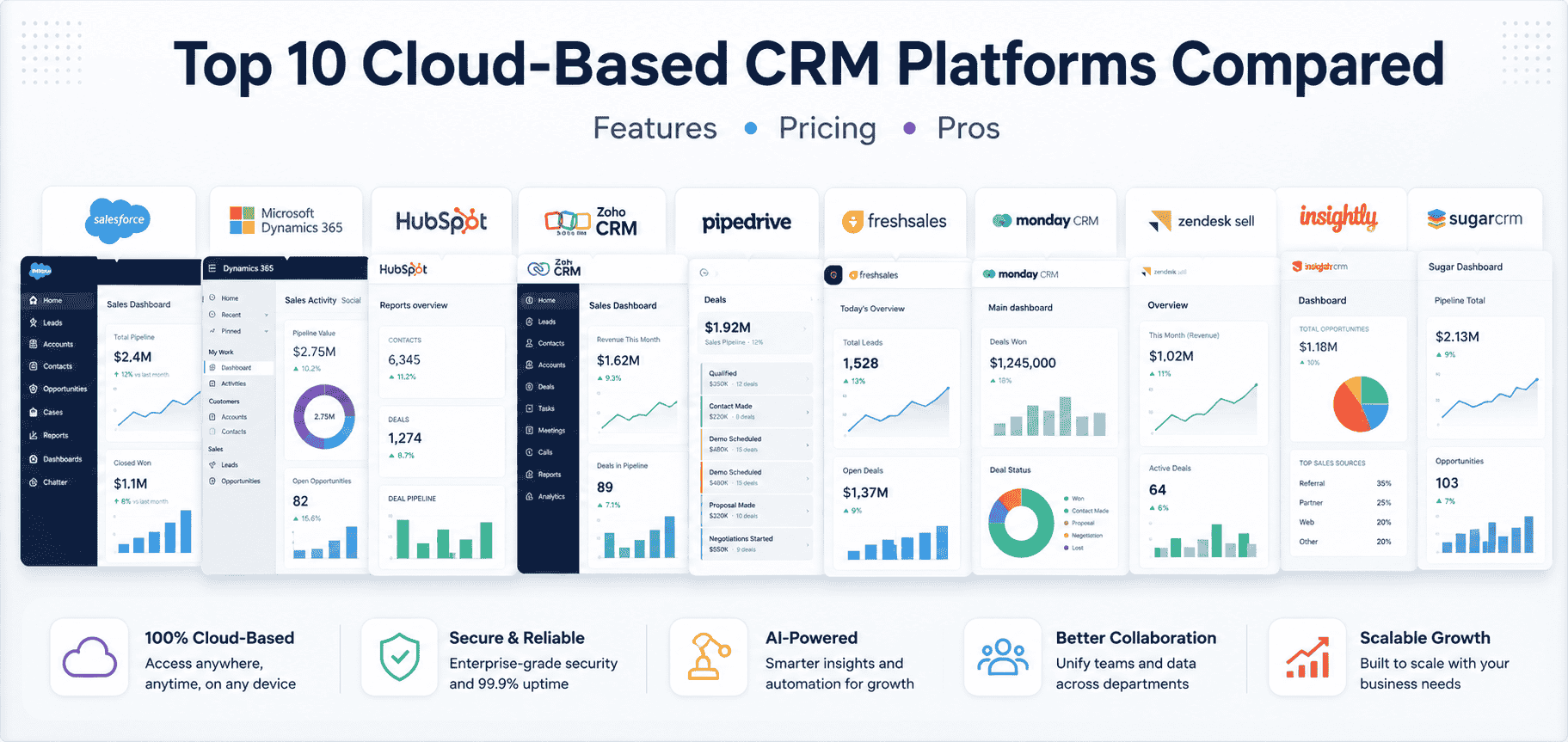
A cloud-based CRM is customer relationship management software hosted on the vendor's servers and accessed through a browser or app, rather than installed on your own company hardware. There's nothing to patch, no local server to maintain, and updates roll out automatically for every user at once.
That's the core distinction from on-premise CRM, which your IT team installs, hosts, and maintains internally — usually at a higher upfront cost but with more control over where data physically lives. For most businesses outside of healthcare, government, and other tightly regulated sectors, cloud has become the default because it converts a capital hardware investment into a predictable monthly subscription and removes the maintenance burden entirely.
Our CRM specialists can help you compare platforms based on your budget, business size, industry, and long-term growth plans—so you invest in the right solution the first time.
Book a Free ConsultationEach platform below was evaluated on five criteria: core CRM feature depth (pipeline, contact, and deal management), ease of implementation, AI and automation capability, total cost of ownership (not just sticker price), and fit for a specific team profile. Pricing was checked against vendor pricing pages and independent pricing trackers in July 2026; where sources disagreed, the vendor's own published price took priority. Because CRM vendors revise pricing often, Salesforce alone repriced its Enterprise and Unlimited tiers within the last two years — treat every figure below as a starting point to verify, not a locked-in quote.
Platform | Starting Price (per user/mo, annual billing) | Best For | Free Plan? |
|---|---|---|---|
$25 (Starter Suite) | Enterprises needing deep customization | No | |
~$65 Professional / ~$50–$95 range by source | Microsoft 365-native and growing mid-market organizations | No | |
HubSpot CRM | $0 core CRM / $20 Sales Hub Starter | Teams that want marketing + sales unified | Yes |
Zoho CRM | $0 (up to 3 users) / $14 Standard | Budget-conscious SMBs wanting feature depth | Yes |
Pipedrive | ~$14–$24 (Essential/Lite) | Sales teams that want a pure visual pipeline | No |
monday CRM | $12 (Basic, 3-seat minimum) | Teams already using monday.com for work management | No (14-day trial) |
Freshsales (Freshworks) | $0 (up to 3 users) / ~$9 Growth | Lean teams wanting built-in phone + AI scoring | Yes |
Zendesk Sell | ~$19–$25 entry tier | Teams pairing sales with Zendesk support | No |
SugarCRM (Sugar Sell) | $19 Essentials (3–9 users) / $59 Standard (15-user minimum applies above Essentials) | Mid-market/enterprise needing deep customization | No |
Keap | Custom-quoted, mandatory onboarding | Small service businesses wanting CRM + marketing automation + payments bundled | No |
Prices are approximate, per-seat, billed annually, and pulled from vendor pricing pages and independent trackers as of July 2026. Always confirm current pricing directly with the vendor.
Salesforce remains the CRM enterprises default to when they need depth: cross-object reporting, a huge AppExchange marketplace, and Agentforce AI agents layered on top of the core platform. It runs five main tiers: Starter Suite ($25/user/month), Pro Suite ($100), Enterprise ($175), Unlimited ($350), and the AI-native Agentforce 1 Sales edition ($550), with the jump from Starter to Pro representing roughly a 4x price increase because of where Salesforce gates core features like advanced automation.
.png)
Pros: Unmatched customization depth, huge partner/integration ecosystem, strong forecasting and pipeline analytics at Enterprise tier and above.
Cons: Steep price jump between tiers, most useful plans require annual billing, implementation typically needs a certified partner to configure well.
Best for: Mid-market and enterprise sales organizations with the budget and internal process maturity to use its depth.
Microsoft Dynamics 365 pairs full CRM capability with the tools most sales and service teams already live in every day – Outlook, Teams, and Excel – so a rep sees relevant customer history and next steps without ever leaving their inbox. Pricing for the Sales application runs in the roughly $50–$95 per user per month range depending on tier and source, and the real value case sharpens as an organization adds other Dynamics 365 applications (Customer Service, Field Service, Customer Insights) on the same underlying Microsoft data platform, rather than stitching together separate best-of-breed tools that each need their own integration work.
.png)
Where Dynamics 365 pulls ahead of the field for a growing business is extensibility without a rebuild: the Power Platform lets internal teams or an implementation partner customize workflows, build automations with Power Automate, and layer Copilot AI across sales, service, and operations all inside one licensing and data model instead of bolting together disconnected point solutions.
Pros: Native integration with Microsoft 365, Teams, and Outlook that competitors can only approximate through third-party connectors; Copilot AI built across the suite; Power Platform extensibility that scales from simple automations to custom applications; a clean growth path into a full CRM-plus-operations platform as the business expands beyond sales.
Cons: The strongest value depends on being in (or moving toward) the Microsoft ecosystem, and getting licensing, module selection, and configuration right is easiest with an experienced implementation partner rather than a pure self-serve setup.
Best for: Growing and mid-market businesses, especially those already on Microsoft 365, that want CRM to feel like a natural extension of their existing tools rather than a separate system to adopt and maintain.
Capability | Professional | Enterprise | Premium |
|---|---|---|---|
Lead & Opportunity Management | ✅ | ✅ | ✅ |
Sales Pipeline Management | ✅ | ✅ | ✅ |
Email & Outlook Integration | ✅ | ✅ | ✅ |
Custom Sales Processes | Limited | ✅ | ✅ |
AI-Powered Copilot | Limited | ✅ | ✅ Advanced |
Predictive Lead Scoring | ❌ | ✅ | ✅ |
Conversation Intelligence | ❌ | Basic | Advanced |
Revenue Intelligence | ❌ | Limited | ✅ |
Advanced Forecasting | ❌ | ✅ | ✅ |
Sales Accelerator | ❌ | ✅ | ✅ |
Note: Microsoft periodically updates Dynamics 365 licensing and feature availability. Some AI and Copilot capabilities may require additional licensing or specific Microsoft 365 and Power Platform subscriptions. Always verify the latest licensing details before purchasing.
Talk to Our CRM Experts and find the cloud CRM solution that best fits your business goals.
Book a Free ConsultationHubSpot's core CRM database is genuinely free, which makes it the easiest on-ramp on this list. The real cost center is Sales Hub, priced per seat: Free, Starter (~$20/seat), Professional (~$90/seat, plus a mandatory onboarding fee often quoted around $1,500), and Enterprise (~$150/seat, with onboarding fees that can run into the thousands). HubSpot restructured its seat model in 2024 to a fully per-seat structure at Professional and Enterprise, which simplified per-user math for larger teams but raised costs for very small Professional buyers.
Pros: Genuinely usable free tier, tightly integrated marketing/sales/service hubs, strong reporting once past Starter.
Cons: Marketing Hub pricing is separate and expensive (Professional starts near $890/month), Professional/Enterprise tiers carry real onboarding fees, per-seat costs scale fast for larger teams.
Best for: Growing teams that want marketing and sales data in one system without stitching tools together.
Zoho consistently prices below Salesforce and HubSpot at comparable feature depth, with a free tier for up to 3 users, then Standard, Professional, Enterprise, and Ultimate tiers running roughly $14 to $52 per user per month on annual billing. Its real differentiator is the broader Zoho One ecosystem: bundling CRM with dozens of other Zoho apps can undercut a comparable Salesforce-plus-add-ons stack by a wide margin at scale.
Pros: Strong feature-to-price ratio, usable free tier, deep ecosystem if you're already using other Zoho products.
Cons: Interface and setup are less polished than Salesforce or HubSpot out of the box, steeper learning curve to configure well.
Best for: Cost-conscious SMBs and mid-market teams that don't need Salesforce-level AppExchange depth.
Pipedrive popularized the drag-and-drop visual pipeline that most competitors have since copied, and it stays laser-focused on sales rather than trying to be a full marketing suite. Its four tiers, commonly listed as Essential/Lite, Advanced/Growth, Professional/Premium, and Enterprise/Power/Ultimate — start around $14–$24 per user per month on annual billing and scale to roughly $99 at the top end, with add-ons like LeadBooster and Campaigns priced separately.
Pros: Clean, fast-to-learn visual pipeline, strong 500+ integration library, no marketing bloat for pure sales teams.
Cons: No permanent free plan, no built-in marketing automation, add-ons can meaningfully raise the effective per-seat cost.
Best for: Sales-led SMB teams that want a purpose-built pipeline tool without a full CRM suite's complexity.
Cynoteck helps businesses evaluate, implement, customize, and optimize leading cloud CRM platforms, including Salesforce and Microsoft Dynamics 365. Our certified CRM experts ensure a smooth implementation, seamless integrations, and maximum return on your investment.
Book a Free Consultationmonday CRM is the sales module of the broader monday.com work-OS platform, which makes it a strong fit for teams already running projects and workflows in monday.com. Pricing runs Basic ($12/seat), Standard ($17/seat), Pro ($28/seat), and a custom-quoted Ultimate tier, all on a 3-seat minimum with seats sold in predefined buckets.
Pros: Highly visual, flexible boards that extend beyond sales into general work management, useful for teams that want CRM and project tracking in one place.
Cons: Core CRM depth (forecasting, sequences, lead scoring) is locked behind the Pro tier; automation-action caps on lower tiers can be limiting.
Best for: Teams already standardized on monday.com who want sales tracking without adopting a second platform.
Freshsales bundles built-in phone, email, and Freddy AI-powered lead scoring into a single sales CRM, positioning it as an AI-capable option at a lower price point than Salesforce Einstein or HubSpot Enterprise. It offers a free tier for up to 3 users, then Growth (~$9/user/month), Pro (~$39), and Enterprise (~$59) tiers on annual billing.
Pros: Strong AI feature set relative to price, built-in calling removes the need for a separate dialer tool, generous free tier for very small teams.
Cons: Deeper Freddy AI capabilities are often gated as separate add-ons, less third-party ecosystem depth than Salesforce or HubSpot.
Best for: Lean sales teams that want modern AI features without an enterprise price tag.
Zendesk Sell is the sales CRM half of the Zendesk customer-experience suite, built to pair cleanly with Zendesk's support/ticketing product. Entry pricing generally starts in the high-teens to mid-twenties per user per month, with the caveat that combining Sell with a Support or Suite plan bills as a separate line item — so total spend climbs quickly for teams wanting both sales and service in one vendor relationship.
Pros: Tight integration with Zendesk support tools, clean and fast interface, good fit for revenue teams that already run support on Zendesk.
Cons: Combining Sell with Support/Suite plans adds meaningfully to total cost, less standalone sales depth than dedicated sales-first CRMs like Pipedrive.
Best for: Companies that want sales and customer support data living in the same vendor ecosystem.
As a trusted Salesforce Partner and Microsoft Solutions Partner, Cynoteck delivers end-to-end CRM consulting, implementation, customization, integration, and support services tailored to your business needs.
Book a Free ConsultationSugarCRM splits its product into Sugar Sell (sales), Sugar Serve (support, from $80/user/month), and Sugar Market (marketing, from roughly $1,000/month for 10,000 contacts) — a modular structure that suits organizations wanting to license only what they need. Sugar Sell itself runs from an Essentials tier around $19/user/month (capped at 3–9 users) up through Standard, Advanced, and Premier tiers, with a 15-user minimum applying once you move past Essentials or combine Sell with Serve.
Pros: Deep customization and workflow flexibility, both cloud and on-premise deployment options, strong fit for complex B2B account-based sales processes.
Cons: 15-user minimum on core tiers raises the real entry cost for smaller teams, interface feels dated next to newer cloud-native competitors.
Best for: Mid-market and enterprise B2B organizations, especially in manufacturing, wholesale, and distribution, that need deep ERP integration and customizable workflows.
Keap bundles CRM with marketing automation, invoicing, and payment processing specifically for small service businesses, built around what it calls "Lifecycle Automation" — a guided framework for capturing, nurturing, and converting leads. Pricing is generally quoted directly by Keap's sales team and typically includes mandatory implementation services rather than pure self-serve signup.
Pros: Genuinely all-in-one for small service businesses (CRM, email/SMS automation, invoicing, and payments in one bill), guided onboarding reduces setup guesswork.
Cons: Mandatory implementation adds upfront cost, less suited to larger or more complex sales organizations than dedicated enterprise CRMs.
Best for: Small service-based businesses that want CRM, marketing automation, and payments unified with hands-on setup support.
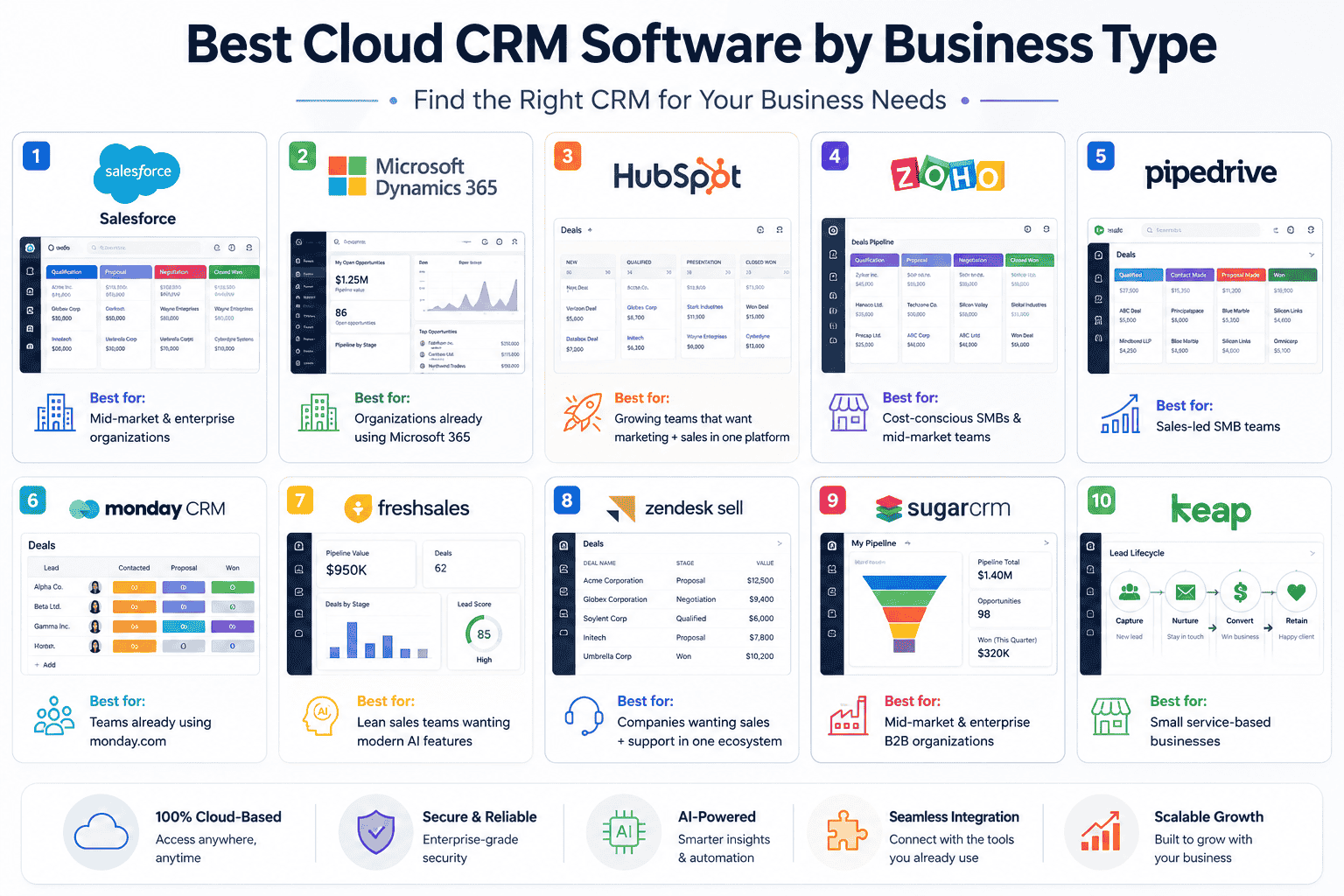
For most businesses, yes — cloud CRM wins on cost, speed of deployment, and flexibility. On-premise CRM requires upfront hardware investment and ongoing IT overhead that cloud converts into a predictable monthly subscription, which is a major reason cloud has become the default deployment model industry-wide.
On-premise still holds an edge in specific regulated contexts — healthcare, government, and other sectors where strict data-residency or compliance rules require local hosting. Hybrid setups, blending cloud access with on-premise data storage, exist mainly to bridge that gap, though they're less common outside large enterprise deployments. Reputable cloud CRM vendors generally offer stronger baseline security than most small and mid-sized businesses can build in-house on their own — AES-256 encryption, multi-factor authentication, and third-party audits like SOC 2 Type II are standard among the platforms compared above — but compliance-sensitive buyers should still confirm HIPAA, GDPR data-residency, or industry-specific requirements directly with the vendor before signing.
Start with your existing tech stack — it usually decides more than the feature list. If your team already runs on Microsoft 365, Teams, and Outlook, Microsoft Dynamics 365 typically wins on total value: CRM data lives inside tools people already use daily, instead of becoming one more app reps have to remember to check.
Check what's actually included at your price point, not the advertised "starting at" figure. Automation, forecasting, and AI features are frequently gated to higher tiers across every vendor on this list.
Factor in onboarding and implementation, not just the subscription. HubSpot's Professional/Enterprise tiers, SugarCRM's user minimums, and Keap's mandatory setup services all add real cost beyond the sticker price — and Dynamics 365's biggest ROI unlocks when licensing and Power Platform automation are configured by someone who's done it before.
Think beyond the sales pipeline. Dynamics 365 and Salesforce both scale into full CRM-plus-operations platforms (service, field service, finance) as a business grows, which matters if this CRM needs to still fit in three years, not just this quarter.
Pilot with a real sales cycle before committing annually. Most platforms above offer free tiers or trials — run at least one full deal cycle through the system before signing a 12-month contract.
For most growing, Microsoft-standardized businesses comparing this list, Microsoft Dynamics 365 offers the strongest combination of native integration, extensibility through the Power Platform, and room to grow into a full operations platform — without the steep, feature-gated tier jumps that come with Salesforce.
Choosing a platform from this list is only step one the harder part is configuring pipelines, migrating historical data cleanly, and getting a sales team to actually adopt the new system instead of quietly going back to spreadsheets. Cynoteck works as a Microsoft Dynamics 365 consulting and implementation partner, helping businesses move from evaluation to a CRM that's actually configured around how their sales and service teams work — not just the vendor's default setup.
That includes Dynamics 365 implementation and go-live support, Power Platform automation and custom workflow builds, integration with Microsoft 365, ERP, and other business systems, data migration from legacy CRMs or spreadsheets, and ongoing managed support once you're live. Pricing for this kind of engagement depends on the number of users, which Dynamics 365 modules you're deploying, how much customization your processes require, and the level of ongoing support you want — so it's worth scoping rather than estimating from a generic package price.
If Microsoft Dynamics 365 looks like the right fit from this comparison — or you already know it's the platform you want and need help getting the licensing, setup, and automation right — talk to a Cynoteck Dynamics 365 consultant to scope the right plan for your business.
What is the best cloud-based CRM for a small business?
For most small businesses, HubSpot CRM, Zoho CRM, or Freshsales offer the strongest starting point — all three have usable free tiers and low-cost paid plans that cover contact management, pipeline tracking, and basic automation without a large upfront commitment.
Is cloud CRM safe for storing customer data?
Yes, for most businesses. Reputable cloud CRM vendors typically offer stronger security than in-house infrastructure, including encryption, multi-factor authentication, and independent audits like SOC 2 Type II — though regulated industries should confirm specific compliance requirements like HIPAA or GDPR data residency before signing.
Which cloud CRM has the cheapest starting price?
HubSpot, Zoho CRM, and Freshsales all offer free plans, making them the cheapest entry points on this list. For paid plans, monday CRM's Basic tier and Pipedrive's entry tier both start in the low-to-mid teens per user per month on annual billing.
How much does a cloud CRM typically cost per user?
Most platforms on this list range from free (entry tiers) to roughly $60–$100 per user per month for mid-level plans, with enterprise-grade tiers at Salesforce or SugarCRM's higher plans reaching $150–$550 per user per month depending on features and add-ons.
Why choose Microsoft Dynamics 365 over Salesforce?
Dynamics 365 generally offers a smoother total-cost curve than Salesforce, whose most useful automation and reporting features sit behind steep tier jumps, and it integrates natively with Microsoft 365, Teams, and Outlook rather than through third-party connectors. For businesses already standardized on Microsoft tools, or planning to grow into a full CRM-plus-operations platform, Dynamics 365 is typically the stronger long-term fit.
What's the difference between Microsoft Dynamics 365 and Salesforce?
Dynamics 365 integrates natively with Microsoft 365, Teams, and Outlook and extends cleanly into service, field service, and finance on one platform, while Salesforce offers a broader third-party AppExchange ecosystem and is platform-agnostic. For organizations already invested in Microsoft's tools, Dynamics 365 usually delivers more value per dollar; Salesforce tends to make more sense for teams with no existing platform preference and a larger budget for customization.
Can I switch cloud CRM platforms later without losing my data?
Generally yes — most cloud CRMs support data export and offer migration tools or partner support for moving contacts, deals, and history to a new platform, though the complexity and cost of migration scale with how customized your original setup was.
Do I need a free trial before committing to a cloud CRM?
Yes, ideally. Running at least one full sales cycle through a trial or free tier surfaces workflow gaps that a feature list won't show, and most platforms in this comparison — including Salesforce, Pipedrive, and monday CRM — offer trials specifically for this purpose.
The right cloud CRM is the one your team will actually use six months from now, not the one with the longest feature list on launch day. Pricing, AI capability, and integrations will keep shifting through 2026 as every vendor on this list races to bolt on more AI-driven automation — so revisit this comparison before you renew, not just before you buy. If Microsoft Dynamics 365 looks like the right next step for your business, Cynoteck's Dynamics 365 consultants can help you scope the right plan and get it configured right the first time.

Discover the top 10 benefits of custom CRM software development for modern businesses. Learn how tailored CRM solutions improve efficiency, enhance customer relationships, and drive business growth.
We are more than just developers and consultants—we are your partners in navigating the digital landscape. Let us be the engine behind your next big success while you focus on your core vision.
Explore Opportunities! Power BI vs Excel (1).webp)
 Top 10 Cloud Based CRM Platforms Compared (Features, Pricing & Pros).webp)
.png)
.png)