Salesforce Customization vs Configuration: A Complete Guide for 2026
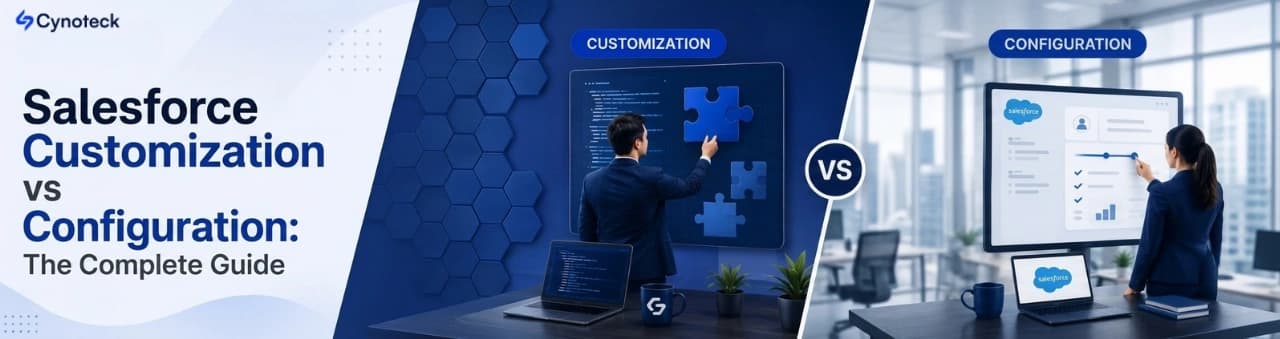
Salesforce configuration uses built-in, no-code tools to adapt Salesforce, while customization uses code to extend the platform beyond standard capabilities. The right approach depends on your business requirements, timeline, cost, complexity, and long-term maintenance needs.
Summary: This guide explains the real difference between Salesforce customization and configuration, when each one is the right call, and how AI features like Agentforce are changing that decision in 2026. By the end, you will have a clear way to decide which approach fits your business right now. |
Salesforce gives you two ways to shape the platform around your business: configuration and customization. Picking the wrong one is one of the most common reasons Salesforce projects go over budget or never get properly adopted by the team. This guide breaks down what each approach involves, when to use each one, and how AI agents are reshaping the decision this year.
Configuration is built into Salesforce and needs no code. Customization extends the platform with code and needs a developer. The table below lays out how they compare at a glance.
Configuration | Customization | |
Coding required | No | Yes |
Who does it | Salesforce admin | Salesforce developer |
Typical timeline | Days to a few weeks` | Several weeks to a few months |
Cost | Lower | Higher |
Maintenance after updates | Minimal | Requires testing every release |
Best for | Standard to moderately complex processes | Unique logic, high data volume, custom integrations |
Note: Salesforce powers more than 150,000 businesses worldwide, and almost every one of them uses a mix of both approaches. The real skill is knowing where the line sits for your business, not picking a side. |
If your Salesforce org feel harder to use than it should, we would be glad to take a look. A conversation is often all it takes to find a better way forward.
Request a Free Salesforce ConsultationSalesforce configuration means adjusting the platform using the built-in tools already sitting inside Setup, without writing a single line of code. In simple terms, you are rearranging and switching on features Salesforce already gives you, not building new ones.
A Salesforce admin, the person who manages a company's Salesforce environment (also called an org), can handle almost all configuration work without a developer. This is why configuration is fast, cheap, and low-risk compared to custom development.
Custom fields and objects: Add new fields to standard records like Accounts, Contacts, and Opportunities, or build entirely new objects for data that does not fit the standard model.
Page layouts and record types: Control which fields different teams see on the same record and offer separate versions of a process for different business units.
Salesforce Flow: The platform's main no-code automation tool. It handles record-triggered actions, screen-based forms, and scheduled tasks without any Apex code.
Reports and dashboards: Build real-time views of pipeline, case volume, or campaign performance using Salesforce's native reporting engine.
Permission sets and role hierarchy: Control who can see, edit, or delete specific records and fields.
Validation rules and approval processes: Stop bad data at entry and route requests through multi-step sign-off chains.
Pros | Cons |
No coding, admin-friendly | Limited to what Salesforce's tools support |
Fast to deploy | Cannot handle highly complex or unique logic |
Automatically compatible with Salesforce's seasonal releases | Some advanced integrations still need code |
Lower cost, lower risk | Large orgs can still get messy without good documentation |
Salesforce customization means extending what the platform can do by writing custom code. This means building features, screens, or logic that do not exist in the standard product.
Customization needs a Salesforce developer, someone trained in the platform's programming tools. Unlike configuration, custom code must be tested and reviewed every time Salesforce releases a new version because it runs on top of the platform rather than within it.
Apex: Salesforce's own server-side programming language, similar to Java. Developers use it to write business logic that runs automatically, called triggers, along with reusable classes and scheduled batch jobs.
Lightning Web Components (LWC): A JavaScript-based framework for building custom screens and interface elements inside the Lightning Experience.
Visualforce: An older HTML-based framework for custom pages. Still found in many older orgs, though Salesforce now recommends LWC for new work.
SOQL (Salesforce Object Query Language): The query language developers use to pull and filter data from an org.
REST and SOAP APIs: Connection points that let Salesforce talk to outside systems, used to build custom integrations where no pre-built connector exists.
Custom Apex triggers that run business logic automatically when a record is created or updated
Purpose-built Lightning Web Components for a specific team or workflow
Complex third-party integrations with no ready-made AppExchange connector
Batch Apex for processing large volumes of records on a schedule
Custom mobile experiences built on the Salesforce platform
Pros | Cons |
Can handle almost any business requirement | Costs more, both to build and to maintain |
Full control over logic and interface | Needs developer expertise for every change |
Solves problems configuration genuinely cannot | Must be tested before every seasonal release |
Note: Apex code deployed to production must meet Salesforce's 75% code coverage requirement through unit tests. This is not optional. It is one of the reasons customization takes longer and costs more than configuration. |
Now that you know what each approach involves on its own, here is how they stack up side by side across the factors that affect a project's cost, speed, and long-term upkeep.
Factor | Configuration | Customization |
Coding required | No | Yes |
Who can do it | Salesforce admin | Salesforce developer |
Time to deploy | Days to weeks | Weeks to months |
Cost | Lower | Higher |
Maintenance | Low, updates automatically | Higher, needs testing every release |
Flexibility | Limited to built-in tools | Can handle almost any requirement |
Risk | Very low | Moderate, code errors can affect the org |
AI and Agentforce readiness | Cleaner foundation, easier to connect | Needs extra review before AI features go live |
Best for | Standard to moderate processes | Complex, unique, or high-volume needs |
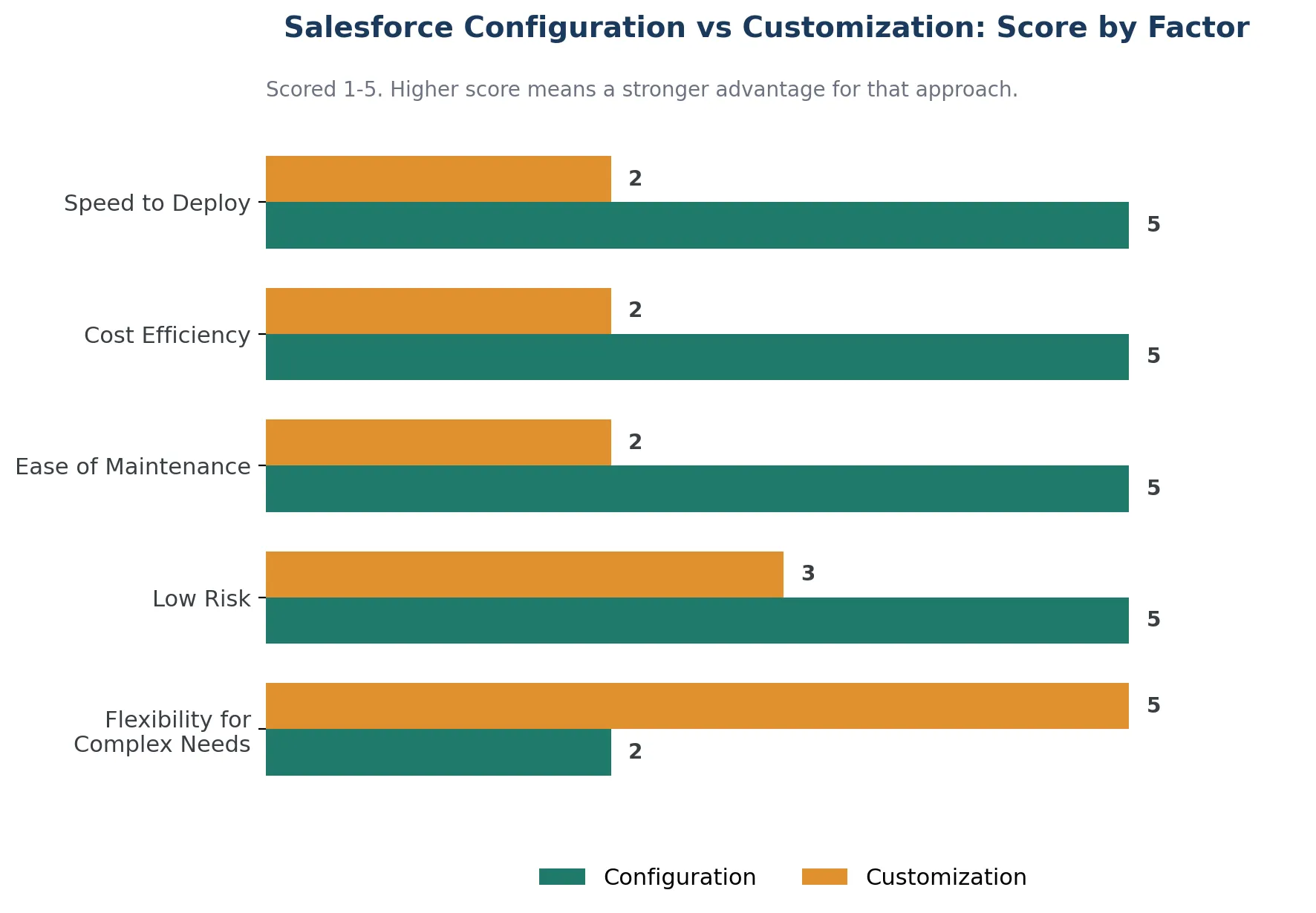
Most successful Salesforce projects use a mix of both. The real question is not which one to pick exclusively, but how much of each your business needs.
That is a common question, and there is no wrong one to ask. We would be happy to walk through your specific requirement with you.
Talk to a Salesforce ConsultantThe comparison table above gives you the summary. This section unpacks each factor individually, so you can see exactly why it leans toward configuration or customization and what that means for your specific project.
Configuration only needs a trained Salesforce admin. Customization needs a certified developer who understands Apex, LWC, and Salesforce's governor limits, the platform's built-in caps on how much processing a single transaction can use.
Best fit: Configuration, because it removes the dependency on scarce, expensive developer time for everyday changes.
A configured change, like a new field or an updated Flow, can go live the same day. A custom feature usually needs a build phase, a test phase, and a deployment phase, often spread across several sprints.
Best fit: Configuration, when the business needs results fast.
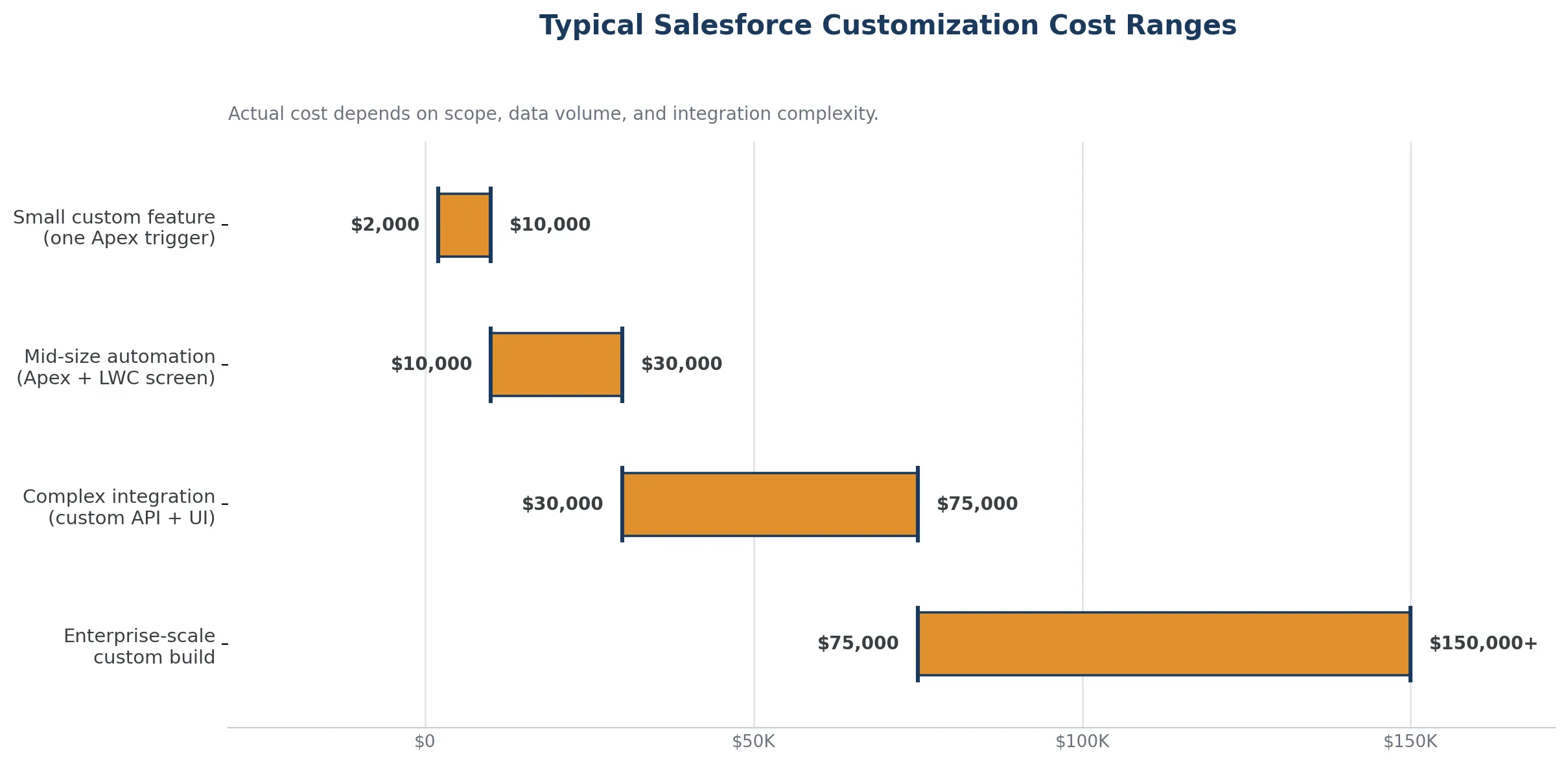
Configuration work is billed at admin rates and needs no separate testing infrastructure. Customization adds developer time, code review, and ongoing maintenance, which is why a single custom integration can run from a few thousand dollars to tens of thousands, depending on scope.
Best fit: Configuration, for anything that does not genuinely require code.
Salesforce ships three seasonal releases a year: Spring, Summer, and Winter. Configuration is automatically compatible with these updates. Custom code has to be tested in a sandbox, a safe copy of your org used for testing, before every release to catch anything that might break.
Best fit: Configuration, for lower long-term maintenance overhead.
Multi-factor pricing models, high-volume data processing, and integrations with systems that have no ready-made connector are genuinely beyond what point-and-click tools can do.
Best fit: Customization, once you hit the real limits of declarative tools.
A misconfigured Flow is usually easy to spot and fix. Poorly written Apex can introduce bugs, security gaps, or performance issues that are harder to trace, especially in a large org.
Best fit: Configuration, for lower operational risk.
Agentforce, Salesforce's platform for autonomous AI agents, performs best on a clean, well-structured org. Heavily customized orgs with complex, undocumented Apex often require additional rework before AI features can be safely layered in.
Best fit: Configuration-first orgs, though custom Apex actions are still needed for advanced agent behavior. More on this below.
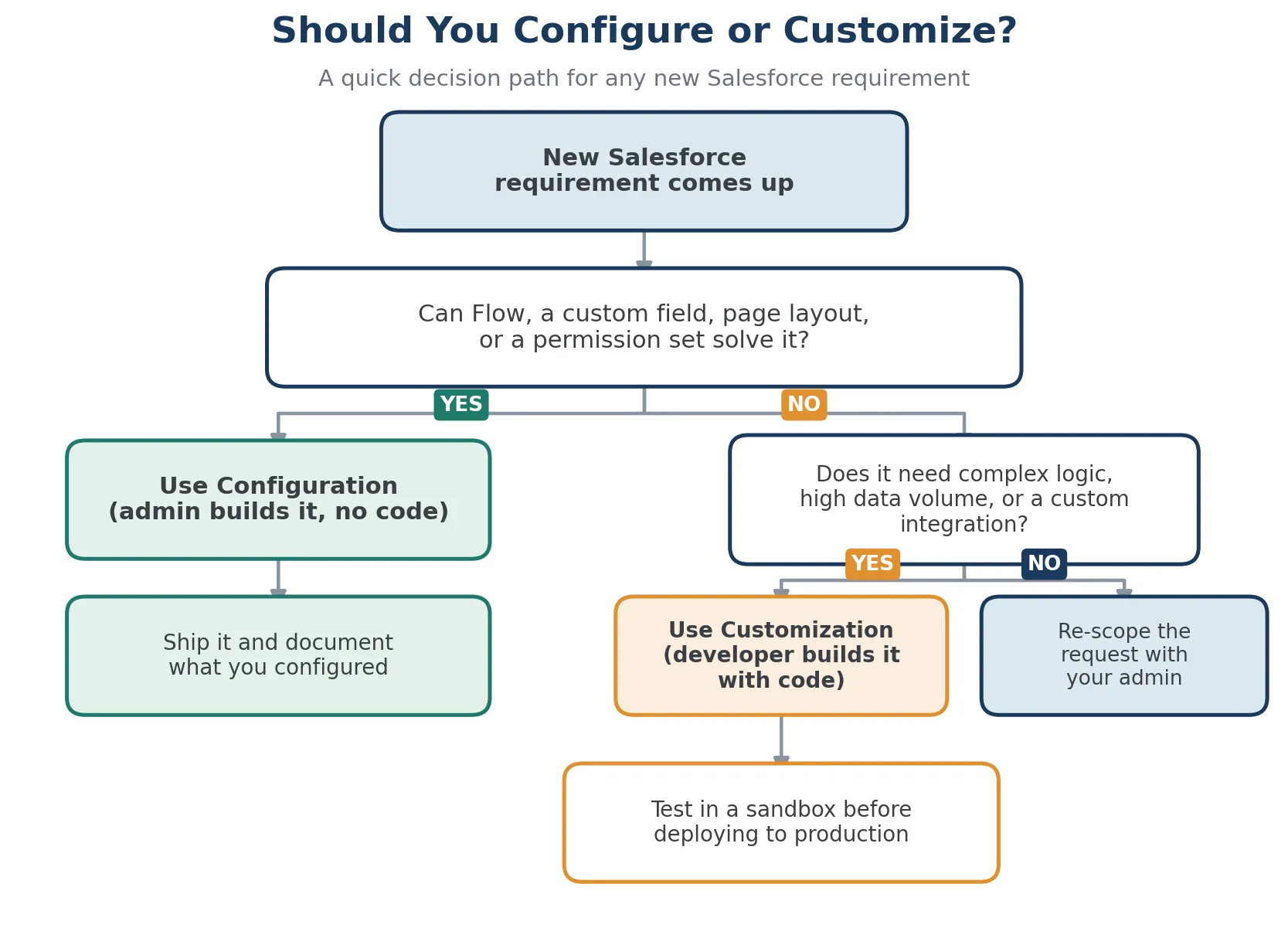
Experienced Salesforce consultants follow one simple rule: always try to solve a problem through configuration before reaching for custom code. This is called the configure-first principle, and it saves most businesses significant time and money.
Configure-First Rule: Always try to solve a business requirement through configuration before writing custom code. Configuration is faster, cheaper, and easier to maintain. Add customization only where configuration genuinely cannot meet the need. |
The reason this works is simple. Configuration is easier to update as the business evolves. It does not break during seasonal releases. It does not need a developer for every small adjustment. This means that when a new requirement comes up, the first question should always be: can Salesforce Flow, a record type, or a permission set solve this? If the answer is yes, that is your answer. If you hit a genuine limit of what point-and-click tools can do, customization becomes the right next step.
Configuration works well for most businesses running standard operations. Here is where it consistently delivers results:
First-time Salesforce implementations: A retail company setting up Sales Cloud for the first time does not need custom code on day one. Standard objects, a handful of custom fields, and a well-built Flow for lead assignment can get a team live in weeks, not months.
Fast timelines: A professional services firm that needs a working client tracking system within four weeks can realistically get there through configuration alone. A custom build for the same scope could take three to four months.
Standard processes: A financial services company running a straightforward onboarding workflow, approval sign-offs, and activity tracking will find that Salesforce's native tools cover almost everything, without a single line of code.
In-house admin support: If your own Salesforce admin will maintain the system in the future, configuration gives them a foundation they can update themselves, without waiting on a developer every time a business rule changes.
There are situations where configuration genuinely cannot meet the requirement, and forcing it creates workarounds that hurt the team instead of helping them.
Non-standard business rules: A manufacturing company calculating pricing from raw material costs, customer tier, contract length, and regional tax rules cannot express all of that logic in Flow alone. An Apex trigger or custom class is the right tool here.
High-volume automated data processing: A healthcare organization updating tens of thousands of patient records weekly from an external data feed needs batch Apex. Configuration tools are not built for that scale.
Integrations with no pre-built connector: The AppExchange marketplace, Salesforce's app store for third-party tools, covers hundreds of popular systems. A logistics company running a proprietary warehouse system, though, may need a custom API connection because no off-the-shelf solution exists for it.
Interfaces that do not exist in Lightning: A field service company needing technicians to complete a guided, multi-step checklist with conditional questions may need a purpose-built Lightning Web Component.
Branded portals and communities: Building a partner, dealer, or customer self-service portal on Salesforce Experience Cloud, the platform's tool for external-facing sites, usually needs custom components to match brand and logic.
Most real-world Salesforce projects use configuration and customization side by side. The skill is knowing where that boundary sits for your specific business.
To give you an example, an insurance company might configure its core sales pipeline, lead routing, and renewal notifications entirely through Flow and standard fields. That covers roughly 80 percent of what the sales team needs. Then, to dynamically calculate risk-adjusted premiums from real-time underwriting data pulled via an external API, the team adds a custom Apex integration and a Lightning Web Component to display the results directly on the Opportunity record.
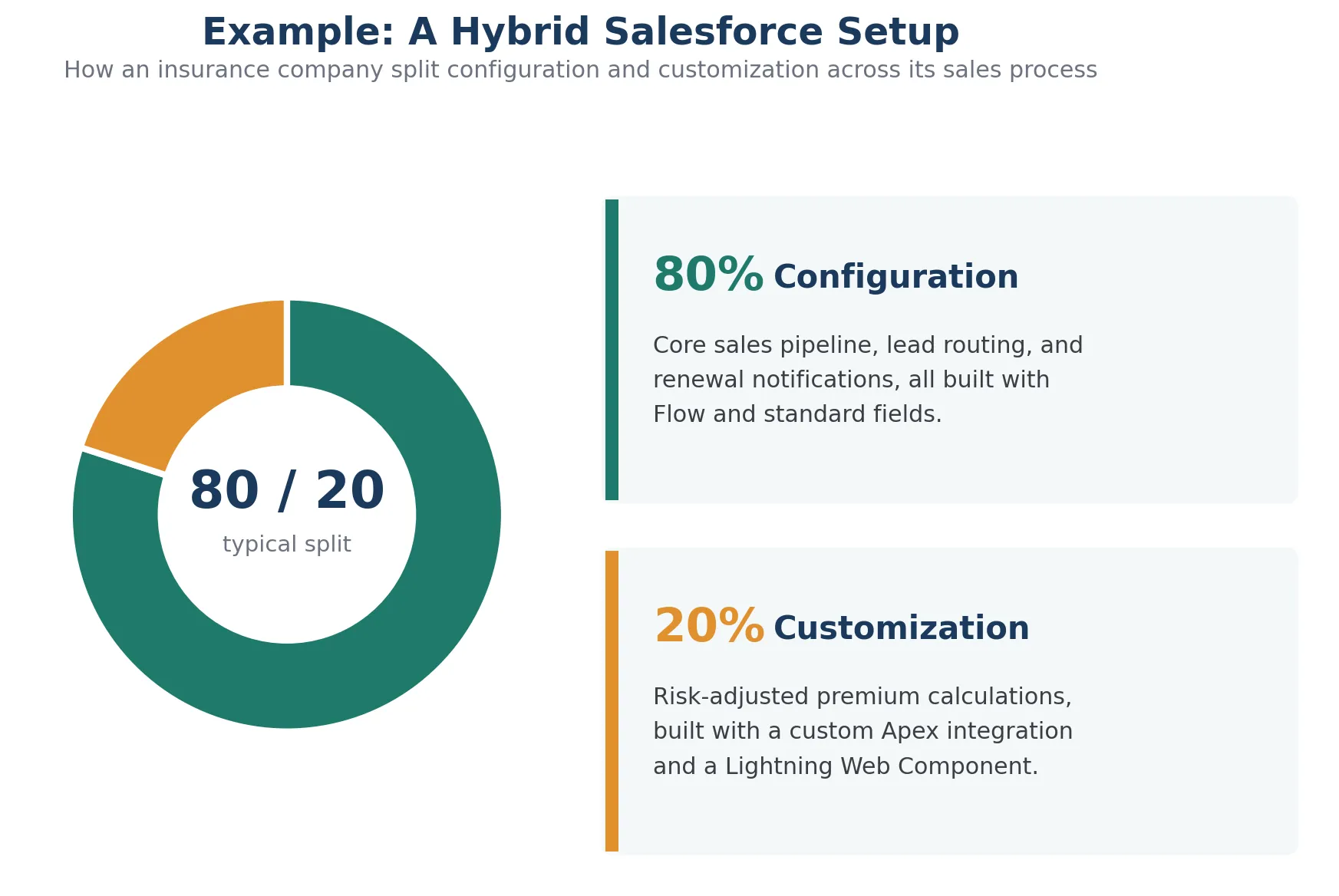
The configuration layer stays easy to update as the sales process evolves. The custom layer handles the one thing configuration genuinely cannot. Together, they give the team exactly what it needs without over-building the org.
Note: Aim for a well-configured foundation, adding targeted customization only where it solves a real problem. This costs less, maintains better, and adapts faster as the business grows. |
Understanding where things go wrong helps you avoid the most expensive mistakes teams make.
Over-customization occurs when developers write custom code for tasks that Flow or standard configuration could already handle. The result is a system that is expensive to update, prone to breaking during seasonal releases, and dependent on a developer for even small changes. This is more common than most businesses expect, and it quietly adds up in maintenance fees over several years.
Under-configuration is costly in a different way. A company that never adjusts Salesforce beyond the default setup ends up with a generic system that does not reflect how the business works day-to-day. Reps work around it rather than inside it; data quality drops, and adoption remains low. This is usually where the real cost of a bad Salesforce setup shows up, not in the license fee, but in the hours lost to manual workarounds.
Mixed changes with no documentation create a third problem. When code and configuration are built at different times by different people with no record of what changed or why, troubleshooting becomes very difficult, and a seasonal release can break something nobody remembers building.
Note: Dirty, undocumented data compounds every one of these problems. Gartner estimates that poor data quality costs the average organization around $15 million a year, and that cost only grows once AI agents start acting on the same messy records. |
This is the part most guides on this topic still miss, and it matters more with every Salesforce release.
Agentforce, Salesforce's platform for deploying autonomous AI agents that handle sales, service, and other tasks without constant human input, needs a clean, well-configured org to work properly. An agent handling inbound service cases needs properly configured case record types, clear routing rules, and reliable data. If the org is buried under complex, undocumented Apex, the AI layer becomes far harder to set up correctly.
A few updates worth knowing if you are weighing this decision right now:
Salesforce rebranded Sales Cloud as Agentforce Sales and Data Cloud as Salesforce Data 360 in the Spring '26 release, reflecting how tightly AI agents are now woven into the core platform.
The new Agentforce Builder, generally available since Spring '26, lets teams pair deterministic logic (rules that always run the same way) with flexible AI reasoning, using a feature called Agent Script.
Setup with Agentforce is a beta AI assistant built into the Setup menu itself. Admins can describe what they need in plain language, and the assistant helps create objects, build flows, and troubleshoot formulas, reducing manual clicking through menus.
Agentforce for Flow, now generally available, lets an admin describe a business process in plain language and have AI draft the record-triggered or screen flow for them, without using any generative AI credits.
Building a fully custom Agentforce agent still needs developer work: Apex actions written with the @InvocableMethod annotation, Flow-based actions, and Prompt Builder templates that guide how the agent reasons about a task.
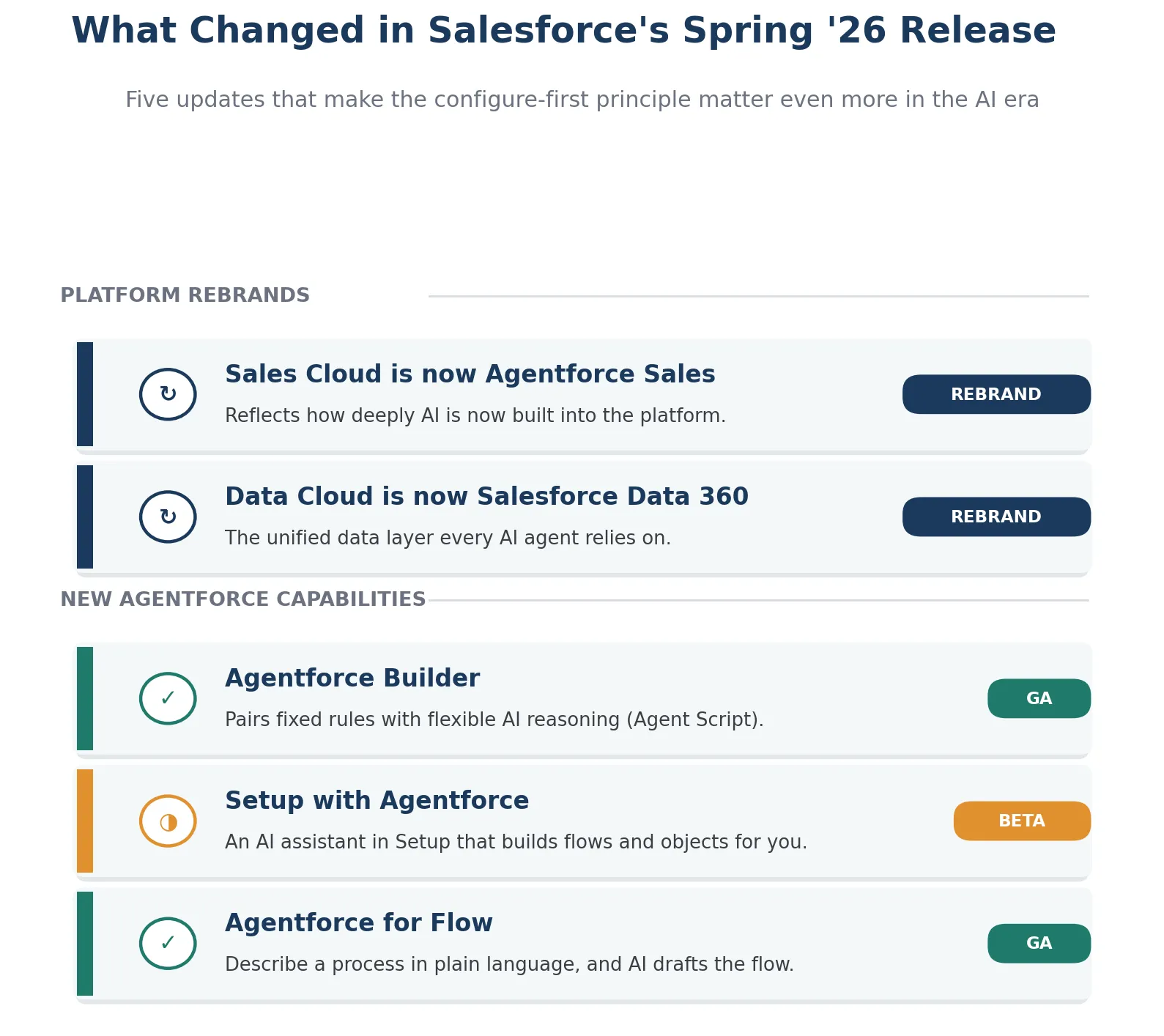
This means that the configure-first principle matters even more in the AI era. A cleanly configured org connects to Salesforce's AI tools with far less friction. Custom code, by contrast, often needs extra review before it is safe to plug into an autonomous agent.
Pro Tip: If AI adoption is on your roadmap for the next year or two, audit your current customization footprint now. Ask which parts could be replaced with modern configuration tools, such as Flow. It surfaces technical debt that was probably overdue for removal anyway, and it makes your Agentforce rollout far smoother. |
We would be happy to help you check whether your org is ready for Agentforce before you begin. Start a quick conversation.
Book a Free Agentforce Readiness ReviewThe right answer depends partly on who is asking the question. We have shared 4 different scenarios by role, so you can easily understand how to decide between Salesforce customization and configuration.
Start with the actual problem, not the tool. If the goal is to get your team to use Salesforce consistently, configuration almost always fixes this better than customization. Simpler layouts, clearer automation, and better dashboards solve adoption problems. Customization adds capability, but it does not fix adoption on its own.
Weigh the long-term maintenance cost. Every line of custom Apex is a future maintenance obligation. Before approving a customization project, check whether Flow, a record type change, or an AppExchange app could achieve the same outcome.
Document what you have already tried through configuration before bringing in a developer. This protects you from unnecessary complexity and gives the developer a clear, scoped brief if customization genuinely is needed.
Ask directly how they approach the configure-first principle. A good partner explains what they can solve through configuration before proposing custom development. If the first conversation is heavy on code and light on standard tools, treat that as a signal worth paying attention to.
Salesforce customization and configuration are not competing options. They are two tools that work best together, with configuration as the default and customization added only where it solves a real problem. Getting that balance right shapes how much your Salesforce investment costs to run, how well your team uses it day-to-day, and how ready you are for the AI features arriving with every new release.
If your org is not performing the way you expected, the fix is rarely a full rebuild. It is usually a careful review of what should stay configured, what genuinely needs custom code, and what should be removed altogether.
Whether you are setting up Salesforce for the first time or reviewing an org that is not performing as expected, talk to a certified Salesforce consultant to get a clear, honest picture of what needs to change in your org and what does not.
Book a Free Consultation TodayConfiguration uses Salesforce’s built-in point-and-click tools to adjust settings, layouts, automation, and permissions without code. Customization uses code, such as Apex or Lightning Web Components, to add functionality that standard Salesforce features cannot provide.
Yes. The configure-first approach is generally recommended because configuration is typically faster, less costly, and easier to maintain. Customization should be added when configuration cannot meet a specific business requirement.
Configuration is generally less costly because it can often be handled by a Salesforce administrator. Customization requires development resources, and costs vary from a few thousand dollars for smaller features to $50,000 or more for complex integrations, depending on scope.
Not necessarily. Custom code should be reviewed and tested with Salesforce’s seasonal releases to ensure compatibility. Well-designed and maintained code is less likely to cause issues, while older, undocumented, or overly complex customizations may require additional updates.
Yes. Organizations can start with a configured Salesforce foundation and add targeted customization as their requirements become more complex. This approach allows businesses to extend Salesforce gradually instead of developing extensive custom functionality from the beginning.
Agentforce and other Salesforce AI capabilities benefit from clean, well-structured Salesforce environments. Organizations with extensive customizations may need additional work before adopting some AI capabilities. Reviewing and simplifying unnecessary customizations can help support future AI adoption.
 Outsource Salesforce Development or Build In-House Which is the Best for Your Business.webp)
Outsourcing Salesforce development vs. building an in-house Salesforce team: 2026 cost insights, salary comparisons, key benefits, challenges, and the best hiring model for your business growth.
We are more than just developers and consultants—we are your partners in navigating the digital landscape. Let us be the engine behind your next big success while you focus on your core vision.
Explore Opportunities!