Mobile App Development Tech Stack: How to Choose (2026 Guide)
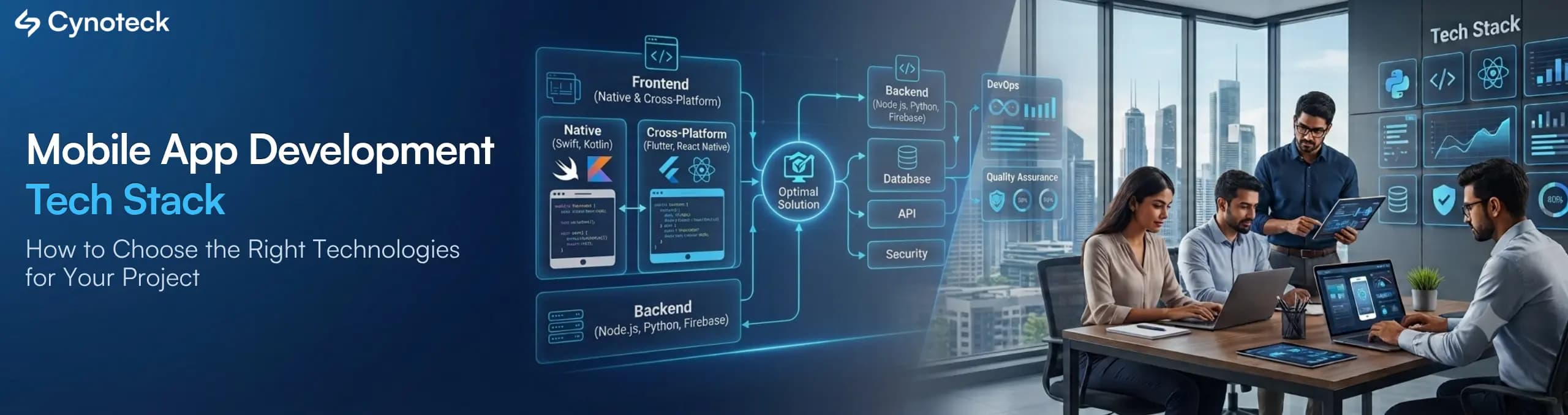
Summary: A mobile app development tech stack has seven layers: frontend, backend, database, cloud hosting, AI capability, DevOps tooling, and security. The right combination depends on your budget, timeline, expected user load, compliance requirements, and your team's existing skills. This post covers each layer with specific tools, real cost and timeline context, industry-specific recommendations with app examples. |
Most founders pick a mobile app development tech stack based on what a developer friend recommends, or whatever framework is trending on social media that month. That approach works fine until the app needs to scale, add a feature, or survive a developer leaving the project. This guide walks through every layer of a modern tech stack, explains the tradeoffs competitors gloss over, and gives you a practical framework for matching technologies to your actual business goals instead of hype.
A mobile app development tech stack is the complete set of programming languages, frameworks, databases, and tools used to build, run, and maintain a mobile application. It covers everything the user sees on their screen and everything running behind the scenes to make the app work.
The frontend, also called the client side, is what the user touches: buttons, screens, gestures, and animations. The backend, or server side, is the engine room. It handles data, business logic, and communication with other systems, like a payment processor or a CRM.
A complete mobile app technology stack also includes the database that stores information, the cloud platform that hosts everything, the AI layer if the app has smart features, the DevOps tooling that ships updates safely, and the security layer that keeps user data protected.
Most people often assume "tech stack" just means the programming language. In reality, a stack decision touches at least seven layers, and getting even one wrong creates problems that surface months after launch, not during development.
The table below breaks down what sits in each layer:
Layer | What It Does | Common Technologies |
Frontend | User interface, screens, gestures | Swift, Kotlin, React Native, Flutter |
Backend | Business logic, APIs, data processing | Node.js, Python/Django, Laravel, .NET |
Database | Stores and retrieves app data | PostgreSQL, MongoDB, Firebase, Redis |
Cloud | Hosting, storage, compute | AWS, Google Cloud, Azure |
AI | Smart features, automation | OpenAI API, RAG, vector databases |
DevOps | Build, test, and release automation | GitHub Actions, Docker, Kubernetes |
Security | Data protection, authentication | OAuth 2.0, JWT, SSL/TLS, encryption |
NOTE: When starting a mobile app project, it is always good to ask your development partner to explain their complete app architecture, not just the technologies they'll use.
Choosing the right mobile app development tech stack starts with your business goals, not your technology preferences. Instead of choosing what looks impressive in a demo, focus on what your app needs to accomplish and how it can support your business as it grows.
There are six questions you should answer before choosing any technology:
What is your timeline?
A cross-platform framework like Flutter or React Native ships faster than building separate native apps, since one codebase serves both iOS and Android. If you need to launch in 10 to 12 weeks, that constraint alone rules out certain choices.
What is your budget?
Native development for both iOS and Android usually costs more, because you are effectively funding two parallel builds. A single-platform MVP with basic features generally lands in the tens of thousands of dollars, while a feature-rich, multi-platform app with custom backend work, payments, and AI can run well into six figures. Cross-platform frameworks reduce this gap by sharing one codebase across both operating systems.
How many users do you expect in year one, and in year three?
A stack that handles 5,000 users comfortably may fall over at 500,000 without a backend and database designed for horizontal scaling, meaning the ability to add more servers to absorb traffic, from day one.
Does the app need deep hardware access?
Apps using advanced camera features, Bluetooth peripherals, or AR need native code or well-supported plugins. Not every cross-platform framework handles this equally well, and forcing a framework to do something it was not built for usually shows up as lag or crashes later.
What compliance requirements apply?
A healthcare app handling patient records needs HIPAA-aligned data handling. A fintech app needs PCI, DSS security compliance standards for payment data. These requirements affect database choice, cloud region, and encryption approach, so they need deciding before backend work starts, not after.
Who maintains the app after launch?
If your in-house team knows JavaScript, a Node.js backend and React Native frontend keeps hiring and maintenance simpler than picking a stack nobody on your team can support.
For this reason, the right mobile app development tech stack is rarely the newest one. It is the one that matches your growth plan, your team's skill set, your compliance obligations, and your budget for year one and beyond.
Get expert recommendations based on your app goals, budget, scalability, and future roadmap.
Discuss Your App RequirementsThis is usually the first real decision a founder faces, and it deserves a direct answer instead of being buried halfway down a page, which is where most competitor content puts it.
Native app development means writing separate code for iOS (using Swift) and Android (using Kotlin), each running directly on that operating system's tools: Xcode for iOS, Android Studio for Android.
Cross-platform development uses one shared codebase, written in a framework like React Native or Flutter, that compiles down to both platforms.
Hybrid apps wrap a web application inside a native shell using tools like Ionic or Capacitor, rendering the interface with HTML, CSS, and JavaScript inside a WebView.
Factor | Native | Cross-Platform | Hybrid |
Performance | Highest, direct hardware access | Near-native for most business apps | Lowest, runs inside a WebView |
Cost | Highest, two separate codebases | Moderate, one shared codebase | Lowest, fastest to build |
Timeline | Longest | Faster, shared logic across platforms | Fastest |
Hardware access | Full (camera, Bluetooth, sensors, AR) | Good, with some plugin gaps for advanced hardware | Limited |
Best for | Gaming, AR, apps with heavy custom animation | Most business apps, MVPs, e-commerce, on-demand services | Content apps, internal tools, simple MVPs |
Maintenance | Two codebases to update | One codebase, faster fixes | One codebase, simplest to maintain |
There is no universal winner. Native wins when hardware access or animation quality is the top priority. Cross-platform wins for most business apps because it balances speed, cost, and performance. Hybrid wins only when budget and speed matter more than user experience polish.
Pro Tip: If you are unsure which category your app falls into, list your top five required features and check each one against the "hardware access" column above. If none of them need deep hardware access, cross-platform is almost always the right call.
The frontend is everything the user interacts with directly. Frontend choice is usually the first decision founders make, and also the one most often made for the wrong reasons, such as picking whatever a friend's startup used without checking if it fits.
Swift is Apple's programming language for iOS development. SwiftUI is the modern declarative framework for building interfaces, replacing the older UIKit approach in most new projects. Xcode is the development environment where iOS apps get built, tested, and submitted to the App Store. This combination gives full access to every iOS feature the moment Apple releases it, without waiting for a cross-platform framework to add support.
Kotlin is Google's recommended language for Android development, replacing Java in most new projects due to its more concise syntax and safer handling of null values. Jetpack Compose is Android's modern toolkit for building interfaces declaratively, similar in philosophy to SwiftUI. Android Studio is the primary development environment for Android apps.
Uses JavaScript and React to build apps that run on both iOS and Android from one codebase. It has strong community support and a large pool of available developers, which matters when hiring or scaling a team quickly. Performance is close to native for most business apps, though extremely graphics-heavy apps may still need native modules for specific screens. Meta, the company behind React Native, uses it in parts of the Facebook and Instagram apps.
Google's cross-platform framework using the Dart programming language. Flutter renders its own UI components rather than relying on the operating system's native components, which gives highly consistent visuals across both platforms but a slightly larger app size. Flutter has grown fastest in industries needing custom, heavily branded interfaces, since developers get pixel-level control without fighting platform defaults.
A newer approach that lets teams share business logic across iOS and Android while keeping each platform's native UI layer. This suits teams that want native look and feel but do not want to duplicate backend-facing logic twice.
Web applications that behave like mobile apps, offering offline functionality, push notifications, and home screen installation without going through an app store. PWAs work well for content-driven products or early MVPs where app store review delays would slow down testing cycles.
The backend handles the logic, data processing, and communication that the frontend never shows the user directly. This is where business rules live, where data gets validated, and where your app talks to other systems like a payment gateway, a mapping API, or a CRM.
Node.js runs JavaScript on the server, which means frontend and backend developers can share the same language. This speeds up hiring for smaller teams and is a common choice for startups building an MVP quickly.
Python with Django or FastAPI suits apps with heavy data processing or machine learning features, since Python has the strongest libraries for both. FastAPI in particular has become popular for AI-integrated backends because of its speed and native support for asynchronous requests.
It remains a solid choice for content-heavy apps and admin-facing systems, especially where the team already has PHP experience and does not need to introduce a new language.
This is common in enterprise environments already running Microsoft infrastructure. It integrates naturally with Dynamics 365 or Azure-based systems, which matters for businesses standardized on Microsoft tools.
Ruby on Rails still shows up in content-driven and marketplace apps, valued for how quickly it lets a small team ship a working MVP, though its hiring pool has shrunk compared to Node.js or Python.
Backend architecture matters as much as the language itself. A REST API exposes data through standard HTTP requests and works for most business apps. GraphQL lets the frontend request exactly the data it needs in a single call, which reduces over-fetching on slower mobile connections. As a result, apps with complex, nested data structures, like a social feed combining posts, comments, and profiles, often perform better with GraphQL than plain REST.
Third-party API integrations are also part of this layer. Stripe or Braintree handle payments, Twilio handles SMS and voice, Google Maps or Mapbox handle location features, and most apps rely on at least two or three of these rather than building the equivalent functionality from scratch.
Pro Tip: Do not choose a backend language based purely on developer availability. A cheaper hire on an unfamiliar stack often costs more in the long run through slower delivery, harder debugging, and a knowledge gap if that developer leaves.
The database is where all your app's information lives: user accounts, transactions, messages, and records. Choosing between database types affects both performance and how easily the app scales as usage grows.
PostgreSQL and MySQL store data in structured tables with defined relationships between them. This works well for apps with clear, consistent data patterns, like e-commerce orders or booking systems, where data integrity and the ability to run complex queries matter more than flexibility.
MongoDB store data in flexible, document-based formats rather than fixed tables. This suits apps with rapidly changing data structures, such as social apps or content platforms where every record might look slightly different from the next.
It is a real-time NoSQL database from Google, popular for apps needing live data sync across devices, like chat apps or collaborative tools. It also bundles authentication and hosting, which speeds up MVP development for smaller teams without dedicated backend engineers.
Redis is an in-memory data store used for caching, not as a primary database. It holds frequently accessed data in memory for near-instant retrieval, which matters for apps with high read traffic, like a news feed, a live leaderboard, or a product catalog with heavy browsing.
It covered in more depth in the AI section below, store data as mathematical representations called embeddings, used specifically to power AI search and retrieval features.
Most production apps end up using more than one database technology. A common combination pairs PostgreSQL for structured transactional data with Redis for caching and, increasingly, a vector database layered in for AI-powered search or recommendations.
Note: Switching database types after launch is one of the most expensive rewrites in mobile development, since it usually means rewriting large parts of the backend. Get this decision right before writing production code, not after the first thousand users arrive.
Cloud hosting determines where your app's backend, database, and files actually live, and how well the app performs as your user base grows. The three dominant providers are AWS, Google Cloud, and Microsoft Azure, and each has strengths worth knowing before you commit.
AWS offers the widest range of services, from EC2 for computing power to S3 for file storage and Lambda for serverless functions that run code without managing dedicated servers. AWS suits almost any app type, though its sheer number of options can overwhelm teams without prior cloud experience.
It integrates tightly with Firebase and offers strong tools for apps using machine learning or data analytics, since Google's AI infrastructure runs on the same platform your app would use.
MS Azure is the natural choice for businesses already using Dynamics 365, Power Platform, or Microsoft 365, because authentication, data flow, and licensing align more smoothly across the Microsoft ecosystem than switching to a separate cloud provider would.
It runs backend code without managing dedicated servers, scaling automatically as traffic increases or decreases. This reduces hosting costs for apps with unpredictable or spiky traffic, though it requires careful design to avoid unexpected delays when infrequently used functions have to start up from cold, a limitation known as cold start latency.
Monthly hosting and API infrastructure costs vary widely with scale, typically ranging from a few hundred dollars a month for an early-stage app to several thousand dollars a month once an app has meaningful traffic and data volume.
Note: Picking a cloud platform is not just a technical decision. If your company already runs on Microsoft 365 or Google Workspace, staying inside that ecosystem usually reduces integration headaches and licensing complexity later.
AI features are no longer a "nice to have" bolted onto an app after launch. More apps now build AI into the core experience from day one, whether that means a chatbot, personalized recommendations, or document processing, and AI-native features have shifted from a premium extra to a baseline expectation in competitive consumer apps.
LLMs such as GPT-4, Claude, and Gemini power features like in-app assistants, content generation, and natural language search. An LLM is a machine learning model trained on large amounts of text, capable of understanding and generating human language in response to a prompt.
RAG connects an LLM to your own business data, so it can answer questions accurately about your specific products, records, or policies instead of relying only on its general training. This matters because a general-purpose LLM without RAG will guess, sometimes confidently and incorrectly, a known failure mode called hallucination.
Vector databases like Pinecone, Weaviate, or Chroma store data as embeddings, which are numerical representations of meaning rather than exact keywords. This is what makes RAG systems able to find relevant information even when the user's wording does not exactly match the stored text.
Computer vision covers features like image recognition, object detection, and OCR (optical character recognition), used in apps that scan documents, verify IDs, or inspect product quality through the camera.
Predictive analytics uses historical data to forecast outcomes, like predicting which users are likely to cancel a subscription or which products a customer will want next.
Businessess often miss is the difference between building AI and using AI tools. Building AI means training or fine-tuning models on your own data, which takes real engineering effort and a meaningful data set to work from. Using AI tools means calling an existing API, like OpenAI's or Google's, and connecting it to your app's data through RAG. Most business apps only need the second approach, and it costs considerably less to implement than a custom-trained model.
Keep Note: Before adding any AI feature, ask what happens when the model gives a wrong answer. If there is no fallback plan, such as a human review step or a confidence threshold that hands off to a person, the feature is not ready for production.
DevOps practices and CI/CD pipelines determine how quickly and safely your team can ship updates after the app is live. This layer rarely gets discussed with founders, yet it directly affects how often bugs reach real users and how long a critical fix takes to go live.
CI/CD (Continuous Integration/Continuous Deployment):
They automate the process of testing and releasing new code. Every time a developer submits a change, automated tests run first, and if they pass, the update deploys without manual steps. This reduces the risk of a broken build reaching the app store.
Common tools in this layer include GitHub Actions, Bitrise, and Fastlane for automating builds and app store submissions, alongside Docker for packaging apps into consistent, portable environments and Kubernetes for managing those containers at scale on the backend.
Testing tools matter here too. Appium and Espresso handle automated testing for Android, while XCTest handles it for iOS, catching regressions before they ever reach a real user's device.
Monitoring tools like Sentry, Firebase Crashlytics, or Mixpanel track crashes, performance issues, and usage patterns in real time after launch. This matters because most app problems surface only once real users, on real devices, in real network conditions, start using the app in ways your test team never tried.
Note: A stack without CI/CD is not necessarily broken on day one, but it becomes a bottleneck the moment you need to ship a fix quickly. Building this in early costs far less than retrofitting it after six months of manual, error-prone deployments.
Security is not a single technology choice. It is a set of practices applied across every layer of the stack, from how data travels between the app and server to how user passwords get stored, and it needs to be built in from the start rather than added right before launch.
Secures data in transit between the app and your servers, preventing anyone intercepting the connection from reading the information.
Handle authentication, letting users log in securely and stay authenticated without repeatedly re-entering credentials on every screen.
Protects stored information even if a database is ever accessed without authorization.
It is a widely referenced list of the most common mobile application security risks, including insecure data storage and weak server-side controls, and a useful checklist for any development team to test against before launch.
It applies to apps handling patient health information, affecting how data is stored, who can access it, and where it can be hosted.
PCI DSS compliance
Applies to apps processing payment card data directly, though most apps avoid this burden by routing payments through a compliant processor like Stripe instead of handling card data themselves.
GDPR and general data residency rules
These rules matter for apps when handling personal data from users in regulated regions, affecting where data can legally be stored and processed.
Because of this, mobile app development security standards should be identified before development begins, not added as a last-minute consideration. Authentication method, encryption approach, compliance scope, and data storage location all need deciding before the first line of backend code gets written, since retrofitting compliance after launch is far more expensive than designing for it from day one.
There is no single best mobile app development tech stack. The right combination depends entirely on your industry, business model, expected scale, and internal team capability. To make the decision easier, the sections below group recommendations by business type and industry, along with familiar app examples that show how these technologies are used.
We'll help you select the technologies that fit your business, users, and long-term product strategy.
Talk to Our App ExpertsEvery business has different technical priorities. A startup launching its first product, an enterprise connecting internal systems, and a company building AI-powered features all need different technology choices. The examples below show the tech stacks commonly used for each business type.
React Native or Flutter for frontend, Node.js backend, Firebase or PostgreSQL for database, and a serverless setup on AWS or Google Cloud. This combination favors speed and lower upfront cost over long-term customization. Example: an early-stage scheduling app similar in scope to how Calendly first launched, before adding deeper integrations.
React Native or native frontend for performance during checkout, Node.js or .NET backend, PostgreSQL for transactional data, Redis for caching product listings, and strong payment gateway security through a provider like Stripe. Example: an app in the shape of Shopify's own mobile storefront experience.
Native or React Native frontend, .NET backend, Azure hosting, and tight integration with Dynamics 365 or Power Platform for internal data flow. Example: a field service app for technicians that syncs work orders directly with Dynamics 365.
Python or FastAPI backend for easier machine learning integration, a vector database like Pinecone for RAG-based search, and cloud hosting on whichever provider hosts your chosen LLM API. Example: a customer support app with an AI assistant similar in concept to Intercom's Fin.
Industry requirements also influence the technology behind a mobile app. Factors such as compliance, user behavior, integrations, and performance expectations vary from one industry to another. Here are the tech stacks commonly used across different industries and the reasons behind those choices.
React Native or Flutter frontend for cross-platform reach, Node.js backend, PostgreSQL for booking data, Redis for caching search results, and heavy reliance on third-party APIs for maps, flights, and payments. Example: an app similar in structure to Airbnb or MakeMyTrip, where search speed and map performance directly affect conversion.
Flutter frontend for consistent branding across devices, Node.js or Django backend, PostgreSQL for structured course and progress data, Firebase for real-time features like live classes, and video streaming infrastructure through a CDN. Example: an app in the same category as Duolingo or Byju's, where offline access to lessons matters as much as the core content.
Native frontend for reliable hardware access to health sensors and cameras, .NET or Python backend, a HIPAA-compliant hosting setup on AWS or Azure, encrypted data at rest, and strict role-based access controls. Example: an app similar in purpose to Teladoc or Practo, where compliance and data security shape almost every technical decision before features get discussed.
Native frontend for maximum security and performance, .NET or Java backend, PostgreSQL for transactional integrity, strong encryption and PCI DSS-aligned architecture, and biometric authentication. Example: an app comparable to a digital banking product like Chime or Revolut, where trust and security signals matter as much as the interface itself.
React Native or native frontend for real-time map performance, Node.js backend for handling concurrent requests, PostgreSQL paired with Redis for live location caching, and a cloud setup built for sudden traffic spikes. Example: an app in the mold of Uber or DoorDash, where real-time tracking and two-sided marketplace logic (riders and drivers, or customers and couriers) drive the architecture.
Flutter or React Native frontend, Node.js backend, MongoDB or Firebase for flexible, fast-changing data structures, and CDN-backed cloud storage for media files. Example: an app similar to a niche community platform like Discord's mobile experience, where message delivery speed and media handling matter more than transactional data integrity.
Pro Tip: If your business fits more than one category above, prioritize the requirement with the highest cost of failure. An e-commerce app that also wants AI recommendations should still get checkout security and performance right before investing engineering time in the AI layer.
Cynoteck starts every mobile project with a discovery phase focused on business goals, expected user load, and internal team capability before recommending a single technology. This means the conversation begins with questions, not a pitch.
The process typically follows four steps.
First, mapping the app's core features against real hardware and integration needs, since this rules out unsuitable frameworks early and prevents a costly mid-project pivot.
Second, evaluating budget and timeline against native, React Native, and Flutter options honestly, including the tradeoffs of each rather than defaulting to whichever framework the available team already knows.
Third, matching backend and database choices to expected scale, not just current requirements, so the app does not need a costly rewrite once it crosses 50,000 or 500,000 users.
Finally, building in security, compliance, and DevOps practices from the first sprint rather than adding them before launch under time pressure, which is when mistakes tend to happen.
A mistake worth avoiding at this stage is choosing a stack based on what a team already knows how to build, rather than what the business actually needs. The two overlap often, but not always, and a good technology partner will tell you clearly when they do not.
Frequently Asked Questions:
For most startups, React Native or Flutter for the frontend paired with Node.js for the backend offers the fastest path to launch at the lowest cost, since both share a single codebase across iOS and Android and reduce the size of the team needed to maintain it.
React Native suits teams already familiar with JavaScript and benefits from a larger developer pool. Flutter offers more consistent visuals across platforms through its own rendering engine rather than relying on native components. Neither is universally better; the right choice depends on your team's existing skills and how custom your interface needs to be.
Native development is worth the extra cost when your app depends heavily on advanced hardware features, like AR, complex Bluetooth integrations, or graphics-intensive gaming, where cross-platform frameworks may not offer full support without extra custom native modules.
Cost depends more on feature complexity and backend architecture than the specific technologies chosen. A simple MVP with a cross-platform frontend and serverless backend typically costs tens of thousands of dollars, while a feature-rich app with custom AI, payments, and compliance requirements can run into six figures or more.
Adding AI later is usually safer for a first release. Launching with core functionality solid, then layering in AI features like recommendations or chat once you have real usage data, tends to produce more accurate and useful AI behavior than guessing at day one with no data to ground it.
Use a relational database like PostgreSQL for apps with structured, consistent data such as orders or bookings. Use a NoSQL database like MongoDB or Firebase for apps with flexible or rapidly changing data structures, such as social feeds or chat, and add Redis for caching once read traffic grows.
A framework, like React Native or Flutter, is one piece of the frontend layer. A tech stack is the complete combination of frontend, backend, database, cloud, AI, DevOps, and security technologies working together, so the framework is only one decision inside a much larger set of choices.
Check whether your backend supports horizontal scaling, meaning the ability to add more servers as traffic grows, and whether your database can handle your projected data volume at three times your current user count without a redesign. If either answer is unclear, have your technical partner stress-test the architecture before launch rather than after.

Mobile healthcare apps improve patient care by enabling remote monitoring, timely reminders, secure data access, better communication, and cost-efficient healthcare services through mHealth technology.
B2B apps help businesses streamline operations, enable on-the-go access to data, improve client engagement, support omnichannel sales, and drive scalable revenue by simplifying complex business workflows.
We are more than just developers and consultants—we are your partners in navigating the digital landscape. Let us be the engine behind your next big success while you focus on your core vision.
Explore Opportunities!