Mobile App Development Process in 2026: A Complete Step-by-Step Guide
Building a mobile app in 2026 is one of the smartest business decisions you can make. The numbers make this clear.
The global mobile app development market stands at $305 billion in 2026 and is on track to reach $618 billion by 2031.
In 2026, consumers are projected to download over 180 billion apps globally across the App Store and Google Play — and that number keeps growing.
But here is the truth most guides skip. Having a great app idea is only the starting point. The real difference between an app that succeeds and one that never gains traction is the process behind it.
Whether you are a business owner building your first app or a developer looking for a clearer framework, this guide walks you through every step of the mobile app development process — simply, clearly, and in the right order.
Before diving into the steps, this is the question every business owner asks first — and it deserves a straight answer.
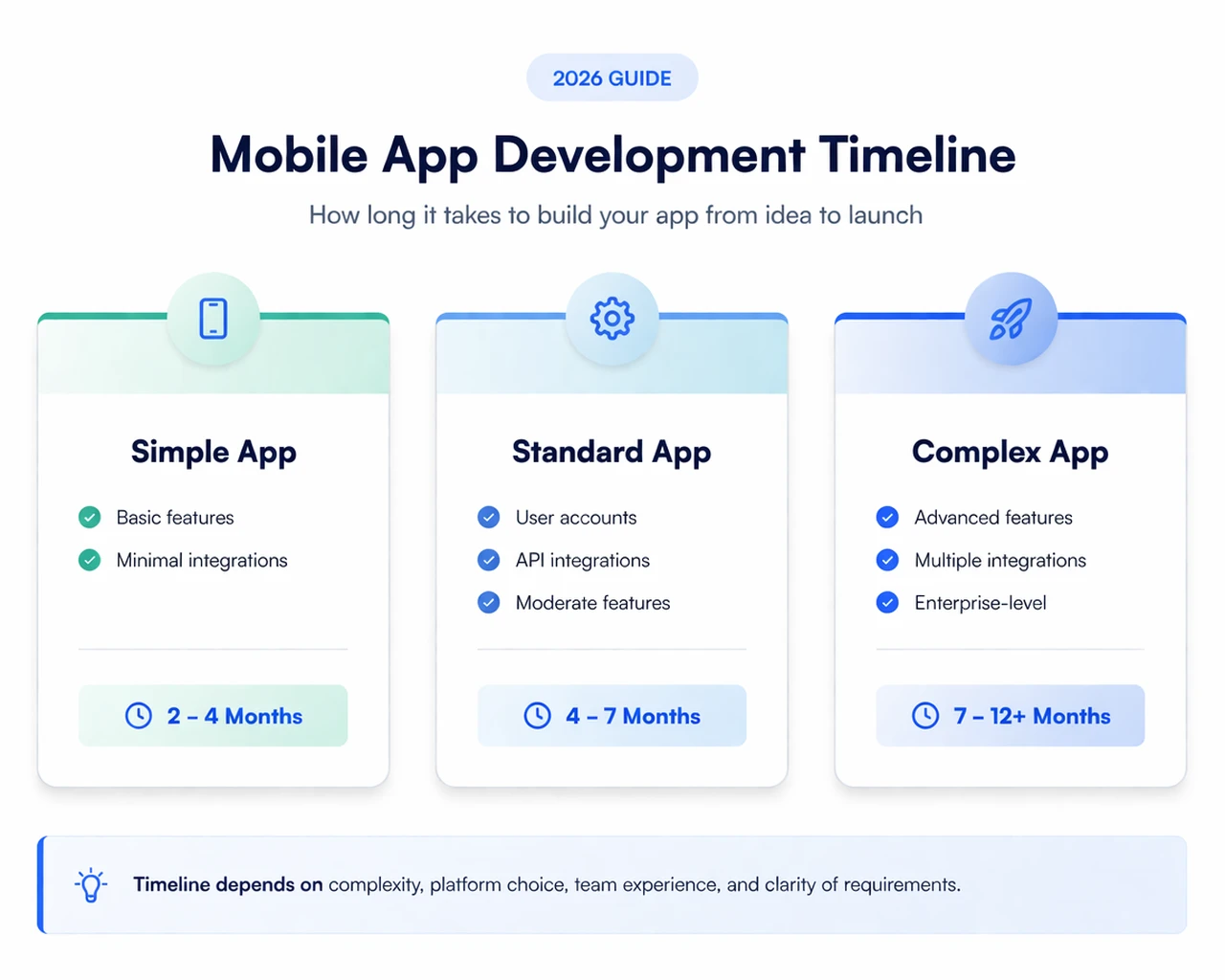
In 2026, most mobile apps take 3 to 9 months to go from idea to launch. However, this timeline is not fixed — it varies significantly based on several key factors, including app complexity, feature set, platform choice, and the experience of the development team.
App Type | What It Includes | Estimated Timeline |
|---|---|---|
Simple App | Basic features, minimal integrations | 2 – 4 months |
Standard App | Moderate features, API integrations, and user accounts | 4 – 7 months |
Complex App | Advanced features, multiple integrations, enterprise-grade | 7 – 12+ months |
App complexity (features, logic, integrations)
Platform choice (iOS, Android, or cross-platform)
Team experience and size
Clarity of requirements at the start
Choosing cross-platform development frameworks like Flutter or React Native can reduce development time by 30–40%, especially when building for both iOS and Android. For most businesses, this is often the fastest and most cost-effective way to launch an MVP.
The most common cause of delays is not the technology — it is unclear requirements at the start. Projects with clearly defined scope, features, and user flows from the beginning:
Move faster
Cost less
Require fewer revisions
Now that you have a realistic understanding of timelines, let’s break down the complete mobile app development process step by step — so you can plan and execute your app the right way.
We help you validate your idea, plan the right features, and choose the best tech stack — so you don’t waste time or budget.
Get Expert GuidanceLet’s break down the mobile app development process into clear and actionable steps — so you can plan, build, and launch your app with confidence.
Every successful app begins with clarity — not just an idea, but a real problem that users genuinely want solved. Before moving forward, you need to clearly define:
What your app does
Who it is for
Why it matters
Apps that succeed are not just innovative — they are useful and relevant.
Identify your target audience and their pain points,
Validate whether the problem is worth solving,
Analyze competitors and identify market gaps,
Define your unique value proposition (UVP),
Decide your monetization strategy early.
Don’t worry if everything isn’t perfectly clear at this stage — that’s completely normal. The goal here is not perfection, but clarity. If you can clearly explain your app idea and its value to someone, the rest will become clearer as you move forward.
Evaluate technical feasibility of the idea
Identify core features vs optional features (MVP thinking)
Consider platform choice (iOS, Android, or cross-platform)
Highlight potential technical risks or dependencies
At this stage, your role is to bring realism into the idea. Not every idea is easy to build — and that’s okay. What matters is identifying what’s possible now, what can be simplified, and what can be improved later. A well-thought-out MVP will always outperform an overcomplicated first version.
Planning is where most app projects either succeed or quietly start going wrong.
Many businesses rush into development — only to face delays, budget overruns, and constant revisions later. A well-defined plan ensures that your development process is smooth, predictable, and efficient.
Before writing a single line of code, every key aspect of your app should be clearly defined.
Define complete feature list (prioritize must-have vs optional),
Identify target platforms (iOS, Android, or both),
Set a realistic budget,
Establish timeline and milestones,
Finalize monetization strategy.
Take your time with this step — this is where most costly mistakes begin.
If your plan is unclear, your development will be too. But if this part is solid, everything that follows becomes much easier to manage. Strong planning reduces cost overruns and avoids scope creep.
Define technical requirements and architecture,
Choose tech stack (native or cross-platform),
Break features into development phases (MVP approach),
Identify dependencies, APIs, and integrations,
Estimate development effort and risks.
As a developer, this is your chance to bring structure to the idea. The clearer your technical approach is now, the fewer surprises you’ll face during development. This ensures clarity before execution begins.
By now, you should have a much clearer roadmap in front of you. You’ll likely have:
A clear product roadmap
Finalized feature scope (MVP defined)
Technical approach and architecture
Timeline and development milestones
Budget alignment
When these are clearly defined, your team can move faster, avoid confusion, and stay aligned without constant back-and-forth.
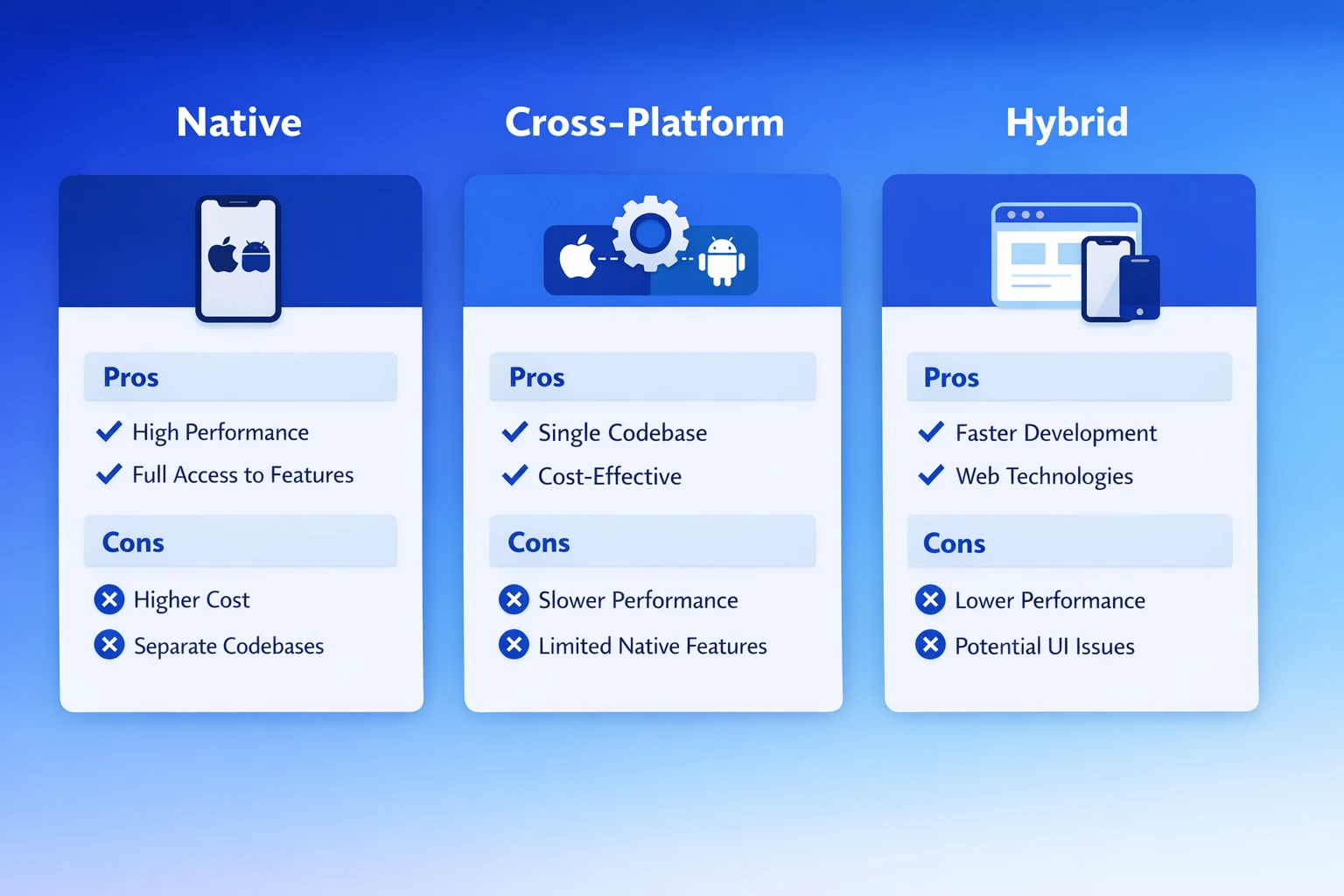
Choosing the right development approach is one of the most critical decisions in your app journey.
This decision directly impacts:
Development time
Budget
Performance
Scalability
Making the wrong choice here can lead to higher development costs and rework later.
Factors | Native | Cross-Platform | Hybrid |
|---|---|---|---|
Platforms | iOS or Android separately | iOS and Android together | iOS and Android together |
Performance | Highest | Very close to native | Moderate |
Development time | Longer | 30–40% faster | Moderate |
Cost | Higher | Lower | Lower |
Best for | Performance-critical apps | Most business apps | Content-heavy apps |
This comparison gives you a clearer picture, but the right choice ultimately depends on your app’s goals, budget, and long-term vision. There’s no one-size-fits-all answer here — the key is choosing an approach that aligns with what you’re trying to build, not just what seems faster or cheaper.
To make this decision even easier, we’ve broken it down further from both a business and developer perspective — so you can quickly see what works best for your situation.
Want faster time-to-market? → Go cross-platform
Limited budget? → Cross-platform is cost-effective
Need premium performance (e.g. gaming)? → Consider native
Long-term scalability matters → Choose based on product vision
As a business owner your focus should on mobile app ROI, speed, and cost efficiency. The idea is to not just think about what works today, but what will still work as your app grows — without slowing you down or increasing costs unnecessarily.
Native → Better control, deeper device integration
Cross-platform → Faster development, shared codebase
Evaluate performance trade-offs based on app complexity
Consider ecosystem, libraries, and maintainability
As a developer, your focus here should be on choosing an approach that gives you the right balance between performance and development efficiency — without creating unnecessary complexity in the codebase.
By the end of this step 3, you should have:
Chosen development approach (Native or Cross-platform)
Clear platform strategy (iOS, Android, or both)
Initial tech direction for your app
Design is not just about how your app looks — it’s about how it works.
A well-designed app feels intuitive, effortless, and engaging. A poorly designed one frustrates users and leads to quick uninstalls.
In today’s competitive market, user experience (UX) is often the difference between an app that grows and one that gets ignored.
Focus on user journey and experience
Ensure design supports your business goals (engagement, conversions)
Maintain consistent branding (colors, fonts, tone)
Reduce friction in key actions (signup, purchase, navigation)
As a business owner, you can guide the design based on your vision or discuss it with your development team to ensure it supports your goals — branding, engagement, and conversions.
If your budget allows, it’s better to work with a team that has dedicated UI/UX experts — you just need to clearly share your goals, and they’ll handle the rest.
Start with wireframes (basic structure of screens)
Create interactive prototypes for better visualization
Define design systems (components, typography, spacing)
Ensure responsiveness across devices and screen sizes
For developer, this step is about gathering the right inputs from the app owner — their goals, target users, and key expectations — and using that data to shape a design that aligns with UX and business outcomes.
If you don’t have UI/UX expertise, you can collaborate with a part-time designer or use ready-made templates. And if you’re part of a larger team, the marketing and UI/UX teams usually handle this and provide clear design blueprints — making your implementation much more straightforward and goal-focused.
Wireframing → Basic layout and structure
User Flow Mapping → How users navigate through the app
UI Design → Visual elements (colors, typography, components)
Prototyping → Clickable model for testing and feedback
Tools like Figma and Adobe XD make this process efficient and collaborative.
By the end of this step, you should have:
Wireframes for all key screens
Defined user flows
High-fidelity UI designs
Clickable prototype ready for testing
Instead of building a full-featured app right away, start with a Minimum Viable Product (MVP) — a version of your app that includes only the core features needed to solve the main user problem.
An MVP allows you to test your idea in the real world with minimal time and investment.
Focus only on essential features (avoid overbuilding)
Validate your idea with real users early
Gather feedback before scaling
Use MVP to pitch to investors or stakeholders
This is the step most smart business owners follow. They focus not on building a perfect app, but on solving the core problem with the minimum essential features. They launch a basic version of the app to gather real user feedback. This approach helps reduce risk, save time and cost, and ensures that future development is based on actual user data and insights.
Build core functionality first
Set up backend, APIs, and database structure
Integrate only necessary third-party services
Ensure scalability for future updates
By focusing on core features first, developers can reduce complexity, avoid rework, and speed up development. An MVP enables early testing, helping identify issues and refine the product based on real user feedback, ultimately saving time and resources.
To convince the client, developers can explain that building an MVP first reduces risk, controls budget, and validates the idea before full investment, ensuring the final product is aligned with real user needs rather than assumptions.
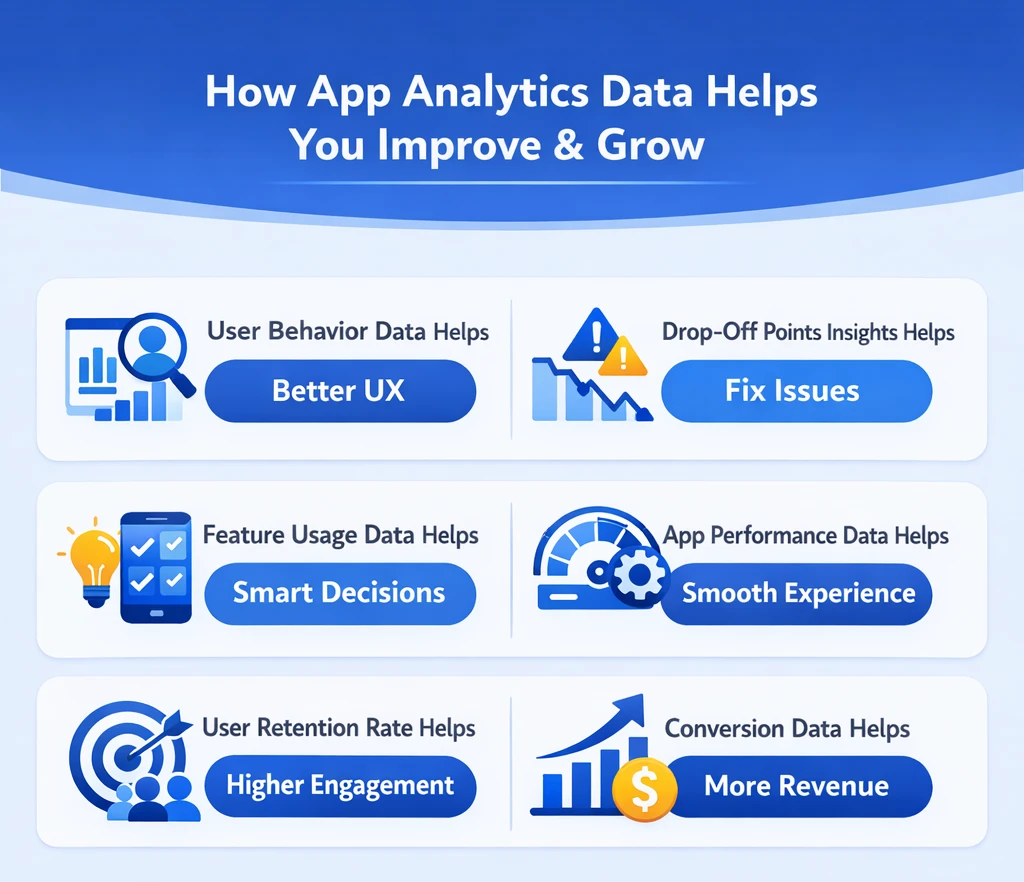
Analytics helps understand key app performance metrics. Instead of relying on assumptions, analytics provides real user data to guide improvements and future feature development. With analytics, you understand exactly:
How users interact with your app
Where they drop off
Feature usage
Performance issues
What drives engagement and retention
This step will ensures that the app evolves based on what users need and how they use it, leading to better engagement and more informed technical decisions. This is why analytics should be built before launch — not after.
Always ensure that analytics is set up before the app is launched, not after. It’s important to clearly communicate this to the developer, as analytics from day one. Without it, valuable data from initial users is lost. By insisting on pre-launch analytics setup, you can make core decisions from the start and continuously improve the app based on real insights.
This is especially important for MVP-based apps, where future features and updates depend on real user behavior and performance. Setting up analytics before launch gives developers immediate visibility into app performance, helping track crashes, user flows, and issues from day one for faster optimization.
Firebase Analytics
Apple App Analytics
Mixpanel
Amplitude
UXcam
AppRadar
Testing is where your app is exposed to situations that development environments can’t fully simulate. Real users don’t follow ideal flows—they switch networks, use low-end devices, tap multiple times, and navigate unpredictably.
This step helps uncover issues like:
App freezing on specific devices
Slow response on weak internet
Broken flows during interruptions (calls, app switching)
Features behaving differently outside controlled testing
Most users decide whether to keep or uninstall an app within the first few minutes. If something feels slow, confusing, or broken—they leave.
Good testing is not just about fixing bugs—it’s about ensuring your app holds up under real-world conditions from the first interaction.
Your role is not to test the app yourself, but to ensure it is tested in real conditions. Ask for:
Testing across multiple devices and OS versions
Real user (beta) testing before public release
Clear confirmation that critical flows (signup, payment, etc.) are stable
Skipping this step often leads to poor reviews and lost users immediately after launch—something that’s hard to recover from.
Your role is not to test the app yourself, but to ensure it is tested in real conditions. Ask for:
Testing across multiple devices and OS versions
Real user (beta) testing before public release
Clear confirmation that critical flows (signup, payment, etc.) are stable
Skipping this step often leads to poor reviews and lost users immediately after launch—something that’s hard to recover from.
Functional Testing → Do all features work correctly?
Performance Testing → Does the app run smoothly under different conditions?
Usability Testing → Is the app easy to use for new users?
Security Testing → Is user data protected?
Device & Compatibility Testing → Works across different devices and OS versions
Release your app to a small group of real users:
Collect feedback
Identify usability issues
Fix real-world problems before public launch
Launching your app is more than just publishing it on the app stores — it’s about making sure your app is visible, accessible, and ready for users from day one. A well-planned launch can significantly impact your app’s early traction and long-term success.
A business owner should not treat app launch as just publishing the app—it is a strategic business activity where their active involvement is critical.
In this step, the owner’s role is to:
Define a launch strategy (soft launch or full launch)
Prepare app store content (screenshots, descriptions, positioning)
Plan initial traffic sources (social media, ads, existing customers)
Set up a feedback loop to collect early user insights
Without this involvement, even a well-built app can fail because users don’t come automatically after launch. Visibility, positioning, and early engagement are driven by business decisions—not development.
For developers, launch is where things move from a controlled environment to unpredictable real-world conditions, and this is where small overlooked details can break the app.
Some critical areas developers must focus on before and during launch:
Environment Mismatch Issues (APIs, database configs, variables)
Edge Device & OS Fragmentation (versions, low-RAM phones, screen sizes)
Network Variability
App Store Specific Problems
User Behavior Edge Cases
Server Load & Scaling Gaps
Developers should use production-ready configurations, proper build settings, and staging validation to ensure everything works exactly as expected at launch. They must also verify API endpoints, permissions, app store compliance, and release builds so the app goes live without errors or rejections.
Google Play → Faster approval (few hours to a couple of days)
Apple App Store → Typically 1–3 days (can be longer if rejected or revised)
Write a clear, keyword-rich app description
Use high-quality screenshots and visuals
Choose the right category and tags
Add an engaging app title and subtitle
Once the app is live, your focus shifts from building to understanding how it performs in the real world. This step is about identifying what is actually happening inside your app at scale.
As a business owner, this is the stage where you understand whether your app is actually driving results or just existing. After launch, your focus should be on what users are doing inside the app—are they purchasing, signing up, engaging, or simply dropping off.
At this step, you need to closely observe:
Whether users are continuing to use the app or uninstalling it quickly
At which point users are dropping off (signup, checkout, etc.)
Which features are actually being used vs. ignored
Whether the app is contributing to your core goals like revenue, leads, or retention
If you skip this step, the biggest risk is operating blindly. The app may seem active, but you won’t know what’s working and what’s failing. You may keep investing in marketing or adding features without understanding their real impact.
As a developer, don’t think your job is done after deployment. This is the stage where you actually see how your app behaves with real users who installed the app. Real users will use the app in ways you didn’t expect, on devices you didn’t test, and on networks you can’t control.
API failures, slow responses, and timeout issues
Crash patterns across devices and OS versions
UI breakdowns caused by real user interactions
You need to constantly observe and connect the dots. For example, if users are dropping at a certain step, don’t assume it’s a business issue—it could be a latency problem, UI lag, or a failed API call.
Keep an eye on logs, errors, and performance patterns
Identify issues early before they scale
Fix root causes, not just visible bugs
Don’t assume “no complaints = everything is fine”
Don’t ignore small warnings—they often become major issues later
Don’t push updates blindly without understanding the impact
This step is important because it helps you become a reliable developer, not just a code writer. The right approach is to treat every release as something that needs to be observed, understood, and improved continuously. That’s how you build apps that actually perform well in the market.
Firebase Crashlytics — Crash Reporting
Firebase Analytics — Analytics
Google Analytics — Tracking
Sentry — Error Tracking
New Relic — Performance Monitoring
Datadog — Observability
AppDynamics — APM
Mixpanel — User Behavior
Instabug — Bug Reporting
Android Profiler — Profiling
Xcode Instruments — Profiling
By this stage, you already have data, feedback, and real usage patterns. Now the focus shifts from observation to decision-making.
This step is about choosing:
What to improve
What to remove
What to build next
Your role is to prioritize updates based on business impact.
Focus on:
Fixing points where users drop off
Strengthening features that drive conversions or engagement
Avoiding unnecessary features that don’t add value
Growth doesn’t come from adding more—it comes from improving what already works.
Your role is to prioritize updates based on business impact.
Focus on:
Fixing points where users drop off
Strengthening features that drive conversions or engagement
Avoiding unnecessary features that don’t add value
Growth doesn’t come from adding more—it comes from improving what already works.
AI is no longer a “nice-to-have” feature—it’s becoming a standard expectation. As part of the modern app development process, both business owners and developers should consider adding at least one AI-driven feature to enhance user experience.
In 2026, this means taking an extra step during development to integrate capabilities like:
Personalized recommendations
Smart search and suggestions
Chatbots and automated support
Predictive user behavior
In the modern app development process, speed has become a key factor. That’s why many businesses are now adopting low-code and no-code approaches—especially in the early stages of development.
Instead of spending months building everything from scratch, these platforms allow you to quickly build, test, and validate your idea with minimal effort. This is particularly useful during the MVP phase, where the goal is to launch fast and learn from real users.
Why people are choosing this approach:
Faster development and time-to-market
Lower initial cost
Easier testing of ideas before full investment
Whether you’re a business owner or a developer, using low-code or no-code tools as part of your process can help you validate ideas quickly, reduce risk, and make better decisions before scaling to full development.
Security is no longer something you “add later”—it’s something you build from day one. In 2026, this has become critical because users are more aware than ever about how their data is being used, while cases of data breaches, scams, and misuse of personal information are continuously increasing.
To protect users, governments and regulatory bodies across countries are introducing stricter data protection laws and security compliance requirements. This means apps are now expected to handle user data responsibly—not just for safety, but also to avoid legal risks and penalties. Ignoring security today doesn’t just risk your app—it can damage your brand and user confidence permanently.
If you look at how apps are built today, one clear shift is happening—teams don’t just want to launch an app, they want to grow it easily over time without starting from scratch again. That’s why cross-platform development is becoming the go-to approach in 2026.
With a single codebase for both iOS and Android, you can:
Add new features faster on both platforms
Keep everything consistent as your app grows
Manage updates without handling two separate versions
As frameworks have improved, performance is now close to native, making it suitable for most business apps. Instead of managing multiple versions, teams can focus on improving one product and expanding it step by step.
That’s the real advantage—cross-platform makes it easier to build once and keep improving without extra complexity.
Building a successful mobile app in 2026 is not about luck—or just having a great idea. It’s about following the right process and executing it consistently. Each stage in the development journey plays a critical role. When done right:
Risks are reduced
Time and cost are optimized
The chances of success increase significantly
The most successful apps are not always backed by the biggest budgets. They are built by teams that:
Plan with clarity
Execute with discipline
Improve continuously based on real user data
That’s what turns an idea into a product people not only use—but keep coming back to. In today’s market, launching an app is easy. Building an app that grows, performs, and delivers real business value—that’s what truly matters. This is only possible by following the right development process. We hope this guide helps you build an app that truly grows your business—if you’re a business owner—or strengthens your skills, experience, and reputation—if you’re a developer.
A: The mobile app development process is the complete set of steps required to take an app from initial idea to a live, functioning product on the App Store or Google Play. It covers ideation, planning, design, development, testing, launch, and ongoing improvement — in that order.
A: Most mobile apps take between 3 and 9 months to build. Simple apps with basic features can be completed in 2 to 4 months. Standard apps with moderate complexity typically take 4 to 7 months. Complex enterprise-grade apps with advanced features and multiple integrations can take 7 to 12 months or longer.
A: Native apps are built separately for iOS and Android, delivering the highest performance but at a greater cost and time. Cross-platform apps use a single codebase for both platforms — frameworks like Flutter and React Native deliver near-native quality at 30 to 40 percent lower cost and time. Hybrid apps combine web technologies with a native shell — suitable for content-heavy apps but with some performance limitations.
A: The average cost to develop a mobile app ranges from $15,000 for a basic app to $150,000 or more for a complex, feature-rich app. The final cost of mobile app development depends on features, platform choice, developer location, and the complexity of integrations required.
A: Planning. Teams that define their scope, features, platform, and budget clearly before development begins finish faster, stay within budget, and build better products. Unclear requirements at the start are the single most common cause of delays and cost overruns.
A: For most businesses, building for both platforms using a cross-platform framework is the most practical choice. It reaches the widest audience at the lowest cost and in the shortest time. If your audience is predominantly iOS users — such as in North America and Western Europe — starting with iOS alone is also a valid approach.
A: An MVP — Minimum Viable Product — is a stripped-down version of your app with only the core features needed to launch and test with real users. Starting with an MVP lets you validate your idea, gather feedback, and improve the product with real data before investing in the full feature set. For most businesses, this is the smarter and lower-risk path to a successful app.
A: Look for a team with a proven portfolio of apps similar to yours in complexity and industry. Check their process — do they start with discovery and planning, or jump straight to building? Ask about post-launch support, communication practices, and how they handle scope changes. A partner with experience in your specific app type will move faster, make fewer mistakes, and deliver a better result.
A: Monitor your app's key metrics — active users, retention rate, session length, and crash reports — consistently. Act on user feedback quickly. Release regular updates that fix issues and add value. Stay current with iOS and Android operating system updates to ensure your app performs well on the latest devices. The apps that stay relevant are the ones that treat launch as the beginning, not the end.

Mobile healthcare apps improve patient care by enabling remote monitoring, timely reminders, secure data access, better communication, and cost-efficient healthcare services through mHealth technology.
B2B apps help businesses streamline operations, enable on-the-go access to data, improve client engagement, support omnichannel sales, and drive scalable revenue by simplifying complex business workflows.
We are more than just developers and consultants—we are your partners in navigating the digital landscape. Let us be the engine behind your next big success while you focus on your core vision.
Explore Opportunities!