LangChain vs. AutoGen vs. CrewAI: How to Choose an Agent Orchestration Framework
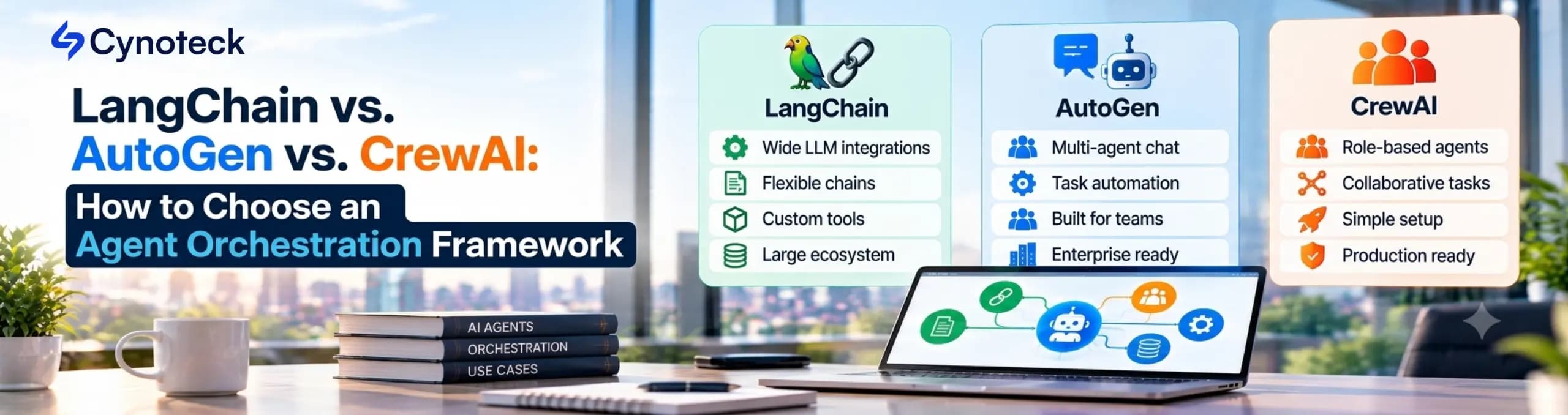
Choosing between LangChain, AutoGen, and CrewAI is not as straightforward as it used to be. AutoGen is only getting maintenance updates, and LangChain renamed its orchestration engine to LangGraph. The right choice depends on how your business runs its workflows. LangGraph is a good fit if you need to manage state, approvals, and audit trails. CrewAI makes sense when your work is split into clear roles, like handing off tasks between specialists. If your team relies on .NET or Azure, Microsoft Agent Framework (which now replaces AutoGen) is likely the best match. In many cases, you may find that you do not need a framework at all.
Choosing an agent framework for your business is a design decision that affects how you manage state, retries, approvals, and audits as your system grows. Many comparisons focus only on features and overlook the long-term effects of these agents.
In this guide, we will walk you through how we make these decisions in practice. We check every status, version, and install size directly from each project's official sources. Our agentic AI development services team works hands-on with LangChain, AutoGen, and CrewAI, and we always base our recommendations on workflow complexity, not personal preference. We use the same approach for client projects to keep things objective.
Choose LangGraph, LangChain's orchestration runtime, if your workflow needs strong state management, approvals, and audit trails. CrewAI is a better fit when your work is divided among specialist roles. For new projects built on Microsoft technologies, choose the Microsoft Agent Framework over AutoGen.
The table below summarizes these recommendations for quick reference. The following sections explain the reasoning and evidence behind each point.
Situation | Start with | Why |
|---|---|---|
Branching workflows, approvals, retries, and audit needs | LangGraph | Explicit graph, checkpoints, and interrupts give you control |
Work that splits into specialist roles with clear handoffs | CrewAI | Crews model roles, and Flows add deterministic structure |
A .NET or Azure-first team that wants a Microsoft support path | Microsoft Agent Framework | Python and .NET parity, graph workflows, and built-in OpenTelemetry |
An AutoGen system already in production | Keep it running, then plan a migration | AutoGen gets no new features, and Microsoft publishes a migration guide |
One agent with a handful of tools | LangChain's | A full orchestration layer adds cost without adding value |
Agents that must interoperate across teams or frameworks | Any of the above, exposed through A2A and MCP | Protocols matter more than the framework at the boundary |
Table 1. Quick selection guide. This reflects our judgment based on the evidence below.
Several recent changes have shifted the landscape. AutoGen is now in maintenance mode only. LangChain's orchestration layer is now called LangGraph. CrewAI now combines Crews and Flows. With these updates, it is no longer accurate to treat all three as equally active choices.
AutoGen's own README is explicit. It says AutoGen has no new features and points new users to the Microsoft Agent Framework, which it calls the enterprise-ready successor. The package registry agrees, since PyPI lists autogen-agentchat 0.7.5, uploaded on September 30, 2025, as the latest release.
The LangChain stack has also evolved. The documentation now describes LangChain as the agent framework and LangGraph as the orchestration runtime. You can use LangGraph on its own, but installing LangChain will still include LangGraph as a dependency.
We have found that third-party guides often disagree on basic facts. For example, some mention an AutoGen 1.0 release in 2026, but neither the official repository nor PyPI lists such a version. That is why we always verify the current status ourselves before making any recommendation.
Project | Latest release (PyPI) | Uploaded | License | Status |
|---|---|---|---|---|
LangChain | 1.4.5 | Oct 12, 2026 | MIT | Active |
LangGraph | 1.2.15 | Oct 12, 2026 | MIT | Active |
CrewAI | 1.15.28 | Oct 14, 2026 | MIT | Active |
Microsoft Agent Framework ( | 1.21.0 | Oct 8, 2026 | MIT | Active; AutoGen's stated successor |
AutoGen ( | 0.7.5 | Sep 30, 2025 | MIT | Maintenance mode; community-managed |
Table 2. Release and status check on October 14, 2026. Sources: PyPI package metadata and each project's README.
Each framework takes a different approach to how agents work together in a multi-agent system. LangGraph uses a graph model, CrewAI focuses on teams, and Microsoft Agent Framework combines agents with typed workflows. Understanding these core ideas helps you see the trade-offs involved.
LangGraph is a low-level framework for building long-running, stateful agents. Its docs say it lets you mix fixed steps with LLM-driven steps in one graph, focusing on durable execution, streaming, and human-in-the-loop control. LangChain sits one level up, because it supplies the agent layer: building blocks for models, tools, and the loop around them. LangSmith, the tracing and evaluation platform, also works across frameworks, including CrewAI.
LangGraph is a good choice if you need to control exactly where AI runs versus standard code. Its persistence layer saves the graph state as checkpoints, so you can resume, roll back, or recover from failures. If your team needs a higher-level tool quickly, remember that LangGraph is described as very low-level in its own documentation. You will need to write more code upfront.
Microsoft Agent Framework is Microsoft's framework for production agents and multi-agent workflows, and Microsoft names it as AutoGen's successor. Its README also lists Python and .NET support. A Go SDK is in public preview. Its workflows are graph-based, with sequential, concurrent, handoff, and group-chat patterns, and Microsoft also documents checkpoints, streaming, human-in-the-loop control, and time travel. Built-in OpenTelemetry covers tracing, so Azure-first and .NET teams get a natural fit.
Keep in mind that the default installation includes many connector packages, and some, like the A2A package, are still in beta. The core package itself is stable and lightweight. We compare both options below.
CrewAI is a self-contained Python framework for multi-agent work. It brings its own building blocks: agents, tasks, crews, flows, and tools. Its README splits the model into two: Crews provide autonomous, role-based collaboration, while Flows provide event-driven control with state and branching.
CrewAI fits well when your workflow has clear roles, such as a researcher passing results to a writer. In these cases, you can use a Flow for predictable steps and add a Crew where you need more autonomy. Watch out for two things: CrewAI collects anonymous usage telemetry by default, but you can turn it off by setting OTEL_SDK_DISABLED=true. Also, its built-in tracing is only available in the commercial AMP tier, so that open-source users will need third-party tools for tracing.
We evaluate each framework using ten criteria and adjust the weights based on project risk. Then we test the top two options in a short proof of concept. This approach keeps our decisions evidence-based rather than driven by personal preference.
Begin by giving each criterion a weight from 1 to 3. Score each framework from 0 to 2 for each criterion, multiply the scores by the weights, and add them up. For example, if you are working on a regulated project, give security and governance the highest weight. If you are building a prototype, focus more on team fit and speed.
Criterion | Why it matters | What we check |
|---|---|---|
Control-flow fit | Deterministic and autonomous steps need different tools | Can you pin down where the LLM decides, and where code does? |
State and persistence | Long tasks must survive failures | Checkpoints, durable execution, store options, and resume behavior |
Human-in-the-loop | Approvals are a governance control | Pause, review, edit, and resume support |
Observability and evaluation | You cannot fix what you cannot see | Trace depth, export format, and eval hooks |
Interoperability | Lock-in grows where protocols are weak | MCP and A2A support, and its maturity |
Security and data handling | Agents touch sensitive systems | Telemetry defaults, secrets handling, and sandboxing |
Operations and deployment | Production needs more than a script | Hosting options, scaling model, and upgrade path |
Dependency footprint | Every package adds supply-chain surface | Installed packages, size, and cold-start time |
Project health | Frameworks can stall or change direction | Release cadence, ownership, and license |
Team fit | Skills decide delivery speed | Language support and learning curve |
Table 3. Our ten evaluation criteria. The weights are a suggestion; adjust them to project risk.
This method matches the early steps in our own process. We start by mapping workflows, compliance requirements, and identifying which processes are a good fit for agents. Next, we select the stack, including models, vector databases, and the coordination layer. We also design how memory, tool access, and escalation will work.
You do not always need an orchestration framework. Often, a single agent with the right tools is enough. Adding a framework too soon can hide the real issues. Start with the simplest solution that meets your needs.
Pattern | What it looks like | Framework need |
|---|---|---|
Single agent with tools | One model loop that calls functions | Optional: a plain SDK or |
Deterministic workflow with LLM steps | Fixed stages such as classify, route, and draft | A workflow engine, or plain code with a state store |
Multi-agent collaboration | Specialists, handoffs, and reviewers | A framework helps with state, handoffs, and tracing |
Cross-system agent network | Agents owned by different teams | Protocols such as A2A and MCP at the boundary |
Table 4. Orchestration patterns, from simplest to most complex.
Add more agents only when a single agent's context or tool set becomes too hard to manage. Each extra agent brings more messaging, higher costs, and more places where things can break. For more details, see our guide to agentic AI and how it works.
All three frameworks support the basics: tool calling, state management, and human review. The main differences are in their control models, observability features, and paid options. The table below includes only what we could confirm from each project's official documentation.
Dimension | LangGraph | CrewAI | Microsoft Agent Framework |
|---|---|---|---|
Core model | Graph of nodes with shared state | Crews (role-based) plus Flows (event-driven) | Agents plus graph-based workflows |
Languages | Python and JavaScript | Python | Python and .NET; Go in public preview |
State and persistence | Checkpointers for thread state; stores for long-term memory | Checkpointing and Flow state | Checkpoints, resume, and agent sessions |
Human-in-the-loop | Interrupts | Human input and review on tasks | Pause for external input, then resume |
Time travel and replay | Documented | Not documented in the README | Documented |
Observability | LangSmith tracing and evaluation | Built-in tracing in AMP; third-party tools in open source | Built-in OpenTelemetry integration |
MCP | Adapter in LangChain (beta) | MCP servers as tools | MCP clients |
A2A | Endpoint in LangSmith Agent Server | Stated in the README | Separate package, still beta |
Commercial layer | LangSmith (tracing, deployment) | CrewAI AMP (deployment, governance) | Microsoft Foundry hosting |
Table 5. Side-by-side comparison from official documentation, October 14, 2026. "Beta" reflects the vendor's own labels.
Two points are worth highlighting. LangChain marks its MCP adapter as beta and notes that the API could change. Microsoft also labels its A2A package as beta. If you need cross-agent interoperability, be sure to test these features early in your project.
A clean install of LangGraph brings in 38 packages and uses 53 MB of space. CrewAI installs 137 packages and takes up 720 MB. Microsoft's default meta-package installs 211 packages and uses 669 MB, but the core package alone is much lighter at 11 packages and 19 MB.
Install size is often overlooked in comparisons, but it affects container size, cold start times, and supply chain checks. To get accurate numbers, we installed each framework in a fresh Python 3.12 environment on October 14, 2026. We counted every installed package, measured the site-packages folder, and timed how long it took to import each framework's main classes.
Stack (clean install) | Version installed | Packages | Disk size | Import time |
|---|---|---|---|---|
LangGraph | 1.2.15 | 38 | 53 MB | 0.55 s |
LangChain (includes LangGraph) | 1.4.5 | 39 | 54 MB | 0.58 s |
CrewAI | 1.15.28 | 137 | 720 MB | 2.10 s |
Microsoft Agent Framework, core only | 1.21.0 | 11 | 19 MB | 0.14 s |
Microsoft Agent Framework, default meta-package | 1.19.0 | 211 | 669 MB | Not measured |
AutoGen AgentChat plus OpenAI extension | 0.7.5 | 28 | 58 MB | 0.25 s |
Table 6. Our own measurements: median of five import runs in a Linux container, installed with uv. Timings are indicative, and sizes vary by platform.
These numbers reflect clear reasons. CrewAI includes its own memory and knowledge stack by default, such as ChromaDB, LanceDB, and ONNX Runtime. Microsoft's meta-package bundles provider connectors, and 23 out of 31 packages are still in pre-release. As a result, the latest version required pre-release flags, and the installer selected version 1.19.0.
These numbers do not mean one framework is better or worse. They do mean you should install only what you need, pin your package versions, and create a software bill of materials before you commit. A 720 MB image adds up quickly when you run agents in many short-lived containers.
To run a multi-agent system in production, you need five things: state recovery, human approval gates, observability, cost controls, and an operations plan. The frameworks provide hooks for the first three, but you will need to design and manage the rest yourself.
Concern | What the framework gives you | What you must design and operate |
|---|---|---|
State recovery | Checkpointers, durable execution, and resume | The store, backups, retention, and encryption |
High availability and disaster recovery | State hooks, not topology | Replicas, failover, and recovery objectives |
Transport security | Nothing specific | TLS or mTLS at gateways and between services |
Approval gates | Interrupts and human-input features | Who approves, timeouts, and the audit trail |
Observability | LangSmith, OpenTelemetry, or integrations | What to log, redaction rules, and retention |
Data governance | Configuration switches, such as CrewAI's telemetry flag | Secrets, PII handling, and data residency |
Cost control | No automatic budgets | Token limits, timeouts, and spend alerts |
Evaluation | Hooks for datasets and scoring | Test sets, thresholds, and release gates |
Table 7. Production concerns, split between framework and team. This table reflects our engineering view, grounded in each framework's documented capabilities.
Frameworks do not replace the need for solid infrastructure. For example, a checkpointer can save state, but it will not make your database highly available. This gap is a common reason why many pilots never reach production. That is why our QA phase always includes tests for fallbacks, integration security, load, and failure modes.
Keep your key components portable, and treat the framework as something you can swap out if needed. In practice, following these five habits will cover most of the risk.
Expose tools as MCP servers, so they work across frameworks. Our guide to connecting Claude to Salesforce-hosted MCP servers shows the pattern in practice.
Version prompts as assets. Store them outside framework classes, with tests.
Own your state schema. Define the data model yourself, then map it into the framework's state objects.
Keep evaluations separate. A framework-neutral test harness lets you compare candidates fairly.
Export traces in open formats. OpenTelemetry keeps tracing portable.
Protocols are useful here, and both MCP and A2A are now hosted by the Linux Foundation, with MCP under the Agentic AI Foundation. However, support still varies by framework, as shown in Table 5. Be sure to test the protocol you plan to use before making a final decision.
Test your top two framework choices on the same real tasks with the same tools, and base your decision on what you actually measure. A proof of concept will answer questions that documentation cannot. We recommend the plan below.
Day | What to do | Pass if |
|---|---|---|
1 | Define a representative task set and a scoring rubric | Success means the same thing to everyone |
2 | Build a no-framework baseline | You know what the framework must beat |
3 to 4 | Implement the task in both candidates with shared MCP tools | Both reach the baseline's quality |
5 | Kill a process mid-run, then resume | State recovers without duplicate actions |
6 | Add an approval gate | A reviewer can pause, edit, and resume |
7 | Add tracing and an evaluation run | A trace answers "why did it do that?" |
8 | Measure cost per accepted task and p95 latency | Numbers fit your budget |
9 | Review security, telemetry, and dependencies | Footprint and data flow pass review |
10 | Score against Table 3 and write the decision memo | The winner and the migration cost are explicit |
Table 8. A ten-working-day proof of concept plan.
Track the cost per accepted result, not just the cost per token. An agent that retries many times might look cheap per call but end up expensive per outcome. Set clear criteria so you can stop a failing option early.
The best framework depends on your workflow's shape. The examples below are for illustration and are not based on specific client projects.
Scenario | Likely fit | Reason |
|---|---|---|
Claims triage with mandatory human approval and audit logs | LangGraph | Explicit control flow with checkpoints and interrupts |
Research-and-drafting pipeline with clear specialist roles | CrewAI, with a Crew inside a Flow | Roles map to agents, and the Flow adds structure |
Internal assistant for a .NET and Azure shop | Microsoft Agent Framework | Native .NET support and OpenTelemetry |
Existing AutoGen prototype heading to production | Migrate to Microsoft Agent Framework | Maintenance mode makes a new build on AutoGen a risk |
Support bot that answers from one knowledge base | Single agent, no orchestration layer | The pattern needs no coordination |
Agents owned by separate teams that must cooperate | Per-team choice, joined by A2A and MCP | Protocols matter at the boundary |
Table 9. Scenario guide.
If your systems run on Salesforce, consider a platform-native option. Our guide to Agentforce versus custom AI agents explains this trade-off in more detail.
Most mistakes come from three habits: choosing based on popularity, skipping a baseline, and ignoring operational needs. Each of these is easy to avoid with the right approach.
Choosing by GitHub stars or tutorials instead of workflow fit.
Starting with a multi-agent design when one agent would work.
Building on a project whose maintainers have moved on, as AutoGen's status shows.
Skipping a no-framework baseline, which hides whether the framework helps.
Ignoring telemetry defaults and install size until a security review catches them.
Treating state persistence as solved because a checkpointer exists.
Hard-coding prompts and tools into framework classes, which makes switching costly.
We choose frameworks based on workflow complexity and risk, and we confirm our choice as we build. Our process starts with requirements analysis and design, then moves through development sprints, QA, and go-live.
Here is how our AI team helps businesses choose the right framework:
Requirement analysis: We map workflows, customer journeys, and compliance needs. We also assess which processes suit agents and which do not.
Design: We pick the stack, including models, vector databases, and the coordination layer. We also design memory, tool access, and escalation logic.
Development in sprints: We build the reasoning core and tool links first. Then we connect enterprise systems and add governance rules.
QA and safety testing: We test fallbacks, integration security, load, and failure modes against real data.
Integration and go-live: We connect the agent to your CRM, helpdesk, and chat tools. Then we confirm that data flows and decisions hold up in real conditions.
We build both single-agent and multi-agent systems using LangChain, AutoGen, and CrewAI. For new projects on Microsoft technologies, we recommend the Microsoft Agent Framework, the maintained successor to AutoGen. If you are not sure whether to start with a design review or move straight into development, our guide to AI consulting versus AI development can help you decide.
No matter what your evaluation of LangChain, AutoGen, or CrewAI shows, one thing stays the same: the best agent orchestration framework depends on your workflow, your team, and your risk profile. Taking time for a short design review can save you months of rework later.
If you would like to discuss your architecture with our engineers, reach out to our agentic AI development services team. Whether you need a single agent or a multi-agent system, we'll recommend the framework that fits your workflow, or tell you if you don't need one at all.
Only for fixes. AutoGen's README says it is in maintenance mode, with no new features, and is community-managed. PyPI dates its last release to September 30, 2025, so new projects should begin on Microsoft Agent Framework.
Microsoft Agent Framework. AutoGen's README calls it the enterprise-ready successor and points existing users to a migration guide. It supports Python and .NET, with a Go SDK in public preview.
They work on different layers. LangChain provides the agent framework, and LangGraph provides the orchestration runtime. For simple tool-calling agents, LangChain's `create_agent` is enough. For stateful workflows with approvals, use LangGraph.
Yes. LangGraph's documentation says you do not need LangChain to use it. The docs do use LangChain components in many examples, and installing LangChain pulls in LangGraph.
CrewAI's README describes it as built for production-ready multi-agent workflows, and it has an active release cadence. Whether it fits your project depends on your needs for observability, footprint, and control. Test those in a proof of concept.
It collects anonymous usage telemetry by default. Its README says prompts, task descriptions, and agent data stay out of that telemetry unless you enable the `share_crew` feature. Set `OTEL_SDK_DISABLED=true` to turn telemetry off.
All three support MCP in some form. A2A support differs: LangSmith's Agent Server exposes an A2A endpoint, CrewAI states A2A support, and Microsoft's A2A package is still beta. Verify the version you plan to use.
No single option wins everywhere, but AutoGen is a poor choice for new production builds because it is in maintenance mode. LangGraph suits stateful workflows with approvals, CrewAI suits role-based work, and the Microsoft Agent Framework suits .NET- and Azure-first teams.
Often, no. One agent with solid tools covers many use cases. Add agents when one agent's context or tool set becomes unmanageable.
The open-source cores are MIT-licensed and free. Commercial layers such as LangSmith, CrewAI AMP, and Microsoft Foundry hosting are optional. Model usage is usually the higher cost.
Yes, if you join them with protocols. Expose agents through A2A and tools through MCP, so teams can pick different frameworks without rewriting integrations.
We suggest about two weeks for a proof of concept on real tasks. Shorter tests rarely surface state-recovery, approval, and cost problems.
What is Artificial Intelligence? Artificial intelligence (AI) is intelligence demonstrated by machines, which makes it possible for machines to learn from experience, adjust to new inputs and perform human-like tasks.
We are more than just developers and consultants—we are your partners in navigating the digital landscape. Let us be the engine behind your next big success while you focus on your core vision.
Explore Opportunities!
 What Al Services Does a Business Actually Need in 2026.webp)