Dynamics 365 Sales 2026: Pricing, Features & Alternatives
Summary: This guide covers what Dynamics 365 Sales costs in 2026, what it does, what real users say about it, and which tools are worth considering instead. By the end, you will know if it fits your sales team and your budget. |
If you are researching CRM software for your sales team, Dynamics 365 Sales has probably come up. It is Microsoft's customer relationship management tool, built to help sales teams track leads, manage deals, and close business faster. This guide breaks down the pricing, features, what real customers say in their reviews, and the alternatives to compare it against, so you can decide with confidence rather than guesswork.
Factors | Details |
Starting price | $65 per user, per month (Sales Professional) |
Top plan | $150 per user, per month (Sales Premium) |
Free trial | Yes, 30 days, direct from Microsoft |
Best for | Businesses already using Microsoft 365, Teams, and Outlook |
G2 rating | 3.8 out of 5 (1,600+ reviews) |
Capterra rating | 4.4 out of 5 (5,800+ reviews) |
Setup | Usually needs a certified Microsoft partner |
Dynamics 365 Sales is Microsoft's cloud-based CRM tool for managing the sales process from first contact to closed deal. In simple terms, it gives your sales team one place to track contacts, deals, and communication, instead of juggling spreadsheets and separate inboxes.
It is part of the larger Dynamics 365 family, which also includes tools for customer service, field service, finance, and marketing. This is why Dynamics 365 Sales connects so easily with the rest of Microsoft's business tools, including Outlook, Teams, and Excel.
Note: Dynamics 365 Sales is sold as its own product with its own price. You do not need to buy the entire Dynamics 365 suite to use it, though it works best alongside other Microsoft 365 tools your team already has. Cynoteck's Dynamics 365 Sales services cover setup and customization if you decide it is the right fit. |
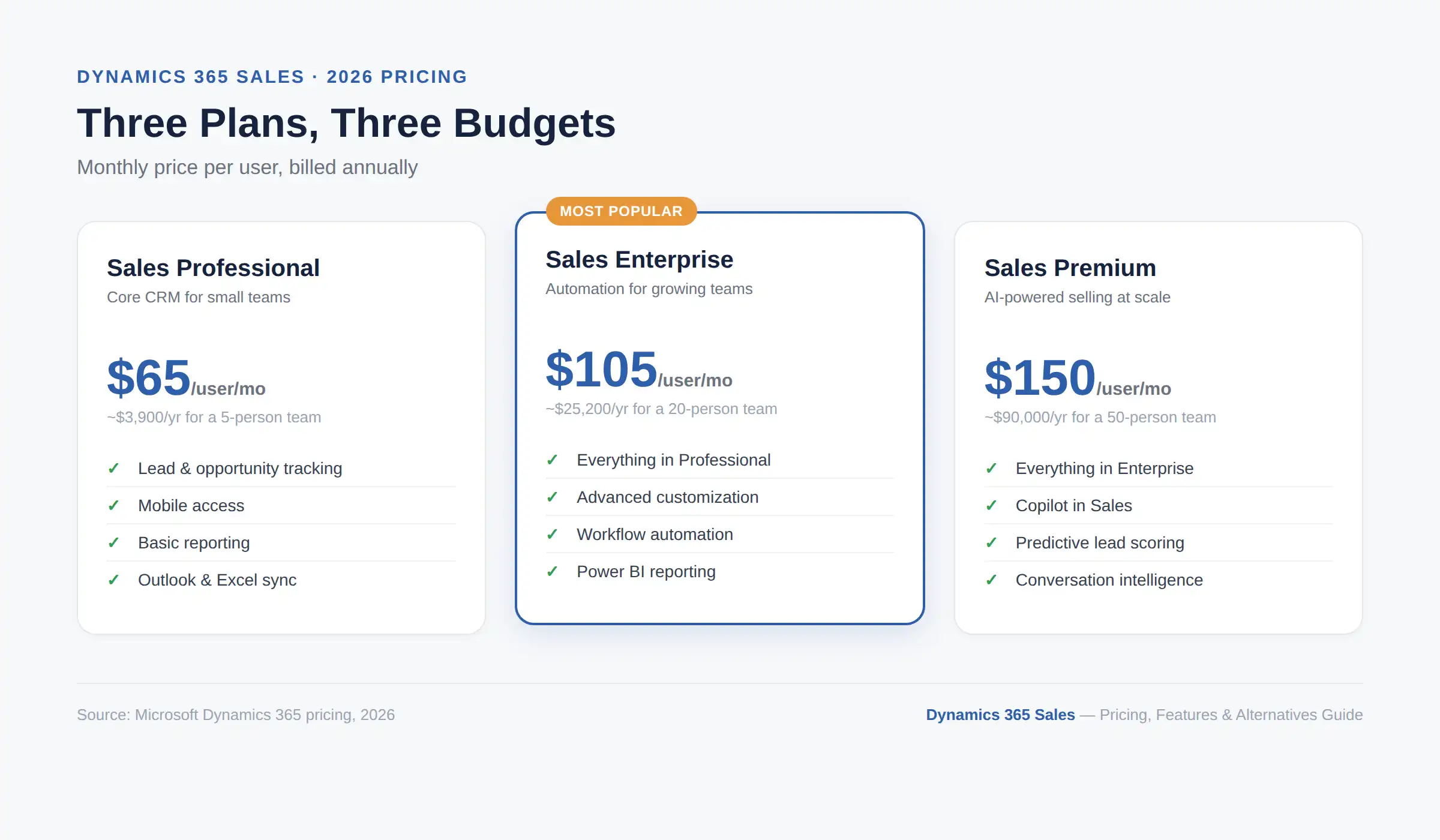
Dynamics 365 Sales costs between $65 and $150 per user, per month, depending on the plan you choose. Microsoft prices it per user per month across three main plans, so your total bill depends on how many people need licenses and which plan they use.
Plan | Price per user/month | Best for |
Sales Professional | $65 | Small teams that need core CRM features |
Sales Enterprise | $105 | Mid-size to large teams that need advanced automation and forecasting |
Sales Premium | $150 | Teams that want built-in AI tools and Copilot credits included |
There is also Microsoft Relationship Sales, a bundle that pairs Sales Enterprise with LinkedIn Sales Navigator. This is not a fixed list price. Instead, Microsoft quotes it through a partner based on your team size, so treat any number you see online as a rough guide rather than a final figure.
These prices apply when you commit to an annual plan paid upfront. Therefore, if you pay month-to-month instead, expect the cost to be higher.
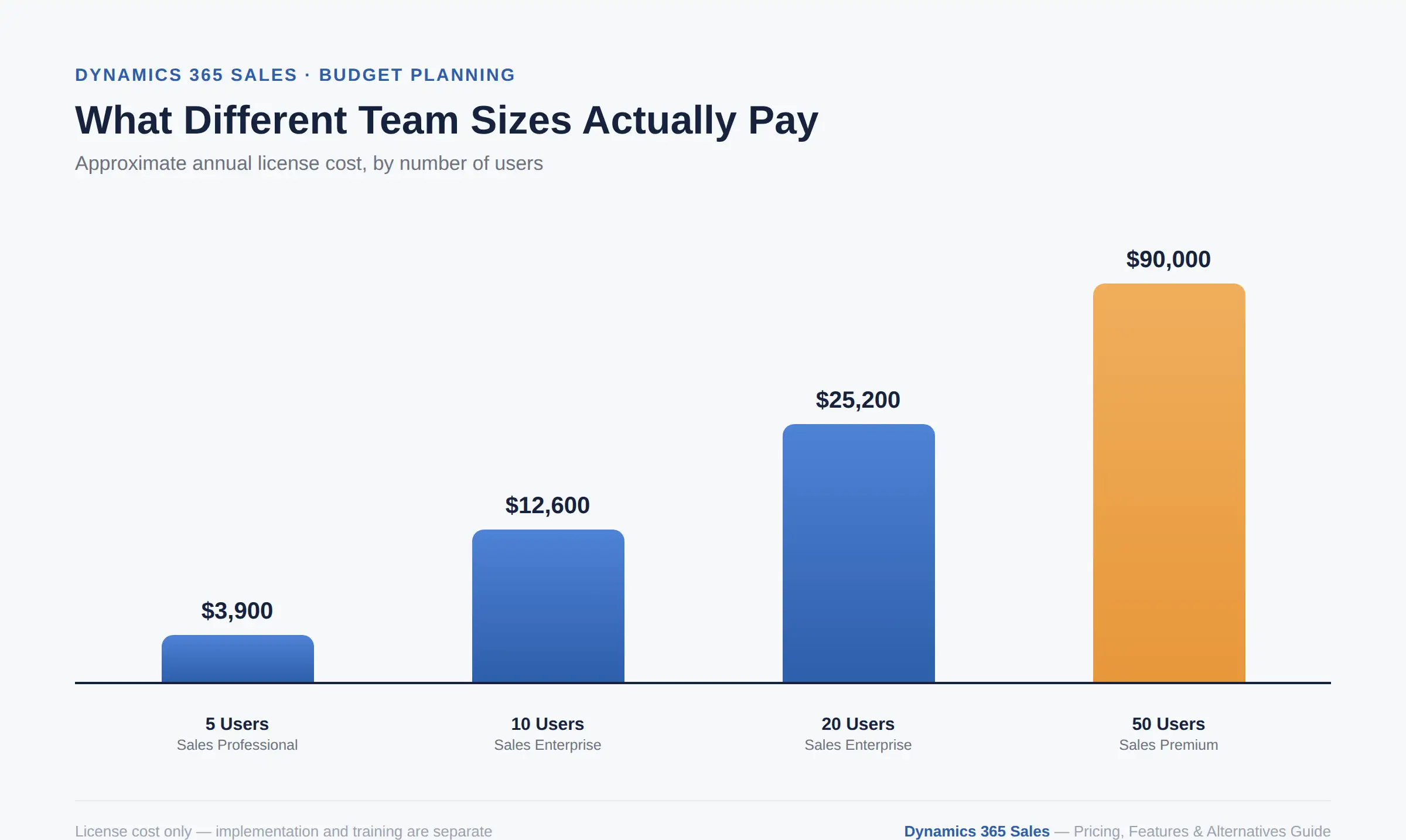
A single price per user does not tell the full story. Here is what a few common team sizes typically pay for licenses alone, before implementation:
Team size | Plan | Approximate annual license cost |
5 users | Sales Professional | Around $3,900 per year |
10 users | Sales Enterprise | Around $12,600 per year |
20 users | Sales Enterprise | Around $25,200 per year |
50 users | Sales Premium | Around $90,000 per year |
Each plan does more than the last, so it helps to know exactly what you get for the price. Here is what is included at each level.
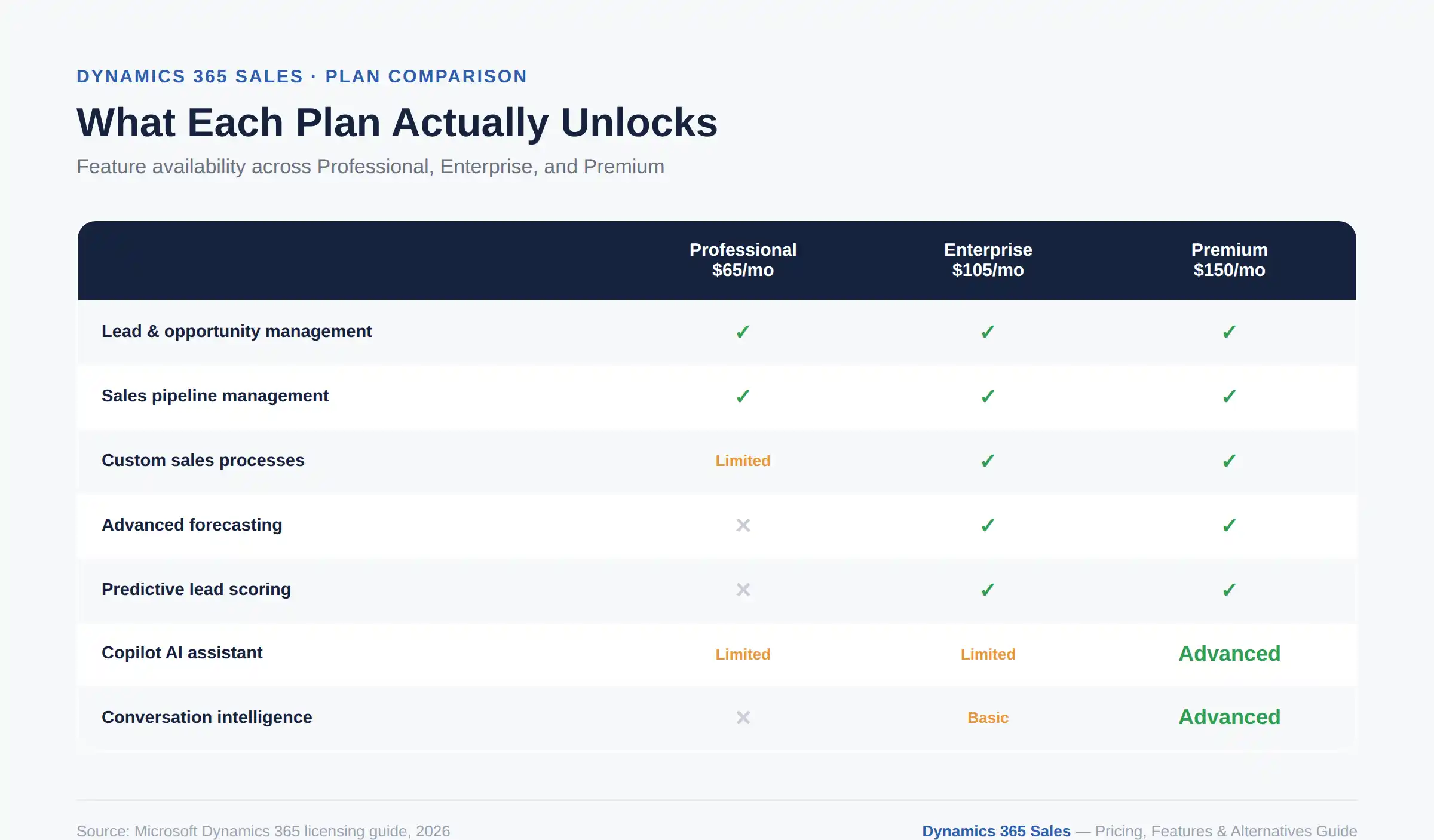
Lead and opportunity management: Track prospects and deals from first contact through to close.
Product and price lists: Store your catalog, quotes, orders, and invoices inside the CRM.
Mobile access: Reps can view and update records from the Dynamics 365 mobile app.
Basic reporting and dashboards: See pipeline status without needing a separate tool.
Microsoft 365 interoperability: Connect with Outlook and Excel for everyday sales work.
Note: Sales Professional caps some things smaller teams rarely hit, such as the number of custom workflows and custom entities. This is why it suits teams with straightforward sales processes rather than complex, multi-stage pipelines. |
Everything in Sales Professional, plus:
Advanced customization: Build custom entities, fields, and business process flows without the caps that apply to Professional.
Workflow automation: Automate multi-step processes across your entire sales cycle, not just single tasks.
Sales forecasting: Predict revenue using pipeline data that updates automatically as deals move.
Power BI reporting: Build detailed, customizable dashboards instead of relying on basic reports.
Sales sequences: Guide reps through structured follow-up steps so nothing gets missed.
Everything in Sales Enterprise, plus:
Copilot in Sales: Drafts emails, summarizes meetings, and suggests next steps automatically, with 1,000 Copilot credits included per user, per month.
Predictive lead and opportunity scoring: AI ranks which leads and deals are most likely to close, so reps prioritize the right accounts.
Conversation intelligence: Analyzes sales calls to flag pricing objections, competitor mentions, and other key moments.
Relationship analytics: Surfaces who on your team already knows a contact, which helps warm up cold outreach.
Premium assistant features: Includes business card reader and enhanced Copilot capabilities across Dynamics 365, Outlook, and Teams.
Pro Tip: If your team is between sizes, for example, 15 users, it is often more cost-effective to license everyone on the same plan rather than splitting the team across two tiers. Mixed licensing is possible, but it adds administrative overhead that usually is not worth the small savings. |
Get a realistic Dynamics 365 Sales budget based on team size, licensing requirements, implementation scope, and future growth plans before making a commitment.
Request a Cost ConsultationThe license fee is only part of the real cost. In addition, most businesses run into a few extra expenses that are not obvious upfront:
Implementation: Getting Dynamics 365 Sales set up properly usually needs a certified partner. This can range from around $25,000 for a simple setup to well over $100,000 for a large, customized rollout.
Copilot AI credits: The Premium plan includes some Copilot credits, but heavy use of AI features often means buying more on a pay-as-you-go basis.
Training and adoption: Your team will need time and support to learn the system, especially if they are moving from a simpler tool.
Ongoing support: Standard support has limits. For faster response times, many businesses add Microsoft's paid support plans, which start at roughly $25,000 a year.
Note: A realistic budget for the first year is often two to three times the license cost once you add implementation and setup. This is one of the most common surprises for businesses that only budget for the per-user sticker price. For a full breakdown of what drives implementation costs up or down, see this Dynamics 365 implementation cost guide. |
Yes, in most cases. Microsoft uses what is called "attach" pricing, which rewards businesses for purchasing multiple Dynamics 365 apps for the same user.
Pro Tip: If your team already uses another Dynamics 365 app, such as Business Central or Customer Service, you may qualify for a discounted attach price on Sales Professional or Sales Enterprise. This can significantly reduce costs, so it is worth asking your Microsoft partner about it before you buy. |
Dynamics 365 Sales covers the core jobs any sales team needs to do, plus a growing set of AI tools. Here are the main features, grouped by what they help you do.
Lead and opportunity tracking: See every deal in your pipeline, along with its stage, value, and next steps.
Sales pipeline views: Visual boards that show where each deal sits so that managers can spot bottlenecks quickly.
Forecasting tools: Predict revenue based on your current pipeline, updated automatically as deals move.
Workflow automation: Set up rules that handle repetitive tasks, like assigning leads or sending follow-up reminders.
Email and calendar sync: Outlook and your calendar connect directly, so reps do not need to switch apps to log activity.
Sequences: Pre-built steps that guide reps through follow-ups, so nothing falls through the cracks.
Copilot in Sales: Drafts emails, summarizes meetings, and suggests next steps based on your CRM data.
Predictive lead scoring: Ranks leads by how likely they are to convert, so reps focus on the right accounts first.
Conversation intelligence: Analyses sales calls to flag key moments, like pricing objections or competitor mentions.
Microsoft 365 integration: Native connections to Teams, Outlook, Excel, and SharePoint.
Power BI dashboards: Custom reports built on your sales data, without needing a separate analytics tool.
Power Platform access: Extend the CRM with Power Apps and Power Automate if your needs grow.
Mobile apps: Most desktop features are available on iOS and Android so that reps can update records from the field.
If your reps work from the field often, it is worth reading about when it makes sense to extend a CRM with a custom mobile app, a decision that applies to Dynamics 365 field teams as much as Salesforce ones. For the full range of modules Cynoteck supports beyond Sales, see the Dynamics 365 Development Services page.
Microsoft updates Dynamics 365 Sales twice a year through its release wave program, and the 2026 release wave 1 leans heavily into AI-assisted selling. This is worth knowing because it shows where the product is heading, not just what it does today.
AI agents for lead qualification: New agents can review incoming leads and flag the ones worth a rep's time, cutting down on manual triage.
Smarter calling tools: Reps get in-call guidance and summaries without switching between apps, which keeps focus on the conversation.
Deal guidance: The system suggests next steps for a deal based on similar past opportunities to shorten the sales cycle.
Note: These features roll out gradually and are not all available on every plan. If AI-assisted selling is a priority for your team, confirm which features are included in the release wave before you commit to a plan. |
Pros | Cons |
Deep integration with Microsoft 365 and Teams | Can feel complex for smaller teams |
Strong AI features on the Premium plan | Full value often assumes you already use Microsoft tools |
Scales well for large, complex sales teams | Setup usually needs a paid implementation partner |
Flexible licensing if you already own other Dynamics 365 apps | Copilot and advanced AI features cost extra |
Solid reporting through Power BI | Learning curve for new users, especially outside Microsoft's ecosystem |
Many of these trade-offs come down to deployment model rather than the software itself. If you are also weighing hosting options, this cloud CRM vs. on-premises CRM comparison breaks down the differences between each approach.
Evaluate Dynamics 365 Sales against your business needs, existing tools, and growth plans before committing to a long-term CRM platform.
Get Expert CRM AdviceDynamics 365 Sales holds a rating of 3.8 out of 5 on G2 from more than 1,600 reviews, and 4.4 out of 5 on Capterra from over 5,800 reviews. This means opinions are generally positive, though not without some frustration.
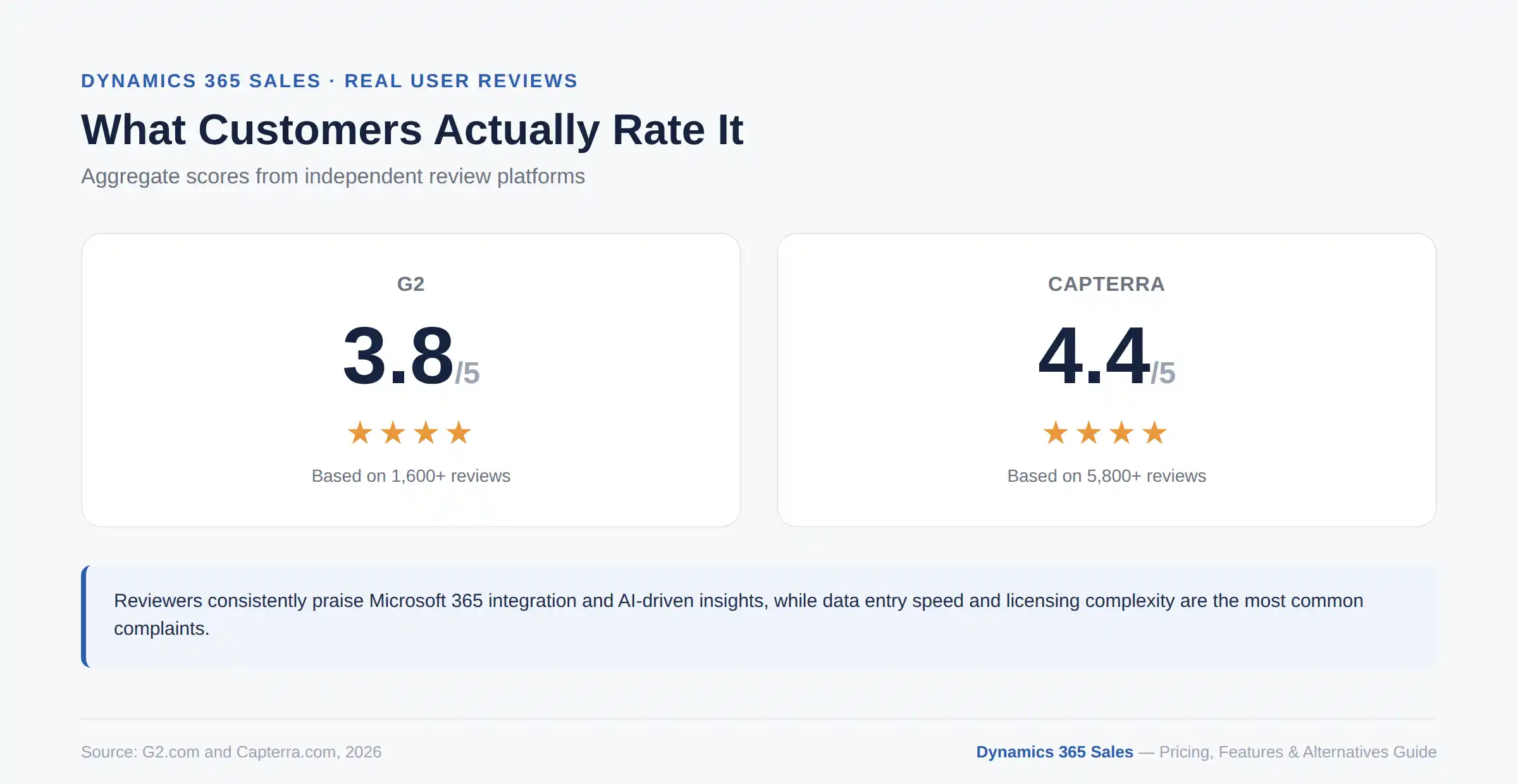
What users like: Reviewers consistently point to how well the tool fits into a business that already runs on Microsoft software. Sales teams say it helps them centralize client information and automate routine tasks, which frees up time for actual selling. Several reviewers also mention the AI-driven insights as genuinely useful for spotting which deals need attention first. One enterprise user, EPAM, reported that moving 600 sales staff to Dynamics 365 Sales with Copilot in 2023 reduced administrative work and gave reps more time with customers.
What users dislike: The most common complaint is that certain tasks, such as data entry and workflow setup, feel slow and clunky. Some users also describe the interface as having a steep learning curve, particularly for teams new to Microsoft's way of doing things. Licensing complexity also comes up often, since reviewers on Gartner Peer Insights note that understanding which plan and add-ons they need requires real effort.
Note: If your team already uses Outlook and Teams every day, reviewers suggest the learning curve will be much smaller. For this reason, your existing tech stack matters more than the software itself when predicting how smooth adoption will be. |
Dynamics 365 Sales is not the right fit for every business. Here are four alternatives worth comparing, depending on what matters most to your team. For a broader look at ten cloud CRM platforms side by side, see this comparison of the top cloud-based CRM platforms.
Tool | Starting price | Best for |
Salesforce Sales Cloud | From around $25/user/month | Businesses that want the most powerful, customizable CRM on the market |
Zoho CRM | Budget-friendly, tiered per-seat pricing | Small to mid-size teams that want strong features without high cost |
HubSpot Sales Hub | Free plan available, paid tiers scale up | Teams that want an easy setup with marketing tools built in |
Pipedrive | Lower-cost, per-seat pricing | Small sales teams that want a simple, visual pipeline with fast setup |
Salesforce Sales Cloud: The closest rival to Dynamics 365 in terms of power and customization. It offers a large ecosystem of add-ons and integrations, though it can also come with a steep learning curve and a higher total cost once you scale. If Salesforce is genuinely on your shortlist, this Salesforce vs Dynamics 365 CRM comparison guide walks through pricing, features, and AI side by side.
Zoho CRM: A strong option if cost is a major factor. It bundles sales automation, AI lead scoring, and reporting into clearly priced tiers, which makes budgeting simpler than Dynamics 365's attach-based licensing.
HubSpot Sales Hub: A good fit for teams that want marketing and sales working from the same data, with a much gentler setup process than Dynamics 365.
Pipedrive: Built for speed. Sales reps can start using it within hours, with no implementation partner or IT setup required, making it appealing to small teams that want to move fast.
Pro Tip: If your main frustration with Dynamics 365 Sales is setup complexity, a lighter tool like Pipedrive or HubSpot often solves that problem better than switching to another enterprise platform like Salesforce. |
If your business already runs on Microsoft 365 and Teams, Dynamics 365 Sales is likely worth the investment. The integration alone often justifies the cost.
If you need the most customizable, enterprise-grade CRM available and budget is less of a concern, Salesforce Sales Cloud is worth a serious look.
If you are a small or mid-size business watching costs closely, Zoho CRM offers strong value without the attach-license complexity.
If your sales team wants marketing and sales in one system, HubSpot Sales Hub keeps things simple.
If speed of setup matters more than deep features, Pipedrive gets your team selling within days, not months.
If none of the off-the-shelf options fit your process exactly, it may be worth exploring the benefits of a custom CRM built on Dynamics 365 or Salesforce instead of forcing your workflow into a standard template.
Compare Dynamics 365 Sales, Salesforce, HubSpot, and other leading CRM solutions with guidance tailored to your business requirements.
Book a Free ConsultationDynamics 365 Sales is a capable CRM, especially for businesses already invested in Microsoft's ecosystem. It scales well, its AI features are improving rapidly with each release wave, and its Power BI reporting is genuinely strong.
However, the license price is only part of the real cost, so budget for implementation and training from the start. If you are still deciding, it is worth speaking with a certified Microsoft partner to get a realistic quote based on your team size and existing tools, rather than relying on list prices alone. Cynoteck's Dynamics 365 Sales services team can walk you through licensing, setup, and a realistic budget for your business, or you can book a free consultation directly.
Ans: Dynamics 365 Sales costs $65 per user per month for Sales Professional, $105 per user per month for Sales Enterprise, and $150 per user per month for Sales Premium. These prices apply when you pay annually.
Ans: Yes. The Premium plan includes Copilot AI credits, which help with tasks such as drafting emails, summarizing meetings, and suggesting next steps for a deal. Lower plans have more limited AI features.
Ans: It can work for small businesses, but it is best suited to teams already using Microsoft 365 tools like Outlook and Teams. Smaller teams without that setup may find lighter tools like Pipedrive or Zoho CRM easier to adopt.
Ans: Most businesses do use a certified implementation partner, especially for anything beyond a very basic setup. This adds upfront cost but usually saves time and avoids configuration errors.
Ans: An attach license is a discounted price you get on a second Dynamics 365 app when you already own another one for the same user. It is one of the easiest ways to lower your total licensing cost.
Ans: Microsoft Relationship Sales bundles Dynamics 365 Sales Enterprise with LinkedIn Sales Navigator. Microsoft does not publish a fixed price for it, so you will need to request a quote through a partner.
Ans: Salesforce Sales Cloud is the most commonly compared alternative, largely due to its comparable scale and customization options. Zoho CRM, HubSpot Sales Hub, and Pipedrive are common choices for teams wanting lower cost or faster setup.
Ans: Yes, Microsoft offers a 30-day free trial directly on its website, letting you test the core features before committing to a paid plan.

Discover the top 10 benefits of custom CRM software development for modern businesses. Learn how tailored CRM solutions improve efficiency, enhance customer relationships, and drive business growth.
We are more than just developers and consultants—we are your partners in navigating the digital landscape. Let us be the engine behind your next big success while you focus on your core vision.
Explore Opportunities! Dynamics 365 Sales Pricing, Features & Alternatives.webp)
.png)
 Power BI vs Excel (1).webp)
 Top 10 Cloud Based CRM Platforms Compared (Features, Pricing & Pros).webp)