Dynamics 365 vs Power Apps: Key Differences, Pricing & When to Use Each (2026)
Dynamics 365 is a suite of pre-built enterprise CRM and ERP applications (Sales, Customer Service, Finance, Business Central) starting at $65/user/month. Power Apps is a low-code platform to build custom applications starting at $20/user/month. They are not competitors — most organizations use both together. This guide tells you exactly when to use each and how to choose.
Every week, thousands of IT decision-makers search the same question: should we use Dynamics 365 or Power Apps? It is one of the most common points of confusion in the Microsoft ecosystem — and the stakes are real. Choose the wrong platform and you either overspend on features you don't need, or underbuild a solution that breaks when it scales.
This guide cuts through the confusion. Written by Cynoteck's Microsoft Practice team with over 12 years of implementation experience, it covers the real architectural differences, current 2026 pricing, practical use cases, and a decision framework to help you choose confidently — or know when to use both.
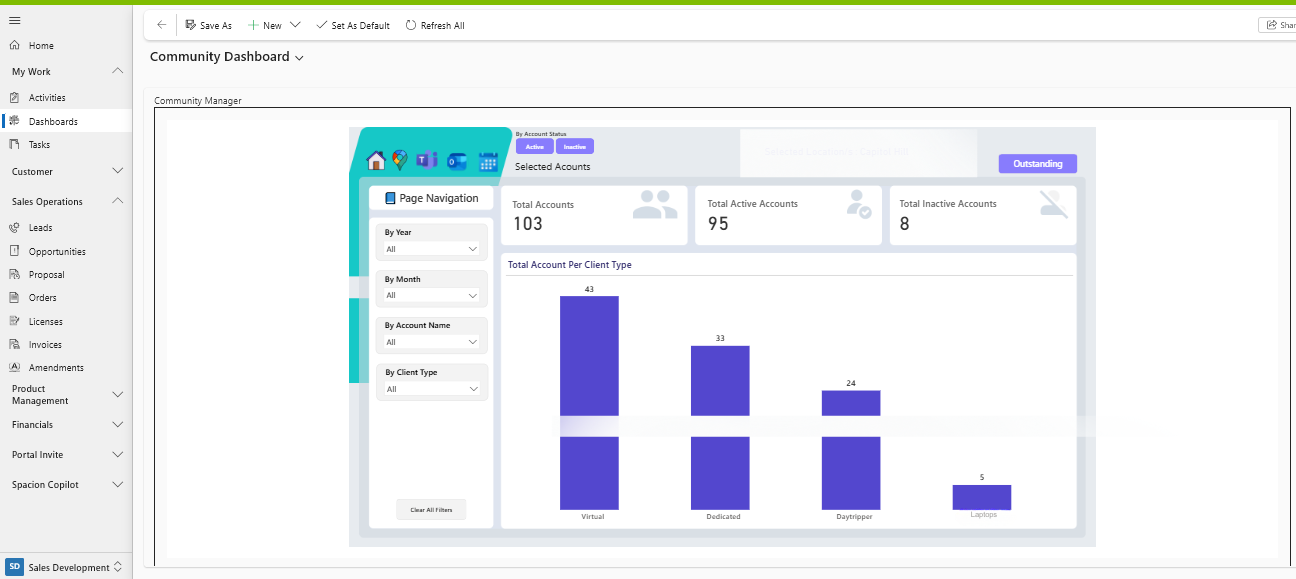
Microsoft Dynamics 365 is a cloud-based suite of intelligent business applications that combines CRM (Customer Relationship Management) and ERP (Enterprise Resource Planning) into a single, unified platform. Built on Microsoft Azure and deeply integrated with Microsoft 365, Power Platform, and Copilot, it helps organizations manage the full spectrum of business operations — from sales and marketing to finance, supply chain, and field service — using a shared data model.
Unlike point solutions, Dynamics 365 is modular. Organizations can start with the specific application they need and add more modules as they grow. Every module shares the same underlying data infrastructure — Microsoft Dataverse — which means customer, financial, and operational data are always connected and never siloed.
📈Dynamics 365 Sales Manage leads, opportunities, and pipelines. AI-driven forecasting and relationship intelligence. Best for sales teams at scale.
🎉Dynamics 365 Customer Service Omnichannel case management, SLA tracking, AI-assisted resolution. Built for enterprise support teams.
💳Dynamics 365 Finance Enterprise-grade ERP for global financial management, compliance, budgeting, and reporting.
🏢Dynamics 365 Business Central All-in-one ERP for small and mid-sized businesses — finance, sales, inventory, and operations.
Dynamics 365 Field Service Work order management, intelligent scheduling, asset tracking, and IoT-enabled predictive maintenance.
Dynamics 365 Project Operations Project planning, resource allocation, billing, and profitability management for project-driven organizations.
Microsoft Power Apps is a low-code application development platform that enables businesses — including non-technical staff — to build custom applications rapidly using a drag-and-drop interface, visual components, and the Power Fx formula language. It connects to over 700 data sources and integrates natively with Microsoft Dataverse, SharePoint, SQL Server, Dynamics 365, Teams, and hundreds of third-party systems.
Power Apps comes in two flavors: Canvas apps give you pixel-perfect design control over the user interface, ideal for custom workflows and mobile experiences. Model-driven apps are built on top of Dataverse and automatically generate their layout from the underlying data model — ideal when you need structure, consistency, and complex business logic.
Build mobile-first apps for field teams with offline access, barcode scanning, and photo capture
Replace spreadsheets and paper forms with structured digital processes
Create internal portals for employee onboarding, expense approvals, and IT requests
Build lightweight CRM or data-entry tools for specific teams
Extend Dynamics 365 with custom interfaces and supplementary workflows
Connect to legacy systems and non-Microsoft data sources via 700+ connectors
📊 2026 Industry Signal According to Gartner, by 2026, 75% of enterprise applications will be built using low-code or no-code platforms like Power Apps. Microsoft's Power Platform was recognized as a Leader in the 2025 Gartner Magic Quadrant for Enterprise Low-Code Application Platforms— an endorsement of both its enterprise readiness and market trajectory.
Before comparing Dynamics 365 vs Power Apps specifically, it helps to understand where Power Apps sits within the broader Microsoft landscape — because a common source of confusion is treating "Power Apps" and "Power Platform" as interchangeable.
Microsoft Power Platform is the umbrella suite containing four tools: Power Apps (custom app development), Power Automate (workflow automation), Power BI (data analytics and reporting), and Copilot Studio (AI chatbot creation).
Microsoft Dynamics 365 is a separate suite of pre-built business applications — it is not part of Power Platform, though the two are deeply integrated and share Microsoft Dataverse as a common data layer.
Dimension | Microsoft Power Platform | Microsoft Dynamics 365 |
|---|---|---|
Nature | Build-your-own toolset | Pre-built application suite |
Key tools | Power Apps, Power Automate, Power BI, Copilot Studio | Sales, Customer Service, Finance, Business Central, Field Service |
Primary use | Build apps, automate workflows, analyze data | Run CRM, ERP, and business operations |
Data layer | Dataverse + 700+ external connectors | Dataverse (native) |
Target audience | Developers, IT, and citizen developers | Sales, finance, service, and operations teams |
Relationship | Power Platform extends Dynamics 365; Dynamics 365 runs on Power Platform infrastructure | |
Dynamics 365 vs Power Apps: Head-to-Head Comparison
Despite living in the same Microsoft ecosystem, Dynamics 365 and Power Apps solve fundamentally different problems. The table below compares them across the dimensions that matter most to business and IT decision-makers.
Feature | Microsoft Dynamics 365 | Microsoft Power Apps |
|---|---|---|
Core purpose | Pre-built enterprise CRM & ERP for end-to-end business process management | Low-code platform to build custom applications for specific business needs |
Best for | Mid-to-large enterprises needing CRM, ERP, or both | Businesses of all sizes needing custom apps or workflow automation |
Deployment speed | Fast for standard processes — pre-built modules deploy in weeks | Very fast for specific workflows — apps can go live in days |
Customization | Structured extensibility within a defined framework | Highly flexible — build anything from scratch |
Data platform | Runs natively on Microsoft Dataverse | Dataverse + 700+ connectors to external sources |
AI / Copilot | Role-based Copilot embedded in business processes (forecasting, case summaries, email drafting) | Copilot for app creation, formula generation, and flow building |
Governance | Enterprise-grade security, compliance, and audit controls built in | Requires deliberate governance planning (Power Platform CoE recommended) |
Mobile support | Mobile app available for all modules | Native mobile app building with offline, camera, GPS, barcode support |
Integration | Deep integration with Microsoft 365, Teams, Azure, Power BI | 700+ connectors including non-Microsoft systems and legacy apps |
Who builds it | Implementation partners + IT teams | IT teams + citizen developers (business users) |
Starting price | From $65/user/month (Sales Professional) | From $20/user/month (Premium) or included in M365 |
Pricing is one of the most searched aspects of this comparison — and rightly so. The cost difference between these platforms is significant. Here is the most current and complete breakdown available as of April 2026.
Plan | Price | Best For | Key Inclusions |
|---|---|---|---|
Developer (Free) | Free | Individual learning & testing | Non-production only; Dataverse, basic connectors |
Premium | $20/user/month | Production use by any team | Unlimited apps, Dataverse, premium connectors, 500 AI Builder credits |
Microsoft 365 (bundled) | Included in M365 E1/E3/E5 | Basic canvas apps only | Standard connectors only; no Dataverse, no premium connectors |
Per App (via CSP) | $5/user/app/month | Single-app use cases | 1 app per license; discontinued from standard channel in Jan 2026 but available via CSP |
⚠️ 2026 Licensing Change Microsoft discontinued the Power Apps per-app plan from the standard commercial channel in January 2026. It remains available via the CSP (Cloud Solution Provider) channel. If you were relying on the per-app plan for new deployments, consult a Microsoft partner before purchasing.
Dynamics 365 uses a per-user, per-month model where the first application you license is charged at the full price, and additional applications (2nd through 5th) are available as "attach licenses" at a significantly reduced rate of $20–$30/user/month.
Module | Base Price (1st App) | Attach Price | Tier |
|---|---|---|---|
Sales Professional | $65/user/month | $20/user/month | SMB / Mid-market |
Sales Enterprise | $105/user/month | $20/user/month | Enterprise |
Customer Service Professional | $50/user/month | $20/user/month | SMB |
Customer Service Enterprise | $105/user/month | $20/user/month | Enterprise |
Business Central Essentials | $80/user/month | – | SMB ERP |
Business Central Premium | $110/user/month | – | SMB ERP (Manufacturing) |
Finance | $180/user/month | $30/user/month | Enterprise ERP |
Supply Chain Management | $180/user/month | $30/user/month | Enterprise ERP |
Team Members (read-only) | $8/user/month | – | Light access |
💡 Cost Optimization Tip Organizations licensing 3+ Dynamics 365 modules can save substantially through attach pricing. A 100-user organization running Sales Enterprise ($105) + Customer Service Enterprise (attach: $20) + Finance (attach: $30) pays $155/user vs $390/user at full standalone pricing — a saving of over $280,000 per year. Always model your license mix before purchasing.
Software licensing is only the first cost layer. For realistic budget planning:
Dynamics 365 implementation: $30,000–$500,000+ depending on complexity, modules, and organization size. Year 1 total cost is typically 3–5× the annual license cost.
Power Apps development: Simple apps can be built internally in hours or days. Complex enterprise apps may require professional services of $15,000–$80,000.
Ongoing support: Dynamics 365 typically requires $50,000–$200,000/year in partner support for mid-market deployments. Power Apps governance and maintenance is lower but still requires IT oversight.
Dynamics 365 is the right platform when your organization needs structured, enterprise-grade business processes that are immediately operational without building them from the ground up. It solves the same problems that historically required large, expensive, on-premises ERP or CRM systems — but in a modern, cloud-native, AI-driven form.
A complete, ready-to-use CRM for managing sales pipeline, leads, and customer relationships
An ERP to manage finance, inventory, supply chain, or manufacturing operations
A single system of truth connecting data across departments (sales, service, finance, operations)
Enterprise-grade security, compliance, and multi-region deployment
Built-in AI forecasting, customer insights, and Copilot-driven automation
Deep integration with Microsoft 365, Teams, and Azure out of the box
Industry-specific functionality available through AppSource certified apps
🏢Financial services firm Replacing a legacy CRM with Dynamics 365 Sales + Customer Service to unify client data and manage complex multi-product relationships.
🚴Manufacturing company Implementing Business Central to manage inventory, production orders, financials, and supplier relationships in a single system.
🔨Field service business Using Dynamics 365 Field Service to dispatch engineers, track assets, and manage SLAs with IoT-connected predictive maintenance.
📈SaaS company scaling Deploying Dynamics 365 Sales Enterprise with Copilot to give a 50-person sales team AI-driven forecasting and pipeline intelligence.
Power Apps excels when the business problem is specific, custom, or not covered by any pre-built enterprise software. If you need something that doesn't exist off-the-shelf — or exists but costs far more than the problem justifies — Power Apps is almost always the right answer.
A custom app for a specific team workflow (approvals, inspections, data capture)
A mobile app for field staff with offline support, camera, or GPS functionality
To digitize paper-based or spreadsheet-driven processes at low cost
A rapid prototype or MVP to test an idea before committing to full development
To extend an existing Dynamics 365 or Microsoft 365 deployment with custom interfaces
A solution that citizen developers (non-IT staff) can build and maintain themselves
Department-level tools without involving IT for full-scale CRM/ERP implementation
📋Site inspection app A construction firm builds a Power App for site managers to log inspections, capture photos, and trigger approval workflows — replacing paper forms entirely.
👨💻Employee onboarding portal HR builds a Power Apps portal connected to SharePoint and Teams to manage new hire checklists, document signing, and IT provisioning requests.
📦Inventory tracker A warehouse team builds a mobile Power App with barcode scanning to track stock movements, replacing an Excel-based system that caused errors.
💰Expense approval app A finance team creates a Power Apps + Power Automate solution to handle expense submissions, manager approvals, and ERP posting — eliminating email chains.
Use these five questions to determine the right fit for your organization. Answer honestly — the goal is the right tool, not the most expensive one.
If you are replacing an existing CRM (e.g., Salesforce, Zoho, HubSpot) or an existing ERP (e.g., SAP, QuickBooks, Sage), Dynamics 365 is almost always the right choice. It provides a complete, production-grade system from day one. If you are building a net-new process that has never been digital before, Power Apps is likely faster and more cost-effective.
If the solution needs to span multiple departments — sales, finance, operations, customer service — with shared data and unified reporting, the cross-departmental structure of Dynamics 365 is purpose-built for this. If the solution serves a single team or department with a specific workflow, Power Apps is faster to deploy and easier to maintain.
Power Apps can deliver a working app in days to weeks. A Dynamics 365 implementation typically takes 6–18 weeks for CRM modules and 3–12 months for complex ERP deployments. Budget accordingly: Power Apps at $20/user/month with in-house development may cost under $5,000 for an initial app. A Dynamics 365 deployment will typically require a $30,000–$500,000 implementation investment depending on scale.
If you already have Microsoft 365, basic Power Apps is already included — start there to test the platform. If you already have a Dynamics 365 license, Power Apps shares the same Dataverse environment at minimal additional cost, making it a natural extension. If you have neither, evaluate both as a combined investment — the integration dividend is significant.
If you plan to scale to 50+ users, add more business functions, or integrate with enterprise systems over the next 2 years, Dynamics 365 is built to scale without architectural rework. If your needs are likely to remain focused on a specific team or workflow, Power Apps scales cost-effectively for departmental use without enterprise overhead.
You need CRM or ERP capabilities
Multiple departments share the system
You need enterprise compliance + governance
You are replacing a legacy enterprise system
Budget of $65–$180/user/month is viable
You need a custom app, not a platform
One team or workflow is the focus
Speed-to-market is the priority
Citizen developers will build or maintain it
Budget of $20/user/month is the ceiling
The most important insight in this entire comparison is this: Dynamics 365 and Power Apps are not competing choices — they are complementary layers of the same Microsoft platform. The most effective digital transformations use Dynamics 365 as the system of record and Power Apps as the flexible innovation layer on top.
This works because both platforms run on Microsoft Dataverse. When Power Apps connects to Dynamics 365 data, there is no integration overhead, no data syncing delay, and no duplicate data management. They share the same security model, the same user identities, and the same governance framework.
📷Field technician mobile app Power Apps builds the mobile experience for field engineers. Data writes directly to Dynamics 365 Field Service — work orders, asset updates, job completion photos — in real time.
🔙Custom lead intake A lightweight Power Apps form captures lead data from trade shows or events and feeds it directly into Dynamics 365 Sales — eliminating manual entry and data loss.
🌐Customer self-service portal Power Pages (part of Power Platform) creates a secure customer portal where clients view their Dynamics 365 case status, submit requests, and download invoices.
✅Approval workflows Power Apps + Power Automate build multi-step approval flows that trigger actions inside Dynamics 365 Finance — purchase orders, credit limit exceptions, pricing approvals.
📈 Proven Business Impact Organizations that combine Dynamics 365 with Power Platform solutions report3× faster deployment for new capabilities and2× better user adoption compared to organizations using Dynamics 365 alone. The combination reduces custom development costs by giving teams the tools to extend the platform themselves.
Cynoteck's certified Microsoft experts have helped 200+ organizations choose and implement the right combination of Dynamics 365 and Power Apps. We'll analyze your current systems, workflows, and growth goals — and give you a clear recommendation.
Book a Free Consultation →These are the questions our Microsoft team answers most often from clients evaluating Dynamics 365 vs Power Apps.
Microsoft Dynamics 365 is a suite of pre-built enterprise CRM and ERP applications — covering sales, customer service, finance, operations, and supply chain — designed for end-to-end business process management. Power Apps is a low-code development platform that lets businesses build custom applications rapidly without heavy coding. In short: Dynamics 365 solves complete enterprise processes out of the box, while Power Apps lets you build targeted solutions for specific problems.
Dynamics 365 pricing in 2026 ranges from $8/user/month (Team Members read-only) to $180/user/month (Finance, Supply Chain Management). Common CRM starting points: Sales Professional ($65), Sales Enterprise ($105), Customer Service Enterprise ($105). For ERP: Business Central Essentials ($80), Business Central Premium ($110). Organizations licensing multiple modules benefit from attach pricing — additional apps from the 2nd to 5th cost only $20–$30/user/month.
Power Apps offers a Premium plan at $20/user/month — unlimited apps, Dataverse access, premium connectors, and 500 AI Builder credits. A limited version is bundled with Microsoft 365 E1/E3/E5 plans. The per-app plan ($5/app/user/month) was discontinued from standard channels in January 2026 but remains available via the CSP channel.
No. Power Apps is not a replacement for Dynamics 365 — it is a complement to it. Dynamics 365 provides structured enterprise CRM and ERP processes out of the box. Power Apps extends those processes with custom applications, mobile tools, and department-specific workflows that Dynamics 365 cannot economically cover. Most mature Microsoft organizations run both: Dynamics 365 as the system of record, Power Apps as the flexible innovation layer on top.
Yes. Power Apps operates completely independently and connects to 700+ data sources including Dataverse, SharePoint, Excel, SQL Server, Salesforce, and third-party APIs. You do not need Dynamics 365 to use Power Apps. However, integrating Power Apps with Dynamics 365 unlocks significantly deeper capabilities — shared data models, unified security, real-time syncing, and enterprise-grade governance.
Microsoft Power Platform is the umbrella suite containing Power Apps, Power Automate, Power BI, and Copilot Studio. Dynamics 365 is a separate suite of pre-built enterprise business applications (CRM + ERP). The key difference: Power Platform tools help you build or automate solutions. Dynamics 365 delivers complete, ready-made solutions for specific business functions. Both share Microsoft Dataverse and are designed to work together.
For most small businesses, Power Apps ($20/user/month) is the better starting point due to lower cost and faster time to value. However, if you specifically need CRM to manage a growing sales pipeline, Dynamics 365 Sales Professional ($65/user/month) is purpose-built and outperforms a custom Power Apps build at scale. Dynamics 365 Business Central ($80/user/month) is one of the most capable SMB ERP platforms available and is widely used by small and mid-sized businesses.
Dynamics 365 Copilot is role-based AI embedded in business processes — sales forecasting, email summarization, case resolution suggestions, and financial anomaly detection. Power Apps Copilot focuses on development productivity — generating app structures from natural language, writing Power Fx formulas, and building automation flows. Think of Dynamics 365 Copilot as AI that helps you run your business, and Power Apps Copilot as AI that helps you build tools faster.
Yes — and this hybrid model is how most mature Microsoft organizations operate. Dynamics 365 serves as the core system of record. Power Apps extends it with custom portals, mobile apps for field teams, lightweight approval tools, and department-specific solutions. Both share Microsoft Dataverse, ensuring real-time data synchronization, unified security, and seamless user experience.
Dynamics 365 is purpose-built for enterprise-scale growth — supporting complex data models, advanced security roles, multi-region deployment, and thousands of users. Power Apps scales well for departmental solutions and custom apps, especially when built on Dataverse. For organization-wide scalability across multiple business functions, Dynamics 365 is the more appropriate foundation. Most large organizations combine both for maximum scale across the enterprise.
Cynoteck follows a consultative, use-case-driven approach: we analyze your existing systems, operational challenges, user base, and growth roadmap. Our certified Microsoft experts then recommend whether Dynamics 365, Power Apps, or a hybrid approach delivers the highest ROI for your specific situation — and handle full implementation, integration, and ongoing optimization. Book a free consultation to get a tailored recommendation.
Whether you need Dynamics 365, Power Apps, or a clear recommendation before you decide — Cynoteck's Microsoft-certified team is ready to help. No pressure, no jargon. Just practical guidance based on your business.
Get a Free Expert Consultation →
Discover the top 10 benefits of custom CRM software development for modern businesses. Learn how tailored CRM solutions improve efficiency, enhance customer relationships, and drive business growth.
We are more than just developers and consultants—we are your partners in navigating the digital landscape. Let us be the engine behind your next big success while you focus on your core vision.
Explore Opportunities! Dynamics 365 Sales Pricing, Features & Alternatives.webp)
.png)
 Microsoft Dynamics 365 Sales Professional vs Enterprise.webp)
 What Are the Al-Powered Features of Dynamics 365 Sales.webp)