Mobile App Development for Different Industries: Benefits, Use Cases & Solutions
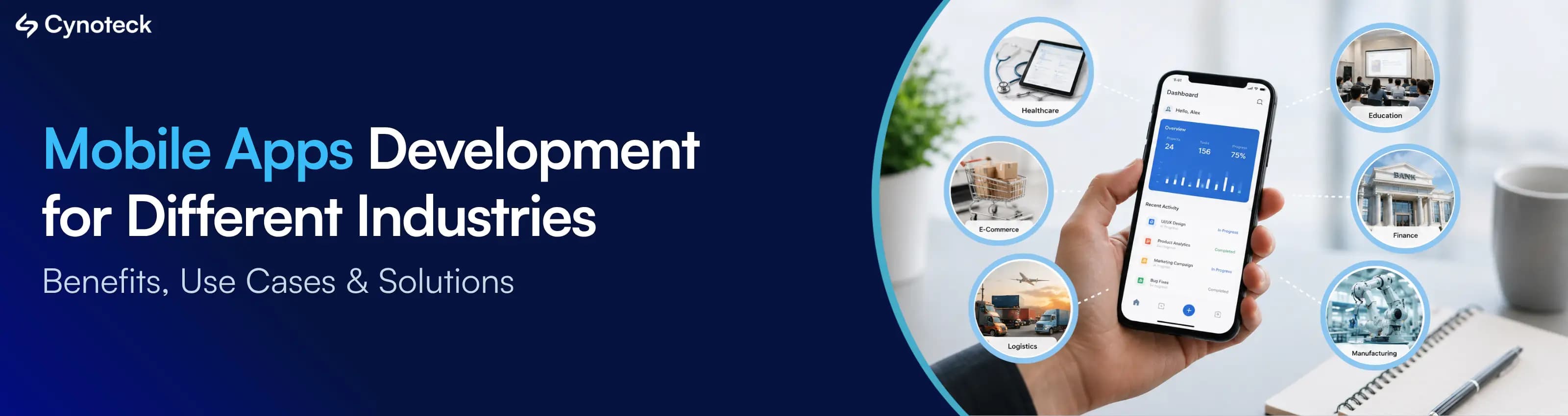
Mobile app solve different problems depending on the business need behind it.
Booking a follow-up appointment without calling a clinic.
Scanning inventory instead of recording it manually.
Sending restock alert based on last purchase.
Delivery companies give delivery guy live route information while keeping customers updated on their orders.
These experiences built to make a specific part of the business easier, faster, and more convenient for customers, employees, or internal teams.
This is where industry-specific mobile app development becomes important.
The right app should fit the way your customers behave, how your employees work, and how your business operates.
In this blog we will learn how businesses across different industries are using mobile apps, the problems they are solving, the features they are using most, and the benefits those solutions deliver.
Businesses are not investing in mobile apps simply because having an app looks modern.
They invest because a well-built app can help them reach more customers, increase engagement, improve retention, reduce operational costs, automate routine work, and create new revenue opportunities.
The practical reasons behind mobile app are:
Mobile apps make digital services easier to access and use,
Designed specifically for smartphones,
Users can open them quickly,
Access important features with fewer steps,
More personalized experience,
Require less data to load,
For businesses, these advantages make the app useful enough that customers keep coming back to it. The more customers use the app and benefit from it, the more value it can create for the business through higher engagement, stronger retention, and more opportunities for growth.
But what makes an app useful depends on the industry, its customers, and the way the business operates. Here is how different industries are using mobile apps to meet those needs.
The purpose and architecture of a mobile app can vary significantly by industry. The table below shows the common types of apps, their main use cases, and the business benefits they can provide in different industries.
Industry | Common App Types | Major Use Cases | Primary Business Benefit |
Healthcare | Patient, telemedicine, provider apps | Appointments, consultations, records, monitoring | Easier patient access and better care coordination |
Banking & FinTech | Banking, payment, investment apps | Payments, transfers, account management, investment tracking | Convenient financial services and stronger customer engagement |
E-commerce & Retail | Shopping, loyalty, marketplace apps | Shopping, payments, promotions, order tracking | Higher engagement, repeat purchases, and sales |
Logistics & Transportation | Driver, fleet, delivery apps | Tracking, dispatch, routing, proof of delivery | Better visibility, faster deliveries, and lower operational costs |
Education | Learning, student, institution apps | Courses, assignments, progress tracking, communication | Better learner engagement and access |
Travel & Hospitality | Booking, hotel, travel apps | Reservations, check-in, itineraries, travel updates | Better guest experience and smoother operations |
Real Estate | Property, agent, buyer apps | Listings, property search, virtual tours, communication | Faster property discovery and lead generation |
Manufacturing | Workforce, inspection, production apps | Inspections, inventory, maintenance, production monitoring | Lower downtime and improved operational efficiency |
Media & Entertainment | Streaming, content, social apps | Content delivery, subscriptions, personalization, engagement | Increased audience engagement and retention |
Food & Restaurants | Ordering, delivery, loyalty apps | Orders, reservations, payments, loyalty, delivery tracking | More convenience, repeat orders, and customer loyalty |
The value of a mobile app comes from how well it fits the way a business serves its customers, manages its operations, or generates revenue. That is why the same app feature can be valuable in one industry but have little relevance in another. Below look at each industry more closely, so you can see where mobile apps are making difference, which features matter for specific business needs, and where an existing app may still have room for improvement.
Healthcare is one of those industries where a mobile app make routine interactions much easier for both patients and healthcare teams.
Mobile apps also support different parts of the healthcare ecosystem.
Hospitals and clinics can use them for patient services and staff workflows, while fitness and wellness businesses, pharmacies, telemedicine providers, and other healthcare services can build apps around their own needs.
Note: An app can make routine healthcare services easier to access, but it does not replace a physical examination, testing, emergency treatment, or other situations where in-person medical care is required.
A healthcare app support patients throughout different stages of their healthcare journey, from finding a provider to managing follow-ups.
Appointment booking and scheduling:
Let patients book, reschedule, and manage appointments without calling the facility.
Telemedicine and virtual consultations:
Allow patients to consult doctors remotely when an in-person visit is not necessary.
Digital health records:
Give patients access to relevant reports, prescriptions, and other health information.
Prescription and medication management:
Help patients keep track of medicines, dosages, and refill reminders.
Health and wellness tracking:
Support activities such as fitness, nutrition, sleep, exercise, and other wellness goals.
Remote patient monitoring:
Collect health information through connected devices or wearables and share relevant data with healthcare teams.
Lab result access:
Allow patients to view test results through the app instead of waiting for printed reports or making repeated calls.
Doctor and specialist search:
Help users find suitable healthcare providers based on their needs and location.
Healthcare communication:
Give patients and providers a convenient way to exchange messages, updates, and reminders.
Quick assistance and emergency services:
Depending on the service, apps can help users request medical assistance, contact emergency services, or locate nearby healthcare facilities.
Healthcare apps also make work easier for doctors and staff. A staff-facing app can help teams access relevant patient information, manage tasks, complete documentation, and update information while moving between departments or patient rooms. This reduce dependence on paperwork and repeated trips to a desktop system.
Secure user authentication
Patient and provider profiles
Appointment scheduling
Video and audio consultations
Secure messaging
Notifications and reminders
Health data integration
Wearable and connected-device integration
Digital payments
Document and report management
Role-based access
Analytics and reporting
Integration with healthcare systems and APIs
Note: As healthcare apps handle sensitive personal and medical information, so security and applicable regulatory requirements need to be considered while planning the app, not added after development is complete.
Reduce administrative workload
Reduce missed appointments
Improve staff productivity
Increase patient retention and engagement
Expand service capacity
Improve operational efficiency
Strengthen customer relationships
Create additional revenue opportunities
If you run a hospital, clinic, pharmacy, telemedicine, fitness, or any other healthcare business, now is a good time to plan a mobile app for your business. More healthcare services are moving to mobile, and businesses that start early can build a stronger connection with their patients. You do not need to add every feature from day one. Start with the services your patients need most and add more features as your business grows.
Money management has become much easier through mobile apps. People now check their balance, make UPI payments, transfer money, manage cards, invest in SIPs, apply for loans, buy insurance, or manage fixed deposits without visiting a branch. They just install the app start interacting with it.
For banks and FinTech businesses, the app becomes a direct channel between the customer and the financial service.
Note: Since these apps handle money and sensitive financial information, security, authentication, reliable transactions, and data protection need to be built into the app from the start.
Banking and FinTech businesses can build apps for:
Mobile banking:
Balance checks, account management, fund transfers, and banking services.
Digital wallets:
Store money digitally and make quick payments.
UPI and mobile payments:
Send and receive money directly from the phone.
Investment platforms:
Manage SIPs, investments, portfolios, and market-related information.
Personal finance:
Track spending, budgets, savings, and financial activity.
Loan and lending:
Apply for loans, upload documents, check application status, and manage repayments.
Insurance services:
Buy policies, manage coverage, make payments, and track claims.
Expense management:
Record and monitor business or personal expenses.
Digital onboarding:
Register customers and complete identity verification without a branch visit.
Account and card management:
Manage accounts, cards, limits, and transaction settings.
Money transfers:
Send money and track transaction status.
Investment tracking:
Monitor portfolio performance and investment activity.
The features depend on the financial service, but banking and FinTech apps commonly need:
Multi-factor authentication
Biometric login
Secure payments
Account dashboards
Transaction history
Real-time notifications
Card management
Fraud detection
Digital document verification
Payment gateway integration
Financial API integration
Encryption
Risk and transaction monitoring
Note: In every banking and fintech industry security and compliance requirements in mobile apps depend on the type of financial data being handled.
For banks and FinTech businesses, a mobile app can help:
Increase digital adoption by giving customers an easier way to use financial services.
Reduce branch and support workload
Increase transaction frequency
Improve customer retention
Increase customer engagement
Reduce manual processing
Launch new financial services faster
If you run a bank, FinTech company, lending business, insurance business, or investment platform, the question is no longer just whether you need an app. Look at the services your customers use repeatedly. If they still depend on branches, calls, or manual processes for those services, a well-planned mobile app can give your business a faster way to serve them and a stronger way to stay connected with them.
For e-commerce and retail businesses, a mobile app make the complete shopping process easier, from finding a product to placing an order and receiving it. Apps such as Amazon, Flipkart, Myntra, Meesho, Blinkit, Zepto, and Instamart have made shopping, quick delivery, and repeat purchases a regular part of mobile usage.
For retailers, the bigger opportunity is having a direct channel to customers. The app can bring products, payments, offers, loyalty programs, order updates, and customer support into one place. This also gives businesses more opportunities to bring customers back instead of depending only on website visits or third-party marketplaces.
Retail businesses can use mobile apps for:
Mobile shopping:
Let customers browse products, compare options, and place orders from their phones.
Product discovery:
Help users find products through search, categories, filters, and personalized suggestions.
Personalized recommendations:
Show products based on previous purchases, browsing activity, and preferences.
Order management:
Let customers place, modify, and track their orders.
Loyalty programs:
Manage loyalty points, memberships, rewards, and special offers.
Digital coupons:
Give customers app-based discounts and promotional offers.
Store locator:
Help customers find nearby stores, outlets, or pickup points.
In-store experiences:
Support product scanning, digital offers, self-checkout, or other in-store services.
Click-and-collect:
Allow customers to order through the app and collect products from a selected store.
Customer support:
Let customers ask questions, raise issues, and track support requests.
Inventory visibility:
Show product availability across stores or locations where applicable.
Subscription commerce:
Manage recurring orders for products customers purchase regularly.
The exact features depend on the retail model, but common features include:
Product catalogs
Search and filtering
Shopping carts
Wishlists
Secure checkout
Multiple payment options
Order tracking
Push notifications
Personalized recommendations
Customer profiles
Loyalty points and rewards
Reviews and ratings
Location services
Analytics
E-commerce platform integration
For retailers and e-commerce businesses, a mobile app can help:
Increase direct customer engagement
Increase repeat purchases
Improve conversion rate
Increase customer retention rate
Increase average order value
Reduce dependency on third-party marketplaces
Improve order visibility
Generate useful customer insights
A good retail app can bring customers back to your business again and again. Instead of waiting for them to open your website, find you on a marketplace, or visit your store, you can put your products, offers, loyalty rewards, and new launches right on their phones. When customers keep using the app, you get more repeat orders, better customer loyalty, useful data about what they buy, and a direct sales channel that can keep bringing in orders.
In logistics and transportation, work keeps moving throughout the day. Delivery guy need delivery details, dispatch teams need to assign and track vehicles, warehouse teams need shipment information, and customers want to know where their order is. A mobile app can keep these activities connected instead of relying on calls, paperwork, and separate updates.
Businesses can use mobile apps for:
Delivery management:
Assign deliveries, update status, and manage delivery tasks.
Driver apps:
Give drivers order details, routes, customer information, and delivery instructions.
Shipment tracking:
Let businesses and customers check shipment status and location.
Fleet management:
Track vehicles, assignments, maintenance, and fleet activity.
Route management:
Help drivers follow planned routes and adjust them when needed.
Dispatch management:
Assign jobs to drivers and keep track of active deliveries.
Proof of delivery:
Capture signatures, photos, timestamps, or other delivery confirmation.
Warehouse operations:
Manage stock movement, scanning, picking, packing, and dispatch activities.
Vehicle inspections:
Record vehicle checks and report issues from the field.
Customer delivery tracking:
Give customers live or regular updates about their orders.
The features depend on the type of logistics operation, but common requirements include:
GPS tracking
Real-time location updates
Route optimization
Driver assignment
Delivery status updates
Digital proof of delivery
Barcode and QR code scanning
Push notifications
Offline functionality
Digital forms
Photo capture
Geofencing
Fleet analytics
Maps integration
For logistics and transportation businesses, a mobile app can help:
Improve delivery visibility by giving managers a clearer view of active deliveries and vehicles.
Reduce manual data entry
Improve driver productivity by keeping orders, routes, customer details, and delivery instructions in one place.
Reduce communication gaps between drivers, dispatchers, warehouse teams, and customers.
Improve route management by giving drivers updated route information and helping teams respond to changes.
Speed up proof of delivery by allowing drivers to submit signatures, photos, and delivery details immediately.
Give customers better delivery updates so they do not have to keep calling for order status.
Make operational information available faster so managers can act on current delivery and fleet information instead of waiting for manual reports.
For a logistics or delivery business, a mobile app can open opportunities beyond managing your existing deliveries. With the right delivery network, tracking system, driver app, and service quality, you can take on delivery work from e-commerce brands, retailers, marketplaces, and other businesses that need reliable last-mile support. Some businesses also offer different delivery speeds, such as standard and faster delivery, creating opportunities for logistics partners that can meet those service levels. The more efficiently you can manage drivers, routes, orders, and delivery updates, the more delivery volume your business can handle and the more revenue opportunities you can take on. Of course, winning and retaining these clients still depends on your delivery performance, coverage, pricing, and service quality.
Education is no longer limited to what happens inside a classroom. Students now use their phones to attend classes, watch lessons, submit assignments, practice questions, learn languages, and track their progress. Platforms such as Khan Academy, BYJU'S, and Duolingo have shown how much learning can be delivered through a mobile experience.
For schools, colleges, coaching institutes, edtech companies, and training providers, an app can also bring students, teachers, parents, and administrators onto the same platform. Instead of managing learning, communication, attendance, and updates through separate channels, these activities can be handled through one mobile experience.
Education businesses and institutions can use mobile apps for:
Online learning:
Give students access to lessons and learning material from their phones.
Student portals:
Let students manage courses, schedules, fees, results, and other information.
Course management:
Organize courses, modules, learning material, and student access.
Virtual classrooms:
Conduct live online classes and connect students with teachers.
Assessments and quizzes:
Conduct tests, quizzes, and practice sessions through the app.
Assignment submission:
Let students submit assignments and receive updates from teachers.
Teacher communication:
Give teachers a direct way to share updates, instructions, and feedback.
Attendance management:
Record and track student attendance digitally.
Parent communication:
Keep parents updated about attendance, assignments, results, and important notices.
Learning progress tracking:
Show students and teachers how learning is progressing.
Educational content delivery:
Provide videos, notes, practice material, and other learning resources.
The features will depend on the type of education business, but common requirements include:
Student and teacher profiles
Course catalogs
Video lessons
Live classes
Assessments and quizzes
Digital assignments
Progress dashboards
Push notifications
Discussion forums
Chat
Certificates
Payment integration
Content management integration
Offline Study Materials
For educational organizations and edtech businesses, a mobile app can help:
Reach more students by making courses and learning material available beyond a physical classroom.
Increase course enrollment by giving learners an easier way to access, and purchase courses.
Improve student retention rate
Increase engagement through quizzes, notifications, progress tracking, live classes, and interactive content.
Reduce administrative work by moving attendance, assignments, communication, payments, and other routine tasks into the app.
Support new revenue models through paid courses, subscriptions, certifications, premium content, and online programs.
Track learner behavior and progress to understand where students are engaging, struggling, or dropping off.
Expand beyond local markets by allowing an education business to deliver its courses to students in different locations.
For an education business, the opportunity goes beyond putting existing courses on a mobile screen. A well-planned app can help you reach students outside your local area, sell courses or subscriptions directly, keep learners engaged for longer, and build a digital education business that is not limited by classroom capacity.
Travel is one of those industries where customers are constantly on the move. They may need to book a hotel, check a bus or flight, find a nearby place, manage a reservation, or get an update while travelling. Apps such as Uber, Ola, Rapido, BlaBlaCar, redBus and others have made it normal for people to handle these services directly from their phones.
Mobile app become the place where customers manage their trip before, during, and after their visit.
Depending on the business, an app can support:
Hotel and travel booking:
Let customers search, compare, book, and manage reservations.
Flight management:
Provide booking details, schedules, status updates, and other travel information.
Digital check-in:
Let guests complete check-in steps before reaching the hotel or destination.
Itinerary management:
Keep bookings, schedules, tickets, and trip details in one place.
Travel guides:
Provide destination information, places to visit, maps, and useful local information.
Loyalty programs:
Give returning customers access to points, rewards, and member benefits.
Room service:
Allow hotel guests to request food, housekeeping, maintenance, or other services through the app.
Guest communication:
Let hotels and travel providers send updates and respond to customer requests.
Local recommendations:
Suggest restaurants, attractions, activities, and services based on the customer's location or interests.
Transportation booking:
Let customers book taxis, buses, transfers, or other local transportation.
Travel and hospitality apps include:
Search and booking
Digital payments
Maps and GPS
Digital check-in
Booking management
Push notifications
Personalized recommendations
Loyalty programs
Reviews and ratings
Chat support
Multi-language support
Manage Advanced Booking Package
Travel itinerary management
For travel and hospitality businesses, a mobile app helps:
Increase direct bookings by giving customers a direct way to book without depending entirely on third-party platforms.
Reduce booking and support workload by letting customers manage reservations, check-ins, and common requests themselves.
Increase repeat bookings through loyalty programs, personalized offers, and easier rebooking.
Increase additional sales by promoting room upgrades, food, transport, activities, and other services during the customer's journey.
Improve customer retention by giving travelers a convenient reason to keep using the same brand for future trips.
Improve service coordination by sending requests directly to the right hotel or travel team.
Build direct customer relationships by keeping communication, offers, bookings, and customer activity within the business's own app.
Create more revenue opportunities by selling related services before and during the customer's trip.
A mobile app can bring bookings, repeat customers, and extra sales directly to the business. Without a strong mobile experience, customers can easily move to another hotel, travel company, booking platform, or transport provider that makes booking and communication easier. Even after getting the first booking, there is a chance to lose the next one if the customer has no easy reason to come back. A good app keeps the business in front of the customer, makes repeat booking easier, and gives more chances to sell services such as room upgrades, transport, food, activities, and travel packages.
Real estate is a business where customers often need to search, compare, enquire, schedule visits, and communicate with agents before making a decision. Apps such as Zillow, Zerodha, and 99acres show how their mobile platforms can make property discovery and customer interaction much easier.
A mobile app support the people working behind the property listing. Agents manage leads and appointments, property managers handle tenant requests, and buyers or tenants keep track of properties they are interested in without depending on repeated calls and messages.
Real estate businesses can use mobile apps for:
Property search:
Let users search properties by location, price, property type, size, and other requirements.
Property listings:
Show complete property details, photos, videos, amenities, pricing, and availability.
Virtual property tours:
Let potential buyers or tenants explore properties remotely before scheduling a physical visit.
Agent apps:
Help agents manage properties, leads, appointments, follow-ups, and customer communication.
Property management:
Manage properties, maintenance requests, documents, payments, and other property-related tasks.
Tenant portals:
Give tenants a place to pay rent, raise maintenance requests, receive notices, and communicate with property managers.
Appointment scheduling:
Let users book property visits based on agent availability.
Lead management:
Capture enquiries and help agents follow up with potential buyers or tenants.
Property valuation:
Provide property estimates or valuation-related information based on available data.
Real estate marketplaces:
Bring multiple property listings, buyers, sellers, agents, and service providers onto one platform.
Depending on the type of real estate app, common features include:
Advanced property search
Filters and sorting
Maps and location services
Property images and videos
Virtual tours
Saved properties
Property comparison
Agent profiles
Appointment booking
Chat and messaging
Push notifications
CRM integration
Document management
A well-built app help real estate businesses:
Generate more qualified leads by letting interested buyers and tenants enquire directly about relevant properties.
Increase property enquiries by making listings easier to discover, compare, and share.
Help agents handle more leads by keeping property details, customer information, appointments, and follow-ups in one place.
Speed up communication between buyers, tenants, agents, sellers, and property managers.
Reduce time spent on routine coordination through online appointments, notifications, document sharing, and tenant requests.
Increase property visibility by keeping listings accessible to potential buyers and tenants throughout the day.
Build a direct customer channel instead of depending only on property portals and third-party platforms.
Create more opportunities to earn through property sales, rentals, premium listings, lead services, property management, and related services.
A weak digital experience can make a potential buyer move to another listing or another agent before your team even gets a chance to follow up. A strong mobile app keeps your properties, agents, enquiries, and customers connected, giving your business more chances to convert interest into site visits, deals, rentals, and repeat business.
A manufacturing business has people working across production floors, warehouses, maintenance teams, quality checks, and field locations. Much of their work depends on getting the right information at the right time. A mobile app put production tasks, inspection details, inventory information, work orders, and equipment updates directly in the hands of the people doing the work.
For example, a worker can scan a barcode, complete a quality checklist, report a machine issue, or update a work order from the production floor instead of writing it down and entering it into a system later.
Manufacturing businesses use mobile apps for:
Production monitoring:
Check production status, targets, output, and ongoing work.
Equipment inspections:
Complete inspection checklists and record equipment conditions.
Inventory management:
Check stock, update quantities, and track material movement.
Maintenance management:
Create maintenance requests, assign tasks, and track repairs.
Quality control:
Record inspection results and report quality issues from the production floor.
Worker task management:
Assign tasks and let employees update their progress.
Safety inspections:
Complete safety checklists and report hazards or incidents.
Field service:
Give service teams access to work orders, equipment details, and customer information.
Warehouse operations:
Manage receiving, picking, packing, dispatch, and stock movement.
Asset tracking:
Track machines, equipment, tools, and other business assets.
Work order management:
Create, assign, update, and close work orders from mobile devices.
Depending on the manufacturing workflow, an app include:
Employee authentication
Task management
Digital checklists
Barcode and QR code scanning
Photo and video capture
IoT integration
Equipment monitoring
Offline functionality
Push notifications
Work order management
Inventory integration
Analytics dashboards
ERP and business system integrations
Reduce paperwork by replacing paper-based checklists, forms, and inspection records.
Reduce data-entry errors by letting employees enter information directly at the point of work.
Speed up inspections by allowing teams to complete and submit checks from the production floor.
Improve production visibility by giving managers faster access to current production and equipment information.
Improve employee productivity by putting tasks, instructions, and work orders directly on the worker's device.
Reduce equipment downtime by helping teams report issues quickly and track maintenance work.
Improve inventory control through barcode scanning and real-time stock updates.
Keep field and production teams connected by giving both sides access to the information they need.
Manufacturing app reduces downtime, production delays, inventory mistakes, paperwork, and avoidable labor costs. Faster reporting helps teams fix machine issues sooner, keep stock records accurate, and keep production moving. Without these systems, small delays and errors keep adding up across shifts and production lines, increasing operating costs and reducing overall output.
For media and entertainment businesses, the mobile app is often where the audience spends most of its time. Whether it is watching a show on JioTV, Hotstar, Netflix, Amazon play or listening to Kuku FM, reading news, following live events, or engaging with exclusive content, the phone has become a major place where people consume entertainment.
This gives media businesses a direct way to put content in front of their audience without depending entirely on websites, TV platforms, or other distribution channels. The app also becomes a place to manage subscriptions, promote new content, understand what audiences are watching or listening to, and bring users back for the next piece of content.
Media businesses use mobile apps for:
Video streaming:
Deliver movies, shows, short videos, web series and other video content directly to users.
Music and audio streaming:
Provide songs, podcasts, audiobooks, and other audio content.
Digital publishing:
Deliver magazines, articles, books, and other digital publications.
News apps:
Provide breaking news, articles, videos, and personalized news feeds.
Podcast platforms:
Host and distribute podcasts while allowing users to follow and save shows.
Event apps:
Provide event schedules, tickets, updates, and attendee information.
Fan engagement:
Give fans access to exclusive content, updates, merchandise, and community features.
Content communities:
Let users comment, discuss, share, and interact around content.
Live event streaming:
Stream live sport games, concerts, shows, and other events.
Subscription platforms:
Manage paid memberships, premium content, and recurring subscriptions.
Depending on the type of content and business model, common features include:
Content libraries
Video and audio streaming
Search and filtering
Personalized recommendations
User profiles
Watchlists and favorites
Offline content
Subscriptions
In-app purchases
Push notifications
Social sharing
Comments and communities
Analytics
Content management integration
A strong mobile app gives media businesses a direct channel to their audience and opens up several revenue opportunities:
Increase content consumption by making content available wherever users are.
Increase subscription revenue by giving users a simple way to discover and pay for premium content.
Reduce dependence on third-party platforms by building a direct connection with the audience.
Increase audience retention through personalized recommendations, notifications, watchlists, and regular content updates.
Improve content decisions by seeing what users watch, listen to, search for, save, or stop consuming.
Increase advertising opportunities through a larger and more engaged mobile audience.
Create new revenue streams through subscriptions, premium content, in-app purchases, memberships, and sponsored content.
Build stronger audience relationships by giving users a direct place to follow creators, shows, channels, events, or communities.
For this industry losing a user's attention often means losing the next view, subscription, or ad impression as well. A mobile app keeps your content one tap away and gives you more control over how users discover, consume, and pay for it. Without a strong mobile experience, a large part of that audience can easily shift to another platform that offers faster access, better recommendations, or more engaging content.
The mobile has changed customer experience how customers discover food, place orders, make payments, book tables, and come back for their next meal. Businesses such as Swiggy, Zomato, and Burger King use mobile apps to make ordering and customer engagement a regular part of the customer journey.
The opportunity is not limited to food delivery. A restaurant's own app can bring ordering, reservations, loyalty, offers, payments, and customer communication directly under the business's control.
Food businesses can use mobile apps for:
Food ordering:
Let customers browse the menu, customize items, place orders, and pay.
Delivery management:
Manage deliveries, assign orders, and track delivery status.
Table reservations:
Let customers check availability and reserve tables.
Restaurant discovery:
Help customers find nearby outlets, menus, offers, and timings.
Digital menus:
Let customers view menus, prices, ingredients, and available options.
Loyalty programs:
Give regular customers points, rewards, and member benefits.
Pickup ordering:
Let customers place orders in advance and collect them from the outlet.
Kitchen management:
Send orders directly to the kitchen and keep order status updated.
Customer feedback:
Collect ratings, reviews, and feedback after an order.
Catering management:
Manage catering enquiries, bookings, menus, and order details.
Depending on the business model, common features include:
Digital menus
Search and filters
Cart and checkout
Online payments
Order tracking
GPS and location services
Delivery management
Restaurant profiles
Ratings and reviews
Loyalty programs
Push notifications
Offers and promotions
Kitchen order integration
A mobile app gives restaurants and food businesses a direct channel to customers and helps them:
Increase direct orders instead of depending entirely on third-party delivery platforms.
Reduce order handling work by sending customer orders directly into the restaurant's system.
Increase repeat orders through saved preferences, easy reordering, loyalty rewards, and timely offers.
Increase average order value by promoting add-ons, combos, upgrades, and relevant offers during checkout.
Reduce commission costs on direct orders when customers order through the business's own app instead of a third-party platform.
Build customer loyalty by giving regular customers rewards and benefits for ordering directly.
Improve delivery control through order tracking, driver management, and real-time status updates.
Get useful customer data about ordering frequency, popular items, preferences, and buying patterns.
Create more sales opportunities through personalized offers, subscriptions, meal plans, catering, and repeat-order campaigns.
Every order placed through a third-party platform can mean paying a commission and losing direct access to the customer relationship. A good own-brand app gives customers a reason to order directly, come back more often, use loyalty rewards, and spend more with the business. The longer customers keep using the app, the more orders, customer data, and direct revenue the restaurant gets without depending entirely on outside platforms.
Mobile app opportunities are not limited to the industries covered above. Businesses in many other sectors also use apps to make services easier to access, reduce manual work, improve communication, and stay connected with customers and field teams.
Insurance apps make it easier to manage policies, pay premiums, submit claims, access documents, and check claim status without repeated calls or office visits.
A mobile app can help vehicle owners book servicing, check vehicle information, manage insurance, access roadside assistance, receive maintenance reminders, and handle other vehicle-related services from their phones.
Fitness businesses use apps for workout plans, nutrition tracking, online coaching, memberships, progress tracking, and wearable integration. The app also keeps customers connected with the business between training sessions.
Construction companies use mobile apps to manage site inspections, assign tasks, complete safety checks, track equipment, record working hours, share project updates, and keep site teams connected with office teams.
Mobile apps help farmers and agricultural businesses manage crop information, weather updates, field mapping, equipment, inventory, farm activities, and connected agricultural devices.
Energy and utility companies use apps for bill payments, consumption tracking, service requests, issue reporting, and important alerts. Field teams can also use mobile apps for inspections, maintenance, work orders, and asset management.
Apps from telecom providers give customers control over plans, payments, data usage, upgrades, account management, and support. Providers also use apps to send service updates, offers, and network-related notifications.
No matter which industry you are in, mobile is already becoming an important part of how businesses reach and retain customers. If you still do not have an app, this is a good time to start planning one around the needs of your business. A well-planned app can help you reach more customers, bring them back more often, increase sales, and give your business another strong channel for growth before your competitors get further ahead.
A modern mobile app needs a strong foundation. These are the features and capabilities that have become important for businesses that want their app to compete, retain users, and support long-term growth.
The app should open quickly, respond smoothly, and work reliably even when users are dealing with slow networks or heavy traffic.
A slow app is not just a technical problem. Users leave, abandon tasks, and move to another option when the experience becomes frustrating.
Signing up and logging in should not become a reason for users to leave the app. At the same time, customer and business data needs proper protection.
Depending on the app, this may include passwordless login, OTP, biometric authentication, multi-factor authentication, or other secure login methods.
Users should not have to start from zero every time they open the app. Their preferences, previous activity, frequently used features, and relevant content should help make the experience more useful.
Personalization is no longer limited to showing product recommendations. It can also affect offers, notifications, search results, content, menus, and the features a user sees first.
Notifications bring users back to the app, but sending too many of them can have the opposite effect.
Use them for things users actually need to know, such as order updates, appointment reminders, payment alerts, new content, important account activity, or relevant offers.
As an app grows, finding the right feature or information becomes more important. Users should be able to reach what they need without going through multiple screens.
Search, filters, clear menus, shortcuts, and frequently used actions should make the app easy to navigate.
If the business accepts payments through the app, the payment experience needs to be simple, secure, and reliable.
Support for suitable payment methods, transaction status, receipts, refunds, and payment history also reduces confusion for customers and support teams.
Users need an easy way to ask for help when something goes wrong. In-app chat, support requests, FAQs, feedback forms, or other suitable support options can reduce the need to move customers to another channel.
Feedback also gives businesses direct information about what users like, where they struggle, and what needs improvement.
Building an app without knowing how people use it is like running a store without knowing what customers buy.
Analytics should show important information such as user activity, feature usage, conversions, drop-offs, purchases, retention, and other business-specific metrics. This helps businesses improve the app based on actual user behavior rather than assumptions.
Depending on the business, it may need to connect with CRM, ERP, payment systems, e-commerce platforms, booking systems, maps, communication tools, analytics platforms, or other existing software.
A connected app keeps information moving between the mobile experience and the systems the business already depends on.
Security should be part of the app from the beginning, not something checked just before launch.
User information, payments, business data, login credentials, documents, and other sensitive information need appropriate protection based on the type of app and the data it handles.
AI is becoming part of everyday apps, from intelligent search and recommendations to conversational assistants, content generation, document processing, and predictive features.
That does not mean every app needs an AI chatbot. It means the app should be planned in a way that allows useful AI capabilities to be added when they solve a real business problem.
The businesses getting the most from mobile are not simply adding more features. They are building apps that are fast, easy to use, secure, connected to their business systems, and useful enough for customers to keep coming back. Get these basics right first, then add advanced capabilities such as AI, automation, IoT, or predictive features where they actually create a business advantage.
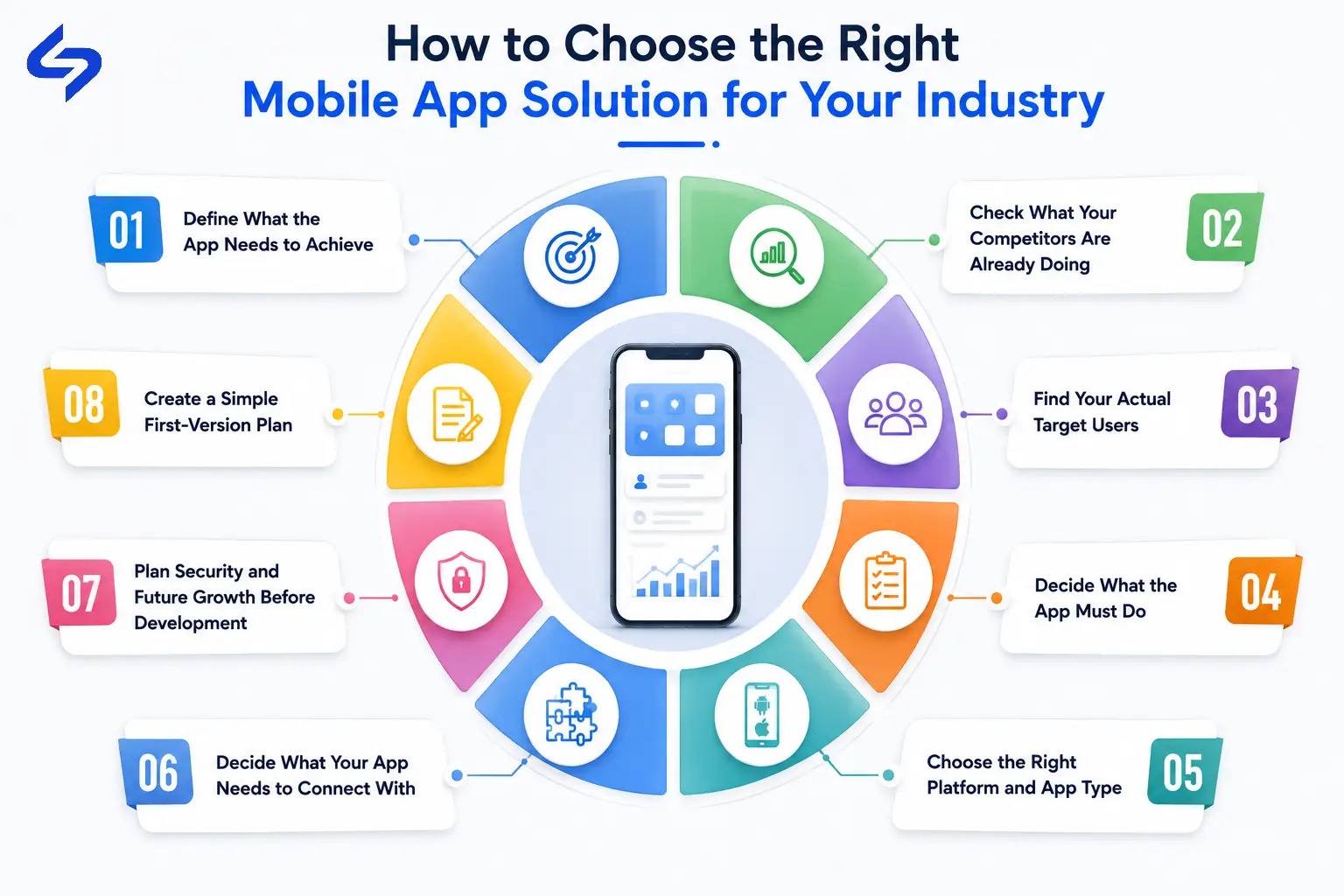
Planning an app can bring up many questions about what to build, which features to include, who should use it, and how everything should work together. To make this easier, we have put together a clear roadmap below. Use these points to collect the right information about your business, then use those findings to plan an app that actually fits your needs.
Follow these steps before you start development.
Start with the business result you want from the app. Ask yourself:
What problem is costing my business time or money?
What process do my customers find difficult to do a specific task?
What work is taking too much manual effort in my business?
Where are my customers dropping off while using my services?
Which service could become faster or easier through an app?
What would improve if customers used my app regularly?
Then define one clear primary goal.
For example:
Increase repeat orders by making reordering easier.
or
Reduce delivery coordination time by giving drivers and dispatchers real-time updates.
A clear goal keeps the app focused. Without one, businesses often keep adding features without knowing whether those features are actually helping the business.
Your competitor having an app is not enough reason to build the same app. Download their apps and use them and check:
How quickly does the app respond?
How easy is it to complete the main task?
What features do they offer?
Where does the user have to take unnecessary steps?
What information is missing?
What could make the experience more comfortable?
What extra value could you give through rewards, offers, faster service, or better support?
Do not build another version of your competitor's app. Find something your users would value more. Find the problem or issue your competitor's app is not solving. If you did not find any issue or gap then simply offer the same services with more better way or add additional value to those services.
Do not decide your audience by simply writing "everyone who may use the app."
Find out who will actually use it. Start by looking at your existing business data and check:
Who currently buys or uses your services.
Identify your most frequent and valuable customer groups.
Look at how they currently interact with your business.
Check what devices they use.
Talk to existing customers and ask what they find difficult or time-consuming.
Identify which group would use the app most often.
Separate customers, employees, agents, drivers, managers, or other users if they need different functions.
Then create a simple user profile for each important group.
For example:
Customer: What do they need to do?
Employee: What work do they need to complete?
Manager: What information do they need to see?
This prevents you from building features for people who will never use them.
Now turn the problems you found into features.
Separate them into three groups:
Must Have
Features required for the app to perform its main job.
Useful Later
Features that improve the experience but are not required for the first version.
Not Needed or Not Needed For Now
Features that sound attractive but do not support your main business goal.
For example, if the main goal is increasing repeat food orders, online ordering, payments, order tracking, and customer accounts may be essential. An advanced social community may not be.
This step keeps the first version focused and prevents unnecessary development costs.
Only after deciding who will use the app and what it needs to do with your app. Then you should choose the platform.
Your decision may include:
Native Android
Native iOS
Cross-platform app
Progressive Web App
Customer-facing app
Employee-facing app
Enterprise mobile application
Make this step easy by looking at:
Where your users are
Which devices they use
Required performance
Device-specific features
Offline requirements
Development budget
Future expansion plans
This is an important decision because the platform affects your development cost, timeline, performance, and future maintenance. Choosing the wrong foundation can mean spending more money later to rebuild or change the app.
If you are unsure, compare the options against your actual requirements or get advice from an experienced mobile app development company before development begins.
Make a list of the systems your business already uses.
For example:
CRM
ERP
Payment gateway
E-commerce platform
Booking system
Database
Cloud services
Analytics tools
Maps and GPS
IoT devices
Then ask one simple question for each system:
Does the app need to send or receive information from this system?
If yes, add it to your integration plan.
Do not replace a system that already works simply because you are building a mobile app. In many cases, the better approach is to connect the app with the software your business already uses.
If you are not sure which integrations are required, this is one area where your development partner should help you before development starts.
Think about two things before the first line of code is written.
Security: What sensitive information will the app handle?
Based on your answer choose the best and required security compliance in your mobile app.
Scalability: How many users do you expect now, and how many could you have later?
An app built for 1,000 users may need a different backend setup from an app expected to handle 100,000 or more users.
You do not need to predict the exact number. Just give your development team a real growth range so the architecture is not planned only around today's users.
Before development begins, you should have these answers written down:
Business goal: What should the app achieve?
Target users: Who will use it most?
Core problem: What problem will it solve?
Must-have features: What does the first version absolutely need?
Platform: Android, iOS, both, or another approach?
Integrations: Which existing systems must connect with the app?
Security: What data needs protection?
Expected users: How many users do you expect initially and as the business grows?
Success measure: How will you know the app is working?
Once these points are clear, you have a much stronger foundation for discussing scope, cost, timeline, technology, and development with an app development company.
There is no single price for an industry-specific mobile app. The cost depends mainly on what you want the app to do, how complex those features are, and what systems the app needs to connect with.
For a rough planning estimate, look at these factors:
Features and complexity: Basic apps cost less than apps with payments, real-time tracking, AI, offline functionality, or complex workflows.
Platforms: Android, iOS, or both affect development effort and cost.
Integrations: Connecting the app with CRM, ERP, payment systems, IoT devices, or other software adds development work.
Backend and infrastructure: User accounts, databases, APIs, cloud storage, notifications, and expected user volume affect the overall cost.
Security requirements: Apps handling financial, healthcare, personal, or other sensitive data may need additional security and compliance work.
Ongoing maintenance: Budget for bug fixes, OS updates, security updates, performance improvements, new features, and third-party API changes after launch.
The most useful way to estimate your app cost is to first decide what the app needs to achieve, who will use it, which features are essential, and what systems it needs to connect with. Once these points are clear, a development company can give you a much more realistic estimate.
The goal of this guide is to help you see where a mobile app can add value to your own business.
Maybe you are still running your business without an app and wondering if you are missing an opportunity. Maybe you already have an app but know it is not giving your customers or your business enough value. Or maybe you are looking at what competitors are doing and thinking, "I need to do something better before I fall behind."
Now you have a clearer vision of what businesses in different industries are building, what their apps are helping them achieve, which features may fit your business, and what you need to plan before spending money on development.
The next step is to look at your own business, find where a mobile app can help you gain new customers, increase repeat business, improve operations, or create new revenue, and start planning around that opportunity.
A website and a mobile app serve different user needs. If customers regularly return for services, place orders, track information, make payments, or use account-based features, an app can provide a faster and more convenient experience than asking them to use the website every time.
Look at how your customers and employees currently interact with the business. Frequent calls, repeated manual work, customers asking for the same information, poor repeat engagement, or services that could be accessed more easily from a phone are strong signs that an app may be useful.
First find out where users are dropping off and which features they actually use. The problem could be slow performance, difficult navigation, missing features, poor user experience, or simply that the app does not give customers a strong reason to return.
No. Start with the features needed to solve the main business problem and give users a complete working experience. Other features can be added after you see how customers use the app and where they need more value.
Set the expected business result before development starts. Depending on the business, this could be more orders, repeat customers, reduced manual work, faster service, lower operating costs, or revenue from a new digital service.
Use competitor apps to understand what customers already expect, but do not stop at copying them. Find where their experience is slow, difficult, or missing something useful, then give your users a better reason to choose and continue using your app.
Yes, but the decision should be made during planning because the platform affects development, testing, design, and future costs. Your target users, device usage, required features, and business plans should guide whether you start with Android, iOS, both, or another approach.
You should have your business goals, target users, main problems, and must-have features clear before approaching a development company. An experienced app development team can then help you validate the feature list, choose the right platform and architecture, plan integrations, and identify technical issues before development begins.
Launch is the start of the next stage, not the end of the project. User feedback, app performance, security, operating system updates, analytics, bugs, and new business requirements need regular attention, and new features should be added based on what users actually need.
Waiting until competitors have already built a strong mobile presence can make it harder to catch up. If a mobile app can improve your customer experience, increase repeat business, reduce operational problems, or open a new revenue channel, the right time to start is when you have a clear business reason for building it, not simply when everyone else has one.

Mobile healthcare apps improve patient care by enabling remote monitoring, timely reminders, secure data access, better communication, and cost-efficient healthcare services through mHealth technology.
B2B apps help businesses streamline operations, enable on-the-go access to data, improve client engagement, support omnichannel sales, and drive scalable revenue by simplifying complex business workflows.
We are more than just developers and consultants—we are your partners in navigating the digital landscape. Let us be the engine behind your next big success while you focus on your core vision.
Explore Opportunities!