Custom Mobile Apps for CRM: 7 Real Use Cases Where Businesses Outgrow Salesforce and Dynamics 365
Summary: Salesforce and Microsoft Dynamics 365 are powerful CRM platforms, but many growing businesses hit a wall with their standard mobile apps. This post covers 7 real use cases where a custom CRM mobile app filled the gaps, and what each solution delivered. |
Salesforce and Dynamics 365 are two of the most widely used CRM platforms in the world. Both have mobile apps. Both are highly capable. And both, at some point, stop being enough.
Standard mobile apps are built for the widest possible audience. They cannot account for how your specific team works in the field, what your technicians need at the job site, or how your sales process differs from those of other companies on the same platform.
This post looks at 7 real scenarios in which businesses found the standard CRM mobile experience too limiting and what a custom mobile CRM app gave them instead.
Outgrowing a CRM mobile app does not mean the platform has failed. It means the gap between what the standard app offers and what your team needs has grown too wide to ignore.
In simple terms, the standard Salesforce or Dynamics 365 mobile app gives everyone the same experience. A custom CRM mobile app gives your specific users the experience they need to work faster and with fewer errors.
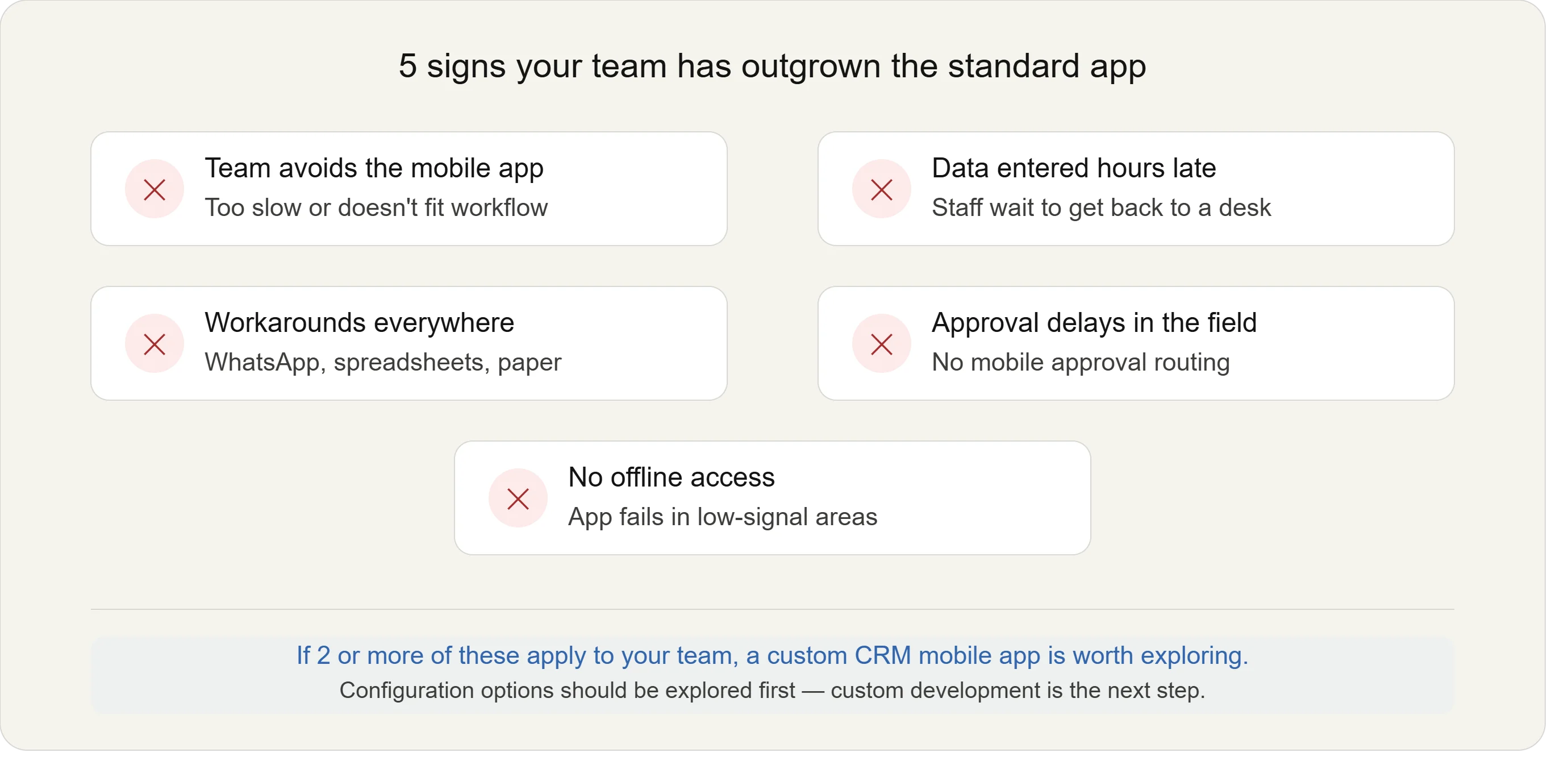
The most common warning signs include:
Field staff avoiding the app: Because it is too slow or not built around how they work.
Data entered late: Because staff wait until they are back at a desk instead of logging on site.
Workarounds piling up: Your team uses WhatsApp or spreadsheets alongside the CRM because the app cannot handle the real workflow.
No offline access: The standard app loses functionality in areas with poor connectivity.
Note: Research shows that 80% of workers worldwide do not have a desk. If your mobile CRM creates friction for those workers, you are losing data accuracy and, eventually, customer satisfaction. |
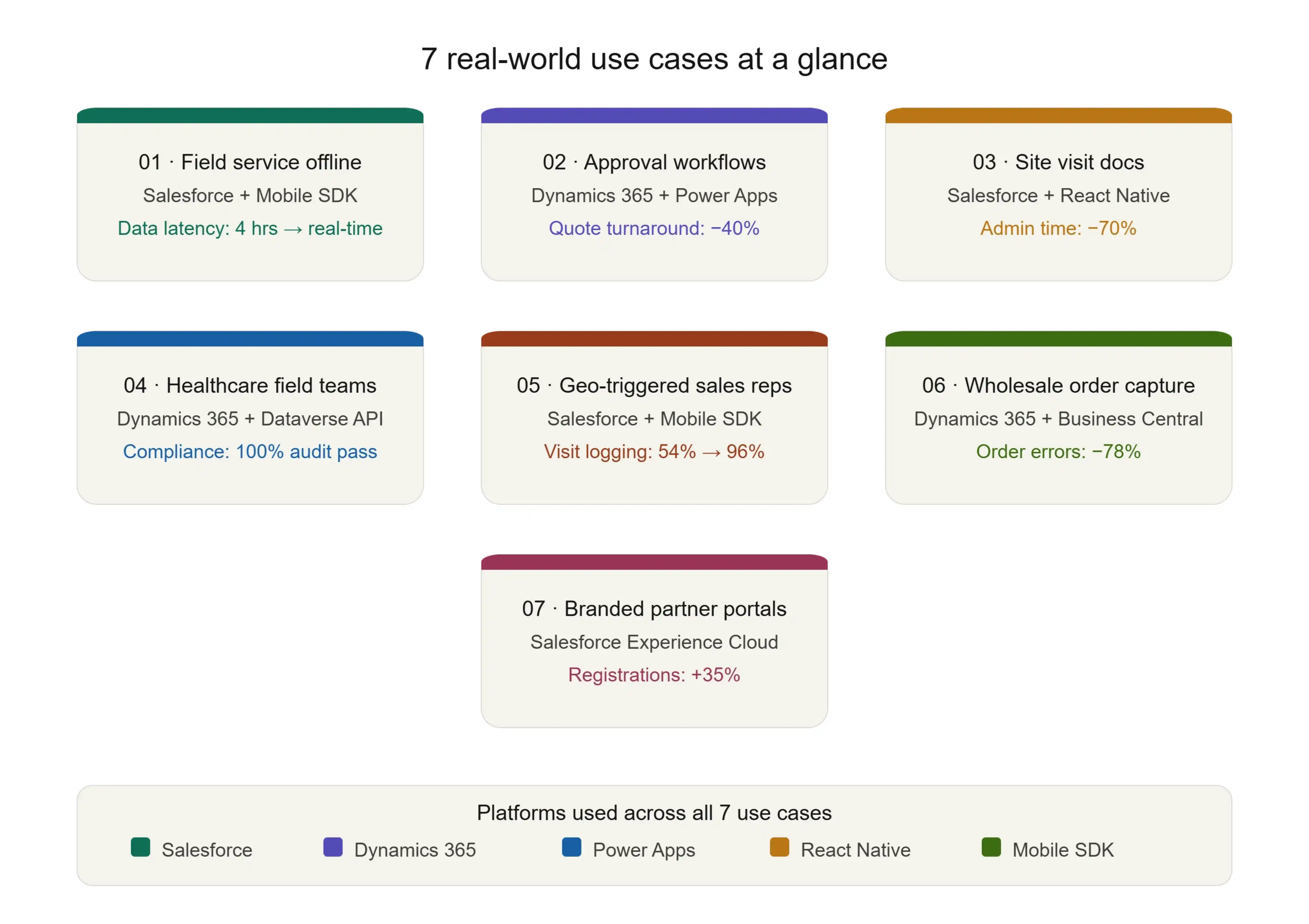
A utilities company used Salesforce Field Service to manage technician dispatches. In remote zones with no signal, the standard app stalled completely. Engineers wrote notes on paper and entered them hours later.
The default Salesforce mobile app offers limited offline capability; it does not support custom objects, complex form logic, or image capture without a connection.
The business built a custom app using the Salesforce Mobile SDK (a developer toolkit for building native iOS and Android apps connected to Salesforce data). Technicians could access the full job history offline, complete inspection forms with photo and barcode capture, log parts used, and automatically sync everything when connectivity returned.
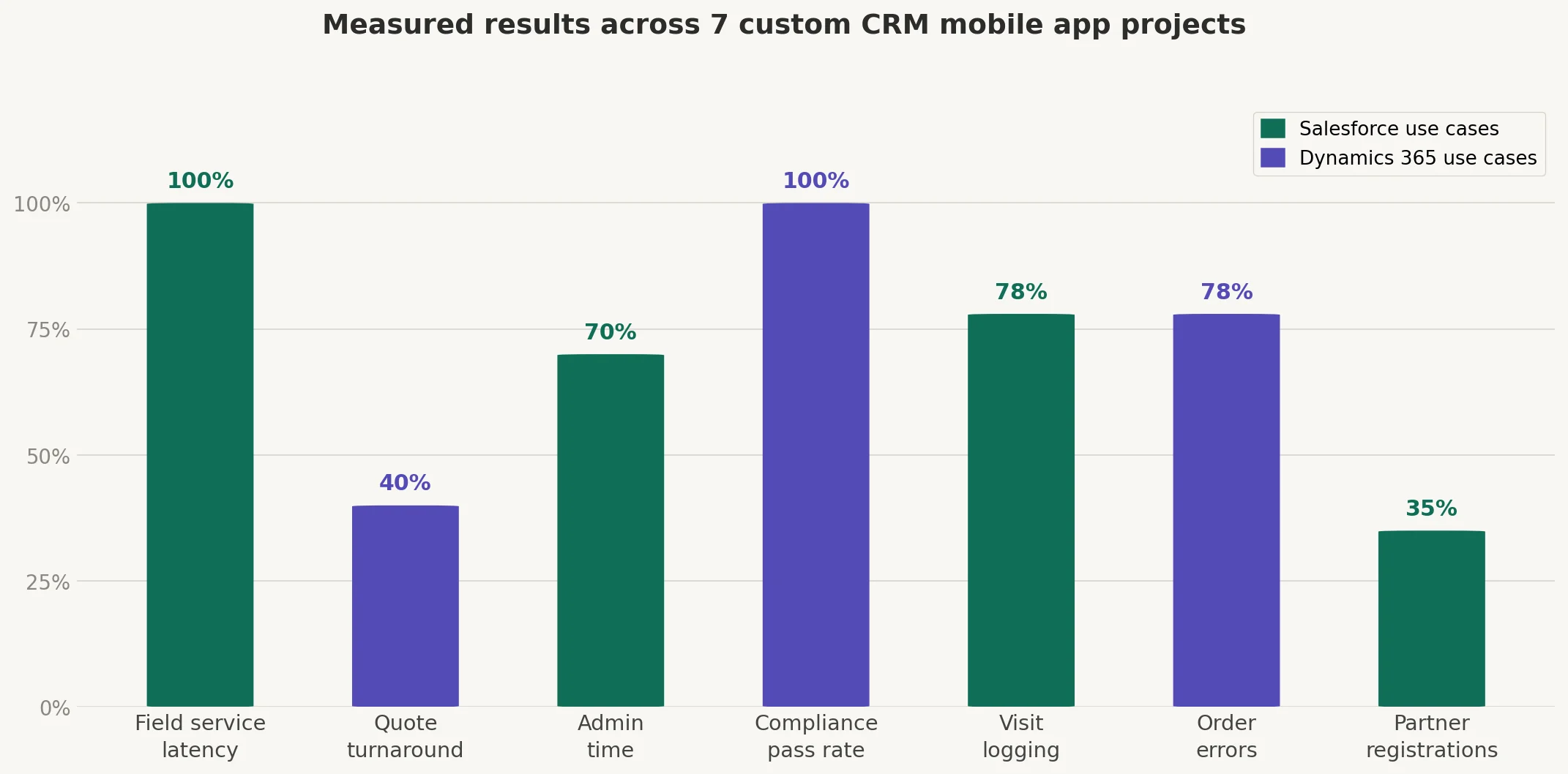
Result: Data latency dropped from 4 hours to near real-time. Paper forms were eliminated.
Pro Tip: If your field teams work in low-connectivity areas, offline-first design is not a feature; it is the foundation on which the entire app must be built. |
Most field teams stop using the standard mobile app within months. A custom app built on your existing Salesforce or Dynamics 365 fixes that without replacing anything.
Book a Free ConsultationA manufacturing business used Dynamics 365 Sales for its B2B quoting process. Reps needed sign-off from pricing, legal, and the regional director before a quote could go out. The standard Dynamics 365 mobile app could not display approval status or allow reps to act on approvals in the field.
The team built a custom app using Power Apps (Microsoft's low-code app builder, part of the Power Platform) with a live approval dashboard, one-tap approve or reject actions, push notifications to the next approver, and a full audit trail.
Result: Quote turnaround time fell by 40%. Reps stopped calling the office for status updates.
Note: Power Apps is included in many Dynamics 365 licenses. For Microsoft ecosystem businesses, this is often the fastest route to a custom mobile workflow. |
A commercial real estate firm with 12 offices used Salesforce to manage deals. Agents needed to log visit notes, capture photos, record GPS locations, and attach documents on-site. The standard mobile app required too many steps and did not properly surface the firm's custom property objects.
They built a React Native app (a cross-platform framework that produces a single app for iOS and Android) connected to Salesforce via the REST API. Agents could start a visit with one tap, auto-log GPS and time, complete structured forms, and attach photos directly to deal records.
Result: Visit data completeness improved by over 60%. Post-visit admin time fell by 70%.
Pro Tip: If your Salesforce org has custom objects, the standard mobile app often cannot surface them cleanly. A custom app built on the Salesforce API gives you full control over what your team sees. |
A healthcare services company used Dynamics 365 Customer Service to manage patient interactions. Community nurses needed to update patient records and log clinical observations in the field while maintaining strict compliance with GDPR and HIPAA.
The standard app exposed more data than nurses needed and could not enforce clinical access controls or capture structured observations, such as pulse or wound condition.
The organization built a native iOS app that connects via the Dataverse Web API (Dataverse is the underlying data platform on which all Dynamics 365 apps run). It included role-based access to records, guided clinical forms, biometric authentication, encrypted local storage, and automatic sync with the patient's case record.
Result: Compliance audit pass rate reached 100%. Average visit documentation time dropped from 12 minutes to under 4 minutes.
An FMCG distributor had 60 sales reps visiting retail stores daily using Salesforce Sales Cloud. Reps were not consistently logging visits or competitor activity because the app required too many manual steps while they were standing on the shop floor.
A custom app using the Salesforce Mobile SDK introduced route planning on a map, geo-fencing (location-based triggers that fire when a device enters a store's GPS zone) to automatically prompt visit logs upon arrival, structured shelf audit forms pre-populated with account data, and competitor pricing capture tied to a custom Salesforce object.
Result: Visit logging compliance went from 54% to 96%. Leadership gained near-real-time field visibility for the first time.
Pro Tip: Geo-triggered CRM workflows are one of the highest-impact mobile features for field sales teams. They remove the biggest barrier to data entry, remembering to do it. |
A wholesale food distributor used Dynamics 365 Sales with reps visiting restaurant and hotel clients. Orders were taken by hand and entered into the system at the office, resulting in regular fulfillment delays.
They built a tablet-optimized app integrated with both Dynamics 365 and Business Central (Microsoft's ERP system for SMBs). Reps could browse the full product catalog with live pricing, build an order with the client present, apply account-specific discounts, and submit directly to fulfillment — with an email confirmation sent instantly.
Result: Order entry errors dropped by 78%. Same-day fulfillment backlogs were eliminated.
A technology manufacturer managed partner relationships through Salesforce Experience Cloud (a Salesforce tool for building external-facing portals). Partners needed mobile access to register deals and check lead status, but the standard portal experience was not native mobile and carried generic Salesforce branding.
The company built a branded native app using Salesforce Connected App authentication (OAuth 2.0, a secure login standard). Partners logged in with existing portal credentials and could register deals via a clean, branded form, receive push notifications on deal status, access an offline marketing collateral library, and message the manufacturer directly from within deal records.
Result: Partner app adoption reached 82% in the first quarter. Deal registrations increased by 35%.
Cynoteck is a certified Salesforce and Microsoft Dynamics 365 partner with hands-on experience delivering custom mobile apps across field service, healthcare, manufacturing, distribution, and partner management.
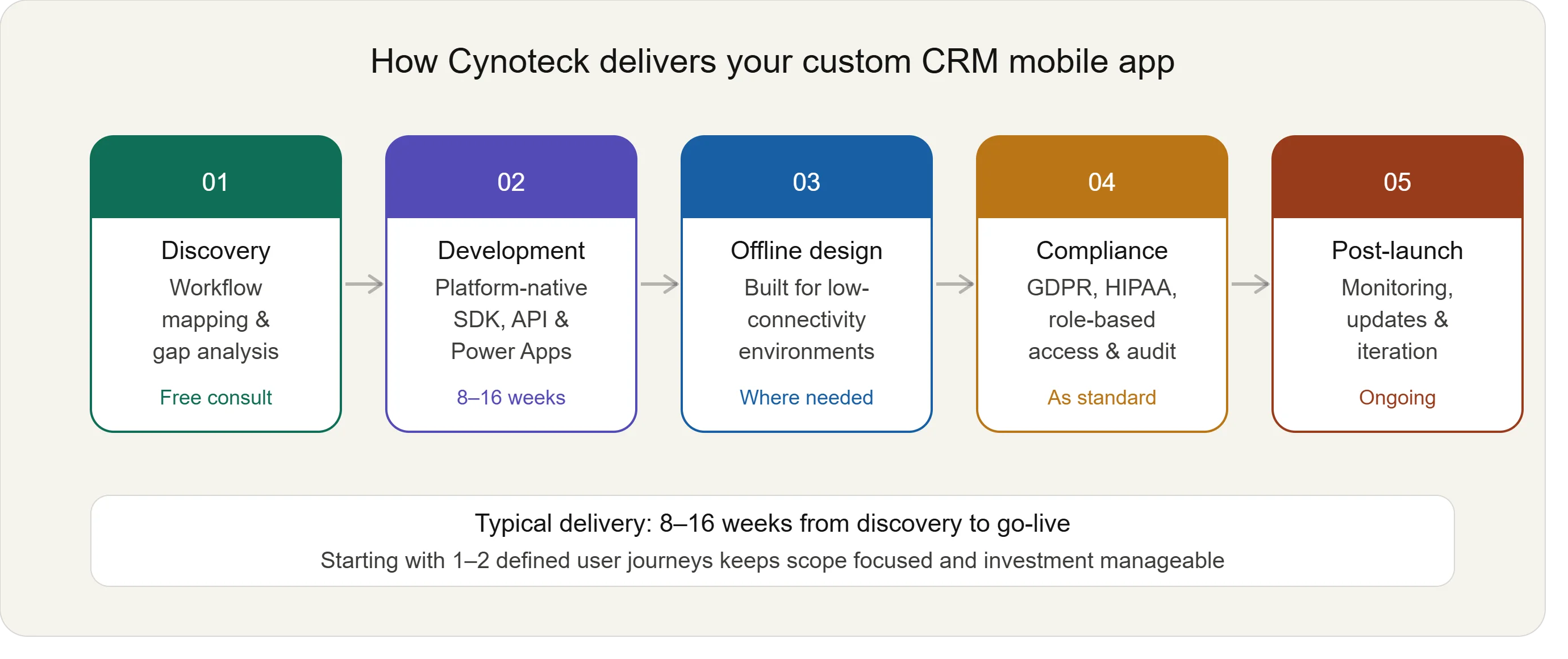
Here is what working with Cynoteck on a custom CRM mobile app looks like:
Discovery and workflow mapping: Our consultants review how your team works in the field and identify exactly where the standard mobile experience is creating friction. We do not build features for their own sake. We build what your users need to do their job.
Platform-native development: We build using Salesforce Mobile SDK, Salesforce REST API, Power Apps, Dataverse Web API, and React Native, the right tool for your existing CRM environment. Your data stays in Salesforce or Dynamics 365. The custom app simply provides a better interface for accessing and updating it.
Offline-first architecture where needed: For field teams in remote or low-connectivity environments, we design offline capability into the app from day one, not as an afterthought.
Compliance-ready builds: For regulated industries, including healthcare, financial services, and government, we build with role-based access, encrypted local storage, and audit-trail logging as standard.
Post-launch support: We stay involved after go-live with monitoring, updates, and iterative improvements as your workflows evolve.
Most custom CRM mobile app projects at Cynoteck are scoped and delivered within 8 to 16 weeks, depending on complexity. We start with a focused scope: one or two key user journeys and expand from there.
Book a free 30-minute consultation to walk through your current mobile CRM setup and identify the highest-impact improvements for your team.
Cynoteck scopes and delivers custom CRM mobile apps in 8 to 16 weeks. Tell us your workflow gap and we will give you a clear picture of what comes next.
Talk to a Cynoteck consultantCustom development is not the right answer for every problem. You likely need a custom CRM mobile app if:
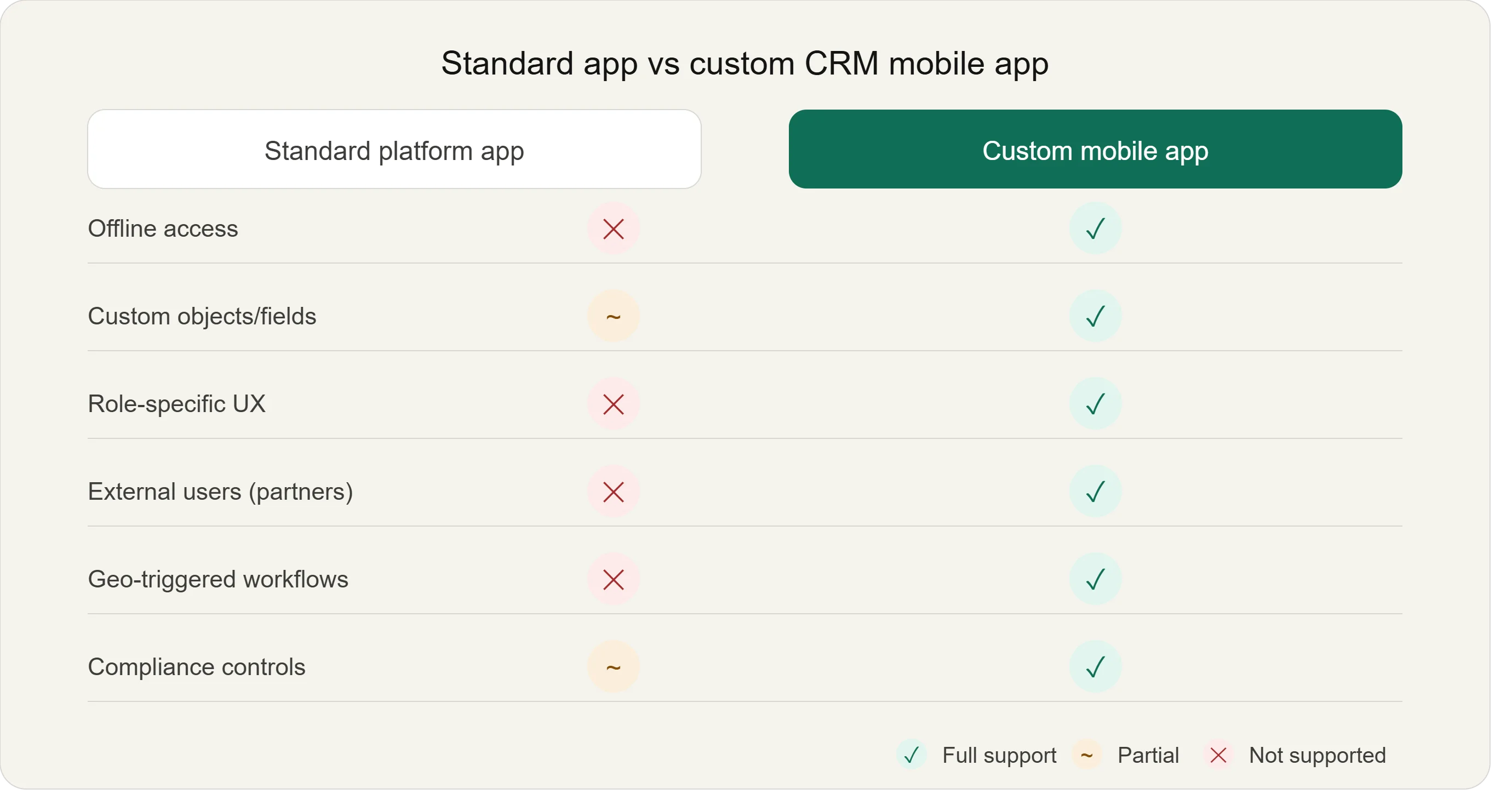
Your team avoids the standard mobile app because it does not match how they work.
You have custom objects or data structures that the standard app handles poorly.
Your users are external: partners, dealers, or patients, who need branded, secure mobile access.
Compliance requirements mean the standard app exposes too much data or too few controls.
Your team regularly works offline, and the standard app's offline capability is insufficient.
If your workflows are standard and your team uses the default app without significant friction, it is worth exploring platform configuration. Lightning App Builder in Salesforce or model-driven app customization in Dynamics 365, before committing to custom development.
Salesforce and Dynamics 365 are excellent platforms. Their mobile apps cover everyday CRM use cases well. However, as your business grows, your workflows become more specific, your data structures more complex, and your teams more distributed.
When the standard mobile experience creates friction rather than removing it, a custom CRM mobile app is a practical solution; one that pays for itself through better data quality, faster processes, and higher team adoption.
If your team is working around the mobile CRM rather than through it, that gap is worth examining. A certified development partner can help you bridge it without rebuilding your CRM from the ground up.
Working around the standard app costs you data accuracy every day. One free call with Cynoteck tells you whether a custom mobile app is the right fix.
Book Your Free ConsultationAns: A custom CRM mobile app is a purpose-built iOS or Android application designed to connect to your existing Salesforce or Dynamics 365 data while providing a user interface tailored to your team's specific workflows. Unlike the standard platform apps, it is built around how your business operates.
Ans: Custom apps connect via APIs, secure channels that let two systems share data. For Salesforce, developers typically use the REST API or Mobile SDK. For Dynamics 365, the Dataverse Web API is the standard method.
Ans: A focused, single-purpose app can typically be scoped and delivered within 8 to 16 weeks. Starting with one or two defined user journeys is the most effective approach and keeps initial investment manageable.
Ans: Yes. Offline capability is one of the most common reasons businesses build custom apps. A custom app can store data locally on the device and sync to your CRM once a connection is restored.
Ans: No. The custom app works alongside your existing platform. Your CRM remains the system of record. The app provides a better mobile interface for specific users or workflows, feeding data back into the same environment your team already uses.
We are more than just developers and consultants—we are your partners in navigating the digital landscape. Let us be the engine behind your next big success while you focus on your core vision.
Explore Opportunities!
 How Salesforce Helps Small Businesses Grow.webp)

 How to Improve Salesforce CRM Adoption in Your Organization.webp)