AI in Android Development: What It Actually Changes for Your App

Over the past couple of years, I’ve had a lot of conversations with startup founders and CTOs who ask some version of the same question: “Should our Android app have AI in it?”
My honest answer is: it depends on what problem you’re trying to solve — not on whether AI sounds impressive in a pitch deck.
I’ve been building mobile apps for over eleven years, working across healthcare, e-commerce, enterprise, and logistics. I’ve seen AI features bolt-on as marketing exercises, and I’ve seen them genuinely transform how users interact with an app. The difference isn’t the technology — it’s whether the AI addresses a real friction point in the user’s experience.
So this article isn’t a broad overview of artificial intelligence. It’s a practical look at what AI in Android development actually means at the implementation level — what’s available, what works in production, and what your business should be thinking about before committing to an AI-powered mobile app.
Android has a significant structural advantage when it comes to AI integration: hardware diversity and open architecture. Unlike more controlled ecosystems, Android runs on devices from budget-tier to flagship, which means Android app development with AI has to account for varying compute resources. That constraint has actually pushed Android AI tooling to become more efficient and more thoughtful.
Google has invested heavily in on-device machine learning for Android through ML Kit, TensorFlow Lite, and more recently, Android’s native support for the Neural Networks API. The push toward on-device AI matters a lot for practical applications — it means the app doesn’t depend on a server call to run an inference, which directly improves speed, reduces data costs, and addresses user privacy concerns.
From a developer perspective, this shift toward on-device machine learning in Android apps has been significant. A few years ago, deploying a meaningful ML model inside a mobile app meant offloading everything to a backend API. Now, TensorFlow Lite Android models can run inference directly on the device with acceptable latency, even on mid-range hardware.
That’s not a minor footnote — it fundamentally changes what’s possible in offline scenarios, in real-time user interactions, and in apps where user data sensitivity matters.
Let me walk through some of the AI features we’ve implemented or evaluated in real Android projects. These aren’t aspirational examples — they’re things that are shipping in production apps today.
This is probably the most commercially valuable AI feature in most consumer-facing Android apps. A recommendation engine that actually understands user behavior — not just purchase history, but session patterns, scroll behavior, time-of-day usage, and content interactions — consistently outperforms static filtered search.
We built a feature for an e-commerce client where the product recommendation logic was tied to both browsing patterns and real-time inventory signals. The recommendation model ran a lightweight inference on-device, reducing server round-trips and making the personalized mobile app experience feel genuinely instant. Conversion on recommended products improved by a measurable margin within the first month.
The technical side involves collaborative filtering models, sometimes combined with content-based filtering for cold-start scenarios (when a new user has no behavioral history). TensorFlow Lite Android handles the inference layer cleanly for models of this size.
Natural language processing in mobile apps has matured significantly. What used to require cloud API calls with noticeable latency can now run with reasonable accuracy on-device using smaller distilled models.
For enterprise apps, this shows up most practically in two places: intelligent search (where users type naturally instead of using rigid filter UI), and AI chatbot Android app functionality for internal support or customer-facing query handling.
One logistics client used an NLP layer in their Android field app to allow warehouse staff to search inventory using natural language queries instead of exact SKU codes. The reduction in search friction directly affected pick accuracy and task completion time — which is the kind of operational ROI that justifies the development cost without any marketing angle attached to it.
Google’s ML Kit includes an on-device entity extraction and smart reply model that’s ready to use out of the box. For more complex NLP requirements, integrating a quantized BERT or similar model via TensorFlow Lite is viable for apps targeting Android 10 and above.
Image recognition in Android apps has a wide range of practical applications beyond the obvious camera-based demos. Some that we’ve worked with directly:
Retail and e-commerce: Visual search that lets users photograph a product and find similar items in your catalog. This reduces the search-to-purchase gap significantly for fashion and home goods apps.
Healthcare: Document scanning with intelligent field extraction — patient intake forms, prescription capture, insurance cards. ML Kit’s document scanning and text recognition handles most of this without custom model training.
Field inspection apps: Damage detection or equipment condition assessment using a trained classification model. A property inspection app can flag potential issues in user-submitted photos before a human reviews them, triaging the review queue.
Manufacturing quality control: On-device defect detection on the production line using an Android tablet with a trained TensorFlow Lite model. This eliminates the server latency that makes real-time detection impractical over an API.
The Google ML Kit image labeling and object detection APIs are good starting points. For domain-specific recognition (proprietary product categories, specialized defect types), you’ll need to train a custom model and export it to TensorFlow Lite format.
Predictive analytics in mobile apps isn’t just a backend data warehouse feature — it can be surfaced directly in the Android UI in ways that make the app feel proactive rather than reactive.
A few examples of what this looks like in practice:
A fitness app that predicts when a user is likely to abandon a workout based on session patterns, and surfaces a timely motivational prompt or difficulty adjustment
A B2B field sales app that surfaces which accounts are most likely to convert this week based on historical interaction data — helping reps prioritize their day without manual analysis
A delivery app that predicts order preparation time based on restaurant load patterns and proactively adjusts estimated delivery windows shown to users
None of these require a data science team running complex infrastructure. The model training happens server-side; the inference — or a simplified version of it — runs on-device or via a lightweight API call. The result is an app that feels like it understands the user’s context, not one that just responds to commands.
Voice assistant Android apps have moved well beyond basic voice-to-text. Modern voice interfaces in Android apps can handle contextual commands, multi-turn dialogue, and task execution within the app’s domain.
For enterprise apps — particularly warehouse management, field service, and healthcare — voice-first interaction isn’t a convenience feature. It’s a safety and efficiency feature. A technician who needs both hands for equipment maintenance can navigate and log work using voice commands, reducing error rates and eliminating the need to constantly pick up a device.
Android’s SpeechRecognizer API combined with a custom intent classification layer gives you most of what you need for domain-specific voice interfaces without building from scratch. For more sophisticated dialogue management, integrating with Dialogflow or a similar NLU layer works well.
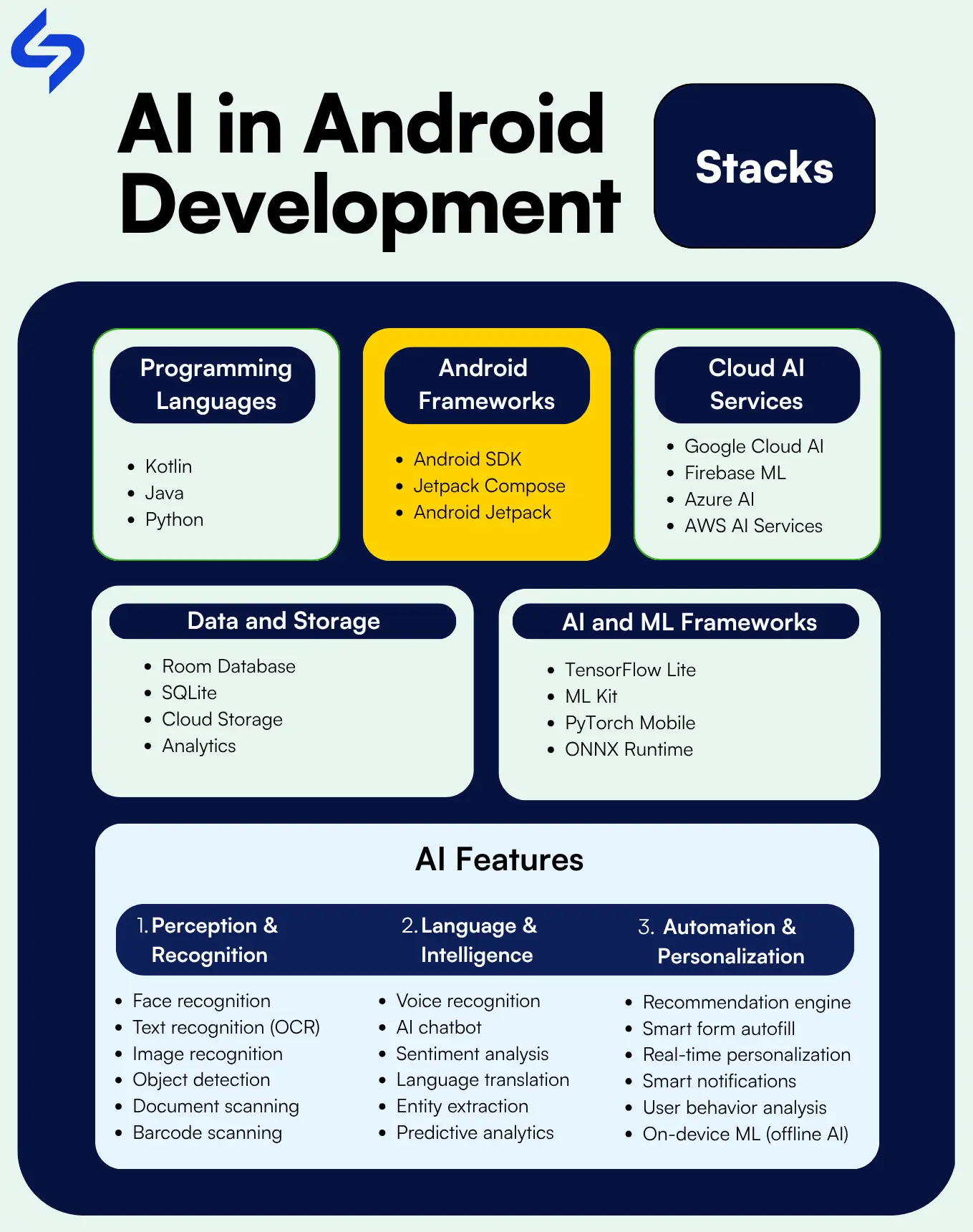
For anyone evaluating what AI integration in mobile apps actually involves technically, here’s a straightforward breakdown of the tools and frameworks that appear most frequently in our Android AI work:
The most accessible entry point for AI features in Android. Provides ready-to-use APIs for face detection, text recognition, barcode scanning, image labeling, language detection, smart reply, entity extraction, and translation. All of these run on-device. If your use case fits within what ML Kit covers, it’s significantly faster to implement than custom model deployment.
For cases where ML Kit doesn’t cover your use case, TensorFlow Lite Android allows you to deploy custom trained models directly in the app. The model is converted to .tflite format and bundled with the app or downloaded dynamically. Performance on modern Android hardware is solid for models of reasonable size. The GPU delegate and NNAPI delegate options allow you to use hardware accelerators where available.
Firebase’s ML capabilities complement TensorFlow Lite by allowing you to deploy and update model files remotely via Firebase, without a full app update. This is practically useful when you’re continuously improving a model — you can push an updated .tflite file to production without waiting for a Play Store review cycle.
On-device AI doesn’t mean avoiding cloud APIs entirely. For tasks that genuinely require more compute — large language model inference, complex document understanding, or specialized domain models — cloud API calls are the right approach. Google Cloud AI, OpenAI APIs, and AWS AI services all integrate cleanly with Android via standard REST calls. The practical consideration is network dependency, latency, and cost at scale.
Worth mentioning specifically: Google’s Gemini Nano model is embedded directly into Android 14+ devices through AICore. This gives developers access to a genuinely capable language model running entirely on-device for supported hardware. The use cases for this are still being defined, but it’s the most significant development in on-device AI for Android in recent years and will increasingly appear in AI Android app solutions for premium device segments.
I want to be direct here, because there’s a lot of inflated language around AI features in mobile apps. The real business case for AI integration comes down to a few specific outcomes:
An AI chatbot Android app that can handle 60–70% of tier-1 support queries — order status, FAQ responses, account issues — measurably reduces support team load. This isn’t magic; it requires good training data and ongoing monitoring. But the cost savings are real and recurring.
Real-time personalization in apps — where content, recommendations, and interface elements adapt based on user behavior — consistently improves session depth and return visit frequency. The relationship between personalized mobile app experience and user retention is well-documented across categories from media to fintech to health and wellness.
AI automation in mobile apps shows up as smart form autofill, document data extraction, automated categorization, and intelligent notification timing. These aren’t headline features, but they reduce friction in high-frequency tasks and directly improve app ratings and retention.
AI-based mobile applications generate richer behavioral signals than traditional analytics. User behavior analysis at the pattern level — not just page views and session duration, but micro-interactions and task completion sequences — gives product teams genuinely actionable input for roadmap decisions.
Mobile app security is an underappreciated AI application. Behavioral biometrics — analyzing how a user holds their phone, typing rhythm, navigation patterns — can flag anomalous activity that indicates account compromise, without adding friction to legitimate users. For fintech and enterprise apps handling sensitive data, this is a meaningful security layer.

If you’re planning AI integration in mobile apps for your Android product, a few practical considerations that will affect your architecture and timeline:
Don’t default to server-side AI just because it’s familiar. On-device machine learning in Android apps is now mature enough for many common use cases. Evaluate each feature individually: if it requires real-time response, involves sensitive user data, or needs to function offline, on-device is usually the better choice. If it requires heavy compute or a large context window (such as LLM-based features), cloud inference is appropriate.
Every AI model adds to your app’s binary size or requires a download. TensorFlow Lite models can range from a few hundred KB to tens of MB. Be deliberate about what you bundle at install time versus download on demand. App performance optimization in this context means profiling model inference time on your target device range — not just on a Pixel 9 in your development environment.
Most AI features in Android apps depend on training data of sufficient quality and quantity. If your app is new and lacks behavioral data, you’ll either need to start with pre-trained models (which is fine for many use cases), use synthetic data for initial training, or design a data collection phase before the AI features go live. Skipping this step is the primary reason AI features underperform in production.
User behavior analysis and AI personalization features require clear user consent in most jurisdictions. GDPR in Europe, India’s DPDP Act, and various US state privacy laws all have implications for how you collect, process, and store the data that powers your AI features. Build the consent and data governance architecture early — retrofitting it is significantly more expensive.
Standard QA processes don’t fully cover AI feature validation. You need to test model accuracy across demographic segments, edge cases, and input variations that standard test scripts won’t surface. Plan for this in your QA timeline and consider A/B testing infrastructure for model performance monitoring post-launch.
A few directions in AI mobile app development that I think are practically relevant over the next 12–24 months:
On-device LLMs becoming mainstream: Gemini Nano and similar compressed language models running directly on flagship Android devices will enable a new class of context-aware, conversational features without network dependency. The hardware threshold for this will drop over time.
Multimodal AI in everyday apps: The ability to process text, images, audio, and structured data together — rather than in separate AI pipelines — opens up more natural interaction patterns. Think of a field service app where a technician can describe an issue verbally while photographing it, and the app generates the service report automatically.
AI-driven app performance optimization: Using behavioral signals to proactively manage memory, prefetch content, and adjust rendering priorities. This isn’t a user-facing feature, but it materially improves perceived app performance, which directly affects ratings and retention.
Federated learning for privacy-preserving personalization: Training models on-device without sending raw user data to a server. Practically relevant for health, finance, and enterprise apps where data sensitivity limits what can be sent to a central model.
AI in Android app testing: AI-assisted test generation and anomaly detection in production are already making their way into the Android development pipeline. This reduces the manual QA burden for AI features specifically, which has historically been the bottleneck.
When evaluating an AI app development company for your Android project, ask them about their actual implementation experience — not just the technologies they list on a capabilities page.
Specifically:
Have they deployed TensorFlow Lite models in production Android apps, and how did they handle model updates post-launch?
How do they approach the trade-off between on-device and server-side inference for features like yours?
What does their testing and validation process look like for AI features specifically?
How do they handle the data governance and consent architecture for features that depend on user behavior analysis?
These aren’t trick questions — they’re the questions that separate teams who have shipped AI-powered Android apps from teams who have watched the demos.
AI in Android development is not a trend you adopt to stay current — it’s a set of tools that solve specific problems better than non-AI approaches. The mistake I see businesses make is either dismissing it as gimmickry or embracing it wholesale without a clear problem to solve.
The most effective AI-powered Android apps I’ve worked on all share a common characteristic: the AI feature addresses friction that users were already experiencing. It wasn’t added to make the app sound impressive. It was added because users were abandoning a flow, support tickets were piling up, or manual processes were slowing down operations.
Start with the problem, not the technology. Identify where your users struggle or where your team spends time on tasks that could be automated. Then evaluate whether an AI feature — recommendation engine, natural language search, image recognition, predictive prompt — is the right solution.
If you’re building a new Android app or adding capabilities to an existing one, and you’re trying to figure out where AI integration actually makes sense for your use case, that’s a conversation worth having with someone who has shipped these features in production — not just someone who can describe what they are.
About the Author
Subodh Dharmwan is the Competency Head – Mobility at Cynoteck Technology Solutions, with over 11 years of experience in mobile application development. He has built and delivered ERP, enterprise, e-commerce, and custom applications using Swift, SwiftUI, Kotlin, Java, Flutter, and React Native. His project experience spans healthcare, logistics, social networking, taxi booking, and e-commerce platforms with complex integrations including Google Maps, Firebase, multiple payment gateways, in-app purchases, and location services. He works closely with startups and enterprises on end-to-end mobile product delivery.
AI in Android development refers to integrating machine learning models, natural language processing, computer vision, and intelligent automation into Android applications. Unlike standard app development — where behavior is explicitly programmed — AI features learn from data and adapt their outputs based on patterns. Practically, this means capabilities like personalized recommendations, voice understanding, image recognition, and predictive prompts that wouldn’t be feasible with rule-based logic alone.
The primary tools for AI integration in Android are Google ML Kit (ready-to-use on-device AI APIs), TensorFlow Lite (custom model deployment on-device), Firebase ML (remote model management), and the Neural Networks API for hardware-accelerated inference. For cloud-based AI features, Google Cloud AI, OpenAI, and AWS AI services integrate via standard REST APIs. Android 14+ devices also support Gemini Nano for on-device language model inference through AICore.
Yes — this is one of the significant practical advantages of on-device machine learning in Android apps. ML Kit and TensorFlow Lite models run entirely on the device without any network connection. This matters for use cases like field service apps, healthcare tools in low-connectivity environments, or any app where real-time response is critical and network latency is unacceptable. Not all AI features translate cleanly to on-device inference — large language models and complex document understanding still typically require cloud calls — but a meaningful range of features can run offline.
Cost depends heavily on which AI features you’re implementing and whether you’re using pre-trained models or training custom ones. Using ML Kit or pre-trained TensorFlow Lite models adds relatively limited development cost on top of standard Android development. Custom model training, data pipeline setup, and sophisticated NLP or computer vision features require more investment — both in initial development and in ongoing model maintenance. The ongoing cost structure also differs: on-device inference has no per-inference cost, while cloud AI API usage scales with volume.
Based on production experience, the AI features that deliver the clearest business ROI in Android apps are: intelligent search with natural language understanding (reduces search abandonment and support tickets), recommendation engines (improves conversion in e-commerce and content apps), AI chatbot functionality for tier-1 support automation, document scanning with field extraction (reduces manual data entry in enterprise apps), and predictive analytics surfaced directly in the UI (helps users or field teams prioritize actions). The right choice depends on your app’s core workflow and where user friction is highest.
For features using ML Kit or pre-trained models — text recognition, image labeling, smart reply, language detection — integration can be relatively quick, often a few weeks for a well-scoped feature. Custom model deployment via TensorFlow Lite takes longer, depending on whether a suitable pre-trained model exists or custom training is required. The data pipeline and governance architecture often takes as long as the feature itself. A realistic timeline for a meaningful AI feature in a production Android app is 6–16 weeks from scoping to release, excluding the data collection phase if custom training is needed.

Mobile healthcare apps improve patient care by enabling remote monitoring, timely reminders, secure data access, better communication, and cost-efficient healthcare services through mHealth technology.
What is Artificial Intelligence? Artificial intelligence (AI) is intelligence demonstrated by machines, which makes it possible for machines to learn from experience, adjust to new inputs and perform human-like tasks.
We are more than just developers and consultants—we are your partners in navigating the digital landscape. Let us be the engine behind your next big success while you focus on your core vision.
Explore Opportunities!
 What Al Services Does a Business Actually Need in 2026.webp)